A proposal, not execution
Imagine someone asks, “How much protein does rice contain?” The model may respond with a tool call: search_foods and the argument {"query":"rice"}. That output is provider data, not a direct call to an app function. The model does not know the local catalogue, cannot access its storage, and cannot invoke code by itself.
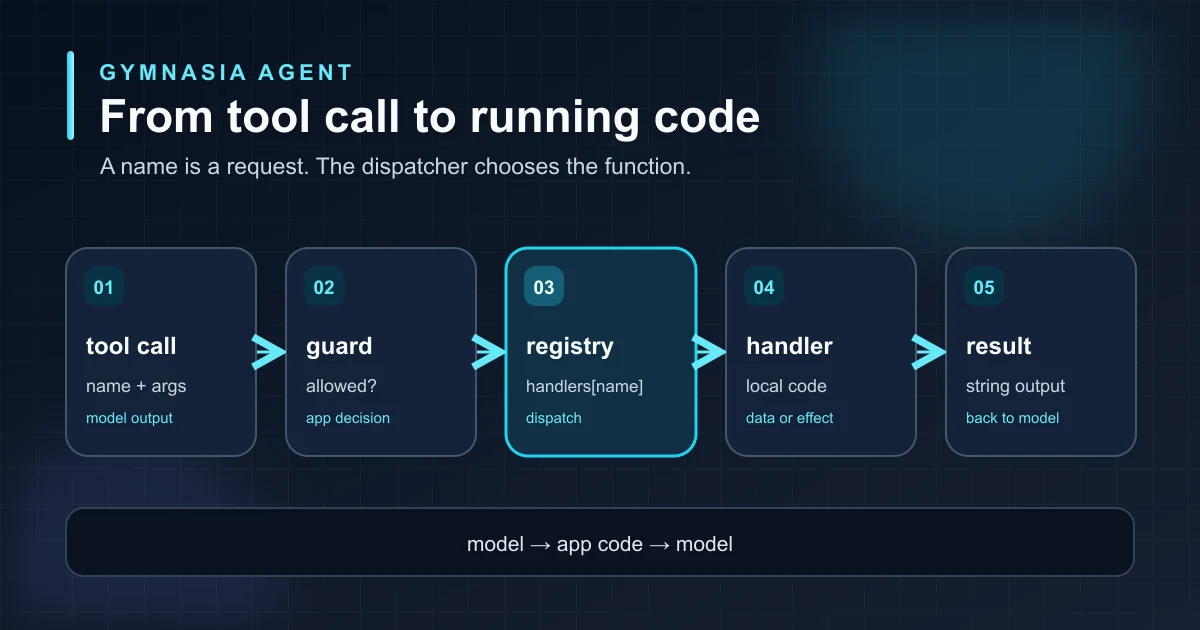
The harness is the program that receives the proposal, decides whether to accept it, and connects the name to a local function. The call identifier is kept separately so the result can later be matched to the correct request. OpenAI, Anthropic, and Google transport tool calls in different formats, but after parsing, the dispatcher works with the same pair: name and args.
The full journey
The first barrier checks that the name is declared and this kind of action is allowed for the request. Only then does the registry look up a handler. In this example, search_foods is a read: its handler searches the catalogue and returns a string containing the results. A local write also needs its effect coordinated and confirmed as persisted before success is reported.
Choose the right function
A registry relates public names to functions. It is the exact boundary between “the model wants to do this” and “the application runs this function.” This reduced example shows the central decision:
const handlers = {
  search_foods: searchFoods,
  read_measurement: readMeasurement,
};

const handler = Object.hasOwn(handlers, call.name)
  ? handlers[call.name]
  : undefined;
if (!handler) return "Unknown tool";
return await handler(call.args, context, dependencies);
Checking that the property belongs to the registry matters: a JavaScript object also inherits names such as constructor and toString. A naive lookup could mistake them for handlers. Keeping the registry fixed during execution ensures that the same name always selects the same function.
The schema advertised to the provider describes the expected argument shape, but it does not make model output trustworthy. Each handler must validate its domain data before a write. Adding generic validation at the dispatcher boundary is a separate improvement; this registry does not yet provide it.
Errors and effects
If a name is undeclared, the harness returns a controlled error without running a function. If a handler fails, the turn should receive a useful result rather than crashing the whole chat. For a read, returning the data or error is enough. For a write, “the handler was called” does not mean “the data was saved”: the effect is confirmed after persistence, and ambiguous failures are not blindly retried.
the model proposes an action; application code decides authorization, runs the handler, and checks the outcome. A tool name never grants permission on its own.
Return the result
The handler produces text. The provider loop packages it with the original identifier: function_call_output for OpenAI, tool_result for Anthropic, or function_result for Google Interactions. It then asks the model for another response. The model can explain what the app found instead of inventing the catalogue contents.
Contract tests
The core test visits every declared name with valid arguments, checks that each reaches its expected behavior and returns text, and compares that list with the registered handlers. Other tests cover unknown names, including inherited JavaScript object properties, and verify that no write dependency is called. Repeating a case with fresh context catches accidental routing changes without depending on a remote model.
Learning to build a complete agent
This article belongs to a series on building an agent or harness through the example of a gym app. The previous step was reconstructing a complete call from a stream; here we saw where it becomes running code. The next boundary is systematically validating arguments before any effect.