
Caffeine: Prevent macOS Sleep Mode

Caffeine: Prevent macOS Sleep Mode Caffeine: Prevent macOS Sleep Mode

Disclaimer: This post has been translated to English using a machine translation model. Please, let me know if you find any mistakes.

Caffeine is a software to prevent our Linux from locking the screen and then going to sleep. To do this, we will give it caffeine.

Installationlink image 5

The installation is very simple, we just have to do

sudo apt update
sudo apt install caffeine

Infinite Caffeinelink image 6

If we press the windows key on the keyboard and type caffeine-indicator, the option to start the software indicator will appear.

caffeine-indicator-executable

If we run it, a software indicator will appear in the top bar of Ubuntu

caffeine-indicator

If we click on the indicator, a menu will appear.
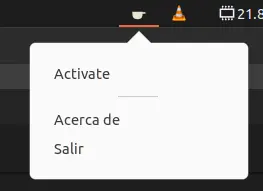
caffeine-indicator-menu

Now we can click on Activate so that our Ubuntu will have infinite caffeine and never go to sleep.

caffeine-indicator-on

Caffeine for a Commandlink image 7

One thing that happens to me is that when I train a neural network, I like to keep the model evaluation in view, even if I'm not at the computer. But if that training takes hours, at some point the screensaver activates and you can no longer see the training progress. So to fix this, we have caffeinate, which by doing

`caffeinate` COMMAND

We will make our computer have caffeine and not fall asleep while running the command COMMAND

Continue reading

Last posts -->

Have you seen these projects?

Gymnasia

Gymnasia Gymnasia
React Native
Expo
TypeScript
FastAPI
Next.js
OpenAI
Anthropic

Mobile personal training app with AI assistant, exercise library, workout tracking, diet and body measurements

Horeca chatbot

Horeca chatbot Horeca chatbot
Python
LangChain
PostgreSQL
PGVector
React
Kubernetes
Docker
GitHub Actions

Chatbot conversational for cooks of hotels and restaurants. A cook, kitchen manager or room service of a hotel or restaurant can talk to the chatbot to get information about recipes and menus. But it also implements agents, with which it can edit or create new recipes or menus

View all projects -->
>_ Available for projects

Do you have an AI project?

Let's talk.

maximofn@gmail.com

Machine Learning and AI specialist. I develop solutions with generative AI, intelligent agents and custom models.

Do you want to watch any talk?

Last talks -->

Do you want to improve with these tips?

Last tips -->

Use this locally

Hugging Face spaces allow us to run models with very simple demos, but what if the demo breaks? Or if the user deletes it? That's why I've created docker containers with some interesting spaces, to be able to use them locally, whatever happens. In fact, if you click on any project view button, it may take you to a space that doesn't work.

Flow edit

Flow edit Flow edit

FLUX.1-RealismLora

FLUX.1-RealismLora FLUX.1-RealismLora
View all containers -->
>_ Available for projects

Do you have an AI project?

Let's talk.

maximofn@gmail.com

Machine Learning and AI specialist. I develop solutions with generative AI, intelligent agents and custom models.

Do you want to train your model with these datasets?

short-jokes-dataset

HuggingFace

Dataset with jokes in English

Use: Fine-tuning text generation models for humor

231K rows 2 columns 45 MB
View on HuggingFace →

opus100

HuggingFace

Dataset with translations from English to Spanish

Use: Training English-Spanish translation models

1M rows 2 columns 210 MB
View on HuggingFace →

netflix_titles

HuggingFace

Dataset with Netflix movies and series

Use: Netflix catalog analysis and recommendation systems

8.8K rows 12 columns 3.5 MB
View on HuggingFace →
View more datasets -->