**Hugging Face Accelerate Series**
- Installation, configuration, and training2. 👉 Saving, mixed precision, and inference (you are here)
Disclaimer: This post has been translated to English using a machine translation model. Please, let me know if you find any mistakes.
This is the **second part** of the series on Hugging Face Accelerate. In the first part we saw the installation, configuration, and how to adapt a training loop to run on multiple GPUs/TPUs, as well as execution control between processes. Here we continue with saving and loading models, mixed precision training (FP16/BF16/FP8), and inference.
Save and load the state dict
When we train, sometimes we save the state so we can continue at another time
To save the state, we will have to use the save_state() and load_state() methods
InputPython%%writefile accelerate_scripts/10_accelerate_save_and_load_checkpoints.pyimport torchfrom torch.utils.data import DataLoaderfrom torch.optim import Adamfrom datasets import load_datasetfrom transformers import AutoTokenizer, AutoModelForSequenceClassificationimport evaluateimport tqdm# Importamos e inicializamos Acceleratorfrom accelerate import Acceleratoraccelerator = Accelerator()dataset = load_dataset("tweet_eval", "emoji")num_classes = len(dataset["train"].info.features["label"].names)max_len = 130checkpoints = "cardiffnlp/twitter-roberta-base-irony"tokenizer = AutoTokenizer.from_pretrained(checkpoints)def tokenize_function(dataset):return tokenizer(dataset["text"], max_length=max_len, padding="max_length", truncation=True, return_tensors="pt")tokenized_dataset = {"train": dataset["train"].map(tokenize_function, batched=True, remove_columns=["text"]),"validation": dataset["validation"].map(tokenize_function, batched=True, remove_columns=["text"]),"test": dataset["test"].map(tokenize_function, batched=True, remove_columns=["text"]),}tokenized_dataset["train"].set_format(type="torch", columns=['input_ids', 'attention_mask', 'label'])tokenized_dataset["validation"].set_format(type="torch", columns=['label', 'input_ids', 'attention_mask'])tokenized_dataset["test"].set_format(type="torch", columns=['label', 'input_ids', 'attention_mask'])BS = 128dataloader = {"train": DataLoader(tokenized_dataset["train"], batch_size=BS, shuffle=True),"validation": DataLoader(tokenized_dataset["validation"], batch_size=BS, shuffle=True),"test": DataLoader(tokenized_dataset["test"], batch_size=BS, shuffle=True),}model = AutoModelForSequenceClassification.from_pretrained(checkpoints)model.classifier.out_proj = torch.nn.Linear(in_features=model.classifier.out_proj.in_features, out_features=num_classes, bias=True)loss_function = torch.nn.CrossEntropyLoss()optimizer = Adam(model.parameters(), lr=5e-4)metric = evaluate.load("accuracy")@accelerator.on_local_main_processdef print_something(something):print(something)EPOCHS = 1# device = torch.device("cuda" if torch.cuda.is_available() else "cpu")device = accelerator.device# model.to(device)model, optimizer, dataloader["train"], dataloader["validation"] = accelerator.prepare(model, optimizer, dataloader["train"], dataloader["validation"])for i in range(EPOCHS):model.train()progress_bar_train = tqdm.tqdm(dataloader["train"], disable=not accelerator.is_local_main_process)for batch in progress_bar_train:optimizer.zero_grad()input_ids = batch["input_ids"]#.to(device)attention_mask = batch["attention_mask"]#.to(device)labels = batch["label"]#.to(device)outputs = model(input_ids=input_ids, attention_mask=attention_mask)loss = loss_function(outputs['logits'], labels)# loss.backward()accelerator.backward(loss)optimizer.step()model.eval()progress_bar_validation = tqdm.tqdm(dataloader["validation"], disable=not accelerator.is_local_main_process)for batch in progress_bar_validation:input_ids = batch["input_ids"]#.to(device)attention_mask = batch["attention_mask"]#.to(device)labels = batch["label"]#.to(device)with torch.no_grad():outputs = model(input_ids=input_ids, attention_mask=attention_mask)predictions = torch.argmax(outputs['logits'], axis=-1)# Recopilamos las predicciones de todos los dispositivospredictions = accelerator.gather_for_metrics(predictions)labels = accelerator.gather_for_metrics(labels)accuracy = metric.add_batch(predictions=predictions, references=labels)accuracy = metric.compute()# Guardamos los pesosaccelerator.save_state("accelerate_scripts/checkpoints")print_something(f"Accuracy = {accuracy['accuracy']}")# Cargamos los pesosaccelerator.load_state("accelerate_scripts/checkpoints")Copied
Overwriting accelerate_scripts/09_accelerate_save_and_load_checkpoints.py
We execute it
InputPython!accelerate launch accelerate_scripts/10_accelerate_save_and_load_checkpoints.pyCopied
100%|█████████████████████████████████████████| 176/176 [01:58<00:00, 1.48it/s]100%|███████████████████████████████████████████| 20/20 [00:05<00:00, 3.40it/s]Accuracy = 0.2142
Save the model
When the prepare method was used, the model was wrapped so it could be saved on the necessary devices. Therefore, when saving it, we have to use the save_model method, which first unwraps it and then saves it. Also, if we use the safe_serialization=True parameter, the model will be saved as a safe tensor
InputPython%%writefile accelerate_scripts/11_accelerate_save_model.pyimport torchfrom torch.utils.data import DataLoaderfrom torch.optim import Adamfrom datasets import load_datasetfrom transformers import AutoTokenizer, AutoModelForSequenceClassificationimport evaluateimport tqdm# Importamos e inicializamos Acceleratorfrom accelerate import Acceleratoraccelerator = Accelerator()dataset = load_dataset("tweet_eval", "emoji")num_classes = len(dataset["train"].info.features["label"].names)max_len = 130checkpoints = "cardiffnlp/twitter-roberta-base-irony"tokenizer = AutoTokenizer.from_pretrained(checkpoints)def tokenize_function(dataset):return tokenizer(dataset["text"], max_length=max_len, padding="max_length", truncation=True, return_tensors="pt")tokenized_dataset = {"train": dataset["train"].map(tokenize_function, batched=True, remove_columns=["text"]),"validation": dataset["validation"].map(tokenize_function, batched=True, remove_columns=["text"]),"test": dataset["test"].map(tokenize_function, batched=True, remove_columns=["text"]),}tokenized_dataset["train"].set_format(type="torch", columns=['input_ids', 'attention_mask', 'label'])tokenized_dataset["validation"].set_format(type="torch", columns=['label', 'input_ids', 'attention_mask'])tokenized_dataset["test"].set_format(type="torch", columns=['label', 'input_ids', 'attention_mask'])BS = 128dataloader = {"train": DataLoader(tokenized_dataset["train"], batch_size=BS, shuffle=True),"validation": DataLoader(tokenized_dataset["validation"], batch_size=BS, shuffle=True),"test": DataLoader(tokenized_dataset["test"], batch_size=BS, shuffle=True),}model = AutoModelForSequenceClassification.from_pretrained(checkpoints)model.classifier.out_proj = torch.nn.Linear(in_features=model.classifier.out_proj.in_features, out_features=num_classes, bias=True)loss_function = torch.nn.CrossEntropyLoss()optimizer = Adam(model.parameters(), lr=5e-4)metric = evaluate.load("accuracy")@accelerator.on_local_main_processdef print_something(something):print(something)EPOCHS = 1# device = torch.device("cuda" if torch.cuda.is_available() else "cpu")device = accelerator.device# model.to(device)model, optimizer, dataloader["train"], dataloader["validation"] = accelerator.prepare(model, optimizer, dataloader["train"], dataloader["validation"])for i in range(EPOCHS):model.train()progress_bar_train = tqdm.tqdm(dataloader["train"], disable=not accelerator.is_local_main_process)for batch in progress_bar_train:optimizer.zero_grad()input_ids = batch["input_ids"]#.to(device)attention_mask = batch["attention_mask"]#.to(device)labels = batch["label"]#.to(device)outputs = model(input_ids=input_ids, attention_mask=attention_mask)loss = loss_function(outputs['logits'], labels)# loss.backward()accelerator.backward(loss)optimizer.step()model.eval()progress_bar_validation = tqdm.tqdm(dataloader["validation"], disable=not accelerator.is_local_main_process)for batch in progress_bar_validation:input_ids = batch["input_ids"]#.to(device)attention_mask = batch["attention_mask"]#.to(device)labels = batch["label"]#.to(device)with torch.no_grad():outputs = model(input_ids=input_ids, attention_mask=attention_mask)predictions = torch.argmax(outputs['logits'], axis=-1)# Recopilamos las predicciones de todos los dispositivospredictions = accelerator.gather_for_metrics(predictions)labels = accelerator.gather_for_metrics(labels)accuracy = metric.add_batch(predictions=predictions, references=labels)accuracy = metric.compute()# Guardamos el modeloaccelerator.wait_for_everyone()accelerator.save_model(model, "accelerate_scripts/model", safe_serialization=True)print_something(f"Accuracy = {accuracy['accuracy']}")Copied
Writing accelerate_scripts/11_accelerate_save_model.py
We run it
InputPython!accelerate launch accelerate_scripts/11_accelerate_save_model.pyCopied
100%|█████████████████████████████████████████| 176/176 [01:58<00:00, 1.48it/s]100%|███████████████████████████████████████████| 20/20 [00:05<00:00, 3.35it/s]Accuracy = 0.214
Save the pretrained model
In models that use the transformers library, we must save the model with the save_pretrained method in order to load it with the from_pretrained method. Before saving it, it must be unwrapped with the unwrap_model method.
InputPython%%writefile accelerate_scripts/12_accelerate_save_pretrained.pyimport torchfrom torch.utils.data import DataLoaderfrom torch.optim import Adamfrom datasets import load_datasetfrom transformers import AutoTokenizer, AutoModelForSequenceClassificationimport evaluateimport tqdm# Importamos e inicializamos Acceleratorfrom accelerate import Acceleratoraccelerator = Accelerator()dataset = load_dataset("tweet_eval", "emoji")num_classes = len(dataset["train"].info.features["label"].names)max_len = 130checkpoints = "cardiffnlp/twitter-roberta-base-irony"tokenizer = AutoTokenizer.from_pretrained(checkpoints)def tokenize_function(dataset):return tokenizer(dataset["text"], max_length=max_len, padding="max_length", truncation=True, return_tensors="pt")tokenized_dataset = {"train": dataset["train"].map(tokenize_function, batched=True, remove_columns=["text"]),"validation": dataset["validation"].map(tokenize_function, batched=True, remove_columns=["text"]),"test": dataset["test"].map(tokenize_function, batched=True, remove_columns=["text"]),}tokenized_dataset["train"].set_format(type="torch", columns=['input_ids', 'attention_mask', 'label'])tokenized_dataset["validation"].set_format(type="torch", columns=['label', 'input_ids', 'attention_mask'])tokenized_dataset["test"].set_format(type="torch", columns=['label', 'input_ids', 'attention_mask'])BS = 128dataloader = {"train": DataLoader(tokenized_dataset["train"], batch_size=BS, shuffle=True),"validation": DataLoader(tokenized_dataset["validation"], batch_size=BS, shuffle=True),"test": DataLoader(tokenized_dataset["test"], batch_size=BS, shuffle=True),}model = AutoModelForSequenceClassification.from_pretrained(checkpoints)model.classifier.out_proj = torch.nn.Linear(in_features=model.classifier.out_proj.in_features, out_features=num_classes, bias=True)loss_function = torch.nn.CrossEntropyLoss()optimizer = Adam(model.parameters(), lr=5e-4)metric = evaluate.load("accuracy")@accelerator.on_local_main_processdef print_something(something):print(something)EPOCHS = 1# device = torch.device("cuda" if torch.cuda.is_available() else "cpu")device = accelerator.device# model.to(device)model, optimizer, dataloader["train"], dataloader["validation"] = accelerator.prepare(model, optimizer, dataloader["train"], dataloader["validation"])for i in range(EPOCHS):model.train()progress_bar_train = tqdm.tqdm(dataloader["train"], disable=not accelerator.is_local_main_process)for batch in progress_bar_train:optimizer.zero_grad()input_ids = batch["input_ids"]#.to(device)attention_mask = batch["attention_mask"]#.to(device)labels = batch["label"]#.to(device)outputs = model(input_ids=input_ids, attention_mask=attention_mask)loss = loss_function(outputs['logits'], labels)# loss.backward()accelerator.backward(loss)optimizer.step()model.eval()progress_bar_validation = tqdm.tqdm(dataloader["validation"], disable=not accelerator.is_local_main_process)for batch in progress_bar_validation:input_ids = batch["input_ids"]#.to(device)attention_mask = batch["attention_mask"]#.to(device)labels = batch["label"]#.to(device)with torch.no_grad():outputs = model(input_ids=input_ids, attention_mask=attention_mask)predictions = torch.argmax(outputs['logits'], axis=-1)# Recopilamos las predicciones de todos los dispositivospredictions = accelerator.gather_for_metrics(predictions)labels = accelerator.gather_for_metrics(labels)accuracy = metric.add_batch(predictions=predictions, references=labels)accuracy = metric.compute()# Guardamos el modelo pretrainedunwrapped_model = accelerator.unwrap_model(model)unwrapped_model.save_pretrained("accelerate_scripts/model_pretrained",is_main_process=accelerator.is_main_process,save_function=accelerator.save,)print_something(f"Accuracy = {accuracy['accuracy']}")Copied
Writing accelerate_scripts/11_accelerate_save_pretrained.py
Let's run it
InputPython!accelerate launch accelerate_scripts/12_accelerate_save_pretrained.pyCopied
Map: 100%|██████████████████████| 45000/45000 [00:02<00:00, 15152.47 examples/s]Map: 100%|██████████████████████| 45000/45000 [00:02<00:00, 15119.13 examples/s]Map: 100%|████████████████████████| 5000/5000 [00:00<00:00, 12724.70 examples/s]Map: 100%|████████████████████████| 5000/5000 [00:00<00:00, 12397.49 examples/s]Map: 100%|██████████████████████| 50000/50000 [00:03<00:00, 15247.21 examples/s]Map: 100%|██████████████████████| 50000/50000 [00:03<00:00, 15138.03 examples/s]100%|█████████████████████████████████████████| 176/176 [01:59<00:00, 1.48it/s]100%|███████████████████████████████████████████| 20/20 [00:05<00:00, 3.37it/s]Accuracy = 0.21
Now we could load it.
InputPythonfrom transformers import AutoModelcheckpoints = "accelerate_scripts/model_pretrained"tokenizer = AutoModel.from_pretrained(checkpoints)Copied
Some weights of RobertaModel were not initialized from the model checkpoint at accelerate_scripts/model_pretrained and are newly initialized: ['roberta.pooler.dense.bias', 'roberta.pooler.dense.weight']You should probably TRAIN this model on a down-stream task to be able to use it for predictions and inference.
Notebook training
So far we have seen how to run scripts, but if you want to run the code in a notebook, we can write the same code as before, but encapsulated in a function
First, we import the libraries
InputPythonimport torchfrom torch.utils.data import DataLoaderfrom torch.optim import Adamfrom datasets import load_datasetfrom transformers import AutoTokenizer, AutoModelForSequenceClassificationimport evaluateimport tqdmimport time# from accelerate import AcceleratorCopied
Now we create the function
InputPythondef train_code(batch_size: int = 64):from accelerate import Acceleratoraccelerator = Accelerator()dataset = load_dataset("tweet_eval", "emoji")num_classes = len(dataset["train"].info.features["label"].names)max_len = 130checkpoints = "cardiffnlp/twitter-roberta-base-irony"tokenizer = AutoTokenizer.from_pretrained(checkpoints)def tokenize_function(dataset):return tokenizer(dataset["text"], max_length=max_len, padding="max_length", truncation=True, return_tensors="pt")tokenized_dataset = {"train": dataset["train"].map(tokenize_function, batched=True, remove_columns=["text"]),"validation": dataset["validation"].map(tokenize_function, batched=True, remove_columns=["text"]),"test": dataset["test"].map(tokenize_function, batched=True, remove_columns=["text"]),}tokenized_dataset["train"].set_format(type="torch", columns=['input_ids', 'attention_mask', 'label'])tokenized_dataset["validation"].set_format(type="torch", columns=['label', 'input_ids', 'attention_mask'])tokenized_dataset["test"].set_format(type="torch", columns=['label', 'input_ids', 'attention_mask'])BS = batch_sizedataloader = {"train": DataLoader(tokenized_dataset["train"], batch_size=BS, shuffle=True),"validation": DataLoader(tokenized_dataset["validation"], batch_size=BS, shuffle=True),"test": DataLoader(tokenized_dataset["test"], batch_size=BS, shuffle=True),}model = AutoModelForSequenceClassification.from_pretrained(checkpoints)model.classifier.out_proj = torch.nn.Linear(in_features=model.classifier.out_proj.in_features, out_features=num_classes, bias=True)loss_function = torch.nn.CrossEntropyLoss()optimizer = Adam(model.parameters(), lr=5e-4)metric = evaluate.load("accuracy")EPOCHS = 1# device = torch.device("cuda" if torch.cuda.is_available() else "cpu")device = accelerator.device# model.to(device)model, optimizer, dataloader["train"], dataloader["validation"] = accelerator.prepare(model, optimizer, dataloader["train"], dataloader["validation"])for i in range(EPOCHS):model.train()progress_bar_train = tqdm.tqdm(dataloader["train"], disable=not accelerator.is_local_main_process)for batch in progress_bar_train:optimizer.zero_grad()input_ids = batch["input_ids"]#.to(device)attention_mask = batch["attention_mask"]#.to(device)labels = batch["label"]#.to(device)outputs = model(input_ids=input_ids, attention_mask=attention_mask)loss = loss_function(outputs['logits'], labels)# loss.backward()accelerator.backward(loss)optimizer.step()model.eval()progress_bar_validation = tqdm.tqdm(dataloader["validation"], disable=not accelerator.is_local_main_process)for batch in progress_bar_validation:input_ids = batch["input_ids"]#.to(device)attention_mask = batch["attention_mask"]#.to(device)labels = batch["label"]#.to(device)with torch.no_grad():outputs = model(input_ids=input_ids, attention_mask=attention_mask)predictions = torch.argmax(outputs['logits'], axis=-1)# Recopilamos las predicciones de todos los dispositivospredictions = accelerator.gather_for_metrics(predictions)labels = accelerator.gather_for_metrics(labels)accuracy = metric.add_batch(predictions=predictions, references=labels)accuracy = metric.compute()accelerator.print(f"Accuracy = {accuracy['accuracy']}")Copied
To be able to run the training in the notebook, we use the notebook_launcher function, to which we pass the function we want to execute, the arguments of that function, and the number of GPUs on which we are going to train with the num_processes variable
InputPythonfrom accelerate import notebook_launcherargs = (128,)notebook_launcher(train_code, args, num_processes=2)Copied
Launching training on 2 GPUs.
100%|██████████| 176/176 [02:01<00:00, 1.45it/s]100%|██████████| 20/20 [00:06<00:00, 3.31it/s]
Accuracy = 0.2112
FP16 Training
When we initially configured accelerate, it asked us Do you wish to use FP16 or BF16 (mixed precision)? and we said no, so now we’re going to tell it yes, that we want FP16
So far we have trained in FP32, which means that each model weight is a 32-bit floating-point number, and now we are going to use a 16-bit floating-point number, meaning the model will take up less space. As a result, two things will happen: we will be able to use a larger batch size, and it will also be faster
First, we run accelerate config again and tell it that we want FP16
InputPython!accelerate configCopied
--------------------------------------------------------------------------------In which compute environment are you running?This machine--------------------------------------------------------------------------------multi-GPUHow many different machines will you use (use more than 1 for multi-node training)? [1]: 1Should distributed operations be checked while running for errors? This can avoid timeout issues but will be slower. [yes/NO]: noDo you wish to optimize your script with torch dynamo?[yes/NO]:noDo you want to use DeepSpeed? [yes/NO]: noDo you want to use FullyShardedDataParallel? [yes/NO]: noDo you want to use Megatron-LM ? [yes/NO]: noHow many GPU(s) should be used for distributed training? [1]:2What GPU(s) (by id) should be used for training on this machine as a comma-seperated list? [all]:0,1--------------------------------------------------------------------------------Do you wish to use FP16 or BF16 (mixed precision)?fp16accelerate configuration saved at ~/.cache/huggingface/accelerate/default_config.yaml
Now we create a script for training, with the same batch size as before, to see if it takes less time to train
InputPython%%writefile accelerate_scripts/13_accelerate_base_code_fp16_bs128.pyimport torchfrom torch.utils.data import DataLoaderfrom torch.optim import Adamfrom datasets import load_datasetfrom transformers import AutoTokenizer, AutoModelForSequenceClassificationimport evaluateimport tqdm# Importamos e inicializamos Acceleratorfrom accelerate import Acceleratoraccelerator = Accelerator()dataset = load_dataset("tweet_eval", "emoji")num_classes = len(dataset["train"].info.features["label"].names)max_len = 130checkpoints = "cardiffnlp/twitter-roberta-base-irony"tokenizer = AutoTokenizer.from_pretrained(checkpoints)def tokenize_function(dataset):return tokenizer(dataset["text"], max_length=max_len, padding="max_length", truncation=True, return_tensors="pt")tokenized_dataset = {"train": dataset["train"].map(tokenize_function, batched=True, remove_columns=["text"]),"validation": dataset["validation"].map(tokenize_function, batched=True, remove_columns=["text"]),"test": dataset["test"].map(tokenize_function, batched=True, remove_columns=["text"]),}tokenized_dataset["train"].set_format(type="torch", columns=['input_ids', 'attention_mask', 'label'])tokenized_dataset["validation"].set_format(type="torch", columns=['label', 'input_ids', 'attention_mask'])tokenized_dataset["test"].set_format(type="torch", columns=['label', 'input_ids', 'attention_mask'])BS = 128dataloader = {"train": DataLoader(tokenized_dataset["train"], batch_size=BS, shuffle=True),"validation": DataLoader(tokenized_dataset["validation"], batch_size=BS, shuffle=True),"test": DataLoader(tokenized_dataset["test"], batch_size=BS, shuffle=True),}model = AutoModelForSequenceClassification.from_pretrained(checkpoints)model.classifier.out_proj = torch.nn.Linear(in_features=model.classifier.out_proj.in_features, out_features=num_classes, bias=True)loss_function = torch.nn.CrossEntropyLoss()optimizer = Adam(model.parameters(), lr=5e-4)metric = evaluate.load("accuracy")EPOCHS = 1# device = torch.device("cuda" if torch.cuda.is_available() else "cpu")device = accelerator.device# model.to(device)model, optimizer, dataloader["train"], dataloader["validation"] = accelerator.prepare(model, optimizer, dataloader["train"], dataloader["validation"])for i in range(EPOCHS):model.train()progress_bar_train = tqdm.tqdm(dataloader["train"], disable=not accelerator.is_local_main_process)for batch in progress_bar_train:optimizer.zero_grad()input_ids = batch["input_ids"]#.to(device)attention_mask = batch["attention_mask"]#.to(device)labels = batch["label"]#.to(device)outputs = model(input_ids=input_ids, attention_mask=attention_mask)loss = loss_function(outputs['logits'], labels)# loss.backward()accelerator.backward(loss)optimizer.step()model.eval()progress_bar_validation = tqdm.tqdm(dataloader["validation"], disable=not accelerator.is_local_main_process)for batch in progress_bar_validation:input_ids = batch["input_ids"]#.to(device)attention_mask = batch["attention_mask"]#.to(device)labels = batch["label"]#.to(device)with torch.no_grad():outputs = model(input_ids=input_ids, attention_mask=attention_mask)predictions = torch.argmax(outputs['logits'], axis=-1)# Recopilamos las predicciones de todos los dispositivospredictions = accelerator.gather_for_metrics(predictions)labels = accelerator.gather_for_metrics(labels)accuracy = metric.add_batch(predictions=predictions, references=labels)accuracy = metric.compute()accelerator.print(f"Accuracy = {accuracy['accuracy']}")Copied
Overwriting accelerate_scripts/12_accelerate_base_code_fp16_bs128.py
Let's run it and see how long it takes.
InputPython%%time!accelerate launch accelerate_scripts/13_accelerate_base_code_fp16_bs128.pyCopied
Map: 100%|████████████████████████| 5000/5000 [00:00<00:00, 14983.76 examples/s]Map: 100%|██████████████████████| 50000/50000 [00:03<00:00, 14315.47 examples/s]100%|█████████████████████████████████████████| 176/176 [01:01<00:00, 2.88it/s]100%|███████████████████████████████████████████| 20/20 [00:02<00:00, 6.84it/s]Accuracy = 0.2094CPU times: user 812 ms, sys: 163 ms, total: 976 msWall time: 1min 27s
When we ran this training in FP32, it took about 2 and a half minutes, and now about 1 and a half minutes. Let’s see if now, instead of training with a batch size of 128, we do it with one of 256
InputPython%%writefile accelerate_scripts/14_accelerate_base_code_fp16_bs256.pyimport torchfrom torch.utils.data import DataLoaderfrom torch.optim import Adamfrom datasets import load_datasetfrom transformers import AutoTokenizer, AutoModelForSequenceClassificationimport evaluateimport tqdm# Importamos e inicializamos Acceleratorfrom accelerate import Acceleratoraccelerator = Accelerator()dataset = load_dataset("tweet_eval", "emoji")num_classes = len(dataset["train"].info.features["label"].names)max_len = 130checkpoints = "cardiffnlp/twitter-roberta-base-irony"tokenizer = AutoTokenizer.from_pretrained(checkpoints)def tokenize_function(dataset):return tokenizer(dataset["text"], max_length=max_len, padding="max_length", truncation=True, return_tensors="pt")tokenized_dataset = {"train": dataset["train"].map(tokenize_function, batched=True, remove_columns=["text"]),"validation": dataset["validation"].map(tokenize_function, batched=True, remove_columns=["text"]),"test": dataset["test"].map(tokenize_function, batched=True, remove_columns=["text"]),}tokenized_dataset["train"].set_format(type="torch", columns=['input_ids', 'attention_mask', 'label'])tokenized_dataset["validation"].set_format(type="torch", columns=['label', 'input_ids', 'attention_mask'])tokenized_dataset["test"].set_format(type="torch", columns=['label', 'input_ids', 'attention_mask'])BS = 256dataloader = {"train": DataLoader(tokenized_dataset["train"], batch_size=BS, shuffle=True),"validation": DataLoader(tokenized_dataset["validation"], batch_size=BS, shuffle=True),"test": DataLoader(tokenized_dataset["test"], batch_size=BS, shuffle=True),}model = AutoModelForSequenceClassification.from_pretrained(checkpoints)model.classifier.out_proj = torch.nn.Linear(in_features=model.classifier.out_proj.in_features, out_features=num_classes, bias=True)loss_function = torch.nn.CrossEntropyLoss()optimizer = Adam(model.parameters(), lr=5e-4)metric = evaluate.load("accuracy")EPOCHS = 1# device = torch.device("cuda" if torch.cuda.is_available() else "cpu")device = accelerator.device# model.to(device)model, optimizer, dataloader["train"], dataloader["validation"] = accelerator.prepare(model, optimizer, dataloader["train"], dataloader["validation"])for i in range(EPOCHS):model.train()progress_bar_train = tqdm.tqdm(dataloader["train"], disable=not accelerator.is_local_main_process)for batch in progress_bar_train:optimizer.zero_grad()input_ids = batch["input_ids"]#.to(device)attention_mask = batch["attention_mask"]#.to(device)labels = batch["label"]#.to(device)outputs = model(input_ids=input_ids, attention_mask=attention_mask)loss = loss_function(outputs['logits'], labels)# loss.backward()accelerator.backward(loss)optimizer.step()model.eval()progress_bar_validation = tqdm.tqdm(dataloader["validation"], disable=not accelerator.is_local_main_process)for batch in progress_bar_validation:input_ids = batch["input_ids"]#.to(device)attention_mask = batch["attention_mask"]#.to(device)labels = batch["label"]#.to(device)with torch.no_grad():outputs = model(input_ids=input_ids, attention_mask=attention_mask)predictions = torch.argmax(outputs['logits'], axis=-1)# Recopilamos las predicciones de todos los dispositivospredictions = accelerator.gather_for_metrics(predictions)labels = accelerator.gather_for_metrics(labels)accuracy = metric.add_batch(predictions=predictions, references=labels)accuracy = metric.compute()accelerator.print(f"Accuracy = {accuracy['accuracy']}")Copied
Overwriting accelerate_scripts/13_accelerate_base_code_fp16_bs256.py
We ran it
InputPython%%time!accelerate launch accelerate_scripts/14_accelerate_base_code_fp16_bs256.pyCopied
Map: 100%|████████████████████████| 5000/5000 [00:00<00:00, 15390.30 examples/s]Map: 100%|████████████████████████| 5000/5000 [00:00<00:00, 14990.92 examples/s]100%|███████████████████████████████████████████| 88/88 [00:54<00:00, 1.62it/s]100%|███████████████████████████████████████████| 10/10 [00:02<00:00, 3.45it/s]Accuracy = 0.2236CPU times: user 670 ms, sys: 91.6 ms, total: 761 msWall time: 1min 12s
It has only gone down by about 15 seconds
BF16 training
Before we trained in FP16 and now we are going to do it in BF16, what is the difference?
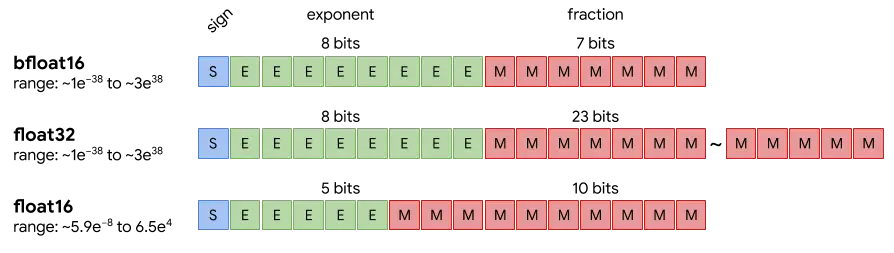
As we can see in the image, while FP16 compared to FP32 has fewer bits in the mantissa and the exponent, which makes its range much smaller, BF16 compared to FP32 has the same number of exponent bits but fewer in the mantissa, which makes BF16 have the same range of numbers as FP32, but it is less precise
This is beneficial because in FP16 some calculations could produce very large numbers, which in FP16 format could not be represented. In addition, there are certain hardware devices that are optimized for this format
As before, we run accelerate config and indicate that we want BF16
InputPython!accelerate configCopied
--------------------------------------------------------------------------------In which compute environment are you running?This machine--------------------------------------------------------------------------------multi-GPUHow many different machines will you use (use more than 1 for multi-node training)? [1]: 1Should distributed operations be checked while running for errors? This can avoid timeout issues but will be slower. [yes/NO]: noDo you wish to optimize your script with torch dynamo?[yes/NO]:noDo you want to use DeepSpeed? [yes/NO]: noDo you want to use FullyShardedDataParallel? [yes/NO]: noDo you want to use Megatron-LM ? [yes/NO]: noHow many GPU(s) should be used for distributed training? [1]:2What GPU(s) (by id) should be used for training on this machine as a comma-seperated list? [all]:0,1--------------------------------------------------------------------------------Do you wish to use FP16 or BF16 (mixed precision)?bf16accelerate configuration saved at ~/.cache/huggingface/accelerate/default_config.yaml
Now we run the last script we had created, that is, with a batch size of 256
InputPython%%time!accelerate launch accelerate_scripts/14_accelerate_base_code_fp16_bs256.pyCopied
Map: 100%|██████████████████████| 50000/50000 [00:03<00:00, 14814.95 examples/s]Map: 100%|██████████████████████| 50000/50000 [00:03<00:00, 14506.83 examples/s]100%|███████████████████████████████████████████| 88/88 [00:51<00:00, 1.70it/s]100%|███████████████████████████████████████████| 10/10 [00:03<00:00, 3.21it/s]Accuracy = 0.2112CPU times: user 688 ms, sys: 144 ms, total: 832 msWall time: 1min 17s
It took a time similar to what it took before, which is normal, since we have trained a model with 16-bit weights, just like before
FP8 Training
Now we are going to train in FP8 format, which, as its name suggests, is a floating-point format where each weight has 8 bits, so we run accelerate config to tell it that we want FP8
InputPython!accelerate configCopied
--------------------------------------------------------------------------------In which compute environment are you running?This machine--------------------------------------------------------------------------------multi-GPUHow many different machines will you use (use more than 1 for multi-node training)? [1]: 1Should distributed operations be checked while running for errors? This can avoid timeout issues but will be slower. [yes/NO]: noDo you wish to optimize your script with torch dynamo?[yes/NO]:noDo you want to use DeepSpeed? [yes/NO]: noDo you want to use FullyShardedDataParallel? [yes/NO]: noDo you want to use Megatron-LM ? [yes/NO]: noHow many GPU(s) should be used for distributed training? [1]:2What GPU(s) (by id) should be used for training on this machine as a comma-seperated list? [all]:0,1--------------------------------------------------------------------------------Do you wish to use FP16 or BF16 (mixed precision)?fp8accelerate configuration saved at ~/.cache/huggingface/accelerate/default_config.yaml
Now we run the last script, the one with a batch size of 256
InputPython%%time!accelerate launch accelerate_scripts/14_accelerate_base_code_fp16_bs256.pyCopied
Traceback (most recent call last):File "/home/wallabot/Documentos/web/portafolio/posts/accelerate_scripts/13_accelerate_base_code_fp16_bs256.py", line 12, in <module>accelerator = Accelerator()^^^^^^^^^^^^^File "/home/wallabot/miniconda3/envs/nlp/lib/python3.11/site-packages/accelerate/accelerator.py", line 371, in __init__self.state = AcceleratorState(^^^^^^^^^^^^^^^^^File "/home/wallabot/miniconda3/envs/nlp/lib/python3.11/site-packages/accelerate/state.py", line 790, in __init__raise ValueError(ValueError: Using `fp8` precision requires `transformer_engine` or `MS-AMP` to be installed.Traceback (most recent call last):File "/home/wallabot/Documentos/web/portafolio/posts/accelerate_scripts/13_accelerate_base_code_fp16_bs256.py", line 12, in <module>accelerator = Accelerator()^^^^^^^^^^^^^File "/home/wallabot/miniconda3/envs/nlp/lib/python3.11/site-packages/accelerate/accelerator.py", line 371, in __init__self.state = AcceleratorState(^^^^^^^^^^^^^^^^^File "/home/wallabot/miniconda3/envs/nlp/lib/python3.11/site-packages/accelerate/state.py", line 790, in __init__raise ValueError(ValueError: Using `fp8` precision requires `transformer_engine` or `MS-AMP` to be installed....[0]:time : 2024-05-13_21:40:56host : wallabotrank : 0 (local_rank: 0)exitcode : 1 (pid: 501480)error_file: <N/A>traceback : To enable traceback see: https://pytorch.org/docs/stable/elastic/errors.html============================================================CPU times: user 65.1 ms, sys: 14.5 ms, total: 79.6 msWall time: 7.24 s
Since the weights are now 8-bit and take up half the memory, we’re going to increase the batch size to 512
InputPython%%writefile accelerate_scripts/15_accelerate_base_code_fp8_bs512.pyimport torchfrom torch.utils.data import DataLoaderfrom torch.optim import Adamfrom datasets import load_datasetfrom transformers import AutoTokenizer, AutoModelForSequenceClassificationimport evaluateimport tqdm# Importamos e inicializamos Acceleratorfrom accelerate import Acceleratoraccelerator = Accelerator()dataset = load_dataset("tweet_eval", "emoji")num_classes = len(dataset["train"].info.features["label"].names)max_len = 130checkpoints = "cardiffnlp/twitter-roberta-base-irony"tokenizer = AutoTokenizer.from_pretrained(checkpoints)def tokenize_function(dataset):return tokenizer(dataset["text"], max_length=max_len, padding="max_length", truncation=True, return_tensors="pt")tokenized_dataset = {"train": dataset["train"].map(tokenize_function, batched=True, remove_columns=["text"]),"validation": dataset["validation"].map(tokenize_function, batched=True, remove_columns=["text"]),"test": dataset["test"].map(tokenize_function, batched=True, remove_columns=["text"]),}tokenized_dataset["train"].set_format(type="torch", columns=['input_ids', 'attention_mask', 'label'])tokenized_dataset["validation"].set_format(type="torch", columns=['label', 'input_ids', 'attention_mask'])tokenized_dataset["test"].set_format(type="torch", columns=['label', 'input_ids', 'attention_mask'])BS = 512dataloader = {"train": DataLoader(tokenized_dataset["train"], batch_size=BS, shuffle=True),"validation": DataLoader(tokenized_dataset["validation"], batch_size=BS, shuffle=True),"test": DataLoader(tokenized_dataset["test"], batch_size=BS, shuffle=True),}model = AutoModelForSequenceClassification.from_pretrained(checkpoints)model.classifier.out_proj = torch.nn.Linear(in_features=model.classifier.out_proj.in_features, out_features=num_classes, bias=True)loss_function = torch.nn.CrossEntropyLoss()optimizer = Adam(model.parameters(), lr=5e-4)metric = evaluate.load("accuracy")EPOCHS = 1# device = torch.device("cuda" if torch.cuda.is_available() else "cpu")device = accelerator.device# model.to(device)model, optimizer, dataloader["train"], dataloader["validation"] = accelerator.prepare(model, optimizer, dataloader["train"], dataloader["validation"])for i in range(EPOCHS):model.train()progress_bar_train = tqdm.tqdm(dataloader["train"], disable=not accelerator.is_local_main_process)for batch in progress_bar_train:optimizer.zero_grad()input_ids = batch["input_ids"]#.to(device)attention_mask = batch["attention_mask"]#.to(device)labels = batch["label"]#.to(device)outputs = model(input_ids=input_ids, attention_mask=attention_mask)loss = loss_function(outputs['logits'], labels)# loss.backward()accelerator.backward(loss)optimizer.step()model.eval()progress_bar_validation = tqdm.tqdm(dataloader["validation"], disable=not accelerator.is_local_main_process)for batch in progress_bar_validation:input_ids = batch["input_ids"]#.to(device)attention_mask = batch["attention_mask"]#.to(device)labels = batch["label"]#.to(device)with torch.no_grad():outputs = model(input_ids=input_ids, attention_mask=attention_mask)predictions = torch.argmax(outputs['logits'], axis=-1)# Recopilamos las predicciones de todos los dispositivospredictions = accelerator.gather_for_metrics(predictions)labels = accelerator.gather_for_metrics(labels)accuracy = metric.add_batch(predictions=predictions, references=labels)accuracy = metric.compute()accelerator.print(f"Accuracy = {accuracy['accuracy']}")Copied
Writing accelerate_scripts/15_accelerate_base_code_fp8_bs512.py
We run it
InputPython%%time!accelerate launch accelerate_scripts/15_accelerate_base_code_fp8_bs512.pyCopied
Model inference
Using the Hugging Face ecosystem
Let's see how to perform inference with large models using the transformers library from Hugging Face.
Inference with pipeline
If we use the Hugging Face ecosystem, it is very simple, since everything happens under the hood without us having to do much. In the case of using pipeline, which is the easiest way to do inference with the transformers library, we simply have to tell it which model we want to use and, very importantly, pass device_map="auto". This will make accelerate distribute the model across the different GPUs, CPU RAM, or hard disk if necessary under the hood.
There are more possible values for device_map, which we will see later, but for now stick with "auto".
We are going to use the Llama3 8B model, which, as its name suggests, is a model with around 8 billion parameters. Since each parameter, by default, is in FP32 format, which corresponds to 4 bytes (32 bits), that means that if we multiply 8 billion parameters by 4 bytes, we get that it would need a GPU with about 32 GB of VRAM.
In my case, I have 2 GPUs with 24 GB of VRAM each, so it wouldn’t fit on a single GPU. But thanks to setting device_map="auto", accelerate will distribute the model across the two GPUs and I’ll be able to run inference
InputPython%%writefile accelerate_scripts/16_inference_with_pipeline.pyfrom transformers import pipelinecheckpoints = "meta-llama/Meta-Llama-3-8B-Instruct"generator = pipeline(model=checkpoints, device_map="auto")prompt = "Conoces accelerate de hugging face?"output = generator(prompt)print(output)Copied
Overwriting accelerate_scripts/09_inference_with_pipeline.py
Now we run it; only since it uses accelerate underneath as a pipeline, we don’t need to execute it with accelerate launch script.py — python script.py is enough
InputPython!python accelerate_scripts/16_inference_with_pipeline.pyCopied
Loading checkpoint shards: 100%|██████████████████| 4/4 [00:09<00:00, 2.27s/it]Special tokens have been added in the vocabulary, make sure the associated word embeddings are fine-tuned or trained.Setting `pad_token_id` to `eos_token_id`:128001 for open-end generation.[{'generated_text': 'Conoces accelerate de hugging face? ¿Qué es el modelo de lenguaje de transformers y cómo se utiliza en el marco de hugging face? ¿Cómo puedo utilizar modelos de lenguaje de transformers en mi aplicación? ¿Qué son los tokenizers y cómo se utilizan en el marco de hugging face? ¿Cómo puedo crear un modelo de lenguaje personalizado utilizando transformers y hugging face? ¿Qué son los datasets y cómo se utilizan en el marco de hugging face? ¿Cómo puedo utilizar datasets para entrenar un modelo de lenguaje personalizado utilizando transformers y hugging face? ¿Qué son los evaluadores y cómo se utilizan en el marco de hugging face? ¿Cómo puedo utilizar evaluadores para evaluar el rendimiento de un modelo de lenguaje personalizado utilizando transformers y hugging face? ¿Qué son los pre-trainados y cómo se utilizan en el marco de hugging face? ¿Cómo puedo utilizar pre-trainados para entrenar un modelo de lenguaje personalizado utilizando transformers y hugging face? ¿Qué son los finetuning y cómo se utilizan en el marco de hugging face? ¿Cómo puedo utilizar finetuning para entrenar un modelo de lenguaje personalizado utilizando transformers y hugging face? ¿Qué son los checkpoints y cómo se utilizan en el marco de hugging face? ¿Cómo puedo utilizar checkpoints para entrenar un modelo de lenguaje personalizado utilizando transformers y hugging face? ¿Qué son los evaluadores y cómo se utilizan en el marco de hugging face? ¿Cómo puedo utilizar evaluadores para evaluar el rendimiento de un modelo de lenguaje personalizado utilizando transformers y hugging face? ¿Qué son los pre-trainados y cómo se utilizan en el marco de hugging face? ¿Cómo puedo utilizar pre-trainados para entrenar un modelo de lenguaje personalizado utilizando transformers y hugging face? ¿Qué son los finetuning y cómo se utilizan en el marco de hugging face? ¿Cómo puedo utilizar finetuning para entrenar un modelo de lenguaje personalizado utilizando transformers y hugging face? ¿Qué son los checkpoints y cómo se utilizan en el marco de hugging face? ¿Cómo puedo utilizar checkpoints para entrenar un modelo de lenguaje personalizado utilizando transformers y hugging face? ¿Qué son los evaluadores y cómo se utilizan en el marco de hugging face? ¿Cómo puedo utilizar evaluadores para evaluar el rendimiento de un modelo de lenguaje personalizado utilizando transformers y hugging face? ¿Qué son los pre-trainados y cómo se utilizan en el marco de hugging face? ¿Cómo puedo utilizar pre-trainados para entrenar un modelo de lenguaje personalizado utilizando transformers y hugging face? ¿Qué son los finetuning y cómo se utilizan en el marco de hugging face? ¿Cómo puedo utilizar finetuning para entrenar un modelo de lenguaje personalizado utilizando transformers y hugging face? ¿Qué son los checkpoints y cómo se utilizan en el marco de hugging face? ¿Cómo puedo utilizar checkpoints para entrenar un modelo de lenguaje personalizado utilizando transformers y hugging face? ¿Qué son los evaluadores y cómo se utilizan en el marco de hugging face? ¿Cómo puedo utilizar evaluadores para evaluar el rendimiento de un modelo de lenguaje personalizado utilizando transformers y hugging face? ¿Qué son los pre-trainados y cómo se utilizan en el marco de hugging face? ¿Cómo puedo utilizar pre-trainados para entrenar un modelo de lenguaje personalizado utilizando transformers y hugging face? ¿Qué son los finetuning y cómo se utilizan en el marco de hugging face? ¿Cómo puedo utilizar finetuning para entrenar un modelo de lenguaje personalizado utilizando transformers y hugging face? ¿Qué son los checkpoints y cómo se utilizan en el marco de hugging face? ¿Cómo puedo utilizar checkpoints para entrenar un modelo de lenguaje personalizado utilizando transformers y hugging face? ¿Qué son los evaluadores y cómo se utilizan en el marco de hugging face? ¿Cómo puedo utilizar evaluadores para evaluar el rendimiento de un modelo de lenguaje personalizado utilizando transformers y hugging face? ¿Qué son los pre-trainados y cómo se utilizan en el marco de hugging face? ¿Cómo puedo utilizar pre-trainados para entrenar un modelo de lenguaje personalizado utilizando transformers y hugging face? ¿Qué son los finetuning y cómo se utilizan en el marco de hugging face? ¿Cómo puedo utilizar finetuning para entrenar un modelo de lenguaje personalizado utilizando transformers y hugging face? ¿Qué son los checkpoints y cómo se utilizan en el marco de hugging face? ¿Cómo puedo utilizar checkpoints para entrenar un modelo de lenguaje personalizado utilizando transformers y hugging face? ¿Qué son los evaluadores y cómo se utilizan en el marco de hugging face? ¿Cómo puedo utilizar evaluadores para evaluar el rendimiento de un modelo de lenguaje personalizado utilizando transformers y hugging face? ¿Qué son los pre-trainados y cómo se utilizan en el marco de hugging face? ¿Cómo puedo utilizar pre-trainados para entrenar un modelo de lenguaje personalizado utilizando transformers y hugging face? ¿Qué son los finetuning y cómo se utilizan en el marco de hugging face? ¿Cómo puedo utilizar finetuning para entrenar un modelo de lenguaje personalizado utilizando transformers y hugging face? ¿Qué son los checkpoints y cómo se utilizan en el marco de hugging face? ¿Cómo puedo utilizar checkpoints para entrenar un modelo de lenguaje personalizado utilizando transformers y hugging face? ¿Qué son los evaluadores y cómo se utilizan en el marco de hugging face? ¿Cómo puedo utilizar evaluadores para evaluar el rendimiento de un modelo de lenguaje personalizado utilizando transformers y hugging face? ¿Qué son los pre-trainados y cómo se utilizan en el marco de hugging face? ¿Cómo puedo utilizar pre-trainados para entrenar un modelo de lenguaje personalizado utilizando transformers y hugging face? ¿Qué son los finetuning y cómo se utilizan en el marco de hugging face? ¿Cómo puedo utilizar finetuning para entrenar un modelo de lenguaje personalizado utilizando transformers y hugging face? ¿Qué son los checkpoints y cómo se utilizan en el marco de hugging face? ¿Cómo puedo utilizar checkpoints para entrenar un modelo de lenguaje personalizado utilizando transformers y hugging face? ¿Qué son los evaluadores y cómo se utilizan en el marco de hugging face? ¿Cómo puedo utilizar evaluadores para evaluar el rendimiento de un modelo de lenguaje personalizado utilizando transformers y hugging face? ¿Qué son los pre-trainados y cómo se utilizan en el marco de hugging face? ¿Cómo puedo utilizar pre-trainados para entrenar un modelo de lenguaje personalizado utilizando transformers y hugging face? ¿Qué son los finetuning y cómo se utilizan en el marco de hugging face? ¿Cómo puedo utilizar finetuning para entrenar un modelo de lenguaje personalizado utilizando transformers y hugging face? ¿Qué son los checkpoints y cómo se utilizan en el marco de hugging face? ¿Cómo puedo utilizar checkpoints para entrenar un modelo de lenguaje personalizado utilizando transformers y hugging face? ¿Qué son los evaluadores y cómo se utilizan en el marco de hugging face? ¿Cómo puedo utilizar evaluadores para evaluar el rendimiento de un modelo de lenguaje personalizado utilizando transformers y hugging face? ¿Qué son los pre-trainados y cómo se utilizan en el marco de hugging face? ¿Cómo puedo utilizar pre-trainados para entrenar un modelo de lenguaje personalizado utilizando transformers y hugging face? ¿Qué son los finetuning y cómo se utilizan en el marco de hugging face? ¿Cómo puedo utilizar finetuning para entrenar un modelo de lenguaje personalizado utilizando transformers y hugging face? ¿Qué son los checkpoints y cómo se utilizan en el marco de hugging face? ¿Cómo puedo utilizar checkpoints para entrenar un modelo de lenguaje personalizado utilizando transformers y hugging face? ¿Qué son los evaluadores y cómo se utilizan en el marco de hugging face? ¿Cómo puedo utilizar evaluadores para evaluar el rendimiento de un modelo de lenguaje personalizado utilizando transformers y hugging face? ¿Qué son los pre-trainados y cómo se utilizan en el marco de hugging face? ¿Cómo puedo utilizar pre-trainados para entrenar un modelo de lenguaje personalizado utilizando transformers y hugging face? ¿Qué son los finetuning y cómo se utilizan en el marco de hugging face? ¿Cómo puedo utilizar finetuning para entrenar un modelo de lenguaje personalizado utilizando transformers y hugging face? ¿Qué son los checkpoints y cómo se utilizan en el marco de hugging face? ¿Cómo puedo utilizar checkpoints para entrenar un modelo de lenguaje personalizado utilizando transformers y hugging face? ¿Qué son los evaluadores y cómo se utilizan en el marco de hugging face? ¿Cómo puedo utilizar evaluadores para evaluar el rendimiento de un modelo de lenguaje personalizado utilizando transformers y hugging face? ¿Qué son los pre-trainados y cómo se utilizan en el marco de hugging face? ¿Cómo puedo utilizar pre-trainados para entrenar un modelo de lenguaje personalizado utilizando transformers y hugging face? ¿Qué son los finetuning y cómo se utilizan en el marco de hugging face? ¿Cómo puedo utilizar finetuning para entrenar un modelo de lenguaje personalizado utilizando transformers y hugging face? ¿Qué son los checkpoints y cómo se utilizan en el marco de hugging face? ¿Cómo puedo utilizar checkpoints para entrenar un modelo de lenguaje personalizado utilizando transformers y hugging face? ¿Qué son los evaluadores y cómo se utilizan en el marco de hugging face? ¿Cómo puedo utilizar evaluadores para evaluar el rendimiento de un modelo de lenguaje personalizado utilizando transformers y hugging face? ¿Qué son los pre-trainados y cómo se utilizan en el marco de hugging face? ¿Cómo puedo utilizar pre-trainados para entrenar un modelo de lenguaje personalizado utilizando transformers y hugging face? ¿Qué son los finetuning y cómo se utilizan en el marco de hugging face? ¿Cómo puedo utilizar finetuning para entrenar un modelo de lenguaje personalizado utilizando transformers y hugging face? ¿Qué son los checkpoints y cómo se utilizan en el marco de hugging face? ¿Cómo puedo utilizar checkpoints para entrenar un modelo de lenguaje personalizado utilizando transformers y hugging face? ¿Qué son los evaluadores y cómo se utilizan en el marco de hugging face? ¿Cómo puedo utilizar evaluadores para evaluar el rendimiento de un modelo de lenguaje personalizado utilizando transformers y hugging face? ¿Qué son los pre-trainados y cómo se utilizan en el marco de hugging face? ¿Cómo puedo utilizar pre-trainados para entrenar un modelo de lenguaje personalizado utilizando transformers y hugging face? ¿Qué son los finetuning y cómo se utilizan en el marco de hugging face? ¿Cómo puedo utilizar finetuning para entrenar un modelo de lenguaje personalizado utilizando transformers y hugging face? ¿Qué son los checkpoints y cómo se utilizan en el marco de hugging face? ¿Cómo puedo utilizar checkpoints para entrenar un modelo de lenguaje personalizado utilizando transformers y hugging face? ¿Qué son los evaluadores y cómo se utilizan en el marco de hugging face? ¿Cómo puedo utilizar evaluadores para evaluar el rendimiento de un modelo de lenguaje personalizado utilizando transformers y hugging face? ¿Qué son los pre-trainados y cómo se utilizan en el marco de hugging face? ¿Cómo puedo utilizar pre-trainados para entrenar un modelo de lenguaje personalizado utilizando transformers y hugging face? ¿Qué son los finetuning y cómo se utilizan en el marco de hugging face? ¿Cómo puedo utilizar finetuning para entrenar un modelo de lenguaje personalizado utilizando transformers y hugging face? ¿Qué son los checkpoints y cómo se utilizan en el marco de hugging face? ¿Cómo puedo utilizar checkpoints para entrenar un modelo de lenguaje personalizado utilizando transformers y hugging face? ¿Qué son los evaluadores y cómo se utilizan en el marco de hugging face? ¿Cómo puedo utilizar evaluadores para evaluar el rendimiento de un modelo de lenguaje personalizado utilizando transformers y hugging face? ¿Qué son los pre-trainados y cómo se utilizan en el marco de hugging face? ¿Cómo puedo utilizar pre-trainados para entrenar un modelo de lenguaje personalizado utilizando transformers y hugging face? ¿Qué son los finetuning y cómo se utilizan en el marco de hugging face? ¿Cómo puedo utilizar finetuning para entrenar un modelo de lenguaje personalizado utilizando transformers y hugging face? ¿Qué son los checkpoints y cómo se utilizan en el marco de hugging face? ¿Cómo puedo utilizar checkpoints para entrenar un modelo de lenguaje personalizado utilizando transformers y hugging face? ¿Qué son los evaluadores y cómo se utilizan en el marco de hugging face? ¿Cómo puedo utilizar evaluadores para evaluar el rendimiento de un modelo de lenguaje personalizado utilizando transformers y hugging face? ¿Qué son los pre-trainados y cómo se utilizan en el marco de hugging face? ¿Cómo puedo utilizar pre-trainados para entrenar un modelo de lenguaje personalizado utilizando transformers y hugging face? ¿Qué son los finetuning y cómo se utilizan en el marco de hugging face? ¿Cómo puedo utilizar finetuning para entrenar un modelo de lenguaje personalizado utilizando transformers y hugging face? ¿Qué son los checkpoints y cómo se utilizan en el marco de hugging face? ¿Cómo puedo utilizar checkpoints para entrenar un modelo de lenguaje personalizado utilizando transformers y hugging face? ¿Qué son los evaluadores y cómo se utilizan en el marco de hugging face? ¿Cómo puedo utilizar evaluadores para evaluar el rendimiento de un modelo de lenguaje personalizado utilizando transformers y hugging face? ¿Qué son los pre-trainados y cómo se utilizan en el marco de hugging face? ¿Cómo puedo utilizar pre-trainados para entrenar un modelo de lenguaje personalizado utilizando transformers y hugging face? ¿Qué son los finetuning y cómo se utilizan en el marco de hugging face? ¿Cómo puedo utilizar finetuning para entrenar un modelo de lenguaje personalizado utilizando transformers y hugging face? ¿Qué son los checkpoints y cómo se utilizan en el marco de hugging face? ¿Cómo puedo utilizar checkpoints para entrenar un modelo de lenguaje personalizado utilizando transformers y hugging face? ¿Qué son los evaluadores y cómo se utilizan en el marco de hugging face? ¿Cómo puedo utilizar evaluadores para evaluar el rendimiento de un modelo de lenguaje personalizado utilizando transformers y hugging face? ¿Qué son los pre-trainados y cómo se utilizan en el marco de hugging face? ¿Cómo puedo utilizar pre-trainados para entrenar un modelo de lenguaje personalizado utilizando transformers y hugging face? ¿Qué son los finetuning y cómo se utilizan en el marco de hugging face? ¿Cómo puedo utilizar finetuning para entrenar un modelo de lenguaje personalizado utilizando transformers y hugging face? ¿Qué son los checkpoints y cómo se utilizan en el marco de hugging face? ¿Cómo puedo utilizar checkpoints para entrenar un modelo de lenguaje personalizado utilizando transformers y hugging face? ¿Qué son los evaluadores y cómo se utilizan en el marco de hugging face? ¿Cómo puedo utilizar evaluadores para evaluar el rendimiento de un modelo de lenguaje personalizado utilizando transformers y hugging face? ¿Qué son los pre-trainados y cómo se utilizan en el marco de hugging face? ¿Cómo puedo utilizar pre-trainados para entrenar un modelo de lenguaje personalizado utilizando transformers y hugging face? ¿Qué son los finetuning y cómo se utilizan en el marco de hugging face? ¿Cómo puedo utilizar finetuning para entrenar un modelo de lenguaje personalizado utilizando transformers y hugging face? ¿Qué son los checkpoints y cómo se utilizan en el marco de hugging face? ¿Cómo puedo utilizar checkpoints para entrenar un modelo de lenguaje personalizado utilizando transformers y hugging face? ¿Qué son los evaluadores y cómo se utilizan en el marco de hugging face? ¿Cómo puedo utilizar evaluadores para evaluar el rendimiento de un modelo de lenguaje personalizado utilizando transformers y hugging face? ¿Qué son los pre-trainados y cómo se utilizan en el marco de hugging face? ¿Cómo puedo utilizar pre-trainados para entrenar un modelo de lenguaje personalizado utilizando transformers y hugging face? ¿Qué son los finetuning y cómo se utilizan en el marco de hugging face? ¿Cómo puedo utilizar finetuning para entrenar un modelo de lenguaje personalizado utilizando transformers y hugging face? ¿Qué son los checkpoints y cómo se utilizan en el marco de hugging face? ¿Cómo puedo utilizar checkpoints para entrenar un modelo de lenguaje personalizado utilizando transformers y hugging face? ¿Qué son los evaluadores y cómo se utilizan en el marco de hugging face? ¿Cómo puedo utilizar evaluadores para evaluar el rendimiento de un modelo de lenguaje personalizado utilizando transformers y hugging face? ¿Qué son los pre-trainados y cómo se utilizan en el marco de hugging face? ¿Cómo puedo utilizar pre-trainados para entrenar un modelo de lenguaje personalizado utilizando transformers y hugging face? ¿Qué son los finetuning y cómo se utilizan en el marco de hugging face? ¿Cómo puedo utilizar finetuning para entrenar un modelo de lenguaje personalizado utilizando transformers y hugging face? ¿Qué son los checkpoints y cómo se utilizan en el marco de hugging face? ¿Cómo puedo utilizar checkpoints para entrenar un modelo de lenguaje personalizado utilizando transformers y hugging face? ¿Qué son los evaluadores y cómo se utilizan en el marco de hugging face? ¿Cómo puedo utilizar evaluadores para evaluar el rendimiento de un modelo de lenguaje personalizado utilizando transformers y hugging face? ¿Qué son los pre-trainados y cómo se utilizan en el marco de hugging face? ¿Cómo puedo utilizar pre-trainados para entrenar un modelo de lenguaje personalizado utilizando transformers y hugging face? ¿Qué son los finetuning'}]
As you can see, it has not responded; instead, it has kept asking questions. This is because Llama3 is a language model that predicts the next token, so with the prompt I gave it, it considered that the best next tokens were ones corresponding to more questions. Which makes sense, because there are times when people have doubts about a topic and ask many questions, so in order to get it to answer the question, we have to condition it a bit.
InputPython%%writefile accelerate_scripts/17_inference_with_pipeline_condition.pyfrom transformers import pipelinecheckpoints = "meta-llama/Meta-Llama-3-8B-Instruct"generator = pipeline(model=checkpoints, device_map="auto")prompt = "Conoces accelerate de hugging face?"messages = [{"role": "system","content": "Eres un chatbot amigable que siempre intenta solucionar las dudas",},{"role": "user", "content": f"{prompt}"},]output = generator(messages)print(output[0]['generated_text'][-1])Copied
Overwriting accelerate_scripts/10_inference_with_pipeline_condition.py
As you can see, a message has been generated with roles, conditioning the model and with the prompt
InputPython!python accelerate_scripts/17_inference_with_pipeline_condition.pyCopied
				Loading checkpoint shards: 100%|██████████████████| 4/4 [00:09<00:00,  2.41s/it]Special tokens have been added in the vocabulary, make sure the associated word embeddings are fine-tuned or trained.Setting `pad_token_id` to `eos_token_id`:128001 for open-end generation.{'role': 'assistant', 'content': '¡Hola!

Sí, conozco Accelerate de Hugging Face. Accelerate es una biblioteca de Python desarrollada por Hugging Face que se enfoca en simplificar y acelerar el entrenamiento y la evaluación de modelos de lenguaje en diferentes dispositivos y entornos.

Con Accelerate, puedes entrenar modelos de lenguaje en diferentes plataformas y dispositivos, como GPUs, TPUs, CPUs y servidores, sin necesidad de cambiar el código de tu modelo. Esto te permite aprovechar al máximo la potencia de cálculo de tus dispositivos y reducir el tiempo de entrenamiento.

Accelerate también ofrece varias características adicionales, como:

* Soporte para diferentes frameworks de machine learning, como TensorFlow, PyTorch y JAX.
* Integración con diferentes sistemas de almacenamiento y procesamiento de datos, como Amazon S3 y Google Cloud Storage.
* Soporte para diferentes protocolos de comunicación, como HTTP y gRPC.
* Herramientas para monitorear y depurar tus modelos en tiempo real.

En resumen, Accelerate es una herramienta muy útil para desarrolladores de modelos de lenguaje que buscan simplificar y acelerar el proceso de entrenamiento y evaluación de sus modelos.

¿Tienes alguna pregunta específica sobre Accelerate o necesitas ayuda para implementarlo en tu proyecto?'}
Now the response does answer our prompt
Inference with AutoClass
Lastly, let’s see how to do inference using only AutoClass.
InputPython%%writefile accelerate_scripts/18_inference_with_autoclass.pyfrom transformers import AutoModelForCausalLM, AutoTokenizer, TextStreamercheckpoints = "meta-llama/Meta-Llama-3-8B-Instruct"tokenizer = AutoTokenizer.from_pretrained(checkpoints, device_map="auto")model = AutoModelForCausalLM.from_pretrained(checkpoints, device_map="auto")streamer = TextStreamer(tokenizer)prompt = "Conoces accelerate de hugging face?"tokens_input = tokenizer([prompt], return_tensors="pt").to(model.device)_ = model.generate(**tokens_input, streamer=streamer, max_new_tokens=500, do_sample=True, top_k=50, top_p=0.95, temperature=0.7)Copied
Overwriting accelerate_scripts/11_inference_with_autoclass.py
As can be seen, the streamer object has been created, which is then passed to the model's generate method. This is useful so that each word is printed as it is generated and there is no need to wait for the entire output to be generated before printing it.
InputPython!python accelerate_scripts/18_inference_with_autoclass.pyCopied
Special tokens have been added in the vocabulary, make sure the associated word embeddings are fine-tuned or trained.Loading checkpoint shards: 100%|██████████████████| 4/4 [00:09<00:00, 2.28s/it]Setting `pad_token_id` to `eos_token_id`:128001 for open-end generation.<|begin_of_text|>Conoces accelerate de hugging face? Si es así, puedes utilizar la biblioteca `transformers` de Hugging Face para crear un modelo de lenguaje que pueda predecir la siguiente palabra en una secuencia de texto.Aquí te muestro un ejemplo de cómo hacerlo:```import pandas as pdimport torchfrom transformers import AutoModelForSequenceClassification, AutoTokenizer# Cargar el modelo y el tokenizadormodel_name = "bert-base-uncased"model = AutoModelForSequenceClassification.from_pretrained(model_name)tokenizer = AutoTokenizer.from_pretrained(model_name)# Cargar el conjunto de datostrain_df = pd.read_csv("train.csv")test_df = pd.read_csv("test.csv")# Preprocesar los datostrain_texts = train_df["text"]train_labels = train_df["label"]test_texts = test_df["text"]...input_ids = batch[0].to(device)attention_mask = batch[1].to(device)labels = batch[2].to(device)optimizer.zero_grad()outputs = model(input_ids, attention_mask=attention_mask, labels=labels)loss = criterion(outputs, labels)loss.backward()optimizer.step()total_loss += loss.item()print(f"Epoch {epoch+1}, Loss: {total
Using PyTorch
Normally, the way to make inferences with PyTorch is to create a model with randomly initialized weights and then load a state dict with the pretrained model weights, so to obtain that state dict we’re going to do a little trick first and download it.
InputPythonimport torchimport torchvision.models as modelsmodel = models.resnet152(weights=models.ResNet152_Weights.IMAGENET1K_V1)torch.save(model.state_dict(), 'accelerate_scripts/resnet152_pretrained.pth')Copied
Downloading: "https://download.pytorch.org/models/resnet152-394f9c45.pth" to /home/maximo.fernandez/.cache/torch/hub/checkpoints/resnet152-394f9c45.pth100%|██████████| 230M/230M [02:48<00:00, 1.43MB/s]
Now that we have the state dict, we are going to do inference as is normally done in PyTorch
InputPythonimport torchimport torchvision.models as modelsdevice = "cuda" if torch.cuda.is_available() else "cpu" # Set deviceresnet152 = models.resnet152().to(device) # Create model with random weights and move to devicestate_dict = torch.load('accelerate_scripts/resnet152_pretrained.pth', map_location=device) # Load pretrained weights into device memoryresnet152.load_state_dict(state_dict) # Load this weights into the modelinput = torch.rand(1, 3, 224, 224).to(device) # Random image with batch size 1output = resnet152(input)output.shapeCopied
torch.Size([1, 1000])
Let's explain what has happened
- When we have done
resnet152 = models.resnet152().to(device), a ResNet152 with random weights has been loaded into GPU memory - When we have done
state_dict = torch.load('accelerate_scripts/resnet152_pretrained.pth', map_location=device)a dictionary with the trained weights has been loaded into GPU memory - When we have done
resnet152.load_state_dict(state_dict), those pretrained weights have been assigned to the model
That is, the model has been loaded twice into the GPU memory
You may be wondering why we first made
model = models.resnet152(weights=models.ResNet152_Weights.IMAGENET1K_V1)
torch.save(model.state_dict(), 'accelerate_scripts/resnet152_pretrained.pth')
To do later
resnet152 = models.resnet152().to(device)
state_dict = torch.load('accelerate_scripts/resnet152_pretrained.pth', map_location=device)
resnet152.load_state_dict(state_dict)
And why don’t we use directly
model = models.resnet152(weights=models.ResNet152_Weights.IMAGENET1K_V1)And we stop saving the state dict to load it later. Well, because PyTorch, underneath, does the same thing we've done. So, in order to see the whole process, we've done in several lines what PyTorch does in one
This way of working has worked well so far, as long as models were manageable in size for consumer GPUs. But since the arrival of LLMs, this approach no longer makes sense
For example, a 6B-parameter model would occupy 24 GB in memory, and since it is loaded twice with this way of working, a 48 GB GPU would be required.
So to fix this, the way to load a pre-trained PyTorch model is:
- Create an empty model with
init_empty_weightsthat will not use RAM memory* Then load the weights withload_checkpoint_and_dispatch, which will load a checkpoint into the empty model and distribute the weights for each layer across all available devices (GPU, CPU, RAM, and hard disk), thanks to settingdevice_map="auto"
InputPythonimport torchimport torchvision.models as modelsfrom accelerate import init_empty_weights, load_checkpoint_and_dispatchwith init_empty_weights():resnet152 = models.resnet152()resnet152 = load_checkpoint_and_dispatch(resnet152, checkpoint='accelerate_scripts/resnet152_pretrained.pth', device_map="auto")device = "cuda" if torch.cuda.is_available() else "cpu"input = torch.rand(1, 3, 224, 224).to(device) # Random image with batch size 1output = resnet152(input)output.shapeCopied
torch.Size([1, 1000])
How accelerate works under the hood
In this video, you can visually see how accelerate works under the hood
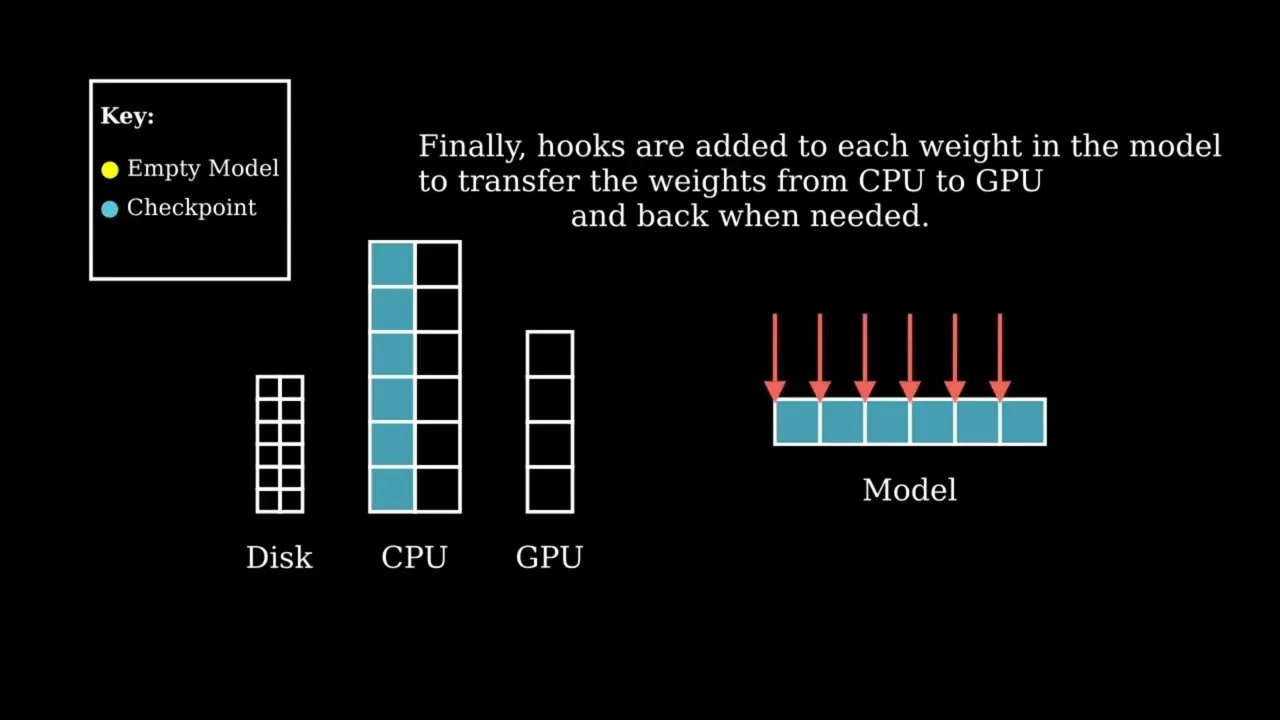
Initialization of an empty model
Accelerate creates the skeleton of an empty model using init_empty_weights so that it uses as little memory as possible
For example, let's see how much RAM I currently have available on my computer
InputPythonimport psutildef get_ram_info():ram = dict(psutil.virtual_memory()._asdict())print(f"Total RAM: {(ram['total']/1024/1024/1024):.2f} GB, Available RAM: {(ram['available']/1024/1024/1024):.2f} GB, Used RAM: {(ram['used']/1024/1024/1024):.2f} GB")get_ram_info()Copied
Total RAM: 31.24 GB, Available RAM: 22.62 GB, Used RAM: 7.82 GB
I have about 22 GB of RAM available
Now let’s try to create a 5000x1000x1000 parameter model, that is, a 5B-parameter model; if each parameter is in FP32, it requires 20 GB of RAM
InputPythonimport torchfrom torch import nnmodel = nn.Sequential(*[nn.Linear(5000, 1000) for _ in range(1000)])Copied
If we take another look at the RAM
InputPythonget_ram_info()Copied
Total RAM: 31.24 GB, Available RAM: 3.77 GB, Used RAM: 26.70 GB
As we can see, we now only have 3 GB of RAM available
Now we are going to delete the model to free up RAM
InputPythondel modelget_ram_info()Copied
Total RAM: 31.24 GB, Available RAM: 22.44 GB, Used RAM: 8.03 GB
We have around 22 GB of RAM available again
Let's now use init_empty_weights from accelerate and then check the RAM.
InputPythonfrom accelerate import init_empty_weightswith init_empty_weights():model = nn.Sequential(*[nn.Linear(5000, 1000) for _ in range(1000)])get_ram_info()Copied
Total RAM: 31.24 GB, Available RAM: 22.32 GB, Used RAM: 8.16 GB
Before, we had exactly 22.44 GB free, and after creating the model with init_empty_weights we have 22.32 GB. The RAM savings are huge. Almost no RAM was used to create the model.
This is based on the meta device introduced in PyTorch 1.9, so it is important that to use accelerate we have a later version of PyTorch.
Loading the weights
Once we have initialized the model, we need to load the weights, which we do using load_checkpoint_and_dispatch, which, as its name suggests, loads the weights and sends them to the device or devices that are necessary.