Disclaimer: This post has been translated to English using a machine translation model. Please, let me know if you find any mistakes.
1. Summary
Let's take a brief introduction to the matrix calculation library NumPy. This library is designed for all kinds of matrix calculations, so we will focus only on the part that will be useful for understanding the calculations within neural networks, but we will leave out interesting things like using the library for linear algebra.

2. What is NumPy?
NumPy is a Python library designed for performing matrix calculations. Matrix calculation is something that is widely used in science in general and in data science in particular, which is why it is necessary to have a library that does this very well.
Its name means Numerical Python
Its main object is the ndarray, which encapsulates n-dimensional arrays of homogeneous data types, unlike Python lists, which can have data of different types.
NumPy aims to perform matrix calculations much faster than with Python lists, but how is this possible?
- NumPy uses compiled code, while Python uses interpreted code. The difference is that Python has to interpret, compile, and execute the code at runtime, whereas NumPy is already compiled, so it runs faster.
- The
ndarrays have a fixed size, unlike Python lists which are dynamic. If in NumPy you want to modify the size of an array, a new one will be created and the old one will be deleted. - All elements of
ndarrays are of the same data type, unlike Python lists which can have elements of different types - Part of the NumPy code is written in C/C++ (much faster than Python)
- The data in arrays is stored in memory continuously, unlike Python lists, which makes them much faster to manipulate
NumPy offers the convenience of using code that is easy to write and read, but it is written and precompiled in C, which makes it much faster.
Suppose we want to multiply two vectors, this would be done in C as follows:
for (i = 0; i < rows; i++): {
  for (j = 0; j < columns; j++): {
    c[i][j] = a[i][j]*b[i][j];
  }
}
NumPy offers the possibility of running this code under the hood, but in a much easier way to write and understand through
c = a * bNumPy offers vectorized code, which means you don't have to write loops, but they are still being executed underneath in optimized and precompiled C code. This has the following advantages:
- The code is easier to write and read
- With fewer lines of code required, there is a lower chance of introducing errors
- The code looks more like mathematical notation
2.1. NumPy as np
Generally, when importing NumPy, it is usually imported with the alias np
InputPythonimport numpy as npprint(np.__version__)Copied
1.18.1
3. Speed of NumPy
As explained, NumPy performs calculations much faster than Python lists. Let's look at an example where the dot product of two matrices is performed using Python lists and using ndarrays.
InputPythonfrom time import time# Dimensión de las matricesdim = 1000shape = (dim, dim)# Se crean dos ndarrays de NumPy de dimensión dim x dimndarray_a = np.ones(shape=shape)ndarray_b = np.ones(shape=shape)# Se crean dos listas de Python de dimensión dim x dim a partir de los ndarrayslist_a = list(ndarray_a)list_b = list(ndarray_b)# Se crean el ndarray y la lista de Python donde se guardarán los resultadosndarray_c = np.empty(shape=shape)list_c = list(ndarray_c)# Producto escalar de dos listas de pythont0 = time()for fila in range(dim):for columna in range(dim):list_c[fila][columna] = list_a[fila][columna] * list_b[fila][columna]t = time()t_listas = t-t0print(f"Tiempo para realizar el producto escalar de dos listas de Python de dimensiones {dim}x{dim}: {t_listas:.4f} ms")# Producto escalar de dos ndarrays de NumPyt0 = time()ndarray_c = ndarray_a * ndarray_bt = time()t_ndarrays = t-t0print(f"Tiempo para realizar el producto escalar de dos ndarrays de NumPy de dimensiones {dim}x{dim}: {t_ndarrays:.4f} ms")# Comparación de tiemposprint(f" Hacer el cálculo con listas de Python tarda {t_listas/t_ndarrays:.2f} veces más rápido que con ndarrays de NumPy")Copied
Tiempo para realizar el producto escalar de dos listas de Python de dimensiones 1000x1000: 0.5234 msTiempo para realizar el producto escalar de dos ndarrays de NumPy de dimensiones 1000x1000: 0.0017 msHacer el cálculo con listas de Python tarda 316.66 veces más rápido que con ndarrays de NumPy
4. Matrices in NumPy
In NumPy an array is an ndarray object
InputPythonarr = np.array([1, 2, 3, 4, 5])print(arr)print(type(arr))Copied
[1 2 3 4 5]<class 'numpy.ndarray'>
4.1. How to create arrays
With the array() method, you can create ndarrays by passing in Python lists (like in the previous example) or tuples.
InputPythonarr = np.array((1, 2, 3, 4, 5))print(arr)print(type(arr))Copied
[1 2 3 4 5]<class 'numpy.ndarray'>
With the zeros() method, you can create matrices filled with zeros
InputPythonarr = np.zeros((3, 4))print(arr)Copied
[[0. 0. 0. 0.][0. 0. 0. 0.][0. 0. 0. 0.]]
The method zeros_like(A) returns a matrix with the same shape as matrix A, but filled with zeros.
InputPythonA = np.array((1, 2, 3, 4, 5))arr = np.zeros_like(A)print(arr)Copied
[0 0 0 0 0]
With the ones() method, you can create matrices filled with ones
InputPythonarr = np.ones((4, 3))print(arr)Copied
[[1. 1. 1.][1. 1. 1.][1. 1. 1.][1. 1. 1.]]
The method ones_like(A) returns an array with the same shape as array A, but filled with ones.
InputPythonA = np.array((1, 2, 3, 4, 5))arr = np.ones_like(A)print(arr)Copied
[1 1 1 1 1]
With the empty() method, you can create arrays with the dimensions you desire, but they are initialized randomly.
InputPythonarr = np.empty((6, 3))print(arr)Copied
[[4.66169180e-310 2.35541533e-312 2.41907520e-312][2.14321575e-312 2.46151512e-312 2.31297541e-312][2.35541533e-312 2.05833592e-312 2.22809558e-312][2.56761491e-312 2.48273508e-312 2.05833592e-312][2.05833592e-312 2.29175545e-312 2.07955588e-312][2.14321575e-312 0.00000000e+000 0.00000000e+000]]
The method empty_like(A) returns an array with the same shape as array A, but initialized randomly.
InputPythonA = np.array((1, 2, 3, 4, 5))arr = np.empty_like(A)print(arr)Copied
[4607182418800017408 4611686018427387904 46139378182410731524616189618054758400 4617315517961601024]
With the method arange(start, stop, step) you can create arrays within a specified range. This method is similar to Python's range() method.
InputPythonarr = np.arange(10, 30, 5)print(arr)Copied
[10 15 20 25]
When arange is used with floating-point arguments, it is generally not possible to predict the number of elements obtained, due to the finite precision of floating-point numbers.
For this reason, it is usually better to use the function linspace(start, stop, n) which takes as an argument the number of elements we want, instead of the step.
InputPythonarr = np.linspace(0, 2, 9)print(arr)Copied
[0. 0.25 0.5 0.75 1. 1.25 1.5 1.75 2. ]
Lastly, if we want to create matrices with random numbers, we can use the random.rand function with a tuple containing the dimensions as a parameter.
InputPythonarr = np.random.rand(2, 3)print(arr)Copied
[[0.32726085 0.65571767 0.73126697][0.91938206 0.9862451 0.95033649]]
4.2. Matrix Dimensions
In NumPy we can create arrays of any dimension. To get the dimension of an array we use the ndim method.
Matrix of dimension 0, which would be equivalent to a number
InputPythonarr = np.array(42)print(arr)print(arr.ndim)Copied
420
1-dimensional matrix, which would be equivalent to a vector
InputPythonarr = np.array([1, 2, 3, 4, 5])print(arr)print(arr.ndim)Copied
[1 2 3 4 5]1
2-dimensional matrix, which would be equivalent to a matrix
InputPythonarr = np.array([[1, 2, 3, 4, 5],[6, 7, 8, 9, 10]])print(arr)print(arr.ndim)Copied
[[ 1 2 3 4 5][ 6 7 8 9 10]]2
Matrix of dimension 3
InputPythonarr = np.array([[[1, 2, 3, 4, 5],[6, 7, 8, 9, 10]],[[11, 12, 13, 14, 15],[16, 17, 18, 19, 20]]])print(arr)print(arr.ndim)Copied
[[[ 1 2 3 4 5][ 6 7 8 9 10]][[11 12 13 14 15][16 17 18 19 20]]]3
Matrix of dimension N. When creating ndarrays, the number of dimensions can be set using the ndim parameter.
InputPythonarr = np.array([1, 2, 3, 4, 5], ndmin=6)print(arr)print(arr.ndim)Copied
[[[[[[1 2 3 4 5]]]]]]6
4.3. Size of the matrices
If we want to see the size of the matrix instead of its dimension, we can use the shape method.
InputPythonarr = np.array([[[1, 2, 3, 4, 5],[6, 7, 8, 9, 10]],[[11, 12, 13, 14, 15],[16, 17, 18, 19, 20]]])print(arr.shape)Copied
(2, 2, 5)
5. Data Types
The data that NumPy arrays can store are the following:
i- integerb- booleanu- unsigned integerf- floatc- Complex floating pointm- TimedeltaM- DateTimeO- ObjectS- stringU- Unicode stringV- Fixed memory fragment for another type (void)
We can check the data type of an array using dtype
InputPythonarr = np.array([1, 2, 3, 4])print(arr.dtype)arr = np.array(['apple', 'banana', 'cherry'])print(arr.dtype)Copied
int64<U6
We can also create arrays specifying the data type we want them to have using dtype
InputPythonarr = np.array([1, 2, 3, 4], dtype='i')print("Enteros:")print(arr)print(arr.dtype)arr = np.array([1, 2, 3, 4], dtype='f')print(" Float:")print(arr)print(arr.dtype)arr = np.array([1, 2, 3, 4], dtype='f')print(" Complejos:")print(arr)print(arr.dtype)arr = np.array([1, 2, 3, 4], dtype='S')print(" String:")print(arr)print(arr.dtype)arr = np.array([1, 2, 3, 4], dtype='U')print(" Unicode string:")print(arr)print(arr.dtype)arr = np.array([1, 2, 3, 4], dtype='O')print(" Objeto:")print(arr)print(arr.dtype)Copied
Enteros:[1 2 3 4]int32Float:[1. 2. 3. 4.]float32Complejos:[1. 2. 3. 4.]float32String:[b'1' b'2' b'3' b'4']|S1Unicode string:['1' '2' '3' '4']<U1Objeto:[1 2 3 4]object
6. Mathematical Operations
6.1. Basic Operations
Matrix operations are performed element-wise, for example, if we add two matrices, the elements of each matrix in the same position will be added, just as it is done in the mathematical addition of two matrices.
InputPythonA = np.array([1, 2, 3])B = np.array([1, 2, 3])print(f"Matriz A: tamaño {A.shape} {A} ")print(f"Matriz B: tamaño {B.shape} {B} ")C = A + Bprint(f"Matriz C: tamaño {C.shape} {C} ")D = A - Bprint(f"Matriz D: tamaño {D.shape} {D}")Copied
Matriz A: tamaño (3,)[1 2 3]Matriz B: tamaño (3,)[1 2 3]Matriz C: tamaño (3,)[2 4 6]Matriz D: tamaño (3,)[0 0 0]
However, if we perform the multiplication of two matrices, the multiplication of each element of the matrices (dot product) is also carried out.
InputPythonA = np.array([[3, 5], [4, 1]])B = np.array([[1, 2], [-3, 0]])print(f"Matriz A: tamaño {A.shape} {A} ")print(f"Matriz B: tamaño {B.shape} {B} ")C = A * Bprint(f"Matriz C: tamaño {C.shape} {C} ")Copied
Matriz A: tamaño (2, 2)[[3 5][4 1]]Matriz B: tamaño (2, 2)[[ 1 2][-3 0]]Matriz C: tamaño (2, 2)[[ 3 10][-12 0]]
To perform the matrix product that has been taught in mathematics all along, you have to use the operator @ or the method dot.
InputPythonA = np.array([[3, 5], [4, 1], [6, -1]])B = np.array([[1, 2, 3], [-3, 0, 4]])print(f"Matriz A: tamaño {A.shape} {A} ")print(f"Matriz B: tamaño {B.shape} {B} ")C = A @ Bprint(f"Matriz C: tamaño {C.shape} {C} ")D = A.dot(B)print(f"Matriz D: tamaño {D.shape} {D}")Copied
Matriz A: tamaño (3, 2)[[ 3 5][ 4 1][ 6 -1]]Matriz B: tamaño (2, 3)[[ 1 2 3][-3 0 4]]Matriz C: tamaño (3, 3)[[-12 6 29][ 1 8 16][ 9 12 14]]Matriz D: tamaño (3, 3)[[-12 6 29][ 1 8 16][ 9 12 14]]
If instead of creating a new array, you want to modify an existing one, you can use the operators +=, -= or *=
InputPythonA = np.array([[3, 5], [4, 1]])B = np.array([[1, 2], [-3, 0]])print(f"Matriz A: tamaño {A.shape} {A} ")print(f"Matriz B: tamaño {B.shape} {B} ")A += Bprint(f"Matriz A tras suma: tamaño {A.shape} {A} ")A -= Bprint(f"Matriz A tras resta: tamaño {A.shape} {A} ")A *= Bprint(f"Matriz A tras multiplicación: tamaño {A.shape} {A} ")Copied
Matriz A: tamaño (2, 2)[[3 5][4 1]]Matriz B: tamaño (2, 2)[[ 1 2][-3 0]]Matriz A tras suma: tamaño (2, 2)[[4 7][1 1]]Matriz A tras resta: tamaño (2, 2)[[3 5][4 1]]Matriz A tras multiplicación: tamaño (2, 2)[[ 3 10][-12 0]]
Operations can be performed on all elements of an array, thanks to a property called broadcasting, which we will explore in more detail later.
InputPythonA = np.array([[3, 5], [4, 1]])print(f"Matriz A: tamaño {A.shape} {A} ")B = A * 2print(f"Matriz B: tamaño {B.shape} {B} ")C = A ** 2print(f"Matriz C: tamaño {C.shape} {C} ")D = 2*np.sin(A)print(f"Matriz D: tamaño {D.shape} {D}")Copied
Matriz A: tamaño (2, 2)[[3 5][4 1]]Matriz B: tamaño (2, 2)[[ 6 10][ 8 2]]Matriz C: tamaño (2, 2)[[ 9 25][16 1]]Matriz D: tamaño (2, 2)[[ 0.28224002 -1.91784855][-1.51360499 1.68294197]]
6.2. Functions on Matrices
As can be seen in the last calculation, NumPy offers function operators over arrays; there are a lot of functions that can be performed on arrays, such as mathematical, logical, linear algebra, etc. We show some below.
InputPythonA = np.array([[3, 5], [4, 1]])print(f"A {A} ")print(f"exp(A) {np.exp(A)} ")print(f"sqrt(A) {np.sqrt(A)} ")print(f"cos(A) {np.cos(A)} ")Copied
A[[3 5][4 1]]exp(A)[[ 20.08553692 148.4131591 ][ 54.59815003 2.71828183]]sqrt(A)[[1.73205081 2.23606798][2. 1. ]]cos(A)[[-0.9899925 0.28366219][-0.65364362 0.54030231]]
There are some functions that return information about the arrays, such as the mean
InputPythonA = np.array([[3, 5], [4, 1]])print(f"A {A} ")print(f"A.mean() {A.mean()} ")Copied
A[[3 5][4 1]]A.mean()3.25
However, we can obtain such information for each axis through the axis attribute. If it is 0, it is done over each column; while if it is 1, it is done over each row.
InputPythonA = np.array([[3, 5], [4, 1]])print(f"A {A} ")print(f"A.mean() columnas {A.mean(axis=0)} ")print(f"A.mean() filas {A.mean(axis=1)} ")Copied
A[[3 5][4 1]]A.mean() columnas[3.5 3. ]A.mean() filas[4. 2.5]
6.3. Broadcasting
Matrix operations can be performed with matrices of different dimensions. In this case, NumPy will detect this and project the smaller matrix to match the larger one.
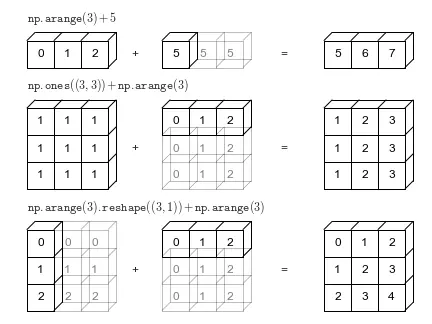
This is a great feature of NumPy, which allows calculations to be performed on arrays without having to worry about matching their dimensions.
InputPythonA = np.array([1, 2, 3])print(f"A {A} ")B = A + 5print(f"B {B} ")Copied
A[1 2 3]B[6 7 8]
InputPythonA = np.array([1, 2, 3])B = np.ones((3,3))print(f"A {A} ")print(f"B {B} ")C = A + Bprint(f"C {C} ")Copied
A[1 2 3]B[[1. 1. 1.][1. 1. 1.][1. 1. 1.]]C[[2. 3. 4.][2. 3. 4.][2. 3. 4.]]
InputPythonA = np.array([1, 2, 3])B = np.array([[1], [2], [3]])print(f"A {A} ")print(f"B {B} ")C = A + Bprint(f"C {C} ")Copied
A[1 2 3]B[[1][2][3]]C[[2 3 4][3 4 5][4 5 6]]
7. Matrix Indexing
Matrix indexing is done the same way as with Python lists
InputPythonarr = np.array([1, 2, 3, 4, 5])arr[3]Copied
4
In the case of having more than one dimension, the index must be specified for each of them.
InputPythonarr = np.array([[1, 2, 3, 4, 5],[6, 7, 8, 9, 10]])arr[1, 2]Copied
8
Negative indexing can be used
InputPythonarr[-1, -2]Copied
9
If one of the axes is not specified, it is considered that the full axis is intended.
InputPythonarr = np.array([[1, 2, 3, 4, 5],[6, 7, 8, 9, 10]])arr[1]Copied
array([ 6, 7, 8, 9, 10])
7.1. Slices of arrays
When indexing, we can keep parts of arrays just like we did with Python lists.
Remember that it was done as follows:
start:stop:step
Where the range goes from start (inclusive) to stop (exclusive) with a step of step
If step is not specified, it defaults to 1
For example, if we want items from the second row and from the second to the fourth column:
- We select the second row with a 1 (since counting starts from 0)
- We select from the second to the fourth row using 1:4, where 1 indicates the second column and 4 indicates the fifth (since the second number specifies the column where it ends without including this column). Both numbers taking into account that counting starts from 0.
InputPythonprint(arr)print(arr[1, 1:4])Copied
[[ 1 2 3 4 5][ 6 7 8 9 10]][7 8 9]
We can take from a position to the end
InputPythonarr[1, 2:]Copied
array([ 8, 9, 10])
From the beginning to a position
InputPythonarr[1, :3]Copied
array([6, 7, 8])
Set the range with negative numbers
InputPythonarr[1, -3:-1]Copied
array([8, 9])
Choose the step
InputPythonarr[1, 1:4:2]Copied
array([7, 9])
7.2. Iteration over arrays
Iteration over multidimensional arrays is performed with respect to the first axis.
InputPythonM = np.array( [[[ 0, 1, 2],[ 10, 12, 13]],[[100,101,102],[110,112,113]]])print(f'Matriz de dimensión: {M.shape} ')i = 0for fila in M:print(f'Fila {i}: {fila}')i += 1Copied
Matriz de dimensión: (2, 2, 3)Fila 0: [[ 0 1 2][10 12 13]]Fila 1: [[100 101 102][110 112 113]]
However, if what we want is to iterate over each item, we can use the 'flat' method
InputPythoni = 0for fila in M.flat:print(f'Elemento {i}: {fila}')i += 1Copied
Elemento 0: 0Elemento 1: 1Elemento 2: 2Elemento 3: 10Elemento 4: 12Elemento 5: 13Elemento 6: 100Elemento 7: 101Elemento 8: 102Elemento 9: 110Elemento 10: 112Elemento 11: 113
8. Matrix Copying
In NumPy we have two ways to copy arrays: using copy, which makes a new copy of the array, and using view, which creates a view of the original array.
The copy owns the data and any changes made to the copy will not affect the original array, and any changes made to the original array will not affect the copy.
The view is not the owner of the data and any changes made to the copy will affect the original array, and any changes made to the original array will affect the copy.
8.1. Copy
InputPythonarr = np.array([1, 2, 3, 4, 5])copy_arr = arr.copy()arr[0] = 42copy_arr[1] = 43print(f'Original: {arr}')print(f'Copia: {copy_arr}')Copied
Original: [42 2 3 4 5]Copia: [ 1 43 3 4 5]
8.2. View
InputPythonarr = np.array([1, 2, 3, 4, 5])view_arr = arr.view()arr[0] = 42view_arr[1] = 43print(f'Original: {arr}')print(f'Vista: {view_arr}')Copied
Original: [42 43 3 4 5]Vista: [42 43 3 4 5]
8.3. Data Owner
In case of doubt whether we have a copy or a view, we can use base
InputPythonarr = np.array([1, 2, 3, 4, 5])copy_arr = arr.copy()view_arr = arr.view()print(copy_arr.base)print(view_arr.base)Copied
None[1 2 3 4 5]
9. Shape of Matrices
We can know the shape of the matrix using the shape method. This will return a tuple, the size of the tuple represents the dimensions of the matrix, and each element of the tuple indicates the number of items in each of the matrix's dimensions.
InputPythonarr = np.array([[[1, 2, 3, 4, 5],[6, 7, 8, 9, 10]],[[11, 12, 13, 14, 15],[16, 17, 18, 19, 20]]])print(arr)print(arr.shape)Copied
[[[ 1 2 3 4 5][ 6 7 8 9 10]][[11 12 13 14 15][16 17 18 19 20]]](2, 2, 5)
9.1. Reshape
We can change the shape of the arrays to whatever we want using the reshape method.
For example, the previous matrix, which has a shape of (2, 2, 4). We can reshape it to (5, 4).
InputPythonarr_reshape = arr.reshape(5, 4)print(arr_reshape)print(arr_reshape.shape)Copied
[[ 1 2 3 4][ 5 6 7 8][ 9 10 11 12][13 14 15 16][17 18 19 20]](5, 4)
It is important to note that when resizing arrays, the number of items in the new shape must match the number of items in the original shape.
That is, in the previous example, the first array had 20 items (2x2x4), and the new array has 20 items (5x4). What we cannot do is resize it to an array of size (3, 4), since there would be a total of 12 items.
InputPythonarr_reshape = arr.reshape(3, 4)Copied
---------------------------------------------------------------------------ValueError Traceback (most recent call last)<ipython-input-12-29e85875d1df> in <module>()----> 1 arr_reshape = arr.reshape(3, 4)ValueError: cannot reshape array of size 20 into shape (3,4)
9.2. Unknown Dimension
In the case where we want to change the shape of an array and one of the dimensions is irrelevant or unknown, we can have NumPy calculate it for us by passing a -1 as the parameter.
InputPythonarr = np.array([[[1, 2, 3, 4, 5],[6, 7, 8, 9, 10]],[[11, 12, 13, 14, 15],[16, 17, 18, 19, 20]]])arr_reshape = arr.reshape(2, -1)print(arr_reshape)print(arr_reshape.shape)Copied
[[ 1 2 3 4 5 6 7 8 9 10][11 12 13 14 15 16 17 18 19 20]](2, 10)
It's important to note that you can't put any number in the known dimensions. The number of items in the original matrix must be a multiple of the known dimensions.
In the previous example, the array has 20 items, which is a multiple of 2, the known dimension introduced. A 3 could not have been used as the known dimension, since 20 is not a multiple of 3, and there would be no number that could be placed in the unknown dimension to make the total number of items 20.
9.3. Flattening of Matrices
We can flatten the arrays, that is, convert them to a single dimension using reshape(-1). This way, regardless of the dimensions of the original array, the new one will always have a single dimension.
InputPythonarr = np.array([[[1, 2, 3, 4, 5],[6, 7, 8, 9, 10]],[[11, 12, 13, 14, 15],[16, 17, 18, 19, 20]]])arr_flatten = arr.reshape(-1)print(arr_flatten)print(arr_flatten.shape)Copied
[ 1 2 3 4 5 6 7 8 9 10 11 12 13 14 15 16 17 18 19 20](20,)
Another way to flatten an array is through the ravel() method.
InputPythonarr = np.array([[[1, 2, 3, 4, 5],[6, 7, 8, 9, 10]],[[11, 12, 13, 14, 15],[16, 17, 18, 19, 20]]])arr_flatten = arr.ravel()print(arr_flatten)print(arr_flatten.shape)Copied
[ 1 2 3 4 5 6 7 8 9 10 11 12 13 14 15 16 17 18 19 20](20,)
9.4. Transpose Matrix
The transpose of a matrix can be obtained using the method T. Transposing a matrix means swapping its rows and columns. The following image provides an example that clarifies this further.
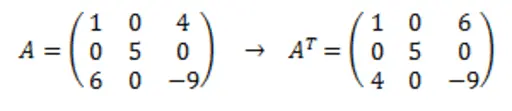
InputPythonarr = np.array([[1, 0, 4],[0, 5, 0],[6, 0, -9]])arr_t = arr.Tprint(arr_t)print(arr_t.shape)Copied
[[ 1 0 6][ 0 5 0][ 4 0 -9]](3, 3)
10. Stacking of Matrices
10.1. Vertical Stacking
Matrices can be stacked vertically (by joining rows) using the vstack() method.
InputPythona = np.array([[1, 1, 1],[2, 2, 2],[3, 3, 3]])b = np.array([[4, 4, 4],[5, 5, 5],[6, 6, 6]])c = np.vstack((a,b))cCopied
array([[1, 1, 1],[2, 2, 2],[3, 3, 3],[4, 4, 4],[5, 5, 5],[6, 6, 6]])
If you have matrices with more than 2 dimensions, vstack() will stack along the first dimension
InputPythona = np.array([[[1, 1],[2, 2]],[[3, 3],[4, 4]]])b = np.array([[[5, 5],[6, 6]],[[7, 7],[8, 8]]])c = np.vstack((a,b))cCopied
array([[[1, 1],[2, 2]],[[3, 3],[4, 4]],[[5, 5],[6, 6]],[[7, 7],[8, 8]]])
10.2. Horizontal Stacking
Matrices can be stacked horizontally (joining columns) using the hstack() method.
InputPythona = np.array([[1, 2, 3],[1, 2, 3],[1, 2, 3]])b = np.array([[4, 5, 6],[4, 5, 6],[4, 5, 6]])c = np.hstack((a,b))cCopied
array([[1, 2, 3, 4, 5, 6],[1, 2, 3, 4, 5, 6],[1, 2, 3, 4, 5, 6]])
If you have matrices with more than 2 dimensions, hstack() will stack along the second dimension.
InputPythona = np.array([[[1, 1],[2, 2]],[[3, 3],[4, 4]]])b = np.array([[[5, 5],[6, 6]],[[7, 7],[8, 8]]])c = np.hstack((a,b))cCopied
array([[[1, 1],[2, 2],[5, 5],[6, 6]],[[3, 3],[4, 4],[7, 7],[8, 8]]])
Another way to add columns to an array is by using the column_stack() method.
InputPythona = np.array([[1, 2, 3],[1, 2, 3],[1, 2, 3]])b = np.array([4, 4, 4])c = np.column_stack((a,b))cCopied
array([[1, 2, 3, 4],[1, 2, 3, 4],[1, 2, 3, 4]])
10.3. Depth Stacking
Matrices can be stacked in depth (third dimension) using the dstack() method.
InputPythona = np.array([[[1, 1],[2, 2]],[[3, 3],[4, 4]]])b = np.array([[[1, 1],[2, 2]],[[3, 3],[4, 4]]])c = np.dstack((a,b))print(f"c: {c} ")print(f"a.shape: {a.shape}, b.shape: {b.shape}, c.shape: {c.shape}")Copied
c: [[[1 1 1 1][2 2 2 2]][[3 3 3 3][4 4 4 4]]]a.shape: (2, 2, 2), b.shape: (2, 2, 2), c.shape: (2, 2, 4)
If you have matrices with more than 4 dimensions, dstack() will stack along the third dimension.
InputPythona = np.array([1, 2, 3, 4, 5], ndmin=4)b = np.array([1, 2, 3, 4, 5], ndmin=4)c = np.dstack((a,b))print(f"a.shape: {a.shape}, b.shape: {b.shape}, c.shape: {c.shape}")Copied
a.shape: (1, 1, 1, 5), b.shape: (1, 1, 1, 5), c.shape: (1, 1, 2, 5)
10.3. Custom Stacking
Using the concatenate() method, you can choose the axis along which the arrays should be stacked.
InputPythona = np.array([[[1, 1],[2, 2]],[[3, 3],[4, 4]]])b = np.array([[[5, 5],[6, 6]],[[7, 7],[8, 8]]])conc0 = np.concatenate((a,b), axis=0) # concatenamiento en el primer ejeconc1 = np.concatenate((a,b), axis=1) # concatenamiento en el segundo ejeconc2 = np.concatenate((a,b), axis=2) # concatenamiento en el tercer ejeprint(f"conc0: {conc0} ")print(f"conc1: {conc1} ")print(f"conc2: {conc2}")Copied
conc0: [[[1 1][2 2]][[3 3][4 4]][[5 5][6 6]][[7 7][8 8]]]conc1: [[[1 1][2 2][5 5][6 6]][[3 3][4 4][7 7][8 8]]]conc2: [[[1 1 5 5][2 2 6 6]][[3 3 7 7][4 4 8 8]]]
11. Splitting Arrays
11.1. Split Vertically
Matrices can be divided vertically (separating rows) using the vsplit() method.
InputPythona = np.array([[1.1, 1.2, 1.3, 1.4],[2.1, 2.2, 2.3, 2.4],[3.1, 3.2, 3.3, 3.4],[4.1, 4.2, 4.3, 4.4]])[a1, a2] = np.vsplit(a, 2)print(f"a1: {a1} ")print(f"a2: {a2}")Copied
a1: [[1.1 1.2 1.3 1.4][2.1 2.2 2.3 2.4]]a2: [[3.1 3.2 3.3 3.4][4.1 4.2 4.3 4.4]]
If you have matrices with more than 2 dimensions, vsplit() will split along the first dimension.
InputPythona = np.array([[[1, 1],[2, 2]],[[3, 3],[4, 4]]])[a1, a2] = np.vsplit(a, 2)print(f"a1: {a1} ")print(f"a2: {a2}")Copied
a1: [[[1 1][2 2]]]a2: [[[3 3][4 4]]]
11.2. Split Horizontally
Matrices can be split horizontally (separating columns) using the hsplit() method.
InputPythona = np.array([[1.1, 1.2, 1.3, 1.4],[2.1, 2.2, 2.3, 2.4],[3.1, 3.2, 3.3, 3.4],[4.1, 4.2, 4.3, 4.4]])[a1, a2] = np.hsplit(a, 2)print(f"a1: {a1} ")print(f"a2: {a2}")Copied
a1: [[1.1 1.2][2.1 2.2][3.1 3.2][4.1 4.2]]a2: [[1.3 1.4][2.3 2.4][3.3 3.4][4.3 4.4]]
If you have matrices with more than 2 dimensions, hsplit() will split along the second dimension
InputPythona = np.array([[[1, 1],[2, 2]],[[3, 3],[4, 4]]])[a1, a2] = np.hsplit(a, 2)print(f"a1: {a1} ")print(f"a2: {a2}")Copied
a1: [[[1 1]][[3 3]]]a2: [[[2 2]][[4 4]]]
11.3. Custom Splitting
Using the array_split() method, you can choose the axis along which to split the arrays.
InputPythona = np.array([[[1, 1],[2, 2]],[[3, 3],[4, 4]]])[a1_eje0, a2_eje0] = np.array_split(a, 2, axis=0)[a1_eje1, a2_eje1] = np.array_split(a, 2, axis=1)[a1_eje2, a2_eje2] = np.array_split(a, 2, axis=2)print(f"a1_eje0: {a1_eje0} ")print(f"a2_eje0: {a2_eje0} ")print(f"a1_eje1: {a1_eje1} ")print(f"a2_eje1: {a2_eje1} ")print(f"a1_eje2: {a1_eje2} ")print(f"a2_eje2: {a2_eje2}")Copied
a1_eje0: [[[1 1][2 2]]]a2_eje0: [[[3 3][4 4]]]a1_eje1: [[[1 1]][[3 3]]]a2_eje1: [[[2 2]][[4 4]]]a1_eje2: [[[1][2]][[3][4]]]a2_eje2: [[[1][2]][[3][4]]]
12. Matrix Search
If you want to search for a value within an array, you can use the where() method which returns the positions where the array has the value we are looking for.
InputPythonarr = np.array([1, 2, 3, 4, 5, 4, 4])ids = np.where(arr == 4)idsCopied
(array([3, 5, 6]),)
Functions can be used to search, for example, if we want to find the positions where the values are even.
InputPythonarr = np.array([1, 2, 3, 4, 5, 6, 7, 8])ids = np.where(arr%2)idsCopied
(array([0, 2, 4, 6]),)
13. Sorting Arrays
By using the sort() method, we can sort arrays
InputPythonarr = np.array([3, 2, 0, 1])arr_ordenado = np.sort(arr)arr_ordenadoCopied
array([0, 1, 2, 3])
If we have strings, it sorts them alphabetically
InputPythonarr = np.array(['banana', 'apple', 'cherry'])arr_ordenado = np.sort(arr)arr_ordenadoCopied
array(['apple', 'banana', 'cherry'], dtype='<U6')
And it also sorts boolean arrays.
InputPythonarr = np.array([True, False, True])arr_ordenado = np.sort(arr)arr_ordenadoCopied
array([False, True, True])
If you have matrices with more than one dimension, it sorts them by dimensions, that is, if you have a 2-dimensional matrix, it sorts the numbers in the first row among themselves and those in the second row among themselves.
InputPythonarr = np.array([[3, 2, 4], [5, 0, 1]])arr_ordenado = np.sort(arr)arr_ordenadoCopied
array([[2, 3, 4],[0, 1, 5]])
By default, it sorts always with respect to the rows, but if you want it to sort with respect to another dimension, you have to specify it through the axis variable.
InputPythonarr = np.array([[3, 2, 4], [5, 0, 1]])arr_ordenado0 = np.sort(arr, axis=0) # Se ordena con respecto a la primera dimensiónarr_ordenado1 = np.sort(arr, axis=1) # Se ordena con respecto a la segunda dimensiónprint(f"arr_ordenado0: {arr_ordenado0} ")print(f"arr_ordenado1: {arr_ordenado1} ")Copied
arr_ordenado0: [[3 0 1][5 2 4]]arr_ordenado1: [[2 3 4][0 1 5]]
14. Filters in arrays
NumPy offers the possibility to search for certain elements in an array and create a new one
This is done by creating a boolean index array, that is, it creates a new array that indicates which positions we keep from the original array and which ones we do not.
Let's look at an example of a boolean index matrix
InputPythonarr = np.array([37, 85, 12, 45, 69, 22])indices_booleanos = [False, False, True, False, False, True]arr_filter = arr[indices_booleanos]print(f"Array original: {arr}")print(f"indices booleanos: {indices_booleanos}")print(f"Array filtrado: {arr_filter}")Copied
Array original: [37 85 12 45 69 22]indices booleanos: [False, False, True, False, False, True]Array filtrado: [12 22]
As can be seen, the filtered array (arr_filtr), only retains the elements from the original array (arr) that correspond to those where the array indices_booleanos is True
Another thing we can see is that it has only kept the even elements, so now we will look at how to keep the even elements of an array without having to do it by hand as we did in the previous example.
InputPythonarr = np.array([[1, 2, 3, 4, 5],[6, 7, 8, 9, 10]])indices_booleanos = arr % 2 == 0arr_filter = arr[indices_booleanos]print(f"Array original: {arr} ")print(f"indices booleanos: {indices_booleanos} ")print(f"Array filtrado: {arr_filter}")Copied
Array original: [[ 1 2 3 4 5][ 6 7 8 9 10]]indices booleanos: [[False True False True False][ True False True False True]]Array filtrado: [ 2 4 6 8 10]