This notebook has been automatically translated to make it accessible to more people, please let me know if you see any typos.
While LoRA provides a way to do fine tuning of language models without the need for GPUs with large VRAMs, in the QLoRA paper they go further and propose a way to do quantized model fine tuning, making even less memory needed to do fine tuning of language models.
LoRA
Updating of weights in a neural network
To understand how LoRA works, we first have to remember what happens when we train a model. Let's go back to the most basic part of deep learning, we have a dense layer of a neural network that is defined as:
y = Wx + b
Where W is the weights matrix and b is the bias vector.
For the sake of simplicity we will assume that there is no bias, so it would look like this
y = Wx
Suppose that for an input x we want it to have an output ŷ.
- First what we do is to calculate the output we get with our current value of pesos W, i.e. we get the value y.
- Next we calculate the error that exists between the value of y that we have obtained and the value that we wanted to obtain ŷ. We call this error loss, and we calculate it with some mathematical function, now it does not matter which one.
- We compute the gardient (the derivative) of the error loss with respect to the weights matrix W, i.e. $Delta W = \frac{dloss}{dW}.
- We update the weights W by subtracting from each of their values the value of the gradient multiplied by a learning factor alpha, i.e. W = W - \alpha \Delta W.
LoRA
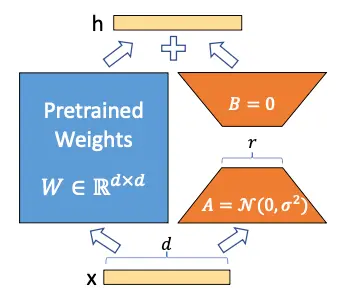
The authors of LoRA propose that the weights matrix W can be decomposed into
W \sim W + Delta W
So, by freezing the W matrix and training only the "Delta W matrix, it is possible to obtain a model that fits new data without having to retrain the whole model.
But you may think that $Delta W is a matrix of size equal to W so nothing has been gained, but here the authors rely on Aghajanyan et al. (2020), a paper in which they showed that although the language models are large and their parameters are matrices with very large dimensions, to adapt them to new tasks it is not necessary to change all the values of the matrices, but changing a few values is enough, which in technical terms, is called Low Rank Adaptation. Hence the name LoRA (Low Rank Adaptation).
We have frozen the model and now we want to train the
Delta W matrix, let's assume that both W and
Delta W are matrices of size 20, so we have 200 trainable parametersNow suppose that the matrix $Delta W can be decomposed into the product of two matrices A and B, i.e.
\Delta W = A · B
For this multiplication to occur the sizes of the matrices A and B have to be 20 times n and n times 10 respectively. Suppose n = 5, so A would be of size 20 × 5, i.e. 100 parameters, and B of size 5 × 10, i.e. 50 parameters, so we would have 100+50=150 trainable parameters. We already have less trainable parameters than before
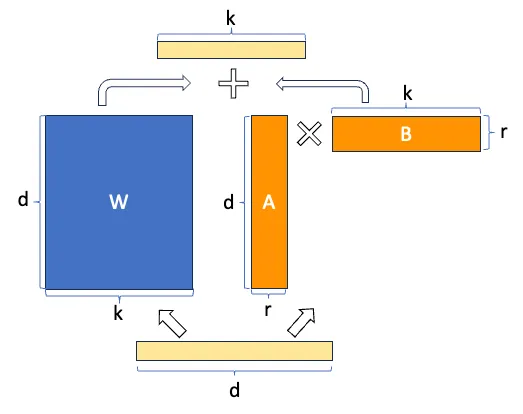
Now let's suppose that W is actually a matrix of size 10.000 × 10.000, so we would have 100.000.000 trainable parameters, but if we decompose $Delta W in A and B with n = 5, we would have a matrix of size 10.000 × 5 and another one of size 5 × 10.000, so we would have 50.000 parameters of one and another 50.000 parameters of the other, in total 100.000 trainable parameters, that is to say we have reduced the number of parameters 1000 times.
You can already see the power of LoRA, when you have very large models, the number of trainable parameters can be greatly reduced.
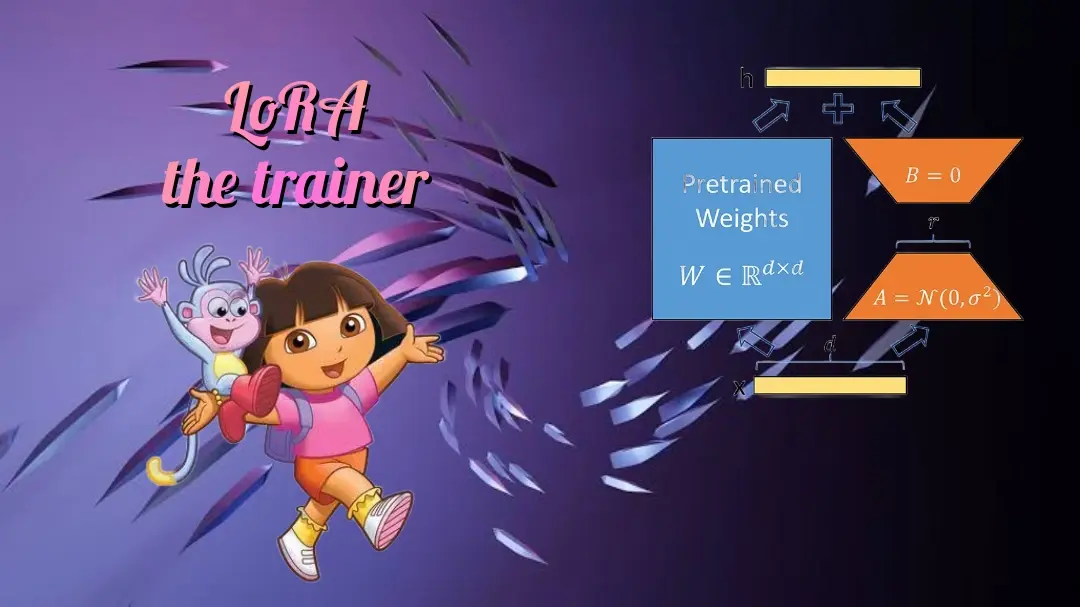
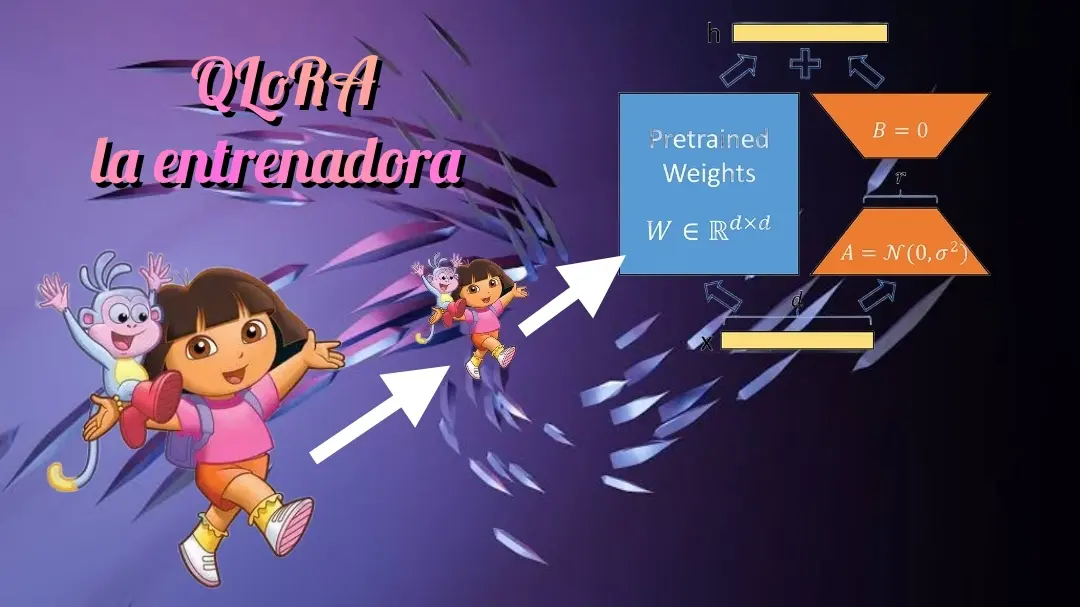
If we look again at the image of the LoRA architecture, we will understand it better.
But it looks even better, the savings in number of trainable parameters with this image
QLoRA
QLoRA is performed in two steps, the first consists of quantizing the model and the second of applying LoRA to the quantized model.
QLoRA Quantization
QLoRA quantization is based on three concepts, 4-bit model quantization with the normal float 4 (NF4) format, double quantization and paged optimizers. All this together makes it possible to save a lot of memory when fine tuning the language models, so let's see what each one consists of
Quantification of language models in normal float 4 (NF4)
In QLoRA, to quantize, what is done is to quantize in normal float 4 (NF4) format, which is a type of 4-bit quantization so that its data have a normal distribution, i.e. they follow a Gaussian bell. To get them to follow this distribution, what is done is to divide the values of the weights in FP16 into quantiles, so that in each quantile there is the same number of values. Once we have the quantiles, a value in 4 bits is assigned to each quantile.
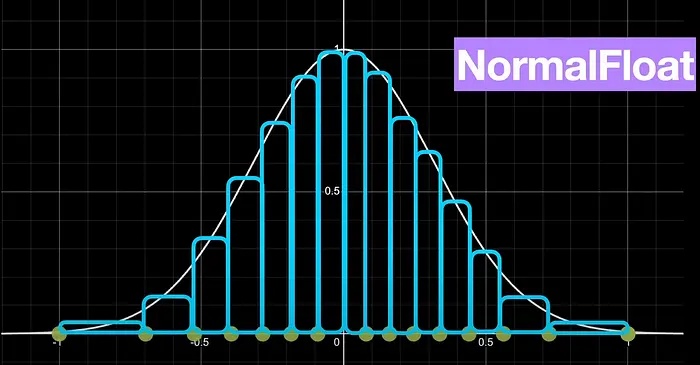
To perform this quantization it uses the SRAM quantization algorithm, which is a very fast quantization algorithm by quantiles, but it has a lot of error with values that are very far away in the distribution of the Gaussian bell, outliers.
As the parameters of the weights of a neural network usually follow a normal distribution (i.e. they follow a Gaussian bell), centered at zero and with a standard deviation σ. What is done is to normalize them to have a standard deviation between -1 and 1, and then quantize them in NF4 format.
Double quantization
As we have mentioned, when quantizing the network parameters, we have to normalize them to have a standard deviation between -1 and 1, and then quantize them in NF4 format. So we have to store some parameters as the values to normalize the parameters, that is, the value by which the data is divided to have a deviation between -1 and 1. These values are stored in FP32 format, so the authors of the paper propose to quantize these parameters to FP8 format.
Although this may not seem to save much memory, the authors estimate that this can save about 0.373 bits per parameter, but if for example we have a model of 8B parameters, which is not an excessively large model today, we would save about 3 GB of memory, which is not bad. In the case of a 70B parameter model, we would save about 26 GB of memory.
Paginated optimizers
Nvidia GPUs have the option to share GPU and CPU RAM, so what they do is store optimizer states in CPU RAM and access them when needed. So they don't have to be stored in GPU RAM and we can save GPU memory.
Fine tuning with LoRA
Once we have quantized the model we can do fine tuning of the quantized model as in LoRA
How to do fine tuning of a quantized model with QLoRA
Now that we have explained QLoRA, let's see an example of how to fine tune a model using QLoRA.
Login to Hugging Face Hub
First we log in to upload the trained model to the Hub.
InputPythonfrom huggingface_hub import notebook_loginnotebook_login()Copied
Dataset
We download the dataset we are going to use, which is a dataset of reviews from Amazon
InputPythonfrom datasets import load_datasetdataset = load_dataset("mteb/amazon_reviews_multi", "en")datasetCopied
DatasetDict({train: Dataset({features: ['id', 'text', 'label', 'label_text'],num_rows: 200000})validation: Dataset({features: ['id', 'text', 'label', 'label_text'],num_rows: 5000})test: Dataset({features: ['id', 'text', 'label', 'label_text'],num_rows: 5000})})
We create a subset in case you want to test the code with a smaller dataset. In my case I will use 100% of the dataset
InputPythonpercentage = 1subset_dataset_train = dataset['train'].select(range(int(len(dataset['train']) * percentage)))subset_dataset_validation = dataset['validation'].select(range(int(len(dataset['validation']) * percentage)))subset_dataset_test = dataset['test'].select(range(int(len(dataset['test']) * percentage)))subset_dataset_train, subset_dataset_validation, subset_dataset_testCopied
(Dataset({features: ['id', 'text', 'label', 'label_text'],num_rows: 200000}),Dataset({features: ['id', 'text', 'label', 'label_text'],num_rows: 5000}),Dataset({features: ['id', 'text', 'label', 'label_text'],num_rows: 5000}))
We see a sample
InputPythonfrom random import randintidx = randint(0, len(subset_dataset_train))subset_dataset_train[idx]Copied
				{'id': 'en_0297000','text': 'Not waterproof at all

Bought this after reading good reviews. But it’s not water proof at all. If my son has even a little accident in bed, it goes straight to mattress. I don’t see a point in having this. So I have to purchase another one.','label': 0,'label_text': '0'}
We obtain the number of classes, to obtain the number of classes we use dataset['train'] and not subset_dataset_train because if the subset is too small it is possible that there are no examples with all the possible classes of the original dataset.
InputPythonnum_classes = len(dataset['train'].unique('label'))num_classesCopied
5
We create a function to create the label field in the dataset. The downloaded dataset has the labels field but the transformers library needs the field to be called label and not labels.
InputPythondef set_labels(example):example['labels'] = example['label']return exampleCopied
We apply the function to the dataset
InputPythonsubset_dataset_train = subset_dataset_train.map(set_labels)subset_dataset_validation = subset_dataset_validation.map(set_labels)subset_dataset_test = subset_dataset_test.map(set_labels)subset_dataset_train, subset_dataset_validation, subset_dataset_testCopied
(Dataset({features: ['id', 'text', 'label', 'label_text', 'labels'],num_rows: 200000}),Dataset({features: ['id', 'text', 'label', 'label_text', 'labels'],num_rows: 5000}),Dataset({features: ['id', 'text', 'label', 'label_text', 'labels'],num_rows: 5000}))
Here is a sample again
InputPythonsubset_dataset_train[idx]Copied
				{'id': 'en_0297000','text': 'Not waterproof at all

Bought this after reading good reviews. But it’s not water proof at all. If my son has even a little accident in bed, it goes straight to mattress. I don’t see a point in having this. So I have to purchase another one.','label': 0,'label_text': '0','labels': 0}
Tokenizer
We implement the tokenizer. To avoid errors, we assign the end of string token to the padding token.
InputPythonfrom transformers import AutoTokenizercheckpoint = "openai-community/gpt2"tokenizer = AutoTokenizer.from_pretrained(checkpoint)tokenizer.pad_token = tokenizer.eos_tokenCopied
We create a function for tokenizing the dataset
InputPythondef tokenize_function(examples):return tokenizer(examples["text"], padding="max_length", truncation=True, max_length=768, return_tensors="pt")Copied
We apply the function to the dataset and remove the columns that we do not need
InputPythonsubset_dataset_train = subset_dataset_train.map(tokenize_function, batched=True, remove_columns=['text', 'label', 'id', 'label_text'])subset_dataset_validation = subset_dataset_validation.map(tokenize_function, batched=True, remove_columns=['text', 'label', 'id', 'label_text'])subset_dataset_test = subset_dataset_test.map(tokenize_function, batched=True, remove_columns=['text', 'label', 'id', 'label_text'])subset_dataset_train, subset_dataset_validation, subset_dataset_testCopied
(Dataset({features: ['labels', 'input_ids', 'attention_mask'],num_rows: 200000}),Dataset({features: ['labels', 'input_ids', 'attention_mask'],num_rows: 5000}),Dataset({features: ['labels', 'input_ids', 'attention_mask'],num_rows: 5000}))
We see again a sample, but in this case we only see the keys.
InputPythonsubset_dataset_train[idx].keys()Copied
dict_keys(['labels', 'input_ids', 'attention_mask'])
Model
We first download the unquantized model
InputPythonfrom transformers import AutoModelForSequenceClassificationmodel = AutoModelForSequenceClassification.from_pretrained(checkpoint, num_labels=num_classes)model.config.pad_token_id = model.config.eos_token_idCopied
Some weights of GPT2ForSequenceClassification were not initialized from the model checkpoint at openai-community/gpt2 and are newly initialized: ['score.weight']You should probably TRAIN this model on a down-stream task to be able to use it for predictions and inference.
We see the memory occupied by
InputPythonmodel_memory = model.get_memory_footprint()/(1024**3)print(f"Model memory: {model_memory:.2f} GB")Copied
Model memory: 0.48 GB
We pass the model to FP16 and look again at the memory occupied by the model.
InputPythonmodel = model.half()Copied
InputPythonmodel_memory = model.get_memory_footprint()/(1024**3)print(f"Model memory: {model_memory:.2f} GB")Copied
Model memory: 0.24 GB
We see the architecture of the model before quantization
InputPythonmodelCopied
GPT2ForSequenceClassification((transformer): GPT2Model((wte): Embedding(50257, 768)(wpe): Embedding(1024, 768)(drop): Dropout(p=0.1, inplace=False)(h): ModuleList((0-11): 12 x GPT2Block((ln_1): LayerNorm((768,), eps=1e-05, elementwise_affine=True)(attn): GPT2Attention((c_attn): Conv1D()(c_proj): Conv1D()(attn_dropout): Dropout(p=0.1, inplace=False)(resid_dropout): Dropout(p=0.1, inplace=False))(ln_2): LayerNorm((768,), eps=1e-05, elementwise_affine=True)(mlp): GPT2MLP((c_fc): Conv1D()(c_proj): Conv1D()(act): NewGELUActivation()(dropout): Dropout(p=0.1, inplace=False))))(ln_f): LayerNorm((768,), eps=1e-05, elementwise_affine=True))(score): Linear(in_features=768, out_features=5, bias=False))
Model quantification
To quantize the model first we have to create the quantization configuration, for this we use the bitsandbytes library, if you don't have it installed you can install it with
pip install bitsandbytesFirst we check if our GPU architecture allows the BF16 format, if not we will use FP16.
Then we create the quantization configuration, with load_in_4bits=True we indicate that it quantizes to 4 bits, with bnb_4bit_quant_type="nf4" we indicate that it does it in NF4 format, with bnb_4bit_use_double_quant=True we tell it to double quantize and with bnb_4bit_compute_dtype=compute_dtype we tell it which data format to use when quantizing, which can be FP16 or BF16.
InputPythonfrom transformers import BitsAndBytesConfigimport torchcompute_dtype = torch.bfloat16 if torch.cuda.is_bf16_supported() else torch.float16bnb_config = BitsAndBytesConfig(load_in_4bit=True,bnb_4bit_quant_type="nf4",bnb_4bit_use_double_quant=True,bnb_4bit_compute_dtype=compute_dtype,)Copied
And now we quantize the model
InputPythonfrom transformers import AutoModelForSequenceClassificationmodel = AutoModelForSequenceClassification.from_pretrained(checkpoint, num_labels=num_classes, quantization_config=bnb_config)Copied
`low_cpu_mem_usage` was None, now set to True since model is quantized.Some weights of GPT2ForSequenceClassification were not initialized from the model checkpoint at openai-community/gpt2 and are newly initialized: ['score.weight']You should probably TRAIN this model on a down-stream task to be able to use it for predictions and inference.
Let's look again at the memory it occupies now that we have quantized it
InputPythonmodel_memory = model.get_memory_footprint()/(1024**3)print(f"Model memory: {model_memory:.2f} GB")Copied
Model memory: 0.12 GB
We see that the size of the model has been reduced.
We return to the architecture of the model once it has been quantized
InputPythonmodelCopied
GPT2ForSequenceClassification((transformer): GPT2Model((wte): Embedding(50257, 768)(wpe): Embedding(1024, 768)(drop): Dropout(p=0.1, inplace=False)(h): ModuleList((0-11): 12 x GPT2Block((ln_1): LayerNorm((768,), eps=1e-05, elementwise_affine=True)(attn): GPT2Attention((c_attn): Linear4bit(in_features=768, out_features=2304, bias=True)(c_proj): Linear4bit(in_features=768, out_features=768, bias=True)(attn_dropout): Dropout(p=0.1, inplace=False)(resid_dropout): Dropout(p=0.1, inplace=False))(ln_2): LayerNorm((768,), eps=1e-05, elementwise_affine=True)(mlp): GPT2MLP((c_fc): Linear4bit(in_features=768, out_features=3072, bias=True)(c_proj): Linear4bit(in_features=3072, out_features=768, bias=True)(act): NewGELUActivation()(dropout): Dropout(p=0.1, inplace=False))))(ln_f): LayerNorm((768,), eps=1e-05, elementwise_affine=True))(score): Linear(in_features=768, out_features=5, bias=False))
We see that the architecture has changed
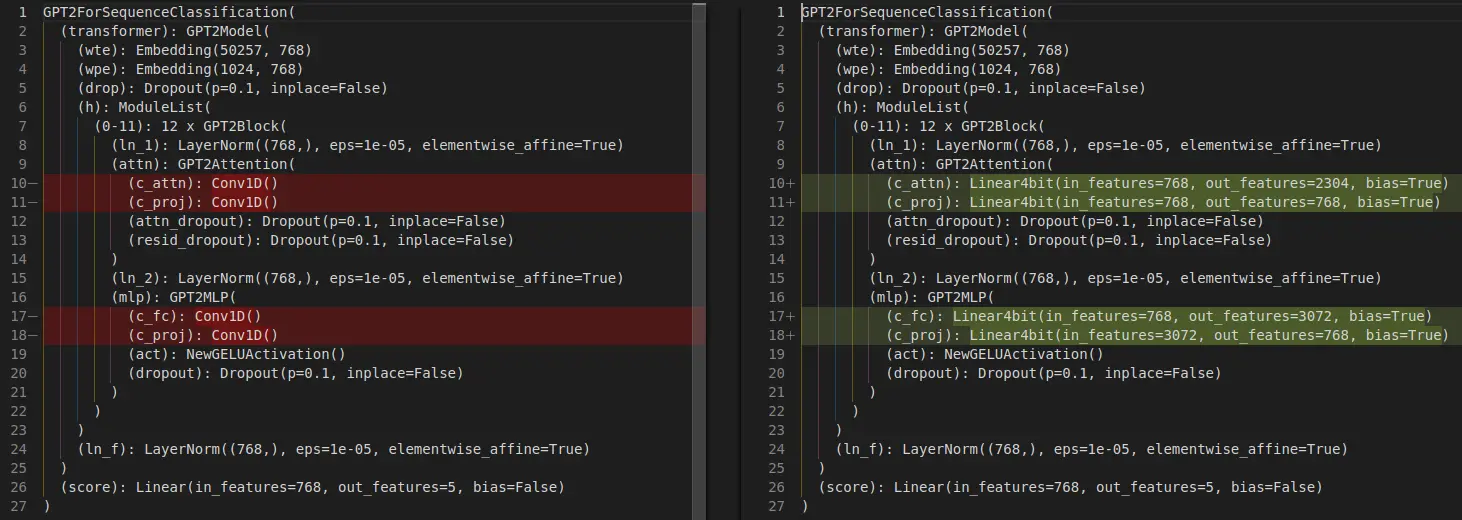
Modified Conv1D layers to Linear4bits layers.
LoRA
Before implementing LoRA, we have to set up the model to train on 4 bits
InputPythonfrom peft import prepare_model_for_kbit_trainingmodel = prepare_model_for_kbit_training(model)Copied
Let's see if the size of the model has changed.
InputPythonmodel_memory = model.get_memory_footprint()/(1024**3)print(f"Model memory: {model_memory:.2f} GB")Copied
Model memory: 0.20 GB
Memory has been increased, so we look at the model architecture again.
InputPythonmodelCopied
GPT2ForSequenceClassification((transformer): GPT2Model((wte): Embedding(50257, 768)(wpe): Embedding(1024, 768)(drop): Dropout(p=0.1, inplace=False)(h): ModuleList((0-11): 12 x GPT2Block((ln_1): LayerNorm((768,), eps=1e-05, elementwise_affine=True)(attn): GPT2Attention((c_attn): Linear4bit(in_features=768, out_features=2304, bias=True)(c_proj): Linear4bit(in_features=768, out_features=768, bias=True)(attn_dropout): Dropout(p=0.1, inplace=False)(resid_dropout): Dropout(p=0.1, inplace=False))(ln_2): LayerNorm((768,), eps=1e-05, elementwise_affine=True)(mlp): GPT2MLP((c_fc): Linear4bit(in_features=768, out_features=3072, bias=True)(c_proj): Linear4bit(in_features=3072, out_features=768, bias=True)(act): NewGELUActivation()(dropout): Dropout(p=0.1, inplace=False))))(ln_f): LayerNorm((768,), eps=1e-05, elementwise_affine=True))(score): Linear(in_features=768, out_features=5, bias=False))
The architecture remains the same, so we assume that the memory increase is due to some extra configuration to be able to apply LoRA in 4 bits.
We create a LoRA configuration, but unlike the LoRA post in which we only configured in target_modeules the scores layer, now we are going to add also the c_attn, c_proj and c_fc layers since they are now of type Linear4bits and not Conv1D.
InputPythonfrom peft import LoraConfig, TaskTypeconfig = LoraConfig(r=16,lora_alpha=32,lora_dropout=0.1,task_type=TaskType.SEQ_CLS,target_modules=['c_attn', 'c_fc', 'c_proj', 'score'],bias="none",)Copied
InputPythonfrom peft import get_peft_modelmodel = get_peft_model(model, config)Copied
InputPythonmodel.print_trainable_parameters()Copied
trainable params: 2,375,504 || all params: 126,831,520 || trainable%: 1.8730
While in the LoRA post we had about 12,000 trainable parameters, we now have about 2 million, as we have now added the c_attn, c_proj and c_fc layers.
Training
Once the quantized model has been instantiated and LoRA has been applied, i.e., once we have done QLoRA, we are going to train it as usual
InputPythonfrom transformers import TrainingArgumentsmetric_name = "accuracy"model_name = "GPT2-small-QLoRA-finetuned-amazon-reviews-en-classification"LR = 2e-5BS_TRAIN = 224BS_EVAL = 224EPOCHS = 3WEIGHT_DECAY = 0.01training_args = TrainingArguments(model_name,eval_strategy="epoch",save_strategy="epoch",learning_rate=LR,per_device_train_batch_size=BS_TRAIN,per_device_eval_batch_size=BS_EVAL,num_train_epochs=EPOCHS,weight_decay=WEIGHT_DECAY,lr_scheduler_type="cosine",warmup_ratio = 0.1,fp16=True,load_best_model_at_end=True,metric_for_best_model=metric_name,push_to_hub=True,logging_dir="./runs",)Copied
In the post Fine tuning SMLs we had to set a BS train size of 28, in the post LoRA by setting the low rank matrices in the linear layers we were able to set a batch size of 400. Now, as when quantizing the model, the PEFT library has converted some more layers to Linear we cannot set such a big batch size and we have to set it to 224.
InputPythonimport numpy as npfrom evaluate import loadmetric = load("accuracy")def compute_metrics(eval_pred):print(eval_pred)predictions, labels = eval_predpredictions = np.argmax(predictions, axis=1)return metric.compute(predictions=predictions, references=labels)Copied
InputPythonfrom transformers import Trainertrainer = Trainer(model,training_args,train_dataset=subset_dataset_train,eval_dataset=subset_dataset_validation,tokenizer=tokenizer,compute_metrics=compute_metrics,)Copied
InputPythontrainer.train()Copied
`use_cache=True` is incompatible with gradient checkpointing. Setting `use_cache=False`.../usr/local/lib/python3.10/dist-packages/torch/utils/checkpoint.py:464: UserWarning: torch.utils.checkpoint: the use_reentrant parameter should be passed explicitly. In version 2.4 we will raise an exception if use_reentrant is not passed. use_reentrant=False is recommended, but if you need to preserve the current default behavior, you can pass use_reentrant=True. Refer to docs for more details on the differences between the two variants.warnings.warn(
<IPython.core.display.HTML object>
<transformers.trainer_utils.EvalPrediction object at 0x7acac436c3d0>
/usr/local/lib/python3.10/dist-packages/torch/utils/checkpoint.py:464: UserWarning: torch.utils.checkpoint: the use_reentrant parameter should be passed explicitly. In version 2.4 we will raise an exception if use_reentrant is not passed. use_reentrant=False is recommended, but if you need to preserve the current default behavior, you can pass use_reentrant=True. Refer to docs for more details on the differences between the two variants.warnings.warn(
<transformers.trainer_utils.EvalPrediction object at 0x7acac32580d0>
/usr/local/lib/python3.10/dist-packages/torch/utils/checkpoint.py:464: UserWarning: torch.utils.checkpoint: the use_reentrant parameter should be passed explicitly. In version 2.4 we will raise an exception if use_reentrant is not passed. use_reentrant=False is recommended, but if you need to preserve the current default behavior, you can pass use_reentrant=True. Refer to docs for more details on the differences between the two variants.warnings.warn(
<IPython.core.display.HTML object>
<transformers.trainer_utils.EvalPrediction object at 0x7acac2f43c10>
TrainOutput(global_step=2679, training_loss=1.1650676093647934, metrics={'train_runtime': 11299.1288, 'train_samples_per_second': 53.101, 'train_steps_per_second': 0.237, 'total_flos': 2.417754341376e+17, 'train_loss': 1.1650676093647934, 'epoch': 3.0})
Evaluation
Once trained we evaluate on the test dataset
InputPythontrainer.evaluate(eval_dataset=subset_dataset_test)Copied
<IPython.core.display.HTML object>
<transformers.trainer_utils.EvalPrediction object at 0x7acb316fe5c0>
{'eval_loss': 0.8883273601531982,'eval_accuracy': 0.615,'eval_runtime': 28.5566,'eval_samples_per_second': 175.091,'eval_steps_per_second': 0.805,'epoch': 3.0}
Publish the model
We create a model card
InputPythontrainer.create_model_card()Copied
We publish it
InputPythontrainer.push_to_hub()Copied
Test the model
Let's approve the model
InputPythonfrom transformers import AutoTokenizer, AutoModelForSequenceClassificationimport torchmodel_name = "GPT2-small-QLoRA-finetuned-amazon-reviews-en-classification"user = "maximofn"checkpoint = f"{user}/{model_name}"num_classes = 5tokenizer = AutoTokenizer.from_pretrained(checkpoint)model = AutoModelForSequenceClassification.from_pretrained(checkpoint, num_labels=num_classes).half().eval().to("cuda")Copied
/home/sae00531/miniconda3/envs/nlp_/lib/python3.11/site-packages/huggingface_hub/file_download.py:1132: FutureWarning: `resume_download` is deprecated and will be removed in version 1.0.0. Downloads always resume when possible. If you want to force a new download, use `force_download=True`.warnings.warn(Some weights of GPT2ForSequenceClassification were not initialized from the model checkpoint at openai-community/gpt2 and are newly initialized: ['score.weight']You should probably TRAIN this model on a down-stream task to be able to use it for predictions and inference./home/sae00531/miniconda3/envs/nlp_/lib/python3.11/site-packages/peft/tuners/lora/layer.py:1119: UserWarning: fan_in_fan_out is set to False but the target module is `Conv1D`. Setting fan_in_fan_out to True.warnings.warn(Loading adapter weights from maximofn/GPT2-small-QLoRA-finetuned-amazon-reviews-en-classification led to unexpected keys not found in the model: ['score.modules_to_save.default.base_layer.weight', 'score.modules_to_save.default.lora_A.default.weight', 'score.modules_to_save.default.lora_B.default.weight', 'score.modules_to_save.default.modules_to_save.lora_A.default.weight', 'score.modules_to_save.default.modules_to_save.lora_B.default.weight', 'score.modules_to_save.default.original_module.lora_A.default.weight', 'score.modules_to_save.default.original_module.lora_B.default.weight'].
InputPythontokens = tokenizer.encode("I love this product", return_tensors="pt").to(model.device)with torch.no_grad():output = model(tokens)logits = output.logitslables = torch.softmax(logits, dim=1).cpu().numpy().tolist()lables[0]Copied
[0.0186614990234375,0.483642578125,0.048187255859375,0.415283203125,0.03399658203125]
NF4 format (FAQ)
What is the NF4 (NormalFloat4) format used in QLoRA?
NF4 (NormalFloat4) is the 4-bit data type QLoRA uses to quantize model weights. With 4 bits there are 16 possible levels; instead of spacing them uniformly, NF4 places them at the quantiles of a standard normal distribution, because neural-network weights are approximately normally distributed (a Gaussian bell centered at 0). Before quantizing, the weights are normalized to the range [-1, 1] (dividing by their absolute maximum), and that normalization constant is stored so they can be dequantized later. This makes NF4 information-theoretically optimal for normally-distributed data and more accurate than uniform 4-bit (int4) quantization.
What is the value range of NF4?
The 16 NF4 levels span the range [-1, 1] — not the integer range -8..7 of int4. The exact values are the quantiles of a normal distribution, so they are denser near 0 (where most weights lie) and sparser toward ±1. In bitsandbytes you enable it with bnb_4bit_quant_type="nf4".
-thumbnail.webp)