py-smi: NVIDIA GPU Monitor in Python

py-smi: NVIDIA GPU Monitor in Python py-smi: NVIDIA GPU Monitor in Python

py-smilink image 3

Disclaimer: This post has been translated to English using a machine translation model. Please, let me know if you find any mistakes.

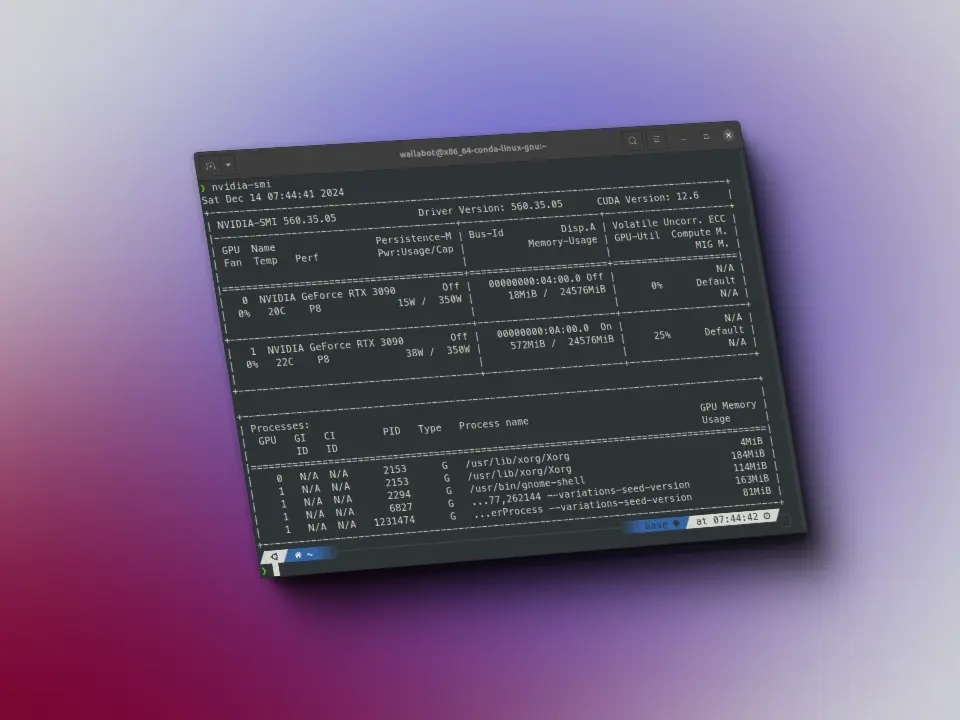
Do you want to be able to use nvidia-smi from Python? Here you have a library to do it.

Installationlink image 4

To install it, run:

pip install python-smi```
      

Usagelink image 5

We import the library

	
<> Input Python
from py_smi import NVML
Copied

We create an object of pynvml (the library behind nvidia-smi)

	
<> Input Python
nv = NVML()
Copied

We get the version of the driver and CUDA

	
<> Input Python
nv.driver_version, nv.cuda_version
Copied
	
>_ Output
('560.35.03', '12.6')

Since in my case I have two GPUs, I create a variable with the number of GPUs

	
<> Input Python
num_gpus = 2
Copied

I get the memory of each GPU

	
<> Input Python
[nv.mem(i) for i in range(num_gpus)]
Copied
	
>_ Output
[_Memory(free=24136.6875, total=24576.0, used=439.3125),
_Memory(free=23509.0, total=24576.0, used=1067.0)]

The utilization

	
<> Input Python
[nv.utilization() for i in range(num_gpus)]
Copied
	
>_ Output
[_Utilization(gpu=0, memory=0, enc=0, dec=0),
_Utilization(gpu=0, memory=0, enc=0, dec=0)]

The power used

This works very well for me, because when I was training a model and had both GPUs full, sometimes my computer would shut down, and looking at the power, I see that the second one consumes a lot, so it may be what I already suspected, which was due to power supply.

	
<> Input Python
[nv.power(i) for i in range(num_gpus)]
Copied
	
>_ Output
[_Power(usage=15.382, limit=350.0), _Power(usage=40.573, limit=350.0)]

The clocks of each GPU

	
<> Input Python
[nv.clocks(i) for i in range(num_gpus)]
Copied
	
>_ Output
[_Clocks(graphics=0, sm=0, mem=405), _Clocks(graphics=540, sm=540, mem=810)]

PCI Data

	
<> Input Python
[nv.pcie_throughput(i) for i in range(num_gpus)]
Copied
	
>_ Output
[_PCIeThroughput(rx=0.0, tx=0.0),
_PCIeThroughput(rx=0.1630859375, tx=0.0234375)]

And the processes (I'm not running anything now)

	
<> Input Python
[nv.processes(i) for i in range(num_gpus)]
Copied
	
>_ Output
[[], []]

Continue reading

Last posts -->

Have you seen these projects?

Gymnasia

Gymnasia Gymnasia
React Native
Expo
TypeScript
FastAPI
Next.js
OpenAI
Anthropic

Mobile personal training app with AI assistant, exercise library, workout tracking, diet and body measurements

Horeca chatbot

Horeca chatbot Horeca chatbot
Python
LangChain
PostgreSQL
PGVector
React
Kubernetes
Docker
GitHub Actions

Chatbot conversational for cooks of hotels and restaurants. A cook, kitchen manager or room service of a hotel or restaurant can talk to the chatbot to get information about recipes and menus. But it also implements agents, with which it can edit or create new recipes or menus

View all projects -->
>_ Available for projects

Do you have an AI project?

Let's talk.

maximofn@gmail.com

Machine Learning and AI specialist. I develop solutions with generative AI, intelligent agents and custom models.

Do you want to watch any talk?

Last talks -->

Do you want to improve with these tips?

Last tips -->

Use this locally

Hugging Face spaces allow us to run models with very simple demos, but what if the demo breaks? Or if the user deletes it? That's why I've created docker containers with some interesting spaces, to be able to use them locally, whatever happens. In fact, if you click on any project view button, it may take you to a space that doesn't work.

Flow edit

Flow edit Flow edit

FLUX.1-RealismLora

FLUX.1-RealismLora FLUX.1-RealismLora
View all containers -->
>_ Available for projects

Do you have an AI project?

Let's talk.

maximofn@gmail.com

Machine Learning and AI specialist. I develop solutions with generative AI, intelligent agents and custom models.

Do you want to train your model with these datasets?

short-jokes-dataset

HuggingFace

Dataset with jokes in English

Use: Fine-tuning text generation models for humor

231K rows 2 columns 45 MB
View on HuggingFace →

opus100

HuggingFace

Dataset with translations from English to Spanish

Use: Training English-Spanish translation models

1M rows 2 columns 210 MB
View on HuggingFace →

netflix_titles

HuggingFace

Dataset with Netflix movies and series

Use: Netflix catalog analysis and recommendation systems

8.8K rows 12 columns 3.5 MB
View on HuggingFace →
View more datasets -->