
The problem: exploring is expensive
Ramp has a product, Ramp Sheets, with an agent that works on spreadsheets. And a spreadsheet agent is only as good as the information it retrieves: if it reads too little, it misses the answer; if it reads too much, it becomes slow, expensive and easy to distract with tabs that have nothing to do with the question.
Looking at their traces, they saw how much that exploration cost:
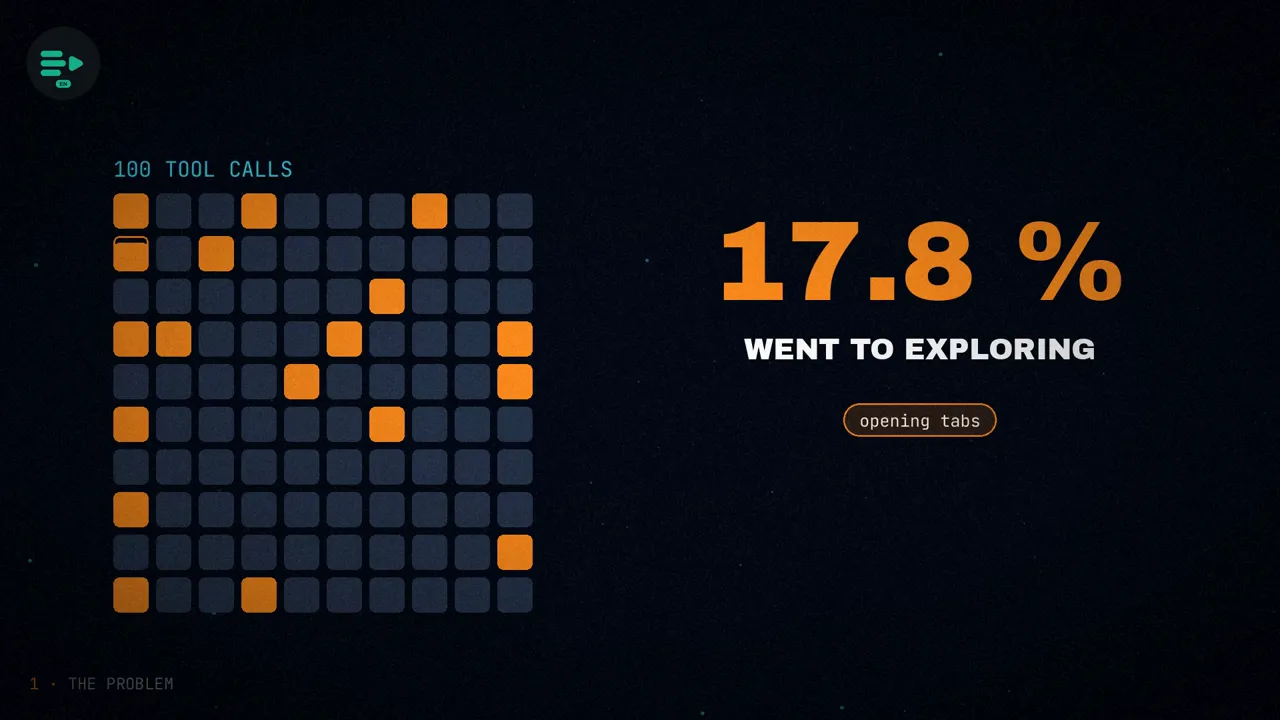
- 17.8% of all tool calls made by the main agent went to opening tabs, reading ranges and discarding irrelevant sheets, before it had the data it needed to answer.
- About 75% of those calls were immediately followed by another read. The authors say this suggests the agent often failed to find the right information on the first try. That is their interpretation, not a measurement of failures.
Their argument is that tweaking the prompt does not change the underlying loop: it would still be a large, slow, general-purpose model navigating the workbook and filtering out the noise. So they moved retrieval into a specialized subagent, Fast Ask. It receives a question like "What was the revenue from March to May?", navigates the workbook, reads the ranges it needs and returns a compact answer to the main agent.
The model behind it is a fine-tuned Qwen3.5-35B-A3B, with roughly 3 billion active parameters.
Why a subagent
The authors give three reasons why retrieval deserves a specialist model:
If the main model reads every tab, it burns tokens on irrelevant rows and can anchor on a decoy. The subagent returns only the cells that matter, or the computed value.
For the user, an agent that gets the fact right away is very different from one that spends turns exploring the workbook.
The most important one. Many spreadsheet questions resolve to an exact value: a date, an invoice ID, an amount in cents, a yes or a no, a row.
That third reason is what opens the door to reinforcement learning: if the answer is an exact value, every attempt can be scored deterministically, with no human labels and no other model acting as a judge. The task was narrow, repeated often, sensitive to latency and objectively scorable. Those are the four conditions I take from the article for deciding when training your own model is worth it.
The training setup
To make the workflow trainable with RL, they framed spreadsheet interaction as an environment: many related tasks, a small tool interface and a deterministic reward function. The model does not learn from demonstrations of correct behavior; it discovers its own strategies for navigating workbooks, retrieving data and computing answers.
- Base model: Qwen/Qwen3.5-35B-A3B.
- Infrastructure: Prime Intellect's Lab platform, with their hosted training and the
verifiersframework. The training environment mirrors the harness the model is deployed with in production. - Training: 100 steps, batch size 256 and 8 rollouts (attempts) per example.
- Evaluation: every 20 steps, on 128 held-out examples, with the base model evaluated alongside the trained one.
- No thinking mode: they disabled it so the comparison matched the low-latency production setting they care about.
If you want to see what an environment like this is made of, and how each framework handles it (including Verifiers, the one from Prime Intellect), I covered it in the post on RL environments for LLMs.
Synthetic workbooks and 14 task types
Each task is a synthetic business workbook, a natural-language question and a ground-truth answer. The workbooks imitate real finance workflows: revenue rollups, invoice reconciliation, spend analysis, time-filtered lookups and aggregations that join several tables.
Synthetic data lets them generate many variations of the same problem, control the answer exactly and change the wording without changing the skill being trained. They defined 14 task types across three families:
| Family | Task types |
|---|---|
| Revenue (4) | net_revenue, variance_vs_target, top_order_contribution, counterfactual_fx |
| Reconciliation (6) | invoice_balance, customer_balance, overdue_invoices, last_payment_date, is_invoice_fully_reconciled, invoice_location |
| Operations (4) | spend_month_total, budget_vs_actual, shared_vendor_uuid, netted_amount_2026 |
For each task they generated three differently phrased variants (an investor memo request, a collections follow-up, a fundraise model question), so the model does not memorize a template. Reconciliation tasks also vary in how the invoice is described, so their prompt space is larger than three per type. An example from the article:
I am tightening our investor memo. What cumulative net recognized revenue did South land across 2025-03 to 2025-05, in USD cents?
That workbook has eleven sheets: Orders, OrderLines, Shipments, Returns, OrderMonthNet, FxExposure, Contracts, FXRates, Targets, HiringPlan and CapTable. The last two have nothing to do with the question, and that is no accident.
Batches are assembled with a balanced round robin: every pass shuffles the dataset and emits all 14 types before repeating any, so they all get the same coverage. And the synthetic world is internally consistent: customers, vendors, SKUs, contract tiers and payment methods are sampled from fixed vocabularies, across thousands of generated workbooks.
The traps
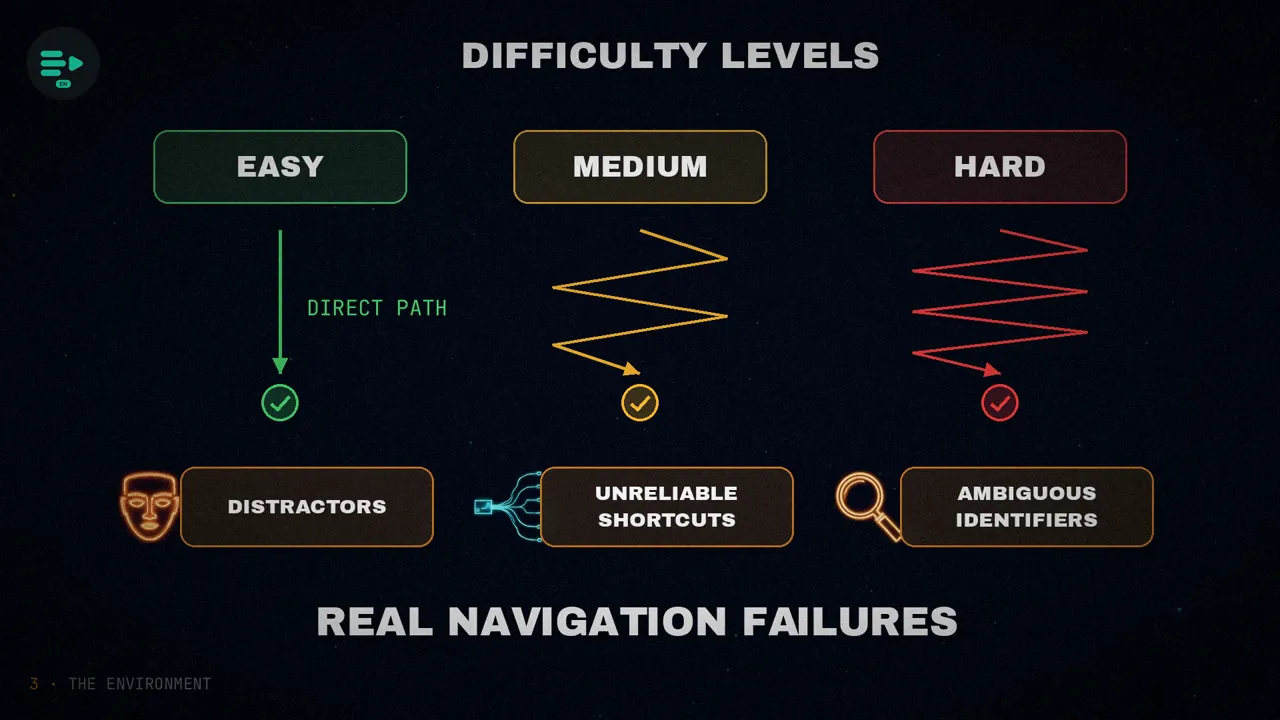
Difficulty controls how much navigation pressure the model faces. Easy tasks usually expose a direct path to the answer. Medium and hard ones make it harder in three ways:
Sheets like HiringPlan or CapTable, with recruiters, open roles and option pools. They sound like finance, but hold nothing the question needs. A model that reads indiscriminately spends its turn budget on them.
Summary sheets like RegionalPnL or SpendSummary that are missing exactly the computed columns that would give the answer. They look like a shortcut, but the model still has to verify or aggregate from the source data. At hard difficulty, they are removed.
In roughly 15-20% of reconciliation tasks, the question does not cite the invoice by its INV-#### ID, but by payment clues (source system, method, date, amount) or by a signature (customer, month, amount, due date). The reference has to be resolved before answering.
Three tools and fifteen turns
The model gets three tools and a budget of 15 turns:
get_workbook_metadatareturns sheet names, tab colors and the approximate used ranges.read_rangesreturns cell data, hard-capped at 1,000 cells per call. Oversized requests are rejected.run_pythonruns sandboxed Python, standard library only. State persists across calls within the same rollout.
Keeping it this small is deliberate: with only three tools, the reward can tell an efficient trajectory from a wasteful one more easily.
The reward
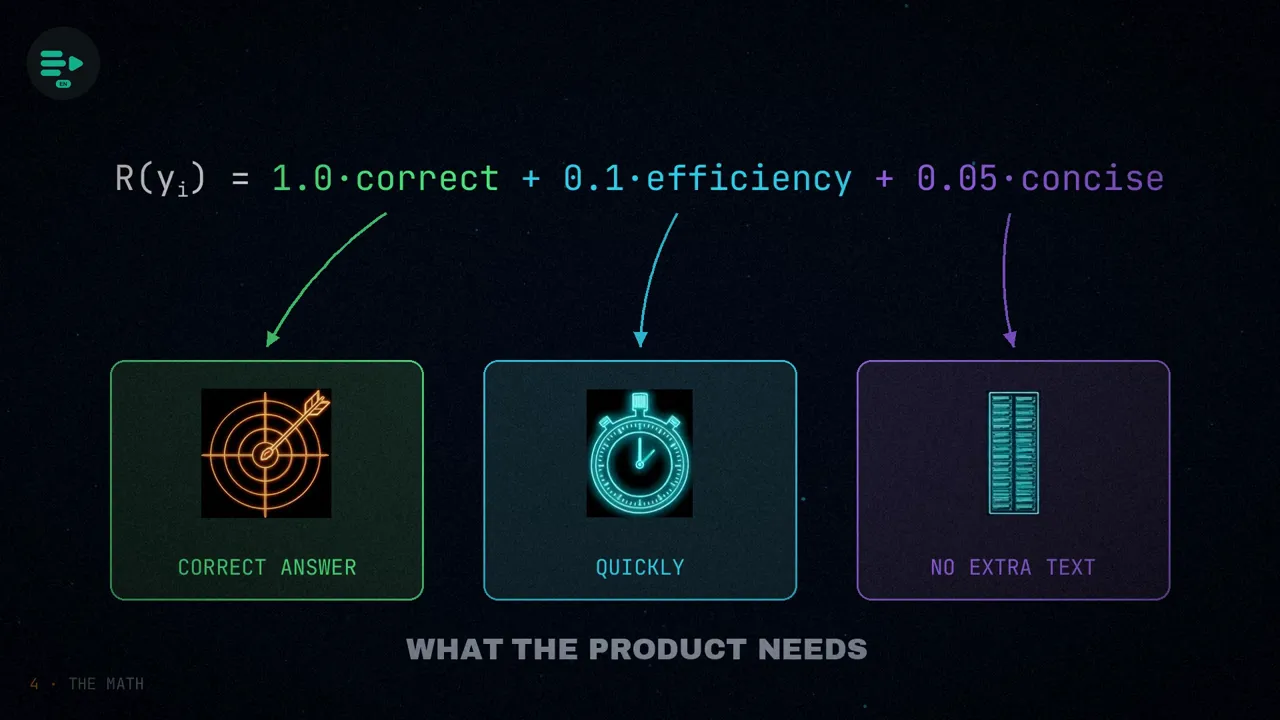
For each question, the model samples eight trajectories. A trajectory is the full trace: the tool calls, the reads, the Python it ran and the final answer. The verifier scores each one with a function that fits on one line:
R(y) = 1.0 · correct(y) + 0.1 · efficiency(y) + 0.05 · concise(y)The reward mirrors what Fast Ask needs in production: return the right answer, do it quickly and avoid adding unnecessary text to the main agent's context.
- Correctness dominates. The 1.0 term only fires if the final
ANSWER:line parses into the expected type and exactly matches the ground truth. - Efficiency and concision are shaping terms. They cannot rescue a wrong answer, but they rank the correct ones: getting it right in five turns scores slightly higher than getting it right after wandering through irrelevant sheets.
GRPO: advantage against the group
They trained with GRPO, a policy gradient method that estimates advantages from groups of rollouts sampled for the same prompt. Instead of fitting a separate value model, it compares each rollout's reward with the others in its group. With G = 8 rollouts, the advantage of rollout i can be written like this:
A_i = R(y_i) − (1/G) · Σ_k R(y_k)In other words, your advantage is your score minus the group average. For the same question, one rollout answers correctly in five turns and another spends its budget on decoy tabs and fails: that difference is the learning signal. Setting the off-policy correction aside, the update has this form:
∇J(θ) ≈ Σ_i Σ_t A_i · ∇ log π_θ(y_i,t | x, y_i,<t)Every token in a trajectory is reinforced or dampened according to the advantage of the whole trajectory. This is what makes RL a natural fit for tool-using agents: nobody labels the correct next tool call, only the final outcome is scored. The math pushes probability toward whatever made the answer correct: reading the metadata first, avoiding decoy tabs, using helper summaries when they are valid, falling back to raw rows when they are not, and emitting a parseable ANSWER: line.
It is the same algorithm used to train NapMem to navigate its memory.
Asynchronous and off-policy
In Fast Ask, a rollout is a multi-turn trajectory: inspect the metadata, read ranges, run Python and answer. Generating those rollouts is much slower than loading data in ordinary supervised fine-tuning. If training had to stop after every update and wait for perfectly fresh trajectories, the GPUs would sit idle much of the time.
Prime Intellect's prime-rl stack solves this with asynchronous off-policy training: rollout workers keep generating trajectories while the trainer updates the model. Some trajectories come from a slightly older version of the policy, and the objective corrects for that bounded staleness with importance weighting:
ρ_t(θ) = π_θ(y_t | x, y_<t) / π_gen(y_t | x, y_<t)The ratio ρ answers a simple question: how much more or less likely is the current model to produce this token than the model that originally generated it? To keep the updates stable, Prime Intellect uses an AIPO-style clipped, importance-weighted objective:
J(θ) = Σ_i,t min( ρ_i,t(θ) · A_i , clip(ρ_i,t(θ), 1 − ε, 1 + ε) · A_i )The clipping limits how much weight a token can carry when its probability has changed a lot since it was generated, so that a stale trajectory does not pull the model further than it should.
Results
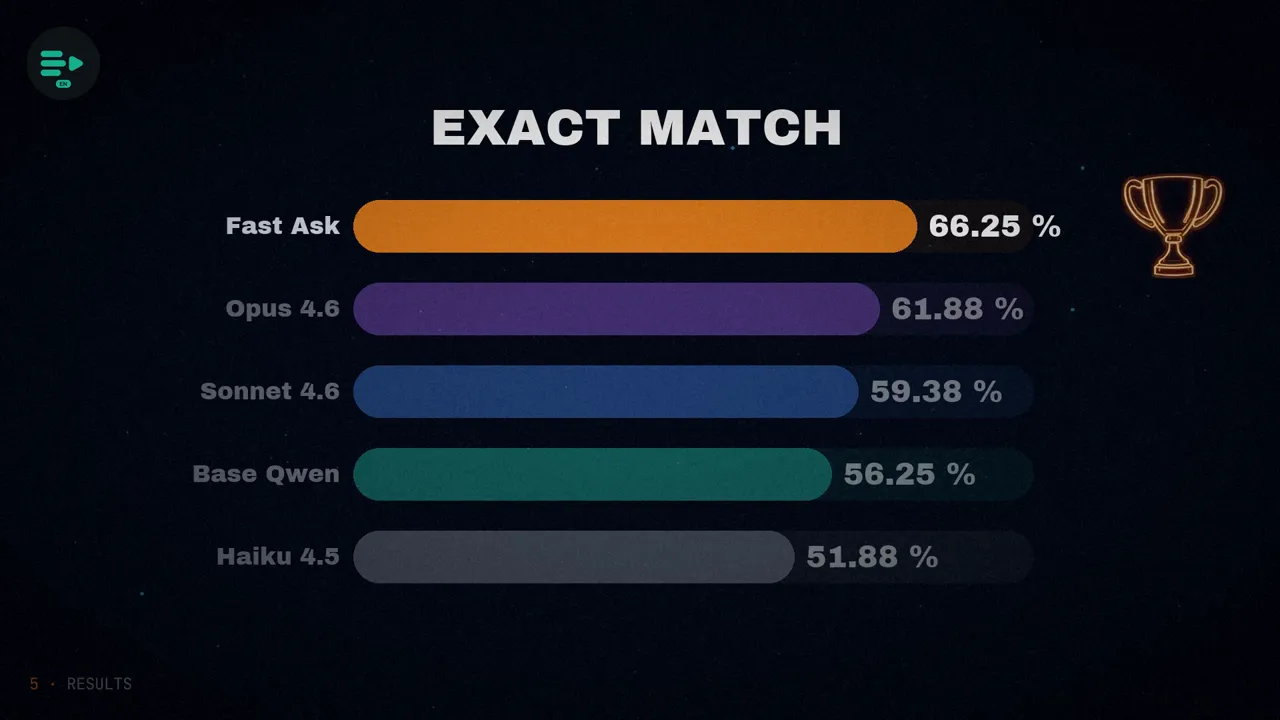
They evaluated the base and trained models alongside the Claude family, on held-out tasks. The metrics are exact-match accuracy and wall-clock time per rollout, relative to Haiku 4.5:
| Model | Exact-match accuracy | Time vs Haiku 4.5 |
|---|---|---|
| Fast Ask (trained Qwen) | 66.25% | 1.05× |
| Claude Opus 4.6 | 61.88% | 1.44× |
| Claude Sonnet 4.6 | 59.38% | 1.60× |
| Qwen3.5-35B-A3B base | 56.25% | 1.34× |
| Claude Haiku 4.5 | 51.88% | 1.00× |
- Ten points over the base model (from 56.25% to 66.25%), while also taking less time: from 1.34× to 1.05×.
- A little over four points above Opus 4.6 (66.25 − 61.88 = 4.37), at a time very close to Haiku 4.5.
- Training took about 26 hours for the 100 steps.
What the model learned
According to the authors, most of the gains came from two things: the model learned to produce correctly formatted, parseable answers, and to plan tighter trajectories that waste fewer turns.
And there is one detail I find the sharpest in the article: total cells read per rollout stayed roughly flat throughout training (around 2,400 in their chart). The model did not learn to read less; it learned to allocate its reads better. In the same figure, cells per turn go up, from about 200 to about 350, while the total does not move: it reads the same amount in fewer trips. That last part is my reading of the chart; the text only talks about the total.
What doesn't add up, and what you can't conclude
Checking the text against the article's own figures, two details do not match:
- The reward curve. The text says reward climbed from roughly 0.2 to 0.8 over the first 40 steps and then plateaued. In the animated chart that accompanies the article, the curve starts near 0.5, dips toward 0.3 and climbs gradually to around 0.8 near step 100. They agree on where it ends, not on how it gets there.
- The size of the evaluation. The article mentions 128 held-out examples for the intermediate evaluations. But the percentages in the final table are exact multiples of 1/160 (106, 99, 95, 90 and 83 correct out of 160), and not of 1/128. So the table seems to come from a different set, of 160 examples, which the article does not describe. That is my deduction, not something the authors state.
Neither changes the conclusion, but the numbers should be read with their limits:
- This is not "Qwen beats Opus" in general. It is one specific retrieval task, in the authors' own evaluation, on synthetic tasks from the same environment and with thinking mode off.
- We don't know whether it holds on real spreadsheets. The article gives no results on customer workbooks.
- Cost is not quantified. They say it comes at "a fraction of the cost and latency" of a frontier model, without giving a cost figure.
- The speed is "about" Haiku's: 1.05×, not 1.00×.
Summary
RL post-training worked here because the environment made spreadsheet retrieval measurable and repeatable: repeated decisions with clear outcomes, with no human-labeled trajectories and no LLM judge. The authors stress that the important work was not in model architecture or scale, but in environment design: the right tasks, a minimal tool interface and a reward grounded in how the product actually works in production.
And they frame it as a pattern they expect to repeat: train small, verifiable subagents for narrow bottlenecks, and let frontier models spend their tokens on judgment instead of retrieval.
If a task is narrow, repeated often, latency-sensitive and verifiable, a small model trained in a good environment can do it better than a large one.
Which bottleneck in your agent checks all four?
Sources
- "Building Fast & Accurate Agents with Prime-RL Post Training", by Ramp Labs, with Ben Geist and Will Brown, May 7, 2026.
- On environments and RL in this blog: RL environments for LLMs and NapMem, another agent trained with GRPO.
- The video, on my channels: English and Spanish.