The loop is yours, not the model's
A call to a language model produces one response and ends. The model cannot run a tool, wait for the result, and keep thinking on its own: when it asks for a tool, its turn ends right there. If someone asks “how much has my bench press improved this month?”, the model can first ask for the workout history, but it will not see that history until someone sends it in a new call.
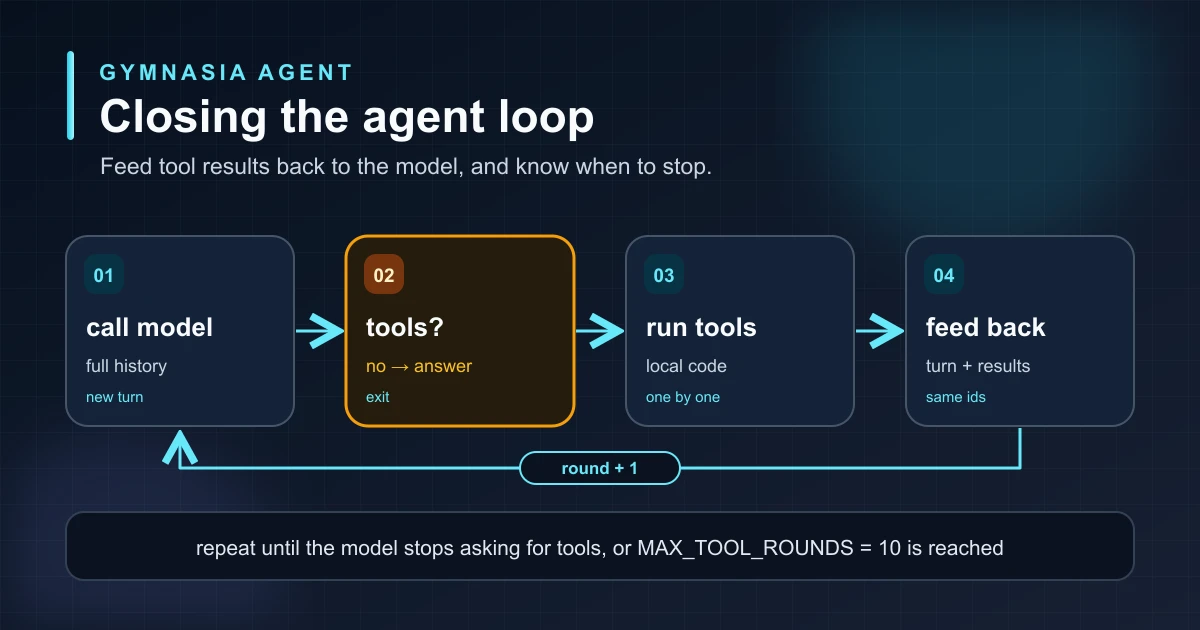
That “someone” is the harness: the program around the model. It receives the request, runs the tool, adds the result to the conversation, and calls the model again. It repeats the process until the model answers without asking for anything else. What we usually call an “agent” is, at its core, that loop written in the application's code. The model decides what to ask for; the loop decides whether it runs, how many times it repeats, and when it stops.
The full cycle
Each pass through the loop is a round: one model call, running the tools it asked for, and sending their results back. The loop has two exits. The normal one happens when the model answers without asking for tools: that is the final answer for the user. The safety one happens when the maximum number of rounds runs out, even if the model keeps asking for tools.
The loop, step by step
This is the loop in pseudocode. The language and the API do not matter: what has to be done is the same in every case. Notice three things: when the loop exits, what is added to the history on each pass, and when the model is called again.
turn = call_model(history)

repeat at most MAX_ROUNDS times:
    if the turn asks for no tools:
        exit                           # normal exit: this is the final answer

    results = []
    for each tool request in the turn:
        result = run_tool(request.name, request.arguments)
        add (request.id, result) to results

    append the turn to the history     # what the model asked for
    append the results to the history  # what the app answered
    turn = call_model(history)

return turn
That is the core. “Repeat at most” enforces the round limit, and “exit” is the normal exit. On each pass the tools run one at a time, in the order the model asked for them. That is slower than running them in parallel, but it keeps two writes to the same data from racing each other. Changing that decision means changing the loop, not the model. The only thing missing is what to do when the loop ends because the rounds ran out, and that has its own section below.
What gets fed back, and in which order
The model remembers nothing between calls. That is why every call receives the whole conversation: the earlier messages from the user and the assistant and, since the loop started, every tool request with its result. Each round appends two things to the end of that history, in this order: first the model's turn with its requests (tool_use), and then a message with one result (tool_result) per request. The identifier connects each result to its request.
The order is not a matter of style. Anthropic rejects a tool_result that does not follow the turn containing its tool_use, and a result without the request that caused it leaves the model with no context to interpret it. The three providers solve the same problem in different ways:
| Provider | Who keeps the history inside the loop | What the loop sends each round |
|---|---|---|
| OpenAI (Responses) | The provider | Only the new results (function_call_output with its call_id) and the previous_response_id, which tells OpenAI which earlier response it continues. |
| Anthropic (Messages) | The application | The whole history: the conversation, the model's turn untouched, followed by a message with one tool_result per tool_use_id. |
| Google (Interactions) | The application, because Gymnasia does not store the interaction on Google's side | The whole history, with each function_call followed by its function_result with the same call_id. |
OpenAI is the exception only inside the loop of a single message: since its API can remember a response by its identifier, sending what is new is enough. When the user writes a new message, Gymnasia starts from scratch and sends the whole conversation, just like with the others. And in every case the same rule holds: the request comes before its result, and each result carries the identifier of the request it answers.
Why you need a limit
Nothing forces the model to stop asking for tools. It can repeat the same call because it is not happy with the result, chain searches without reaching a conclusion, or react to an error by asking for the tool again. Each round is a network call, with its latency and token cost, and the history grows on every pass. Without a limit, a loop like that can leave the user waiting indefinitely.
Gymnasia sets the limit in a constant shared by the three providers: MAX_TOOL_ROUNDS = 10. The number is a product decision, not a technical truth. It has to be high enough for real queries that chain several tools, such as reading the history, computing a personal record, and saving a goal, and low enough to cut a runaway loop before the wait or the bill becomes noticeable.
What happens when the rounds run out
Stopping the loop is the easy part. The hard part is deciding what to tell the user. The first version of Gymnasia got this wrong, and it is worth describing because it is easy to repeat in any harness:
- Google threw a technical error: the response was still waiting for tools when the limit was reached.
- OpenAI and Anthropic left the loop silently and returned the last turn, which still asked for tools. Because the text the model writes between rounds (“let me look up your history…”) accumulates, the user saw that half-finished sentence as if it were the final answer, or a generic “the provider returned no content” error.
Either way, the user got no useful answer and no hint that the round budget had run out. Stopping abruptly throws away the work already done: the agent may already have read the history and been one step away.
The fix: one last call in which the model can only write
When the rounds run out, the loop does not stop dead. It makes one last call to the model in which it cannot ask for any tool, neither the pending ones nor any other: it can only answer with text, using what it has already found out.
First there is one detail to settle. The model's last turn still contains tool requests, and providers require every request to have a result. So the loop answers them without running them, with a result that only says what happened. The instruction about what to do next goes separately, in the system instructions of that last call:
# The rounds ran out and the last turn still asks for tools.
if the turn asks for tools:
    for each pending request:
        result = "Not executed: the step limit for this answer was reached."
    append the turn and those results to the history

    instructions = system_prompt + "You have reached the step limit for this answer.
        Answer with what you already know, explain the limit,
        say what was left undone and ask whether to continue."
    turn = call_model(history, instructions, tools = none)

return turn
So the user gets something like “I found your history, but I reached the step limit for this answer and did not compute the record. Do you want me to continue?”. If they say yes, the agent carries on: the limit is counted per message, so the new message starts with ten fresh rounds. And if the pending tool was a write, such as saving a goal, the model knows it was not done and will not claim otherwise.
Why the instruction does not go in the tool result
The first version put everything in the result: “Not executed… answer with what you know and ask whether to continue”. It worked with Google, but not with OpenAI. The model treated that text as data returned by a tool, not as an instruction: it did not ask, and sometimes it even said it had no access to the tools.
That makes sense. A tool result can contain text you do not control, such as a web page or a document, and a model that obeyed instructions written there would be easy to manipulate. After moving the instruction to the system instructions of the closing call, all three tests with OpenAI explained the limit and ended by asking whether to continue.
a tool result says what happened; what the model should do next goes in the system instructions.
How the model is told not to use tools
All these APIs have a parameter, tool_choice, that decides what the model may do with tools in a given call. With auto, the usual value, the model decides whether to ask for one. With none, the tools stay declared, but the model cannot ask for any and has to answer with text. The closing call uses none. Each provider writes it differently, and there are two traps:
| Provider | How the closing call asks for no tools |
|---|---|
| OpenAI (Responses) and compatible APIs | tool_choice: "none". |
| Anthropic (Messages) | tool_choice: { type: "none" }, without removing the tool list: if the history contains tool requests, the API requires the tools to stay declared. |
| Google (Interactions) | tool_choice: "none" inside generation_config. At the root of the request, the API answers with a 400 Unknown parameter error. |
If there is still no answer
The closing call can fail too: the network drops, or the model ignores the instruction and asks for a tool again. Only then does the user see an error. But not the generic “the provider returned no content”, which explains nothing and invites them to repeat the same question. Instead, they see one that says what happened and what they can do: “This query needed more steps than the assistant can take in a single answer. Try splitting it into smaller questions.”
Design rule:an agent running out of rounds is not just another failure. It has usually found out something useful already, so give it one last chance to say it without letting it ask for more tools, and have it state clearly what it did not get to do and ask whether to continue. Keep the error message for when even that fails, and make it explain what happened.
Testing the loop
The whole loop can be tested without a network and without a model. All you need is a fake provider: a function that, instead of calling the API, returns turns prepared in advance, one per round. Each test then fixes exactly what the model asks for on every pass and checks what the loop does. The same suite is repeated for OpenAI, Anthropic, and Google.
Two rounds and a final answer
The fake provider asks for one tool, then another, and then answers with text. The loop must run both tools, call the model twice, and return the final answer.
History order
On the second call, the history must contain each model turn followed by its results, round by round. If someone swaps the two entries, the test fails before the real provider does.
No tools, no extra passes
If the first response is already text, the loop exits on the first pass: it runs no tools and does not call the model again.
A model that never stops
The fake provider asks for tools on every turn, forever. The loop must run exactly the round limit, answer the pending request without running it, and make the closing call without tools.
The limit gets three more checks. First, when the limit is reached, the pending requests receive the “Not executed” result and are not run. Second, the closing call carries tool_choice set to none, in the place each provider requires, and the closing instruction in the system instructions, only in that call. Third, if the closing call fails, the user sees the message that explains what happened, not the generic one.
How do we know these tests are worth anything? By breaking the code on purpose and checking that they fail. We swapped the order of the history, raised the limit to 11, and removed tool_choice from the closing call, and each time several tests turned red. A test that stays green with broken code protects nothing.
Learn to build a complete agent
This article is part of a series about building an agent or harness, using a gym app as a practical example. The previous step was turning a tool call into executable code; here we closed the cycle by sending the result back to the model and putting a limit on the number of passes.