Disclaimer: This post has been translated to English using a machine translation model. Please, let me know if you find any mistakes.
📚 **This post is part of the _Complete LangGraph Guide_ series**, divided into four chapters that are read in order:
> * 👉 **Part 1: Basic chatbot and tools**
* Part 2: Short-term memory
* Part 3: Long-term memory and human-in-the-loop
* Part 4: State customization and checkpoints
LangGraph is a low-level orchestration framework for building controllable agents
While LangChain provides integrations and components to streamline the development of LLM applications, the LangGraph library enables agent orchestration, offering customizable architectures, long-term memory, and human in the loop to reliably handle complex tasks.
In this post, we are going to disable
LangSmith, which is a graph debugging tool. We are going to disable it so as not to add more complexity to the post and to focus solely onLangGraph
How does LangGraph work?
LangGraph is based on three components:
- Nodes: Represent the application’s processing units, such as calling an LLM or a tool. They are Python functions that run when the node is invoked.
- Take the state as input
- They perform some operation
- They return the updated state
- Edges: Represent the transitions between the nodes. They define the logic of how the graph will be executed, that is, which node will be executed after another. They can be:
- Direct: Go from one node to another
- Conditionals: They depend on a condition
- State: Represents the state of the application, that is, it contains all the information necessary for the application. It is maintained during the execution of the application. It is defined by the user, so you need to think very carefully about what will be stored in it.
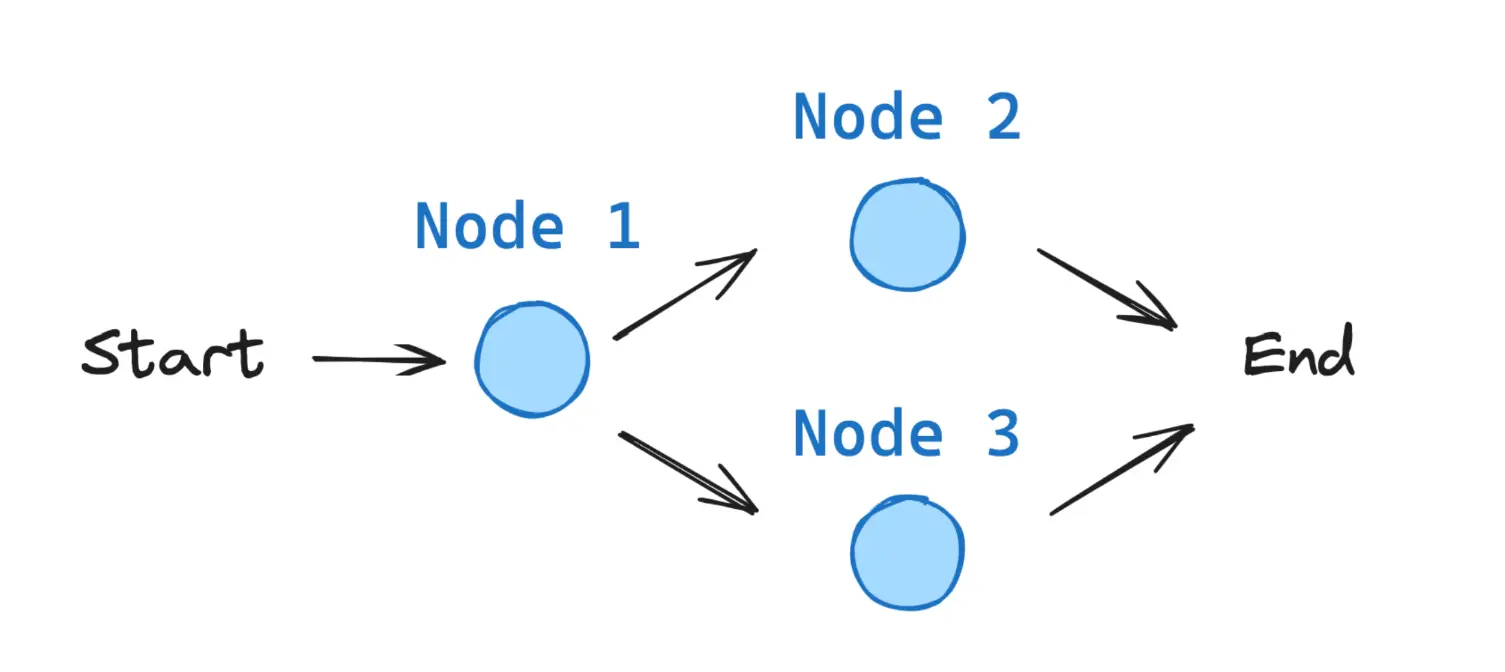
All LangGraph graphs start from a START node and end at an END node.
LangGraph Installation
To install LangGraph, you can use pip:
pip install -U langgraphor install from Conda:
conda install langgraphInstallation of the Hugging Face and Anthropic module
We are going to use a Hugging Face language model, so we need to install its LangGraph package.
pip install langchain-huggingfaceFor one part we are going to use Sonnet 3.7, then we will explain why. So we also installed the Anthropic package.
pip install langchain_anthropicHugging Face API KEY
We are going to use Qwen/Qwen2.5-72B-Instruct via Hugging Face Inference Endpoints, so we need an API KEY.
To be able to use HuggingFace's Inference Endpoints, the first thing you need is to have a HuggingFace account. Once you have one, go to Access tokens in your profile settings and generate a new token.
It needs a name. In my case, I’m going to call it langgraph and enable the Make calls to inference providers permission. It will create a token that we’ll need to copy
To manage the token, we are going to create a file in the same path where we are working called .env and we are going to put the token we copied into the file as follows:
HUGGINGFACE_LANGGRAPH="hf_...."Now, to be able to obtain the token, we need to have dotenv installed, which we install by means of
pip install python-dotenvWe run the following
InputPythonimport osimport dotenvdotenv.load_dotenv()HUGGINGFACE_TOKEN = os.getenv("HUGGINGFACE_LANGGRAPH")Copied
Now that we have a token, we create a client. To do this, we need to have the huggingface_hub library installed. We install it using conda or pip.
pip install --upgrade huggingface_hubo
conda install -c conda-forge huggingface_hubNow we have to choose which model we are going to use. You can see the available models on the Supported models page of the Inference Endpoints documentation from Hugging Face.
We are going to use Qwen2.5-72B-Instruct, which is a very good model.
InputPythonMODEL = "Qwen/Qwen2.5-72B-Instruct"Copied
Now we can create the client
InputPythonfrom huggingface_hub import InferenceClientclient = InferenceClient(api_key=HUGGINGFACE_TOKEN, model=MODEL)clientCopied
<InferenceClient(model='Qwen/Qwen2.5-72B-Instruct', timeout=None)>
We’re doing a test to see if it works
InputPythonmessage = [{ "role": "user", "content": "Hola, qué tal?" }]stream = client.chat.completions.create(messages=message,temperature=0.5,max_tokens=1024,top_p=0.7,stream=False)response = stream.choices[0].message.contentprint(response)Copied
¡Hola! Estoy bien, gracias por preguntar. ¿Cómo estás tú? ¿En qué puedo ayudarte hoy?
Anthropic API KEY
Create a basic chatbot
Let's create a simple chatbot using LangGraph. This chatbot will respond directly to the user's messages. Although it's simple, it will help us see the basic concepts of building graphs with LangGraph.
As its name suggests, LangGraph is a library for handling graphs. So we begin by creating a StateGraph.
A StateGraph defines the structure of our chatbot as a state machine. We will add nodes to our graph to represent the llms, tools, and functions; the llms will be able to make use of those tools and functions; and we will add edges to specify how the bot should transition between those nodes.
So we start by creating a StateGraph that needs a State class to manage the graph state. Since we are now going to create a simple chatbot, we only need to manage a list of messages in the state.
InputPythonfrom typing import Annotatedfrom typing_extensions import TypedDictfrom langgraph.graph import StateGraphfrom langgraph.graph.message import add_messagesclass State(TypedDict):# Messages have the type "list". The `add_messages` function# in the annotation defines how this state key should be updated# (in this case, it appends messages to the list, rather than overwriting them)messages: Annotated[list, add_messages]graph_builder = StateGraph(State)Copied
The add_messages function merges two lists of messages.
New message lists will arrive, so they will be merged into the existing message list. Each message list contains an ID, so they are added using this ID. This ensures that messages are only added, not replaced, unless a new message has the same ID as an existing one, in which case it is replaced.
add_messages is a reducer function, it is a function that is responsible for updating the state.
The graph_builder graph that we have created takes a State state and returns a new State state. In addition, it updates the list of messages.
**Concept**
> When defining a graph, the first step is to define its
State. TheStateincludes the graph schema and thereducer functionsthat handle state updates.
> In our example,
Stateis of typeTypedDict(typed dictionary) with one key:messages.>
add_messagesis areducer functionused to add new messages to the list instead of overwriting them in the list. If a state key does not have areducer function, each value that comes from that key will overwrite the previous values.
>
add_messagesis alanggraphreducer function, but we will be able to create our own
Now we are going to add the chatbot node to the graph. Nodes represent units of work. In general, they are regular Python functions.
We add a node with the add_node method, which receives the name of the node and the function that will be executed.
So we are going to create an LLM with HuggingFace, then we will create a chat model with LangChain that will reference the created LLM. Once we have defined a chat model, we define the function that will be executed in the node of our graph. That function will make a call to the created chat model and return the result.
Finally, we are going to add a node with the chatbot function to the graph
InputPythonfrom langchain_huggingface import HuggingFaceEndpoint, ChatHuggingFacefrom huggingface_hub import loginos.environ["LANGCHAIN_TRACING_V2"] = "false" # Disable LangSmith tracing# Create the LLM modellogin(token=HUGGINGFACE_TOKEN) # Login to HuggingFace to use the modelMODEL = "Qwen/Qwen2.5-72B-Instruct"model = HuggingFaceEndpoint(repo_id=MODEL,task="text-generation",max_new_tokens=512,do_sample=False,repetition_penalty=1.03,)# Create the chat modelllm = ChatHuggingFace(llm=model)# Define the chatbot functiondef chatbot_function(state: State):return {"messages": [llm.invoke(state["messages"])]}# The first argument is the unique node name# The second argument is the function or object that will be called whenever# the node is used.graph_builder.add_node("chatbot_node", chatbot_function)Copied
<langgraph.graph.state.StateGraph at 0x130548440>
We have used ChatHuggingFace, which is a chat of the BaseChatModel type, a base chat type in LangChain. Once we created the BaseChatModel, we created the chatbot_function function that will be executed when the node is run. And finally, we created the chatbot_node node and told it to execute the chatbot_function function.
**Notice**
> The
chatbot_functionnode function takes theStateas input and returns a dictionary containing an update to themessageslist for themensajeskey. This is the basic pattern for allLangGraphnode functions.
The reducer function of our add_messages graph will add the llm response messages to any message that is already in the state.
Next, we add an entry node. This tells our graph where to start its work each time we run it.
InputPythonfrom langgraph.graph import STARTgraph_builder.add_edge(START, "chatbot_node")Copied
<langgraph.graph.state.StateGraph at 0x130548440>
Likewise, we add a finish node. This indicates to the graph that whenever this node is executed, it can finish the job.
InputPythonfrom langgraph.graph import ENDgraph_builder.add_edge("chatbot_node", END)Copied
<langgraph.graph.state.StateGraph at 0x130548440>
We have imported START and END, which we can find in constants, and they are the first and last node of our graph.
Normally, they are virtual nodes
Finally, we need to compile our graph. To do so, we use the graph builder method compile(). This creates a CompiledGraph that we can use to run our application.
InputPythongraph = graph_builder.compile()Copied
We can visualize the graph using the get_graph method and one of the drawing methods, such as draw_ascii or draw_mermaid_png. The drawing for each of the methods requires additional dependencies.
InputPythonfrom IPython.display import Image, displaytry:display(Image(graph.get_graph().draw_mermaid_png()))except Exception as e:print(f"Error al visualizar el grafo: {e}")Copied
<IPython.core.display.Image object>
Now we can try the chatbot!
**Tip**
> In the following code block, you can exit the chat loop at any time by typing
quit,exit, orq.
InputPython# Colors for the terminalCOLOR_GREEN = "\033[32m"COLOR_YELLOW = "\033[33m"COLOR_RESET = "\033[0m"def stream_graph_updates(user_input: str):for event in graph.stream({"messages": [{"role": "user", "content": user_input}]}):for value in event.values():print(f"{COLOR_GREEN}User: {COLOR_RESET}{user_input}")print(f"{COLOR_YELLOW}Assistant: {COLOR_RESET}{value['messages'][-1].content}")while True:try:user_input = input("User: ")if user_input.lower() in ["quit", "exit", "q"]:print(f"{COLOR_GREEN}User: {COLOR_RESET}{user_input}")print(f"{COLOR_YELLOW}Assistant: {COLOR_RESET}Goodbye!")breakevents =stream_graph_updates(user_input)except:# fallback if input() is not availableuser_input = "What do you know about LangGraph?"print("User: " + user_input)stream_graph_updates(user_input)breakCopied
User: HelloAssistant: Hello! It's nice to meet you. How can I assist you today? Whether you have questions, need information, or just want to chat, I'm here to help!User: How are you doing?Assistant: I'm just a computer program, so I don't have feelings, but I'm here and ready to help you with any questions or tasks you have! How can I assist you today?User: Me well, I'm making a post about LangGraph, what do you think?Assistant: LangGraph is an intriguing topic, especially if you're delving into the realm of graph-based models and their applications in natural language processing (NLP). LangGraph, as I understand, is a framework or tool that leverages graph theory to improve or provide a new perspective on NLP tasks such as text classification, information extraction, and semantic analysis. By representing textual information as graphs (nodes for entities and edges for relationships), it can offer a more nuanced understanding of the context and semantics in language data.If you're making a post about it, here are a few points you might consider:1. **Introduction to LangGraph**: Start with a brief explanation of what LangGraph is and its core principles. How does it model language or text differently compared to traditional NLP approaches? What unique advantages does it offer by using graph-based methods?2. **Applications of LangGraph**: Discuss some of the key applications where LangGraph has been or can be applied. This could include improving the accuracy of sentiment analysis, enhancing machine translation, or optimizing chatbot responses to be more contextually aware.3. **Technical Innovations**: Highlight any technical innovations or advancements that LangGraph brings to the table. This could be about new algorithms, more efficient data structures, or novel ways of training models on graph data.4. **Challenges and Limitations**: It's also important to address the challenges and limitations of using graph-based methods in NLP. Performance, scalability, and the current state of the technology can be discussed here.5. **Future Prospects**: Wrap up with a look into the future of LangGraph and graph-based NLP in general. What are the upcoming trends, potential areas of growth, and how might these tools start impacting broader technology landscapes?Each section can help frame your post in a way that's informative and engaging for your audience, whether they're technical experts or casual readers looking for an introduction to this intriguing area of NLP.User: qAssistant: Goodbye!
**Congratulations!** You have built your first chatbot using LangGraph. This bot can participate in a basic conversation by taking user input and generating responses using the LLM we have defined.
Earlier, we had been writing the code little by little, and it may not have been very clear. It was done this way to explain each part of the code, but now we are going to write it again, but organized differently, which looks clearer. In other words, now that each part of the code does not need to be explained, we group it differently so that it is clearer.
InputPythonfrom typing import Annotatedfrom typing_extensions import TypedDictfrom langgraph.graph import StateGraph, START, ENDfrom langgraph.graph.message import add_messagesfrom langchain_huggingface import HuggingFaceEndpoint, ChatHuggingFacefrom huggingface_hub import loginfrom IPython.display import Image, displayimport osos.environ["LANGCHAIN_TRACING_V2"] = "false" # Disable LangSmith tracingimport dotenvdotenv.load_dotenv()HUGGINGFACE_TOKEN = os.getenv("HUGGINGFACE_LANGGRAPH")# Stateclass State(TypedDict):messages: Annotated[list, add_messages]# Create the LLM modellogin(token=HUGGINGFACE_TOKEN) # Login to HuggingFace to use the modelMODEL = "Qwen/Qwen2.5-72B-Instruct"model = HuggingFaceEndpoint(repo_id=MODEL,task="text-generation",max_new_tokens=512,do_sample=False,repetition_penalty=1.03,)# Create the chat modelllm = ChatHuggingFace(llm=model)# Functiondef chatbot_function(state: State):return {"messages": [llm.invoke(state["messages"])]}# Start to build the graphgraph_builder = StateGraph(State)# Add nodes to the graphgraph_builder.add_node("chatbot_node", chatbot_function)# Add edgesgraph_builder.add_edge(START, "chatbot_node")graph_builder.add_edge("chatbot_node", END)# Compile the graphgraph = graph_builder.compile()# Display the graphtry:display(Image(graph.get_graph().draw_mermaid_png()))except Exception as e:print(f"Error al visualizar el grafo: {e}")Copied
<IPython.core.display.Image object>
More
All the more blocks are there in case you want to dive deeper into LangGraph; otherwise, you can read everything without reading the more blocks.
State Typing
We have seen how to create an agent with a typed state using TypedDict, but we can create it with another typed type.
Typing with TypeDict
It is the form we saw before: we type the state as a dictionary using Python’s TypeDict typing. We pass a key and a value for each variable in our state
from typing_extensions import TypedDict
from typing import Annotated
from langgraph.graph.message import add_messages
from langgraph.graph import StateGraph

class State(TypedDict):
messages: Annotated[list, add_messages]
To access the messages, we do it like with any dictionary, using state["messages"]
Typing with dataclass
Another option is to use Python's dataclass typing
from dataclasses import dataclass
from typing import Annotated
from langgraph.graph.message import add_messages
from langgraph.graph import StateGraph

@dataclass
class State:
messages: Annotated[list, add_messages]
As can be seen, it is similar to typing with dictionaries, but now, since the state is a class, we access the messages via state.messages
Typing with Pydantic
Pydantic is a widely used library for typing data in Python. It offers us the possibility to add type checking. Let's check that the message starts with 'User', 'Assistant' or 'System'
from pydantic import BaseModel, field_validator, ValidationError
from typing import Annotated
from langgraph.graph.message import add_messages

class State(BaseModel):
messages: Annotated[list, add_messages] # Should start with 'User', 'Assistant' or 'System'

@field_validator('messages')
@classmethod
python
def validate_messages(cls, value):
# Ensure the messages start with `User`, `Assistant` or `System`python
if not value.startswith["'User'"] and not value.startswith["'Assistant'"] and not value.startswith["'System'"]:
      raise ValueError("Message must start with 'User', 'Assistant' or 'System'")
return value

try:
state = PydanticState(messages=["Hello"])
except ValidationError as e:
  print("Validation Error:", e)
Reducers
As we said, we need to use a Reducer-type function to indicate how to update the state, since otherwise the state values are overwritten.
Let's look at an example of a graph in which we do not use a Reducer-type function to indicate how to update the state
InputPythonfrom typing_extensions import TypedDictfrom langgraph.graph import StateGraph, START, ENDfrom IPython.display import Image, displayclass State(TypedDict):foo: intdef node_1(state):print("---Node 1---")return {"foo": state['foo'] + 1}def node_2(state):print("---Node 2---")return {"foo": state['foo'] + 1}def node_3(state):print("---Node 3---")return {"foo": state['foo'] + 1}# Build graphbuilder = StateGraph(State)builder.add_node("node_1", node_1)builder.add_node("node_2", node_2)builder.add_node("node_3", node_3)# Logicbuilder.add_edge(START, "node_1")builder.add_edge("node_1", "node_2")builder.add_edge("node_1", "node_3")builder.add_edge("node_2", END)builder.add_edge("node_3", END)# Addgraph = builder.compile()# Viewdisplay(Image(graph.get_graph().draw_mermaid_png()))Copied
<IPython.core.display.Image object>
As we can see, we have defined a graph in which node 1 is executed first and then nodes 2 and 3. Let's run it to see what happens.
InputPythonfrom langgraph.errors import InvalidUpdateErrortry:graph.invoke({"foo" : 1})except InvalidUpdateError as e:print(f"InvalidUpdateError occurred: {e}")Copied
---Node 1------Node 2------Node 3---InvalidUpdateError occurred: At key 'foo': Can receive only one value per step. Use an Annotated key to handle multiple values.For troubleshooting, visit: https://python.langchain.com/docs/troubleshooting/errors/INVALID_CONCURRENT_GRAPH_UPDATE
We get an error because first node 1 modifies the value of foo and then nodes 2 and 3 try to modify the value of foo in parallel, which causes an error
So, to avoid that, we use a Reducer-type function to indicate how to modify the state
Predefined reducers
We use the Annotated type to specify that it is a Reducer type function. And we use the add operator to add a value to a list
InputPythonfrom typing_extensions import TypedDictfrom langgraph.graph import StateGraph, START, ENDfrom IPython.display import Image, displayfrom operator import addfrom typing import Annotatedclass State(TypedDict):foo: Annotated[list[int], add]def node_1(state):print("---Node 1---")return {"foo": [state['foo'][-1] + 1]}def node_2(state):print("---Node 2---")return {"foo": [state['foo'][-1] + 1]}def node_3(state):print("---Node 3---")return {"foo": [state['foo'][-1] + 1]}# Build graphbuilder = StateGraph(State)builder.add_node("node_1", node_1)builder.add_node("node_2", node_2)builder.add_node("node_3", node_3)# Logicbuilder.add_edge(START, "node_1")builder.add_edge("node_1", "node_2")builder.add_edge("node_1", "node_3")builder.add_edge("node_2", END)builder.add_edge("node_3", END)# Addgraph = builder.compile()# Viewdisplay(Image(graph.get_graph().draw_mermaid_png()))Copied
<IPython.core.display.Image object>
Let's run it again and see what happens
InputPythongraph.invoke({"foo" : [1]})Copied
---Node 1------Node 2------Node 3---
{'foo': [1, 2, 3, 3]}
As we can see, we initialize the value of foo to 1, which is added to a list. Then node 1 adds 1 to it and appends it as a new value in the list, that is, it adds a 2. Finally, nodes 2 and 3 add one to the last value in the list, that is, both nodes get a 3 and both nodes append it to the end of the list, which is why the resulting list has two 3s at the end
Let's look at the case where one branch has more nodes than another.
InputPythonfrom typing_extensions import TypedDictfrom langgraph.graph import StateGraph, START, ENDfrom IPython.display import Image, displayfrom operator import addfrom typing import Annotatedclass State(TypedDict):foo: Annotated[list[int], add]def node_1(state):print("---Node 1---")return {"foo": [state['foo'][-1] + 1]}def node_2_1(state):print("---Node 2_1---")return {"foo": [state['foo'][-1] + 1]}def node_2_2(state):print("---Node 2_2---")return {"foo": [state['foo'][-1] + 1]}def node_3(state):print("---Node 3---")return {"foo": [state['foo'][-1] + 1]}# Build graphbuilder = StateGraph(State)builder.add_node("node_1", node_1)builder.add_node("node_2_1", node_2_1)builder.add_node("node_2_2", node_2_2)builder.add_node("node_3", node_3)# Logicbuilder.add_edge(START, "node_1")builder.add_edge("node_1", "node_2_1")builder.add_edge("node_1", "node_3")builder.add_edge("node_2_1", "node_2_2")builder.add_edge("node_2_2", END)builder.add_edge("node_3", END)# Addgraph = builder.compile()# Viewdisplay(Image(graph.get_graph().draw_mermaid_png()))Copied
<IPython.core.display.Image object>
If we now execute the graph
InputPythongraph.invoke({"foo" : [1]})Copied
---Node 1------Node 2_1------Node 3------Node 2_2---
{'foo': [1, 2, 3, 3, 4]}
What has happened is that first node 1 was executed, then node 2_1, after that, in parallel, nodes 2_2 and 3, and finally node END
As we have defined foo as a list of integers, and it is typed, if we initialize the state with None we get an error
InputPythontry:graph.invoke({"foo" : None})except TypeError as e:print(f"TypeError occurred: {e}")Copied
TypeError occurred: can only concatenate list (not "NoneType") to list
Let's see how to fix it with custom reducers
Custom reducers
Sometimes we cannot use a predefined Reducer and have to create our own
InputPythonfrom typing_extensions import TypedDictfrom langgraph.graph import StateGraph, START, ENDfrom IPython.display import Image, displayfrom typing import Annotateddef reducer_function(current_list, new_item: list | None):if current_list is None:current_list = []if new_item is not None:return current_list + new_itemreturn current_listclass State(TypedDict):foo: Annotated[list[int], reducer_function]def node_1(state):print("---Node 1---")if len(state['foo']) == 0:return {'foo': [0]}return {"foo": [state['foo'][-1] + 1]}def node_2(state):print("---Node 2---")return {"foo": [state['foo'][-1] + 1]}def node_3(state):print("---Node 3---")return {"foo": [state['foo'][-1] + 1]}# Build graphbuilder = StateGraph(State)builder.add_node("node_1", node_1)builder.add_node("node_2", node_2)builder.add_node("node_3", node_3)# Logicbuilder.add_edge(START, "node_1")builder.add_edge("node_1", "node_2")builder.add_edge("node_1", "node_3")builder.add_edge("node_2", END)builder.add_edge("node_3", END)# Addgraph = builder.compile()# Viewdisplay(Image(graph.get_graph().draw_mermaid_png()))Copied
<IPython.core.display.Image object>
If we now initialize the graph with a None value, it no longer gives us an error
InputPythontry:graph.invoke({"foo" : None})except TypeError as e:print(f"TypeError occurred: {e}")Copied
---Node 1------Node 2------Node 3---
Multiple states
Private States
Suppose we want to hide state variables, for whatever reason, because some variables only add noise or because we want to keep some variable private.
If we want to have a private state, we simply create it.
InputPythonfrom typing_extensions import TypedDictfrom IPython.display import Image, displayfrom langgraph.graph import StateGraph, START, ENDclass OverallState(TypedDict):public_var: intclass PrivateState(TypedDict):private_var: intdef node_1(state: OverallState) -> PrivateState:print("---Node 1---")return {"private_var": state['public_var'] + 1}def node_2(state: PrivateState) -> OverallState:print("---Node 2---")return {"public_var": state['private_var'] + 1}# Build graphbuilder = StateGraph(OverallState)builder.add_node("node_1", node_1)builder.add_node("node_2", node_2)# Logicbuilder.add_edge(START, "node_1")builder.add_edge("node_1", "node_2")builder.add_edge("node_2", END)# Addgraph = builder.compile()# Viewdisplay(Image(graph.get_graph().draw_mermaid_png()))Copied
<IPython.core.display.Image object>
As we can see, we have created the private state PrivateState and the public state OverallState. Each one with a private variable and a public one. First, node 1 is executed, which modifies the private variable and returns it. Then node 2 is executed, which modifies the public variable and returns it. Let's run the graph to see what happens
InputPythongraph.invoke({"public_var" : 1})Copied
---Node 1------Node 2---
{'public_var': 3}
As we can see when executing the graph, we pass the public variable public_var and get as output another public variable public_var with the modified value, but the private variable private_var has never been accessed.
Input and output states
We can define the graph’s input and output variables. Although internally the state may have more variables, we define which variables are inputs to the graph and which variables are outputs.
InputPythonfrom typing_extensions import TypedDictfrom IPython.display import Image, displayfrom langgraph.graph import StateGraph, START, ENDclass InputState(TypedDict):question: strclass OutputState(TypedDict):answer: strclass OverallState(TypedDict):question: stranswer: strnotes: strdef thinking_node(state: InputState):return {"answer": "bye", "notes": "... his is name is Lance"}def answer_node(state: OverallState) -> OutputState:return {"answer": "bye Lance"}graph = StateGraph(OverallState, input=InputState, output=OutputState)graph.add_node("answer_node", answer_node)graph.add_node("thinking_node", thinking_node)graph.add_edge(START, "thinking_node")graph.add_edge("thinking_node", "answer_node")graph.add_edge("answer_node", END)graph = graph.compile()# Viewdisplay(Image(graph.get_graph().draw_mermaid_png()))Copied
<IPython.core.display.Image object>
In this case, the state has 3 variables, question, answer and notes. However, we define question as the graph input and answer as the graph output. Therefore, the internal state can have more variables, but they are not taken into account when invoking the graph. Let's run the graph to see what happens
InputPythongraph.invoke({"question":"hi"})Copied
{'answer': 'bye Lance'}
As we can see, we have fed question into the graph and obtained answer as the output.
Context management
Let's take another look at the basic chatbot code
InputPythonfrom typing import Annotatedfrom typing_extensions import TypedDictfrom langgraph.graph import StateGraph, START, ENDfrom langgraph.graph.message import add_messagesfrom langchain_huggingface import HuggingFaceEndpoint, ChatHuggingFacefrom huggingface_hub import loginfrom IPython.display import Image, displayimport osimport dotenvdotenv.load_dotenv()HUGGINGFACE_TOKEN = os.getenv("HUGGINGFACE_LANGGRAPH")class State(TypedDict):messages: Annotated[list, add_messages]os.environ["LANGCHAIN_TRACING_V2"] = "false" # Disable LangSmith tracing# Create the LLM modellogin(token=HUGGINGFACE_TOKEN) # Login to HuggingFace to use the modelMODEL = "Qwen/Qwen2.5-72B-Instruct"model = HuggingFaceEndpoint(repo_id=MODEL,task="text-generation",max_new_tokens=512,do_sample=False,repetition_penalty=1.03,)# Create the chat modelllm = ChatHuggingFace(llm=model)# Define the chatbot functiondef chatbot_function(state: State):return {"messages": [llm.invoke(state["messages"])]}# Create graph buildergraph_builder = StateGraph(State)# Add nodesgraph_builder.add_node("chatbot_node", chatbot_function)# Connect nodesgraph_builder.add_edge(START, "chatbot_node")graph_builder.add_edge("chatbot_node", END)# Compile the graphgraph = graph_builder.compile()display(Image(graph.get_graph().draw_mermaid_png()))Copied
<IPython.core.display.Image object>
Let's create a context that we will pass to the model
InputPythonfrom langchain_core.messages import AIMessage, HumanMessagemessages = [AIMessage(f"So you said you were researching ocean mammals?", name="Bot")]messages.append(HumanMessage(f"Yes, I know about whales. But what others should I learn about?", name="Lance"))for m in messages:m.pretty_print()Copied
================================== Ai Message ==================================Name: BotSo you said you were researching ocean mammals?================================ Human Message =================================Name: LanceYes, I know about whales. But what others should I learn about?
If we pass it to the graph, we will obtain the output
InputPythonoutput = graph.invoke({'messages': messages})for m in output['messages']:m.pretty_print()Copied
================================== Ai Message ==================================Name: BotSo you said you were researching ocean mammals?================================ Human Message =================================Name: LanceYes, I know about whales. But what others should I learn about?================================== Ai Message ==================================That's a great topic! Besides whales, there are several other fascinating ocean mammals you might want to learn about. Here are a few:1. **Dolphins**: Highly intelligent and social, dolphins are found in all oceans of the world. They are known for their playful behavior and communication skills.2. **Porpoises**: Similar to dolphins but generally smaller and stouter, porpoises are less social and more elusive. They are found in coastal waters around the world.3. **Seals and Sea Lions**: These are semi-aquatic mammals that can be found in both Arctic and Antarctic regions, as well as in more temperate waters. They are known for their sleek bodies and flippers, and they differ in their ability to walk on land (sea lions can "walk" on their flippers, while seals can only wriggle or slide).4. **Walruses**: Known for their large tusks and whiskers, walruses are found in the Arctic. They are well-adapted to cold waters and have a thick layer of blubber to keep them warm.5. **Manatees and Dugongs**: These gentle, herbivorous mammals are often called "sea cows." They live in shallow, coastal areas and are found in tropical and subtropical regions. Manatees are found in the Americas, while dugongs are found in the Indo-Pacific region.6. **Otters**: While not fully aquatic, sea otters spend most of their lives in the water and are excellent swimmers. They are known for their dense fur, which keeps them warm in cold waters.7. **Polar Bears**: Although primarily considered land animals, polar bears are excellent swimmers and spend a significant amount of time in the water, especially when hunting for seals.Each of these mammals has unique adaptations and behaviors that make them incredibly interesting to study. If you have any specific questions or topics you'd like to explore further, feel free to ask!
As we can see now in the output, we have one more message.
If this keeps growing, there will come a point when we will have a very long context, which will mean a higher token cost, which can lead to greater financial expense and also greater latency.
In addition, with very long contexts, LLMs start to perform worse.
In the latest models, as of the time of writing this post, beyond 8k context tokens, the LLM's performance begins to decline
So let's see several ways to handle this
Modify the context with Reducer-type functions
We have seen that with Reducer-type functions we can modify the state messages
InputPythonfrom typing import Annotatedfrom typing_extensions import TypedDictfrom langgraph.graph import StateGraph, START, ENDfrom langgraph.graph.message import add_messagesfrom langchain_huggingface import HuggingFaceEndpoint, ChatHuggingFacefrom langchain_core.messages import RemoveMessagefrom huggingface_hub import loginfrom IPython.display import Image, displayimport osimport dotenvdotenv.load_dotenv()HUGGINGFACE_TOKEN = os.getenv("HUGGINGFACE_LANGGRAPH")class State(TypedDict):messages: Annotated[list, add_messages]os.environ["LANGCHAIN_TRACING_V2"] = "false" # Disable LangSmith tracing# Create the LLM modellogin(token=HUGGINGFACE_TOKEN) # Login to HuggingFace to use the modelMODEL = "Qwen/Qwen2.5-72B-Instruct"model = HuggingFaceEndpoint(repo_id=MODEL,task="text-generation",max_new_tokens=512,do_sample=False,repetition_penalty=1.03,)# Create the chat modelllm = ChatHuggingFace(llm=model)# Nodesdef filter_messages(state: State):# Delete all but the 2 most recent messagesdelete_messages = [RemoveMessage(id=m.id) for m in state["messages"][:-2]]return {"messages": delete_messages}def chat_model_node(state: State):return {"messages": [llm.invoke(state["messages"])]}# Create graph buildergraph_builder = StateGraph(State)# Add nodesgraph_builder.add_node("filter_messages_node", filter_messages)graph_builder.add_node("chatbot_node", chat_model_node)# Connecto nodesgraph_builder.add_edge(START, "filter_messages_node")graph_builder.add_edge("filter_messages_node", "chatbot_node")graph_builder.add_edge("chatbot_node", END)# Compile the graphgraph = graph_builder.compile()display(Image(graph.get_graph().draw_mermaid_png()))Copied
<IPython.core.display.Image object>
As we can see in the graph, we first filter the messages and then pass the result to the model.
We are creating a context again that we will pass to the model, but now with more messages
InputPythonfrom langchain_core.messages import AIMessage, HumanMessagemessages = [AIMessage(f"So you said you were researching ocean mammals?", name="Bot")]messages.append(HumanMessage(f"Yes, I know about whales. But what others should I learn about?", name="Lance"))messages.append(AIMessage(f"I know about sharks too", name="Bot"))messages.append(HumanMessage(f"What others should I learn about?", name="Lance"))messages.append(AIMessage(f"I know about dolphins too", name="Bot"))messages.append(HumanMessage(f"Tell me more about dolphins", name="Lance"))for m in messages:m.pretty_print()Copied
================================== Ai Message ==================================Name: BotSo you said you were researching ocean mammals?================================ Human Message =================================Name: LanceYes, I know about whales. But what others should I learn about?================================== Ai Message ==================================Name: BotI know about sharks too================================ Human Message =================================Name: LanceWhat others should I learn about?================================== Ai Message ==================================Name: BotI know about dolphins too================================ Human Message =================================Name: LanceTell me more about dolphins
If we pass it to the graph, we will obtain the output
InputPythonoutput = graph.invoke({'messages': messages})for m in output['messages']:m.pretty_print()Copied
================================== Ai Message ==================================Name: BotI know about dolphins too================================ Human Message =================================Name: LanceTell me more about dolphins================================== Ai Message ==================================Dolphins are highly intelligent marine mammals that are part of the family Delphinidae, which includes about 40 species. They are found in oceans worldwide, from tropical to temperate regions, and are known for their agility and playful behavior. Here are some interesting facts about dolphins:1. **Social Behavior**: Dolphins are highly social animals and often live in groups called pods, which can range from a few individuals to several hundred. Social interactions are complex and include cooperative behaviors, such as hunting and defending against predators.2. **Communication**: Dolphins communicate using a variety of sounds, including clicks, whistles, and body language. These sounds can be used for navigation (echolocation), communication, and social bonding. Each dolphin has a unique signature whistle that helps identify it to others in the pod.3. **Intelligence**: Dolphins are considered one of the most intelligent animals on Earth. They have large brains and display behaviors such as problem-solving, mimicry, and even the use of tools. Some studies suggest that dolphins can recognize themselves in mirrors, indicating a level of self-awareness.4. **Diet**: Dolphins are carnivores and primarily feed on fish and squid. They use echolocation to locate and catch their prey. Some species, like the bottlenose dolphin, have been observed using teamwork to herd fish into tight groups, making them easier to catch.5. **Reproduction**: Dolphins typically give birth to a single calf after a gestation period of about 10 to 12 months. Calves are born tail-first and are immediately helped to the surface for their first breath by their mother or another dolphin. Calves nurse for up to two years and remain dependent on their mothers for a significant period.6. **Conservation**: Many dolphin species are threatened by human activities such as pollution, overfishing, and habitat destruction. Some species, like the Indo-Pacific humpback dolphin and the Amazon river dolphin, are endangered. Conservation efforts are crucial to protect these animals and their habitats.7. **Human Interaction**: Dolphins have a long history of interaction with humans, often appearing in mythology and literature. In some cultures, they are considered sacred or bring good luck. Today, dolphins are popular in marine parks and are often the focus of eco-tourism activities, such as dolphin-watching tours.Dolphins continue to fascinate scientists and the general public alike, with ongoing research into their behavior, communication, and social structures providing new insights into these remarkable creatures.
As can be seen, the filtering function has removed all messages except the last two, and those two messages have been passed as context to the LLM.
Trim messages
Another solution is to trim each message in the message list that has too many tokens; a token limit is set, and the message that exceeds that limit is removed.
InputPythonfrom typing import Annotatedfrom typing_extensions import TypedDictfrom langgraph.graph import StateGraph, START, ENDfrom langgraph.graph.message import add_messagesfrom langchain_huggingface import HuggingFaceEndpoint, ChatHuggingFacefrom langchain_core.messages import trim_messagesfrom huggingface_hub import loginfrom IPython.display import Image, displayimport osimport dotenvdotenv.load_dotenv()HUGGINGFACE_TOKEN = os.getenv("HUGGINGFACE_LANGGRAPH")class State(TypedDict):messages: Annotated[list, add_messages]os.environ["LANGCHAIN_TRACING_V2"] = "false" # Disable LangSmith tracing# Create the LLM modellogin(token=HUGGINGFACE_TOKEN) # Login to HuggingFace to use the modelMODEL = "Qwen/Qwen2.5-72B-Instruct"model = HuggingFaceEndpoint(repo_id=MODEL,task="text-generation",max_new_tokens=512,do_sample=False,repetition_penalty=1.03,)# Create the chat modelllm = ChatHuggingFace(llm=model)# Nodesdef trim_messages_node(state: State):# Trim the messages based on the specified parameterstrimmed_messages = trim_messages(state["messages"],max_tokens=100, # Maximum tokens allowed in the trimmed liststrategy="last", # Keep the latest messagestoken_counter=llm, # Use the LLM's tokenizer to count tokensallow_partial=True, # Allow cutting messages mid-way if needed)# Print the trimmed messages to see the effect of trim_messagesprint("--- trimmed messages (input to LLM) ---")for m in trimmed_messages:m.pretty_print()print("------------------------------------------------")# Invoke the LLM with the trimmed messagesresponse = llm.invoke(trimmed_messages)# Return the LLM's response in the correct state formatreturn {"messages": [response]}# Create graph buildergraph_builder = StateGraph(State)# Add nodesgraph_builder.add_node("trim_messages_node", trim_messages_node)# Connecto nodesgraph_builder.add_edge(START, "trim_messages_node")graph_builder.add_edge("trim_messages_node", END)# Compile the graphgraph = graph_builder.compile()display(Image(graph.get_graph().draw_mermaid_png()))Copied
<IPython.core.display.Image object>
As we see in the graph, first we filter the messages and then pass the result to the model.
We are going to create a context again that we will pass to the model, but now with more messages
InputPythonfrom langchain_core.messages import AIMessage, HumanMessagemessages = [AIMessage(f"So you said you were researching ocean mammals?", name="Bot")]messages.append(HumanMessage(f"Yes, I know about whales. But what others should I learn about?", name="Lance"))messages.append(AIMessage(f"""I know about sharks too. They are very dangerous, but they are also very beautiful.Sometimes have been seen in the wild, but they are not very common. In the wild, they are very dangerous, but they are also very beautiful.They live in the sea and in the ocean. They can travel long distances and can be found in many parts of the world.Often they live in groups of 20 or more, but they are not very common.They should eat a lot of food. Normally they eat a lot of fish.The white shark is the largest of the sharks and is the most dangerous.The great white shark is the most famous of the sharks and is the most dangerous.The tiger shark is the most aggressive of the sharks and is the most dangerous.The hammerhead shark is the most beautiful of the sharks and is the most dangerous.The mako shark is the fastest of the sharks and is the most dangerous.The bull shark is the most common of the sharks and is the most dangerous.""", name="Bot"))messages.append(HumanMessage(f"What others should I learn about?", name="Lance"))messages.append(AIMessage(f"I know about dolphins too", name="Bot"))messages.append(HumanMessage(f"Tell me more about dolphins", name="Lance"))for m in messages:m.pretty_print()Copied
================================== Ai Message ==================================Name: BotSo you said you were researching ocean mammals?================================ Human Message =================================Name: LanceYes, I know about whales. But what others should I learn about?================================== Ai Message ==================================Name: BotI know about sharks too. They are very dangerous, but they are also very beautiful.Sometimes have been seen in the wild, but they are not very common. In the wild, they are very dangerous, but they are also very beautiful.They live in the sea and in the ocean. They can travel long distances and can be found in many parts of the world.Often they live in groups of 20 or more, but they are not very common.They should eat a lot of food. Normally they eat a lot of fish.The white shark is the largest of the sharks and is the most dangerous.The great white shark is the most famous of the sharks and is the most dangerous.The tiger shark is the most aggressive of the sharks and is the most dangerous.The hammerhead shark is the most beautiful of the sharks and is the most dangerous.The mako shark is the fastest of the sharks and is the most dangerous.The bull shark is the most common of the sharks and is the most dangerous.================================ Human Message =================================Name: LanceWhat others should I learn about?================================== Ai Message ==================================Name: BotI know about dolphins too================================ Human Message =================================Name: LanceTell me more about dolphins
If we pass it to the graph, we will obtain the output
InputPythonoutput = graph.invoke({'messages': messages})Copied
--- trimmed messages (input to LLM) ---================================== Ai Message ==================================Name: BotThe tiger shark is the most aggressive of the sharks and is the most dangerous.The hammerhead shark is the most beautiful of the sharks and is the most dangerous.The mako shark is the fastest of the sharks and is the most dangerous.The bull shark is the most common of the sharks and is the most dangerous.================================ Human Message =================================Name: LanceWhat others should I learn about?================================== Ai Message ==================================Name: BotI know about dolphins too================================ Human Message =================================Name: LanceTell me more about dolphins------------------------------------------------
As you can see, the context passed to the LLM has been truncated; the message, which was very long and had many tokens, has been cut down. Let’s look at the LLM output.
InputPythonfor m in output['messages']:m.pretty_print()Copied
================================== Ai Message ==================================Name: BotSo you said you were researching ocean mammals?================================ Human Message =================================Name: LanceYes, I know about whales. But what others should I learn about?================================== Ai Message ==================================Name: BotI know about sharks too. They are very dangerous, but they are also very beautiful.Sometimes have been seen in the wild, but they are not very common. In the wild, they are very dangerous, but they are also very beautiful.They live in the sea and in the ocean. They can travel long distances and can be found in many parts of the world.Often they live in groups of 20 or more, but they are not very common.They should eat a lot of food. Normally they eat a lot of fish.The white shark is the largest of the sharks and is the most dangerous.The great white shark is the most famous of the sharks and is the most dangerous.The tiger shark is the most aggressive of the sharks and is the most dangerous.The hammerhead shark is the most beautiful of the sharks and is the most dangerous.The mako shark is the fastest of the sharks and is the most dangerous.The bull shark is the most common of the sharks and is the most dangerous.================================ Human Message =================================Name: LanceWhat others should I learn about?================================== Ai Message ==================================Name: BotI know about dolphins too================================ Human Message =================================Name: LanceTell me more about dolphins================================== Ai Message ==================================Certainly! Dolphins are intelligent marine mammals that are part of the family Delphinidae, which includes nearly 40 species. Here are some interesting facts about dolphins:1. **Intelligence**: Dolphins are known for their high intelligence and have large brains relative to their body size. They exhibit behaviors that suggest social complexity, self-awareness, and problem-solving skills. For example, they can recognize themselves in mirrors, a trait shared by only a few other species.2. **Communication**: Dolphins communicate using a variety of clicks, whistles, and body language. Each dolphin has a unique "signature whistle" that helps identify it to others, similar to a human name. They use echolocation to navigate and locate prey by emitting clicks and interpreting the echoes that bounce back.3. **Social Structure**: Dolphins are highly social animals and often live in groups called pods. These pods can vary in size from a few individuals to several hundred. Within these groups, dolphins form complex social relationships and often cooperate to hunt and protect each other from predators.4. **Habitat**: Dolphins are found in all the world's oceans and in some rivers. Different species have adapted to various environments, from tropical waters to the cooler regions of the open sea. Some species, like the Amazon river dolphin (also known as the boto), live in freshwater rivers.5. **Diet**: Dolphins are carnivores and primarily eat fish, squid, and crustaceans. Their diet can vary depending on the species and their habitat. Some species, like the killer whale (which is actually a large dolphin), can even hunt larger marine mammals.6. **Reproduction**: Dolphins have a long gestation period, typically around 10 to 12 months. Calves are born tail-first and are nursed by their mothers for up to two years. Dolphins often form strong bonds with their offspring and other members of their pod.7. **Conservation**: Many species of dolphins face threats such as pollution, overfishing, and entanglement in fishing nets. Conservation efforts are ongoing to protect these animals and their habitats. Organizations like the International Union for Conservation of Nature (IUCN) and the World Wildlife Fund (WWF) work to raise awareness and implement conservation measures.8. **Cultural Significance**: Dolphins have been a source of fascination and inspiration for humans for centuries. They appear in myths, legends, and art across many cultures and are often seen as symbols of intelligence, playfulness, and freedom.Dolphins are truly remarkable creatures with a lot to teach us about social behavior, communication, and the complexities of marine ecosystems. If you have any specific questions or want to know more about a particular species, feel free to ask!
With a truncated context, the LLM still keeps responding
Context Modification and Message Truncation
Let's combine the two previous techniques, modifying the context and trimming the messages.
InputPythonfrom typing_extensions import TypedDictfrom langgraph.graph import StateGraph, START, ENDfrom langgraph.graph.message import add_messagesfrom langchain_huggingface import HuggingFaceEndpoint, ChatHuggingFacefrom langchain_core.messages import RemoveMessage, trim_messagesfrom huggingface_hub import loginfrom IPython.display import Image, displayimport osimport dotenvdotenv.load_dotenv()HUGGINGFACE_TOKEN = os.getenv("HUGGINGFACE_LANGGRAPH")class State(TypedDict):messages: Annotated[list, add_messages]os.environ["LANGCHAIN_TRACING_V2"] = "false" # Disable LangSmith tracing# Create the LLM modellogin(token=HUGGINGFACE_TOKEN) # Login to HuggingFace to use the modelMODEL = "Qwen/Qwen2.5-72B-Instruct"model = HuggingFaceEndpoint(repo_id=MODEL,task="text-generation",max_new_tokens=512,do_sample=False,repetition_penalty=1.03,)# Create the chat modelllm = ChatHuggingFace(llm=model)# Nodesdef filter_messages(state: State):# Delete all but the 2 most recent messagesdelete_messages = [RemoveMessage(id=m.id) for m in state["messages"][:-2]]return {"messages": delete_messages}def trim_messages_node(state: State):# print the messagesprint("--- messages (input to trim_messages) ---")for m in state["messages"]:m.pretty_print()print("------------------------------------------------")# Trim the messages based on the specified parameterstrimmed_messages = trim_messages(state["messages"],max_tokens=100, # Maximum tokens allowed in the trimmed liststrategy="last", # Keep the latest messagestoken_counter=llm, # Use the LLM's tokenizer to count tokensallow_partial=True, # Allow cutting messages mid-way if needed)# Print the trimmed messages to see the effect of trim_messagesprint("--- trimmed messages (input to LLM) ---")for m in trimmed_messages:m.pretty_print()print("------------------------------------------------")# Invoke the LLM with the trimmed messagesresponse = llm.invoke(trimmed_messages)# Return the LLM's response in the correct state formatreturn {"messages": [response]}def chat_model_node(state: State):return {"messages": [llm.invoke(state["messages"])]}# Create graph buildergraph_builder = StateGraph(State)# Add nodesgraph_builder.add_node("filter_messages_node", filter_messages)graph_builder.add_node("chatbot_node", chat_model_node)graph_builder.add_node("trim_messages_node", trim_messages_node)# Connecto nodesgraph_builder.add_edge(START, "filter_messages_node")graph_builder.add_edge("filter_messages_node", "trim_messages_node")graph_builder.add_edge("trim_messages_node", "chatbot_node")graph_builder.add_edge("chatbot_node", END)# Compile the graphgraph = graph_builder.compile()display(Image(graph.get_graph().draw_mermaid_png()))Copied
<IPython.core.display.Image object>
Now we filter, keeping the last two messages, then trim the context so that too many tokens are not used, and finally pass the result to the model.
We create a context to pass it to the graph
InputPythonfrom langchain_core.messages import AIMessage, HumanMessagemessages = [AIMessage(f"So you said you were researching ocean mammals?", name="Bot")]messages.append(HumanMessage(f"Yes, I know about whales. But what others should I learn about?", name="Lance"))messages.append(AIMessage(f"I know about dolphins too", name="Bot"))messages.append(HumanMessage(f"What others should I learn about?", name="Lance"))messages.append(AIMessage(f"""I know about sharks too. They are very dangerous, but they are also very beautiful.Sometimes have been seen in the wild, but they are not very common. In the wild, they are very dangerous, but they are also very beautiful.They live in the sea and in the ocean. They can travel long distances and can be found in many parts of the world.Often they live in groups of 20 or more, but they are not very common.They should eat a lot of food. Normally they eat a lot of fish.The white shark is the largest of the sharks and is the most dangerous.The great white shark is the most famous of the sharks and is the most dangerous.The tiger shark is the most aggressive of the sharks and is the most dangerous.The hammerhead shark is the most beautiful of the sharks and is the most dangerous.The mako shark is the fastest of the sharks and is the most dangerous.The bull shark is the most common of the sharks and is the most dangerous.""", name="Bot"))messages.append(HumanMessage(f"What others should I learn about?", name="Lance"))for m in messages:m.pretty_print()Copied
================================== Ai Message ==================================Name: BotSo you said you were researching ocean mammals?================================ Human Message =================================Name: LanceYes, I know about whales. But what others should I learn about?================================== Ai Message ==================================Name: BotI know about dolphins too================================ Human Message =================================Name: LanceWhat others should I learn about?================================== Ai Message ==================================Name: BotI know about sharks too. They are very dangerous, but they are also very beautiful.Sometimes have been seen in the wild, but they are not very common. In the wild, they are very dangerous, but they are also very beautiful.They live in the sea and in the ocean. They can travel long distances and can be found in many parts of the world.Often they live in groups of 20 or more, but they are not very common.They should eat a lot of food. Normally they eat a lot of fish.The white shark is the largest of the sharks and is the most dangerous.The great white shark is the most famous of the sharks and is the most dangerous.The tiger shark is the most aggressive of the sharks and is the most dangerous.The hammerhead shark is the most beautiful of the sharks and is the most dangerous.The mako shark is the fastest of the sharks and is the most dangerous.The bull shark is the most common of the sharks and is the most dangerous.================================ Human Message =================================Name: LanceWhat others should I learn about?
We pass it to the graph and obtain the output
InputPythonoutput = graph.invoke({'messages': messages})Copied
--- messages (input to trim_messages) ---================================== Ai Message ==================================Name: BotI know about sharks too. They are very dangerous, but they are also very beautiful.Sometimes have been seen in the wild, but they are not very common. In the wild, they are very dangerous, but they are also very beautiful.They live in the sea and in the ocean. They can travel long distances and can be found in many parts of the world.Often they live in groups of 20 or more, but they are not very common.They should eat a lot of food. Normally they eat a lot of fish.The white shark is the largest of the sharks and is the most dangerous.The great white shark is the most famous of the sharks and is the most dangerous.The tiger shark is the most aggressive of the sharks and is the most dangerous.The hammerhead shark is the most beautiful of the sharks and is the most dangerous.The mako shark is the fastest of the sharks and is the most dangerous.The bull shark is the most common of the sharks and is the most dangerous.================================ Human Message =================================Name: LanceWhat others should I learn about?--------------------------------------------------- trimmed messages (input to LLM) ---================================ Human Message =================================Name: LanceWhat others should I learn about?------------------------------------------------
As you can see, we have only kept the last message; this is because the filtering function returned the last two messages, but the truncation function removed the penultimate message for having more than 100 tokens.
Let's see what we have at the model output
InputPythonfor m in output['messages']:m.pretty_print()Copied
================================== Ai Message ==================================Name: BotI know about sharks too. They are very dangerous, but they are also very beautiful.Sometimes have been seen in the wild, but they are not very common. In the wild, they are very dangerous, but they are also very beautiful.They live in the sea and in the ocean. They can travel long distances and can be found in many parts of the world.Often they live in groups of 20 or more, but they are not very common.They should eat a lot of food. Normally they eat a lot of fish.The white shark is the largest of the sharks and is the most dangerous.The great white shark is the most famous of the sharks and is the most dangerous.The tiger shark is the most aggressive of the sharks and is the most dangerous.The hammerhead shark is the most beautiful of the sharks and is the most dangerous.The mako shark is the fastest of the sharks and is the most dangerous.The bull shark is the most common of the sharks and is the most dangerous.================================ Human Message =================================Name: LanceWhat others should I learn about?================================== Ai Message ==================================Certainly! To provide a more tailored response, it would be helpful to know what areas or topics you're interested in. However, here’s a general list of areas that are often considered valuable for personal and professional development:1. **Technology & Digital Skills**:- Programming languages (Python, JavaScript, etc.)...- Goal setting and motivation- Personal finance and budgeting- Critical thinking and problem solving8. **Social & Environmental Impact**:- Social entrepreneurship- Community organizing and activism- Sustainable living practices- Climate change and environmental policyIf you have a specific area of interest or a particular goal in mind, feel free to share, and I can provide more detailed recommendations!================================== Ai Message ==================================
We have filtered the state so much that the LLM does not have enough context; later we will see a way to solve this by adding a summary of the conversation to the state.
Streaming modes
Synchronous streaming
In this case, we are going to receive the full LLM result once it has finished generating the text.
To explain synchronous streaming modes, first let's create a basic graph.
InputPythonfrom typing import Annotatedfrom typing_extensions import TypedDictfrom langgraph.graph import StateGraph, START, ENDfrom langgraph.graph.message import add_messagesfrom langchain_huggingface import HuggingFaceEndpoint, ChatHuggingFacefrom langchain_core.messages import HumanMessagefrom huggingface_hub import loginfrom IPython.display import Image, displayimport osimport dotenvdotenv.load_dotenv()HUGGINGFACE_TOKEN = os.getenv("HUGGINGFACE_LANGGRAPH")class State(TypedDict):messages: Annotated[list, add_messages]os.environ["LANGCHAIN_TRACING_V2"] = "false" # Disable LangSmith tracing# Create the LLM modellogin(token=HUGGINGFACE_TOKEN) # Login to HuggingFace to use the modelMODEL = "Qwen/Qwen2.5-72B-Instruct"model = HuggingFaceEndpoint(repo_id=MODEL,task="text-generation",max_new_tokens=512,do_sample=False,repetition_penalty=1.03,)# Create the chat modelllm = ChatHuggingFace(llm=model)# Nodesdef chat_model_node(state: State):# Return the LLM's response in the correct state formatreturn {"messages": [llm.invoke(state["messages"])]}# Create graph buildergraph_builder = StateGraph(State)# Add nodesgraph_builder.add_node("chatbot_node", chat_model_node)# Connecto nodesgraph_builder.add_edge(START, "chatbot_node")graph_builder.add_edge("chatbot_node", END)# Compile the graphgraph = graph_builder.compile()display(Image(graph.get_graph().draw_mermaid_png()))Copied
<IPython.core.display.Image object>
Now we have two ways to obtain the LLM result: one is through updates mode and the other through values mode.

While updates gives us each new result, values gives us the entire history of results.
Updates
InputPythonfor chunk in graph.stream({"messages": [HumanMessage(content="hi! I'm Máximo")]}, stream_mode="updates"):print(chunk['chatbot_node']['messages'][-1].content)Copied
Hello Máximo! It's nice to meet you. How can I assist you today? Feel free to ask me any questions or let me know if you need help with anything specific.
Values
InputPythonfor chunk in graph.stream({"messages": [HumanMessage(content="hi! I'm Máximo")]}, stream_mode="values"):print(chunk['messages'][-1].content)Copied
hi! I'm MáximoHello Máximo! It's nice to meet you. How can I assist you today? Feel free to ask me any questions or let me know if you need help with anything specific.
Asynchronous streaming
Now we are going to receive the LLM output token by token. To do this, we need to add streaming=True when creating the HuggingFace LLM, and we need to change the chatbot node function to be asynchronous.
InputPythonfrom typing import Annotatedfrom typing_extensions import TypedDictfrom langgraph.graph import StateGraph, START, ENDfrom langgraph.graph.message import add_messagesfrom langchain_huggingface import HuggingFaceEndpoint, ChatHuggingFacefrom langchain_core.messages import HumanMessagefrom huggingface_hub import loginfrom IPython.display import Image, displayimport osimport dotenvdotenv.load_dotenv()HUGGINGFACE_TOKEN = os.getenv("HUGGINGFACE_LANGGRAPH")class State(TypedDict):messages: Annotated[list, add_messages]os.environ["LANGCHAIN_TRACING_V2"] = "false" # Disable LangSmith tracing# Create the LLM modellogin(token=HUGGINGFACE_TOKEN) # Login to HuggingFace to use the modelMODEL = "Qwen/Qwen2.5-72B-Instruct"model = HuggingFaceEndpoint(repo_id=MODEL,task="text-generation",max_new_tokens=512,do_sample=False,repetition_penalty=1.03,streaming=True,)# Create the chat modelllm = ChatHuggingFace(llm=model)# Nodesasync def chat_model_node(state: State):async for token in llm.astream_log(state["messages"]):yield {"messages": [token]}# Create graph buildergraph_builder = StateGraph(State)# Add nodesgraph_builder.add_node("chatbot_node", chat_model_node)# Connecto nodesgraph_builder.add_edge(START, "chatbot_node")graph_builder.add_edge("chatbot_node", END)# Compile the graphgraph = graph_builder.compile()display(Image(graph.get_graph().draw_mermaid_png()))Copied
<IPython.core.display.Image object>
As can be seen, the function has been created as asynchronous and has been turned into a generator, since the yield returns a value and pauses the execution of the function until it is called again.
Let's run the graph asynchronously and see the types of events that are generated.
InputPythontry:async for event in graph.astream_events({"messages": [HumanMessage(content="hi! I'm Máximo")]}, version="v2"):print(f"event: {event}")except Exception as e:print(f"Error: {e}")Copied
event: {'event': 'on_chain_start', 'data': {'input': {'messages': [HumanMessage(content="hi! I'm Máximo", additional_kwargs={}, response_metadata={})]}}, 'name': 'LangGraph', 'tags': [], 'run_id': 'c9c40a00-157a-4229-a0d1-fda00e7bfd34', 'metadata': {}, 'parent_ids': []}event: {'event': 'on_chain_start', 'data': {'input': {'messages': [HumanMessage(content="hi! I'm Máximo", additional_kwargs={}, response_metadata={}, id='6469501c-07b0-42e4-a3e6-f133ace1860c')]}}, 'name': 'chatbot_node', 'tags': ['graph:step:1'], 'run_id': '638828c0-4add-4141-b6b6-484446100237', 'metadata': {'langgraph_step': 1, 'langgraph_node': 'chatbot_node', 'langgraph_triggers': ('branch:to:chatbot_node',), 'langgraph_path': ('__pregel_pull', 'chatbot_node'), 'langgraph_checkpoint_ns': 'chatbot_node:b7599990-0c1a-4133-fb2c-f32105784fbd'}, 'parent_ids': ['c9c40a00-157a-4229-a0d1-fda00e7bfd34']}event: {'event': 'on_chain_start', 'data': {}, 'name': 'chatbot_node', 'tags': ['seq:step:1'], 'run_id': '15247b1a-1cd6-4863-9402-66499f921244', 'metadata': {'langgraph_step': 1, 'langgraph_node': 'chatbot_node', 'langgraph_triggers': ('branch:to:chatbot_node',), 'langgraph_path': ('__pregel_pull', 'chatbot_node'), 'langgraph_checkpoint_ns': 'chatbot_node:b7599990-0c1a-4133-fb2c-f32105784fbd', 'checkpoint_ns': 'chatbot_node:b7599990-0c1a-4133-fb2c-f32105784fbd'}, 'parent_ids': ['c9c40a00-157a-4229-a0d1-fda00e7bfd34', '638828c0-4add-4141-b6b6-484446100237']}event: {'event': 'on_chat_model_start', 'data': {'input': {'messages': [[HumanMessage(content="hi! I'm Máximo", additional_kwargs={}, response_metadata={}, id='6469501c-07b0-42e4-a3e6-f133ace1860c')]]}}, 'name': 'ChatHuggingFace', 'tags': [], 'run_id': '74dfdbb9-4c2d-4a08-ad7d-795b5953cae3', 'metadata': {'langgraph_step': 1, 'langgraph_node': 'chatbot_node', 'langgraph_triggers': ('branch:to:chatbot_node',), 'langgraph_path': ('__pregel_pull', 'chatbot_node'), 'langgraph_checkpoint_ns': 'chatbot_node:b7599990-0c1a-4133-fb2c-f32105784fbd', 'checkpoint_ns': 'chatbot_node:b7599990-0c1a-4133-fb2c-f32105784fbd', 'ls_provider': 'huggingface', 'ls_model_type': 'chat'}, 'parent_ids': ['c9c40a00-157a-4229-a0d1-fda00e7bfd34', '638828c0-4add-4141-b6b6-484446100237', '15247b1a-1cd6-4863-9402-66499f921244']}event: {'event': 'on_chain_stream', 'run_id': '15247b1a-1cd6-4863-9402-66499f921244', 'name': 'chatbot_node', 'tags': ['seq:step:1'], 'metadata': {'langgraph_step': 1, 'langgraph_node': 'chatbot_node', 'langgraph_triggers': ('branch:to:chatbot_node',), 'langgraph_path': ('__pregel_pull', 'chatbot_node'), 'langgraph_checkpoint_ns': 'chatbot_node:b7599990-0c1a-4133-fb2c-f32105784fbd', 'checkpoint_ns': 'chatbot_node:b7599990-0c1a-4133-fb2c-f32105784fbd'}, 'data': {'chunk': {'messages': [RunLogPatch({'op': 'replace','path': '','value': {'final_output': None,'id': '74dfdbb9-4c2d-4a08-ad7d-795b5953cae3','logs': {},'name': 'ChatHuggingFace','streamed_output': [],'type': 'llm'}})]}}, 'parent_ids': ['c9c40a00-157a-4229-a0d1-fda00e7bfd34', '638828c0-4add-4141-b6b6-484446100237']}event: {'event': 'on_chat_model_stream', 'data': {'chunk': AIMessageChunk(content='Hello', additional_kwargs={}, response_metadata={})}, 'run_id': '74dfdbb9-4c2d-4a08-ad7d-795b5953cae3', 'name': 'ChatHuggingFace', 'tags': [], 'metadata': {'langgraph_step': 1, 'langgraph_node': 'chatbot_node', 'langgraph_triggers': ('branch:to:chatbot_node',), 'langgraph_path': ('__pregel_pull', 'chatbot_node'), 'langgraph_checkpoint_ns': 'chatbot_node:b7599990-0c1a-4133-fb2c-f32105784fbd', 'checkpoint_ns': 'chatbot_node:b7599990-0c1a-4133-fb2c-f32105784fbd', 'ls_provider': 'huggingface', 'ls_model_type': 'chat'}, 'parent_ids': ['c9c40a00-157a-4229-a0d1-fda00e7bfd34', '638828c0-4add-4141-b6b6-484446100237', '15247b1a-1cd6-4863-9402-66499f921244']}event: {'event': 'on_chat_model_stream', 'data': {'chunk': AIMessageChunk(content=' Má', additional_kwargs={}, response_metadata={})}, 'run_id': '74dfdbb9-4c2d-4a08-ad7d-795b5953cae3', 'name': 'ChatHuggingFace', 'tags': [], 'metadata': {'langgraph_step': 1, 'langgraph_node': 'chatbot_node', 'langgraph_triggers': ('branch:to:chatbot_node',), 'langgraph_path': ('__pregel_pull', 'chatbot_node'), 'langgraph_checkpoint_ns': 'chatbot_node:b7599990-0c1a-4133-fb2c-f32105784fbd', 'checkpoint_ns': 'chatbot_node:b7599990-0c1a-4133-fb2c-f32105784fbd', 'ls_provider': 'huggingface', 'ls_model_type': 'chat'}, 'parent_ids': ['c9c40a00-157a-4229-a0d1-fda00e7bfd34', '638828c0-4add-4141-b6b6-484446100237', '15247b1a-1cd6-4863-9402-66499f921244']}event: {'event': 'on_chat_model_stream', 'data': {'chunk': AIMessageChunk(content='ximo', additional_kwargs={}, response_metadata={})}, 'run_id': '74dfdbb9-4c2d-4a08-ad7d-795b5953cae3', 'name': 'ChatHuggingFace', 'tags': [], 'metadata': {'langgraph_step': 1, 'langgraph_node': 'chatbot_node', 'langgraph_triggers': ('branch:to:chatbot_node',), 'langgraph_path': ('__pregel_pull', 'chatbot_node'), 'langgraph_checkpoint_ns': 'chatbot_node:b7599990-0c1a-4133-fb2c-f32105784fbd', 'checkpoint_ns': 'chatbot_node:b7599990-0c1a-4133-fb2c-f32105784fbd', 'ls_provider': 'huggingface', 'ls_model_type': 'chat'}, 'parent_ids': ['c9c40a00-157a-4229-a0d1-fda00e7bfd34', '638828c0-4add-4141-b6b6-484446100237', '15247b1a-1cd6-4863-9402-66499f921244']}event: {'event': 'on_chat_model_stream', 'data': {'chunk': AIMessageChunk(content='!', additional_kwargs={}, response_metadata={})}, 'run_id': '74dfdbb9-4c2d-4a08-ad7d-795b5953cae3', 'name': 'ChatHuggingFace', 'tags': [], 'metadata': {'langgraph_step': 1, 'langgraph_node': 'chatbot_node', 'langgraph_triggers': ('branch:to:chatbot_node',), 'langgraph_path': ('__pregel_pull', 'chatbot_node'), 'langgraph_checkpoint_ns': 'chatbot_node:b7599990-0c1a-4133-fb2c-f32105784fbd', 'checkpoint_ns': 'chatbot_node:b7599990-0c1a-4133-fb2c-f32105784fbd', 'ls_provider': 'huggingface', 'ls_model_type': 'chat'}, 'parent_ids': ['c9c40a00-157a-4229-a0d1-fda00e7bfd34', '638828c0-4add-4141-b6b6-484446100237', '15247b1a-1cd6-4863-9402-66499f921244']}event: {'event': 'on_chat_model_stream', 'data': {'chunk': AIMessageChunk(content=' It', additional_kwargs={}, response_metadata={})}, 'run_id': '74dfdbb9-4c2d-4a08-ad7d-795b5953cae3', 'name': 'ChatHuggingFace', 'tags': [], 'metadata': {'langgraph_step': 1, 'langgraph_node': 'chatbot_node', 'langgraph_triggers': ('branch:to:chatbot_node',), 'langgraph_path': ('__pregel_pull', 'chatbot_node'), 'langgraph_checkpoint_ns': 'chatbot_node:b7599990-0c1a-4133-fb2c-f32105784fbd', 'checkpoint_ns': 'chatbot_node:b7599990-0c1a-4133-fb2c-f32105784fbd', 'ls_provider': 'huggingface', 'ls_model_type': 'chat'}, 'parent_ids': ['c9c40a00-157a-4229-a0d1-fda00e7bfd34', '638828c0-4add-4141-b6b6-484446100237', '15247b1a-1cd6-4863-9402-66499f921244']}event: {'event': 'on_chat_model_stream', 'data': {'chunk': AIMessageChunk(content="'s", additional_kwargs={}, response_metadata={})}, 'run_id': '74dfdbb9-4c2d-4a08-ad7d-795b5953cae3', 'name': 'ChatHuggingFace', 'tags': [], 'metadata': {'langgraph_step': 1, 'langgraph_node': 'chatbot_node', 'langgraph_triggers': ('branch:to:chatbot_node',), 'langgraph_path': ('__pregel_pull', 'chatbot_node'), 'langgraph_checkpoint_ns': 'chatbot_node:b7599990-0c1a-4133-fb2c-f32105784fbd', 'checkpoint_ns': 'chatbot_node:b7599990-0c1a-4133-fb2c-f32105784fbd', 'ls_provider': 'huggingface', 'ls_model_type': 'chat'}, 'parent_ids': ['c9c40a00-157a-4229-a0d1-fda00e7bfd34', '638828c0-4add-4141-b6b6-484446100237', '15247b1a-1cd6-4863-9402-66499f921244']}event: {'event': 'on_chat_model_stream', 'data': {'chunk': AIMessageChunk(content=' nice', additional_kwargs={}, response_metadata={})}, 'run_id': '74dfdbb9-4c2d-4a08-ad7d-795b5953cae3', 'name': 'ChatHuggingFace', 'tags': [], 'metadata': {'langgraph_step': 1, 'langgraph_node': 'chatbot_node', 'langgraph_triggers': ('branch:to:chatbot_node',), 'langgraph_path': ('__pregel_pull', 'chatbot_node'), 'langgraph_checkpoint_ns': 'chatbot_node:b7599990-0c1a-4133-fb2c-f32105784fbd', 'checkpoint_ns': 'chatbot_node:b7599990-0c1a-4133-fb2c-f32105784fbd', 'ls_provider': 'huggingface', 'ls_model_type': 'chat'}, 'parent_ids': ['c9c40a00-157a-4229-a0d1-fda00e7bfd34', '638828c0-4add-4141-b6b6-484446100237', '15247b1a-1cd6-4863-9402-66499f921244']}event: {'event': 'on_chat_model_stream', 'data': {'chunk': AIMessageChunk(content=' to', additional_kwargs={}, response_metadata={})}, 'run_id': '74dfdbb9-4c2d-4a08-ad7d-795b5953cae3', 'name': 'ChatHuggingFace', 'tags': [], 'metadata': {'langgraph_step': 1, 'langgraph_node': 'chatbot_node', 'langgraph_triggers': ('branch:to:chatbot_node',), 'langgraph_path': ('__pregel_pull', 'chatbot_node'), 'langgraph_checkpoint_ns': 'chatbot_node:b7599990-0c1a-4133-fb2c-f32105784fbd', 'checkpoint_ns': 'chatbot_node:b7599990-0c1a-4133-fb2c-f32105784fbd', 'ls_provider': 'huggingface', 'ls_model_type': 'chat'}, 'parent_ids': ['c9c40a00-157a-4229-a0d1-fda00e7bfd34', '638828c0-4add-4141-b6b6-484446100237', '15247b1a-1cd6-4863-9402-66499f921244']}event: {'event': 'on_chat_model_stream', 'data': {'chunk': AIMessageChunk(content=' meet', additional_kwargs={}, response_metadata={})}, 'run_id': '74dfdbb9-4c2d-4a08-ad7d-795b5953cae3', 'name': 'ChatHuggingFace', 'tags': [], 'metadata': {'langgraph_step': 1, 'langgraph_node': 'chatbot_node', 'langgraph_triggers': ('branch:to:chatbot_node',), 'langgraph_path': ('__pregel_pull', 'chatbot_node'), 'langgraph_checkpoint_ns': 'chatbot_node:b7599990-0c1a-4133-fb2c-f32105784fbd', 'checkpoint_ns': 'chatbot_node:b7599990-0c1a-4133-fb2c-f32105784fbd', 'ls_provider': 'huggingface', 'ls_model_type': 'chat'}, 'parent_ids': ['c9c40a00-157a-4229-a0d1-fda00e7bfd34', '638828c0-4add-4141-b6b6-484446100237', '15247b1a-1cd6-4863-9402-66499f921244']}event: {'event': 'on_chat_model_stream', 'data': {'chunk': AIMessageChunk(content=' you', additional_kwargs={}, response_metadata={})}, 'run_id': '74dfdbb9-4c2d-4a08-ad7d-795b5953cae3', 'name': 'ChatHuggingFace', 'tags': [], 'metadata': {'langgraph_step': 1, 'langgraph_node': 'chatbot_node', 'langgraph_triggers': ('branch:to:chatbot_node',), 'langgraph_path': ('__pregel_pull', 'chatbot_node'), 'langgraph_checkpoint_ns': 'chatbot_node:b7599990-0c1a-4133-fb2c-f32105784fbd', 'checkpoint_ns': 'chatbot_node:b7599990-0c1a-4133-fb2c-f32105784fbd', 'ls_provider': 'huggingface', 'ls_model_type': 'chat'}, 'parent_ids': ['c9c40a00-157a-4229-a0d1-fda00e7bfd34', '638828c0-4add-4141-b6b6-484446100237', '15247b1a-1cd6-4863-9402-66499f921244']}event: {'event': 'on_chat_model_stream', 'data': {'chunk': AIMessageChunk(content='.', additional_kwargs={}, response_metadata={})}, 'run_id': '74dfdbb9-4c2d-4a08-ad7d-795b5953cae3', 'name': 'ChatHuggingFace', 'tags': [], 'metadata': {'langgraph_step': 1, 'langgraph_node': 'chatbot_node', 'langgraph_triggers': ('branch:to:chatbot_node',), 'langgraph_path': ('__pregel_pull', 'chatbot_node'), 'langgraph_checkpoint_ns': 'chatbot_node:b7599990-0c1a-4133-fb2c-f32105784fbd', 'checkpoint_ns': 'chatbot_node:b7599990-0c1a-4133-fb2c-f32105784fbd', 'ls_provider': 'huggingface', 'ls_model_type': 'chat'}, 'parent_ids': ['c9c40a00-157a-4229-a0d1-fda00e7bfd34', '638828c0-4add-4141-b6b6-484446100237', '15247b1a-1cd6-4863-9402-66499f921244']}event: {'event': 'on_chat_model_stream', 'data': {'chunk': AIMessageChunk(content=' How', additional_kwargs={}, response_metadata={})}, 'run_id': '74dfdbb9-4c2d-4a08-ad7d-795b5953cae3', 'name': 'ChatHuggingFace', 'tags': [], 'metadata': {'langgraph_step': 1, 'langgraph_node': 'chatbot_node', 'langgraph_triggers': ('branch:to:chatbot_node',), 'langgraph_path': ('__pregel_pull', 'chatbot_node'), 'langgraph_checkpoint_ns': 'chatbot_node:b7599990-0c1a-4133-fb2c-f32105784fbd', 'checkpoint_ns': 'chatbot_node:b7599990-0c1a-4133-fb2c-f32105784fbd', 'ls_provider': 'huggingface', 'ls_model_type': 'chat'}, 'parent_ids': ['c9c40a00-157a-4229-a0d1-fda00e7bfd34', '638828c0-4add-4141-b6b6-484446100237', '15247b1a-1cd6-4863-9402-66499f921244']}event: {'event': 'on_chat_model_stream', 'data': {'chunk': AIMessageChunk(content=' can', additional_kwargs={}, response_metadata={})}, 'run_id': '74dfdbb9-4c2d-4a08-ad7d-795b5953cae3', 'name': 'ChatHuggingFace', 'tags': [], 'metadata': {'langgraph_step': 1, 'langgraph_node': 'chatbot_node', 'langgraph_triggers': ('branch:to:chatbot_node',), 'langgraph_path': ('__pregel_pull', 'chatbot_node'), 'langgraph_checkpoint_ns': 'chatbot_node:b7599990-0c1a-4133-fb2c-f32105784fbd', 'checkpoint_ns': 'chatbot_node:b7599990-0c1a-4133-fb2c-f32105784fbd', 'ls_provider': 'huggingface', 'ls_model_type': 'chat'}, 'parent_ids': ['c9c40a00-157a-4229-a0d1-fda00e7bfd34', '638828c0-4add-4141-b6b6-484446100237', '15247b1a-1cd6-4863-9402-66499f921244']}event: {'event': 'on_chat_model_stream', 'data': {'chunk': AIMessageChunk(content=' I', additional_kwargs={}, response_metadata={})}, 'run_id': '74dfdbb9-4c2d-4a08-ad7d-795b5953cae3', 'name': 'ChatHuggingFace', 'tags': [], 'metadata': {'langgraph_step': 1, 'langgraph_node': 'chatbot_node', 'langgraph_triggers': ('branch:to:chatbot_node',), 'langgraph_path': ('__pregel_pull', 'chatbot_node'), 'langgraph_checkpoint_ns': 'chatbot_node:b7599990-0c1a-4133-fb2c-f32105784fbd', 'checkpoint_ns': 'chatbot_node:b7599990-0c1a-4133-fb2c-f32105784fbd', 'ls_provider': 'huggingface', 'ls_model_type': 'chat'}, 'parent_ids': ['c9c40a00-157a-4229-a0d1-fda00e7bfd34', '638828c0-4add-4141-b6b6-484446100237', '15247b1a-1cd6-4863-9402-66499f921244']}event: {'event': 'on_chat_model_stream', 'data': {'chunk': AIMessageChunk(content=' assist', additional_kwargs={}, response_metadata={})}, 'run_id': '74dfdbb9-4c2d-4a08-ad7d-795b5953cae3', 'name': 'ChatHuggingFace', 'tags': [], 'metadata': {'langgraph_step': 1, 'langgraph_node': 'chatbot_node', 'langgraph_triggers': ('branch:to:chatbot_node',), 'langgraph_path': ('__pregel_pull', 'chatbot_node'), 'langgraph_checkpoint_ns': 'chatbot_node:b7599990-0c1a-4133-fb2c-f32105784fbd', 'checkpoint_ns': 'chatbot_node:b7599990-0c1a-4133-fb2c-f32105784fbd', 'ls_provider': 'huggingface', 'ls_model_type': 'chat'}, 'parent_ids': ['c9c40a00-157a-4229-a0d1-fda00e7bfd34', '638828c0-4add-4141-b6b6-484446100237', '15247b1a-1cd6-4863-9402-66499f921244']}event: {'event': 'on_chat_model_stream', 'data': {'chunk': AIMessageChunk(content=' you', additional_kwargs={}, response_metadata={})}, 'run_id': '74dfdbb9-4c2d-4a08-ad7d-795b5953cae3', 'name': 'ChatHuggingFace', 'tags': [], 'metadata': {'langgraph_step': 1, 'langgraph_node': 'chatbot_node', 'langgraph_triggers': ('branch:to:chatbot_node',), 'langgraph_path': ('__pregel_pull', 'chatbot_node'), 'langgraph_checkpoint_ns': 'chatbot_node:b7599990-0c1a-4133-fb2c-f32105784fbd', 'checkpoint_ns': 'chatbot_node:b7599990-0c1a-4133-fb2c-f32105784fbd', 'ls_provider': 'huggingface', 'ls_model_type': 'chat'}, 'parent_ids': ['c9c40a00-157a-4229-a0d1-fda00e7bfd34', '638828c0-4add-4141-b6b6-484446100237', '15247b1a-1cd6-4863-9402-66499f921244']}event: {'event': 'on_chat_model_stream', 'data': {'chunk': AIMessageChunk(content=' today', additional_kwargs={}, response_metadata={})}, 'run_id': '74dfdbb9-4c2d-4a08-ad7d-795b5953cae3', 'name': 'ChatHuggingFace', 'tags': [], 'metadata': {'langgraph_step': 1, 'langgraph_node': 'chatbot_node', 'langgraph_triggers': ('branch:to:chatbot_node',), 'langgraph_path': ('__pregel_pull', 'chatbot_node'), 'langgraph_checkpoint_ns': 'chatbot_node:b7599990-0c1a-4133-fb2c-f32105784fbd', 'checkpoint_ns': 'chatbot_node:b7599990-0c1a-4133-fb2c-f32105784fbd', 'ls_provider': 'huggingface', 'ls_model_type': 'chat'}, 'parent_ids': ['c9c40a00-157a-4229-a0d1-fda00e7bfd34', '638828c0-4add-4141-b6b6-484446100237', '15247b1a-1cd6-4863-9402-66499f921244']}event: {'event': 'on_chat_model_stream', 'data': {'chunk': AIMessageChunk(content='?', additional_kwargs={}, response_metadata={})}, 'run_id': '74dfdbb9-4c2d-4a08-ad7d-795b5953cae3', 'name': 'ChatHuggingFace', 'tags': [], 'metadata': {'langgraph_step': 1, 'langgraph_node': 'chatbot_node', 'langgraph_triggers': ('branch:to:chatbot_node',), 'langgraph_path': ('__pregel_pull', 'chatbot_node'), 'langgraph_checkpoint_ns': 'chatbot_node:b7599990-0c1a-4133-fb2c-f32105784fbd', 'checkpoint_ns': 'chatbot_node:b7599990-0c1a-4133-fb2c-f32105784fbd', 'ls_provider': 'huggingface', 'ls_model_type': 'chat'}, 'parent_ids': ['c9c40a00-157a-4229-a0d1-fda00e7bfd34', '638828c0-4add-4141-b6b6-484446100237', '15247b1a-1cd6-4863-9402-66499f921244']}event: {'event': 'on_chat_model_stream', 'data': {'chunk': AIMessageChunk(content=' Feel', additional_kwargs={}, response_metadata={})}, 'run_id': '74dfdbb9-4c2d-4a08-ad7d-795b5953cae3', 'name': 'ChatHuggingFace', 'tags': [], 'metadata': {'langgraph_step': 1, 'langgraph_node': 'chatbot_node', 'langgraph_triggers': ('branch:to:chatbot_node',), 'langgraph_path': ('__pregel_pull', 'chatbot_node'), 'langgraph_checkpoint_ns': 'chatbot_node:b7599990-0c1a-4133-fb2c-f32105784fbd', 'checkpoint_ns': 'chatbot_node:b7599990-0c1a-4133-fb2c-f32105784fbd', 'ls_provider': 'huggingface', 'ls_model_type': 'chat'}, 'parent_ids': ['c9c40a00-157a-4229-a0d1-fda00e7bfd34', '638828c0-4add-4141-b6b6-484446100237', '15247b1a-1cd6-4863-9402-66499f921244']}event: {'event': 'on_chat_model_stream', 'data': {'chunk': AIMessageChunk(content=' free', additional_kwargs={}, response_metadata={})}, 'run_id': '74dfdbb9-4c2d-4a08-ad7d-795b5953cae3', 'name': 'ChatHuggingFace', 'tags': [], 'metadata': {'langgraph_step': 1, 'langgraph_node': 'chatbot_node', 'langgraph_triggers': ('branch:to:chatbot_node',), 'langgraph_path': ('__pregel_pull', 'chatbot_node'), 'langgraph_checkpoint_ns': 'chatbot_node:b7599990-0c1a-4133-fb2c-f32105784fbd', 'checkpoint_ns': 'chatbot_node:b7599990-0c1a-4133-fb2c-f32105784fbd', 'ls_provider': 'huggingface', 'ls_model_type': 'chat'}, 'parent_ids': ['c9c40a00-157a-4229-a0d1-fda00e7bfd34', '638828c0-4add-4141-b6b6-484446100237', '15247b1a-1cd6-4863-9402-66499f921244']}event: {'event': 'on_chat_model_stream', 'data': {'chunk': AIMessageChunk(content=' to', additional_kwargs={}, response_metadata={})}, 'run_id': '74dfdbb9-4c2d-4a08-ad7d-795b5953cae3', 'name': 'ChatHuggingFace', 'tags': [], 'metadata': {'langgraph_step': 1, 'langgraph_node': 'chatbot_node', 'langgraph_triggers': ('branch:to:chatbot_node',), 'langgraph_path': ('__pregel_pull', 'chatbot_node'), 'langgraph_checkpoint_ns': 'chatbot_node:b7599990-0c1a-4133-fb2c-f32105784fbd', 'checkpoint_ns': 'chatbot_node:b7599990-0c1a-4133-fb2c-f32105784fbd', 'ls_provider': 'huggingface', 'ls_model_type': 'chat'}, 'parent_ids': ['c9c40a00-157a-4229-a0d1-fda00e7bfd34', '638828c0-4add-4141-b6b6-484446100237', '15247b1a-1cd6-4863-9402-66499f921244']}event: {'event': 'on_chat_model_stream', 'data': {'chunk': AIMessageChunk(content=' ask', additional_kwargs={}, response_metadata={})}, 'run_id': '74dfdbb9-4c2d-4a08-ad7d-795b5953cae3', 'name': 'ChatHuggingFace', 'tags': [], 'metadata': {'langgraph_step': 1, 'langgraph_node': 'chatbot_node', 'langgraph_triggers': ('branch:to:chatbot_node',), 'langgraph_path': ('__pregel_pull', 'chatbot_node'), 'langgraph_checkpoint_ns': 'chatbot_node:b7599990-0c1a-4133-fb2c-f32105784fbd', 'checkpoint_ns': 'chatbot_node:b7599990-0c1a-4133-fb2c-f32105784fbd', 'ls_provider': 'huggingface', 'ls_model_type': 'chat'}, 'parent_ids': ['c9c40a00-157a-4229-a0d1-fda00e7bfd34', '638828c0-4add-4141-b6b6-484446100237', '15247b1a-1cd6-4863-9402-66499f921244']}event: {'event': 'on_chat_model_stream', 'data': {'chunk': AIMessageChunk(content=' me', additional_kwargs={}, response_metadata={})}, 'run_id': '74dfdbb9-4c2d-4a08-ad7d-795b5953cae3', 'name': 'ChatHuggingFace', 'tags': [], 'metadata': {'langgraph_step': 1, 'langgraph_node': 'chatbot_node', 'langgraph_triggers': ('branch:to:chatbot_node',), 'langgraph_path': ('__pregel_pull', 'chatbot_node'), 'langgraph_checkpoint_ns': 'chatbot_node:b7599990-0c1a-4133-fb2c-f32105784fbd', 'checkpoint_ns': 'chatbot_node:b7599990-0c1a-4133-fb2c-f32105784fbd', 'ls_provider': 'huggingface', 'ls_model_type': 'chat'}, 'parent_ids': ['c9c40a00-157a-4229-a0d1-fda00e7bfd34', '638828c0-4add-4141-b6b6-484446100237', '15247b1a-1cd6-4863-9402-66499f921244']}event: {'event': 'on_chat_model_stream', 'data': {'chunk': AIMessageChunk(content=' any', additional_kwargs={}, response_metadata={})}, 'run_id': '74dfdbb9-4c2d-4a08-ad7d-795b5953cae3', 'name': 'ChatHuggingFace', 'tags': [], 'metadata': {'langgraph_step': 1, 'langgraph_node': 'chatbot_node', 'langgraph_triggers': ('branch:to:chatbot_node',), 'langgraph_path': ('__pregel_pull', 'chatbot_node'), 'langgraph_checkpoint_ns': 'chatbot_node:b7599990-0c1a-4133-fb2c-f32105784fbd', 'checkpoint_ns': 'chatbot_node:b7599990-0c1a-4133-fb2c-f32105784fbd', 'ls_provider': 'huggingface', 'ls_model_type': 'chat'}, 'parent_ids': ['c9c40a00-157a-4229-a0d1-fda00e7bfd34', '638828c0-4add-4141-b6b6-484446100237', '15247b1a-1cd6-4863-9402-66499f921244']}event: {'event': 'on_chat_model_stream', 'data': {'chunk': AIMessageChunk(content=' questions', additional_kwargs={}, response_metadata={})}, 'run_id': '74dfdbb9-4c2d-4a08-ad7d-795b5953cae3', 'name': 'ChatHuggingFace', 'tags': [], 'metadata': {'langgraph_step': 1, 'langgraph_node': 'chatbot_node', 'langgraph_triggers': ('branch:to:chatbot_node',), 'langgraph_path': ('__pregel_pull', 'chatbot_node'), 'langgraph_checkpoint_ns': 'chatbot_node:b7599990-0c1a-4133-fb2c-f32105784fbd', 'checkpoint_ns': 'chatbot_node:b7599990-0c1a-4133-fb2c-f32105784fbd', 'ls_provider': 'huggingface', 'ls_model_type': 'chat'}, 'parent_ids': ['c9c40a00-157a-4229-a0d1-fda00e7bfd34', '638828c0-4add-4141-b6b6-484446100237', '15247b1a-1cd6-4863-9402-66499f921244']}
/Users/macm1/miniforge3/envs/langgraph/lib/python3.13/site-packages/huggingface_hub/inference/_generated/_async_client.py:2308: FutureWarning: `stop_sequences` is a deprecated argument for `text_generation` task and will be removed in version '0.28.0'. Use `stop` instead.warnings.warn(
event: {'event': 'on_chat_model_stream', 'data': {'chunk': AIMessageChunk(content=' or', additional_kwargs={}, response_metadata={})}, 'run_id': '74dfdbb9-4c2d-4a08-ad7d-795b5953cae3', 'name': 'ChatHuggingFace', 'tags': [], 'metadata': {'langgraph_step': 1, 'langgraph_node': 'chatbot_node', 'langgraph_triggers': ('branch:to:chatbot_node',), 'langgraph_path': ('__pregel_pull', 'chatbot_node'), 'langgraph_checkpoint_ns': 'chatbot_node:b7599990-0c1a-4133-fb2c-f32105784fbd', 'checkpoint_ns': 'chatbot_node:b7599990-0c1a-4133-fb2c-f32105784fbd', 'ls_provider': 'huggingface', 'ls_model_type': 'chat'}, 'parent_ids': ['c9c40a00-157a-4229-a0d1-fda00e7bfd34', '638828c0-4add-4141-b6b6-484446100237', '15247b1a-1cd6-4863-9402-66499f921244']}event: {'event': 'on_chat_model_stream', 'data': {'chunk': AIMessageChunk(content=' let', additional_kwargs={}, response_metadata={})}, 'run_id': '74dfdbb9-4c2d-4a08-ad7d-795b5953cae3', 'name': 'ChatHuggingFace', 'tags': [], 'metadata': {'langgraph_step': 1, 'langgraph_node': 'chatbot_node', 'langgraph_triggers': ('branch:to:chatbot_node',), 'langgraph_path': ('__pregel_pull', 'chatbot_node'), 'langgraph_checkpoint_ns': 'chatbot_node:b7599990-0c1a-4133-fb2c-f32105784fbd', 'checkpoint_ns': 'chatbot_node:b7599990-0c1a-4133-fb2c-f32105784fbd', 'ls_provider': 'huggingface', 'ls_model_type': 'chat'}, 'parent_ids': ['c9c40a00-157a-4229-a0d1-fda00e7bfd34', '638828c0-4add-4141-b6b6-484446100237', '15247b1a-1cd6-4863-9402-66499f921244']}event: {'event': 'on_chat_model_stream', 'data': {'chunk': AIMessageChunk(content=' me', additional_kwargs={}, response_metadata={})}, 'run_id': '74dfdbb9-4c2d-4a08-ad7d-795b5953cae3', 'name': 'ChatHuggingFace', 'tags': [], 'metadata': {'langgraph_step': 1, 'langgraph_node': 'chatbot_node', 'langgraph_triggers': ('branch:to:chatbot_node',), 'langgraph_path': ('__pregel_pull', 'chatbot_node'), 'langgraph_checkpoint_ns': 'chatbot_node:b7599990-0c1a-4133-fb2c-f32105784fbd', 'checkpoint_ns': 'chatbot_node:b7599990-0c1a-4133-fb2c-f32105784fbd', 'ls_provider': 'huggingface', 'ls_model_type': 'chat'}, 'parent_ids': ['c9c40a00-157a-4229-a0d1-fda00e7bfd34', '638828c0-4add-4141-b6b6-484446100237', '15247b1a-1cd6-4863-9402-66499f921244']}event: {'event': 'on_chat_model_stream', 'data': {'chunk': AIMessageChunk(content=' know', additional_kwargs={}, response_metadata={})}, 'run_id': '74dfdbb9-4c2d-4a08-ad7d-795b5953cae3', 'name': 'ChatHuggingFace', 'tags': [], 'metadata': {'langgraph_step': 1, 'langgraph_node': 'chatbot_node', 'langgraph_triggers': ('branch:to:chatbot_node',), 'langgraph_path': ('__pregel_pull', 'chatbot_node'), 'langgraph_checkpoint_ns': 'chatbot_node:b7599990-0c1a-4133-fb2c-f32105784fbd', 'checkpoint_ns': 'chatbot_node:b7599990-0c1a-4133-fb2c-f32105784fbd', 'ls_provider': 'huggingface', 'ls_model_type': 'chat'}, 'parent_ids': ['c9c40a00-157a-4229-a0d1-fda00e7bfd34', '638828c0-4add-4141-b6b6-484446100237', '15247b1a-1cd6-4863-9402-66499f921244']}event: {'event': 'on_chat_model_stream', 'data': {'chunk': AIMessageChunk(content=' if', additional_kwargs={}, response_metadata={})}, 'run_id': '74dfdbb9-4c2d-4a08-ad7d-795b5953cae3', 'name': 'ChatHuggingFace', 'tags': [], 'metadata': {'langgraph_step': 1, 'langgraph_node': 'chatbot_node', 'langgraph_triggers': ('branch:to:chatbot_node',), 'langgraph_path': ('__pregel_pull', 'chatbot_node'), 'langgraph_checkpoint_ns': 'chatbot_node:b7599990-0c1a-4133-fb2c-f32105784fbd', 'checkpoint_ns': 'chatbot_node:b7599990-0c1a-4133-fb2c-f32105784fbd', 'ls_provider': 'huggingface', 'ls_model_type': 'chat'}, 'parent_ids': ['c9c40a00-157a-4229-a0d1-fda00e7bfd34', '638828c0-4add-4141-b6b6-484446100237', '15247b1a-1cd6-4863-9402-66499f921244']}event: {'event': 'on_chat_model_stream', 'data': {'chunk': AIMessageChunk(content=' you', additional_kwargs={}, response_metadata={})}, 'run_id': '74dfdbb9-4c2d-4a08-ad7d-795b5953cae3', 'name': 'ChatHuggingFace', 'tags': [], 'metadata': {'langgraph_step': 1, 'langgraph_node': 'chatbot_node', 'langgraph_triggers': ('branch:to:chatbot_node',), 'langgraph_path': ('__pregel_pull', 'chatbot_node'), 'langgraph_checkpoint_ns': 'chatbot_node:b7599990-0c1a-4133-fb2c-f32105784fbd', 'checkpoint_ns': 'chatbot_node:b7599990-0c1a-4133-fb2c-f32105784fbd', 'ls_provider': 'huggingface', 'ls_model_type': 'chat'}, 'parent_ids': ['c9c40a00-157a-4229-a0d1-fda00e7bfd34', '638828c0-4add-4141-b6b6-484446100237', '15247b1a-1cd6-4863-9402-66499f921244']}event: {'event': 'on_chat_model_stream', 'data': {'chunk': AIMessageChunk(content=' need', additional_kwargs={}, response_metadata={})}, 'run_id': '74dfdbb9-4c2d-4a08-ad7d-795b5953cae3', 'name': 'ChatHuggingFace', 'tags': [], 'metadata': {'langgraph_step': 1, 'langgraph_node': 'chatbot_node', 'langgraph_triggers': ('branch:to:chatbot_node',), 'langgraph_path': ('__pregel_pull', 'chatbot_node'), 'langgraph_checkpoint_ns': 'chatbot_node:b7599990-0c1a-4133-fb2c-f32105784fbd', 'checkpoint_ns': 'chatbot_node:b7599990-0c1a-4133-fb2c-f32105784fbd', 'ls_provider': 'huggingface', 'ls_model_type': 'chat'}, 'parent_ids': ['c9c40a00-157a-4229-a0d1-fda00e7bfd34', '638828c0-4add-4141-b6b6-484446100237', '15247b1a-1cd6-4863-9402-66499f921244']}event: {'event': 'on_chat_model_stream', 'data': {'chunk': AIMessageChunk(content=' help', additional_kwargs={}, response_metadata={})}, 'run_id': '74dfdbb9-4c2d-4a08-ad7d-795b5953cae3', 'name': 'ChatHuggingFace', 'tags': [], 'metadata': {'langgraph_step': 1, 'langgraph_node': 'chatbot_node', 'langgraph_triggers': ('branch:to:chatbot_node',), 'langgraph_path': ('__pregel_pull', 'chatbot_node'), 'langgraph_checkpoint_ns': 'chatbot_node:b7599990-0c1a-4133-fb2c-f32105784fbd', 'checkpoint_ns': 'chatbot_node:b7599990-0c1a-4133-fb2c-f32105784fbd', 'ls_provider': 'huggingface', 'ls_model_type': 'chat'}, 'parent_ids': ['c9c40a00-157a-4229-a0d1-fda00e7bfd34', '638828c0-4add-4141-b6b6-484446100237', '15247b1a-1cd6-4863-9402-66499f921244']}event: {'event': 'on_chat_model_stream', 'data': {'chunk': AIMessageChunk(content=' with', additional_kwargs={}, response_metadata={})}, 'run_id': '74dfdbb9-4c2d-4a08-ad7d-795b5953cae3', 'name': 'ChatHuggingFace', 'tags': [], 'metadata': {'langgraph_step': 1, 'langgraph_node': 'chatbot_node', 'langgraph_triggers': ('branch:to:chatbot_node',), 'langgraph_path': ('__pregel_pull', 'chatbot_node'), 'langgraph_checkpoint_ns': 'chatbot_node:b7599990-0c1a-4133-fb2c-f32105784fbd', 'checkpoint_ns': 'chatbot_node:b7599990-0c1a-4133-fb2c-f32105784fbd', 'ls_provider': 'huggingface', 'ls_model_type': 'chat'}, 'parent_ids': ['c9c40a00-157a-4229-a0d1-fda00e7bfd34', '638828c0-4add-4141-b6b6-484446100237', '15247b1a-1cd6-4863-9402-66499f921244']}event: {'event': 'on_chat_model_stream', 'data': {'chunk': AIMessageChunk(content=' anything', additional_kwargs={}, response_metadata={})}, 'run_id': '74dfdbb9-4c2d-4a08-ad7d-795b5953cae3', 'name': 'ChatHuggingFace', 'tags': [], 'metadata': {'langgraph_step': 1, 'langgraph_node': 'chatbot_node', 'langgraph_triggers': ('branch:to:chatbot_node',), 'langgraph_path': ('__pregel_pull', 'chatbot_node'), 'langgraph_checkpoint_ns': 'chatbot_node:b7599990-0c1a-4133-fb2c-f32105784fbd', 'checkpoint_ns': 'chatbot_node:b7599990-0c1a-4133-fb2c-f32105784fbd', 'ls_provider': 'huggingface', 'ls_model_type': 'chat'}, 'parent_ids': ['c9c40a00-157a-4229-a0d1-fda00e7bfd34', '638828c0-4add-4141-b6b6-484446100237', '15247b1a-1cd6-4863-9402-66499f921244']}event: {'event': 'on_chat_model_stream', 'data': {'chunk': AIMessageChunk(content=' specific', additional_kwargs={}, response_metadata={})}, 'run_id': '74dfdbb9-4c2d-4a08-ad7d-795b5953cae3', 'name': 'ChatHuggingFace', 'tags': [], 'metadata': {'langgraph_step': 1, 'langgraph_node': 'chatbot_node', 'langgraph_triggers': ('branch:to:chatbot_node',), 'langgraph_path': ('__pregel_pull', 'chatbot_node'), 'langgraph_checkpoint_ns': 'chatbot_node:b7599990-0c1a-4133-fb2c-f32105784fbd', 'checkpoint_ns': 'chatbot_node:b7599990-0c1a-4133-fb2c-f32105784fbd', 'ls_provider': 'huggingface', 'ls_model_type': 'chat'}, 'parent_ids': ['c9c40a00-157a-4229-a0d1-fda00e7bfd34', '638828c0-4add-4141-b6b6-484446100237', '15247b1a-1cd6-4863-9402-66499f921244']}event: {'event': 'on_chat_model_stream', 'data': {'chunk': AIMessageChunk(content='.', additional_kwargs={}, response_metadata={})}, 'run_id': '74dfdbb9-4c2d-4a08-ad7d-795b5953cae3', 'name': 'ChatHuggingFace', 'tags': [], 'metadata': {'langgraph_step': 1, 'langgraph_node': 'chatbot_node', 'langgraph_triggers': ('branch:to:chatbot_node',), 'langgraph_path': ('__pregel_pull', 'chatbot_node'), 'langgraph_checkpoint_ns': 'chatbot_node:b7599990-0c1a-4133-fb2c-f32105784fbd', 'checkpoint_ns': 'chatbot_node:b7599990-0c1a-4133-fb2c-f32105784fbd', 'ls_provider': 'huggingface', 'ls_model_type': 'chat'}, 'parent_ids': ['c9c40a00-157a-4229-a0d1-fda00e7bfd34', '638828c0-4add-4141-b6b6-484446100237', '15247b1a-1cd6-4863-9402-66499f921244']}event: {'event': 'on_chat_model_stream', 'data': {'chunk': AIMessageChunk(content='<|im_end|>', additional_kwargs={}, response_metadata={})}, 'run_id': '74dfdbb9-4c2d-4a08-ad7d-795b5953cae3', 'name': 'ChatHuggingFace', 'tags': [], 'metadata': {'langgraph_step': 1, 'langgraph_node': 'chatbot_node', 'langgraph_triggers': ('branch:to:chatbot_node',), 'langgraph_path': ('__pregel_pull', 'chatbot_node'), 'langgraph_checkpoint_ns': 'chatbot_node:b7599990-0c1a-4133-fb2c-f32105784fbd', 'checkpoint_ns': 'chatbot_node:b7599990-0c1a-4133-fb2c-f32105784fbd', 'ls_provider': 'huggingface', 'ls_model_type': 'chat'}, 'parent_ids': ['c9c40a00-157a-4229-a0d1-fda00e7bfd34', '638828c0-4add-4141-b6b6-484446100237', '15247b1a-1cd6-4863-9402-66499f921244']}event: {'event': 'on_chat_model_end', 'data': {'output': AIMessage(content="Hello Máximo! It's nice to meet you. How can I assist you today? Feel free to ask me any questions or let me know if you need help with anything specific.<|im_end|>", additional_kwargs={}, response_metadata={}, id='run-74dfdbb9-4c2d-4a08-ad7d-795b5953cae3-0'), 'input': {'messages': [[HumanMessage(content="hi! I'm Máximo", additional_kwargs={}, response_metadata={}, id='6469501c-07b0-42e4-a3e6-f133ace1860c')]]}}, 'run_id': '74dfdbb9-4c2d-4a08-ad7d-795b5953cae3', 'name': 'ChatHuggingFace', 'tags': [], 'metadata': {'langgraph_step': 1, 'langgraph_node': 'chatbot_node', 'langgraph_triggers': ('branch:to:chatbot_node',), 'langgraph_path': ('__pregel_pull', 'chatbot_node'), 'langgraph_checkpoint_ns': 'chatbot_node:b7599990-0c1a-4133-fb2c-f32105784fbd', 'checkpoint_ns': 'chatbot_node:b7599990-0c1a-4133-fb2c-f32105784fbd', 'ls_provider': 'huggingface', 'ls_model_type': 'chat'}, 'parent_ids': ['c9c40a00-157a-4229-a0d1-fda00e7bfd34', '638828c0-4add-4141-b6b6-484446100237', '15247b1a-1cd6-4863-9402-66499f921244']}event: {'event': 'on_chain_stream', 'run_id': '15247b1a-1cd6-4863-9402-66499f921244', 'name': 'chatbot_node', 'tags': ['seq:step:1'], 'metadata': {'langgraph_step': 1, 'langgraph_node': 'chatbot_node', 'langgraph_triggers': ('branch:to:chatbot_node',), 'langgraph_path': ('__pregel_pull', 'chatbot_node'), 'langgraph_checkpoint_ns': 'chatbot_node:b7599990-0c1a-4133-fb2c-f32105784fbd', 'checkpoint_ns': 'chatbot_node:b7599990-0c1a-4133-fb2c-f32105784fbd'}, 'data': {'chunk': {'messages': [RunLogPatch({'op': 'add','path': '/streamed_output/-','value': AIMessage(content="Hello Máximo! It's nice to meet you. How can I assist you today? Feel free to ask me any questions or let me know if you need help with anything specific.<|im_end|>", additional_kwargs={}, response_metadata={}, id='run-74dfdbb9-4c2d-4a08-ad7d-795b5953cae3-0')},{'op': 'replace','path': '/final_output','value': AIMessage(content="Hello Máximo! It's nice to meet you. How can I assist you today? Feel free to ask me any questions or let me know if you need help with anything specific.<|im_end|>", additional_kwargs={}, response_metadata={}, id='run-74dfdbb9-4c2d-4a08-ad7d-795b5953cae3-0')})]}}, 'parent_ids': ['c9c40a00-157a-4229-a0d1-fda00e7bfd34', '638828c0-4add-4141-b6b6-484446100237']}event: {'event': 'on_chain_end', 'data': {'output': {'messages': [RunLogPatch({'op': 'add','path': '/streamed_output/-','value': AIMessage(content="Hello Máximo! It's nice to meet you. How can I assist you today? Feel free to ask me any questions or let me know if you need help with anything specific.<|im_end|>", additional_kwargs={}, response_metadata={}, id='run-74dfdbb9-4c2d-4a08-ad7d-795b5953cae3-0')},{'op': 'replace','path': '/final_output','value': AIMessage(content="Hello Máximo! It's nice to meet you. How can I assist you today? Feel free to ask me any questions or let me know if you need help with anything specific.<|im_end|>", additional_kwargs={}, response_metadata={}, id='run-74dfdbb9-4c2d-4a08-ad7d-795b5953cae3-0')})]}, 'input': {'messages': [HumanMessage(content="hi! I'm Máximo", additional_kwargs={}, response_metadata={}, id='6469501c-07b0-42e4-a3e6-f133ace1860c')]}}, 'run_id': '15247b1a-1cd6-4863-9402-66499f921244', 'name': 'chatbot_node', 'tags': ['seq:step:1'], 'metadata': {'langgraph_step': 1, 'langgraph_node': 'chatbot_node', 'langgraph_triggers': ('branch:to:chatbot_node',), 'langgraph_path': ('__pregel_pull', 'chatbot_node'), 'langgraph_checkpoint_ns': 'chatbot_node:b7599990-0c1a-4133-fb2c-f32105784fbd', 'checkpoint_ns': 'chatbot_node:b7599990-0c1a-4133-fb2c-f32105784fbd'}, 'parent_ids': ['c9c40a00-157a-4229-a0d1-fda00e7bfd34', '638828c0-4add-4141-b6b6-484446100237']}event: {'event': 'on_chain_stream', 'run_id': '638828c0-4add-4141-b6b6-484446100237', 'name': 'chatbot_node', 'tags': ['graph:step:1'], 'metadata': {'langgraph_step': 1, 'langgraph_node': 'chatbot_node', 'langgraph_triggers': ('branch:to:chatbot_node',), 'langgraph_path': ('__pregel_pull', 'chatbot_node'), 'langgraph_checkpoint_ns': 'chatbot_node:b7599990-0c1a-4133-fb2c-f32105784fbd'}, 'data': {'chunk': {'messages': [RunLogPatch({'op': 'add','path': '/streamed_output/-','value': AIMessage(content="Hello Máximo! It's nice to meet you. How can I assist you today? Feel free to ask me any questions or let me know if you need help with anything specific.<|im_end|>", additional_kwargs={}, response_metadata={}, id='run-74dfdbb9-4c2d-4a08-ad7d-795b5953cae3-0')},{'op': 'replace','path': '/final_output','value': AIMessage(content="Hello Máximo! It's nice to meet you. How can I assist you today? Feel free to ask me any questions or let me know if you need help with anything specific.<|im_end|>", additional_kwargs={}, response_metadata={}, id='run-74dfdbb9-4c2d-4a08-ad7d-795b5953cae3-0')})]}}, 'parent_ids': ['c9c40a00-157a-4229-a0d1-fda00e7bfd34']}event: {'event': 'on_chain_end', 'data': {'output': {'messages': [RunLogPatch({'op': 'add','path': '/streamed_output/-','value': AIMessage(content="Hello Máximo! It's nice to meet you. How can I assist you today? Feel free to ask me any questions or let me know if you need help with anything specific.<|im_end|>", additional_kwargs={}, response_metadata={}, id='run-74dfdbb9-4c2d-4a08-ad7d-795b5953cae3-0')},{'op': 'replace','path': '/final_output','value': AIMessage(content="Hello Máximo! It's nice to meet you. How can I assist you today? Feel free to ask me any questions or let me know if you need help with anything specific.<|im_end|>", additional_kwargs={}, response_metadata={}, id='run-74dfdbb9-4c2d-4a08-ad7d-795b5953cae3-0')})]}, 'input': {'messages': [HumanMessage(content="hi! I'm Máximo", additional_kwargs={}, response_metadata={}, id='6469501c-07b0-42e4-a3e6-f133ace1860c')]}}, 'run_id': '638828c0-4add-4141-b6b6-484446100237', 'name': 'chatbot_node', 'tags': ['graph:step:1'], 'metadata': {'langgraph_step': 1, 'langgraph_node': 'chatbot_node', 'langgraph_triggers': ('branch:to:chatbot_node',), 'langgraph_path': ('__pregel_pull', 'chatbot_node'), 'langgraph_checkpoint_ns': 'chatbot_node:b7599990-0c1a-4133-fb2c-f32105784fbd'}, 'parent_ids': ['c9c40a00-157a-4229-a0d1-fda00e7bfd34']}Error: Unsupported message type: <class 'langchain_core.tracers.log_stream.RunLogPatch'>For troubleshooting, visit: https://python.langchain.com/docs/troubleshooting/errors/MESSAGE_COERCION_FAILURE
As can be seen, the tokens arrive with the on_chat_model_stream event, so let's capture it and print it.
InputPythontry:async for event in graph.astream_events({"messages": [HumanMessage(content="hi! I'm Máximo")]}, version="v2"):if event["event"] == "on_chat_model_stream":print(event["data"]["chunk"].content, end=" | ", flush=True)except Exception as e:passCopied
/Users/macm1/miniforge3/envs/langgraph/lib/python3.13/site-packages/huggingface_hub/inference/_generated/_async_client.py:2308: FutureWarning: `stop_sequences` is a deprecated argument for `text_generation` task and will be removed in version '0.28.0'. Use `stop` instead.warnings.warn(
Hello | Má | ximo | ! | It | 's | nice | to | meet | you | . | How | can | I | assist | you | today | ? | Feel | free | to | ask | me | any | questions | or | let | me | know | if | you | need | help | with | anything | specific | . | <|im_end|> |
Subgraphs
Previously we saw how to fork a graph so that nodes are executed in parallel, but suppose now that what we want is for subgraphs to execute in parallel. So let's see how to do it.
Let's see how to make a log management graph that will have a log summary subgraph and another subgraph for error analysis in the logs.

So what we are going to do is first define each of the subgraphs separately and then add them to the main graph.
Error analysis subgraph in logs
We import the necessary libraries
InputPythonfrom IPython.display import Image, displayfrom langgraph.graph import StateGraph, START, ENDfrom operator import addfrom typing_extensions import TypedDictfrom typing import List, Optional, AnnotatedCopied
We created a class with the structure of the logs
InputPython# The structure of the logsclass Log(TypedDict):id: strquestion: strdocs: Optional[List]answer: strgrade: Optional[int]grader: Optional[str]feedback: Optional[str]Copied
We now create two classes, one with the structure of the log errors and another with the analysis that will report to the output
InputPython# Failure Analysis Sub-graphclass FailureAnalysisState(TypedDict):cleaned_logs: List[Log]failures: List[Log]fa_summary: strprocessed_logs: List[str]class FailureAnalysisOutputState(TypedDict):fa_summary: strprocessed_logs: List[str]Copied
We now create the node functions: one will obtain the failures in the logs; to do this, it will look for the logs that have some value in the grade field. Another will generate a summary of the failures. In addition, we are going to add prints so we can see what is happening internally.
InputPythondef get_failures(state):""" Get logs that contain a failure """cleaned_logs = state["cleaned_logs"]print(f" debug get_failures: cleaned_logs: {cleaned_logs}")failures = [log for log in cleaned_logs if "grade" in log]print(f" debug get_failures: failures: {failures}")return {"failures": failures}def generate_summary(state):""" Generate summary of failures """failures = state["failures"]print(f" debug generate_summary: failures: {failures}")fa_summary = "Poor quality retrieval of documentation."print(f" debug generate_summary: fa_summary: {fa_summary}")processed_logs = [f"failure-analysis-on-log-{failure['id']}" for failure in failures]print(f" debug generate_summary: processed_logs: {processed_logs}")return {"fa_summary": fa_summary, "processed_logs": processed_logs}Copied
Finally, we create the graph, add the nodes and the edges, and compile it
InputPythonfa_builder = StateGraph(FailureAnalysisState,output=FailureAnalysisOutputState)fa_builder.add_node("get_failures", get_failures)fa_builder.add_node("generate_summary", generate_summary)fa_builder.add_edge(START, "get_failures")fa_builder.add_edge("get_failures", "generate_summary")fa_builder.add_edge("generate_summary", END)graph = fa_builder.compile()display(Image(graph.get_graph().draw_mermaid_png()))Copied
<IPython.core.display.Image object>
Let's create a test log
InputPythonfailure_log = {"id": "1","question": "What is the meaning of life?","docs": None,"answer": "42","grade": 1,"grader": "AI","feedback": "Good job!"}Copied
We run the graph with the test log. Since the get_failures function takes the cleaned_logs key from the state, we have to pass the log to the graph using that same key.
InputPythongraph.invoke({"cleaned_logs": [failure_log]})Copied
debug get_failures: cleaned_logs: [{'id': '1', 'question': 'What is the meaning of life?', 'docs': None, 'answer': '42', 'grade': 1, 'grader': 'AI', 'feedback': 'Good job!'}]debug get_failures: failures: [{'id': '1', 'question': 'What is the meaning of life?', 'docs': None, 'answer': '42', 'grade': 1, 'grader': 'AI', 'feedback': 'Good job!'}]debug generate_summary: failures: [{'id': '1', 'question': 'What is the meaning of life?', 'docs': None, 'answer': '42', 'grade': 1, 'grader': 'AI', 'feedback': 'Good job!'}]debug generate_summary: fa_summary: Poor quality retrieval of documentation.debug generate_summary: processed_logs: ['failure-analysis-on-log-1']
{'fa_summary': 'Poor quality retrieval of documentation.','processed_logs': ['failure-analysis-on-log-1']}
It can be seen that it found the test log, since it has a value of 1 in the grade field and then generated a summary of the failures.
Let's define the entire subgraph together again so it looks clearer and also to remove the prints we added for debugging.
InputPythonfrom IPython.display import Image, displayfrom langgraph.graph import StateGraph, START, ENDfrom operator import addfrom typing_extensions import TypedDictfrom typing import List, Optional, Annotated# The structure of the logsclass Log(TypedDict):id: strquestion: strdocs: Optional[List]answer: strgrade: Optional[int]grader: Optional[str]feedback: Optional[str]# Failure clasesclass FailureAnalysisState(TypedDict):cleaned_logs: List[Log]failures: List[Log]fa_summary: strprocessed_logs: List[str]class FailureAnalysisOutputState(TypedDict):fa_summary: strprocessed_logs: List[str]# Functionsdef get_failures(state):""" Get logs that contain a failure """cleaned_logs = state["cleaned_logs"]failures = [log for log in cleaned_logs if "grade" in log]return {"failures": failures}def generate_summary(state):""" Generate summary of failures """failures = state["failures"]fa_summary = "Poor quality retrieval of documentation."processed_logs = [f"failure-analysis-on-log-{failure['id']}" for failure in failures]return {"fa_summary": fa_summary, "processed_logs": processed_logs}# Build the graphfa_builder = StateGraph(FailureAnalysisState,output=FailureAnalysisOutputState)fa_builder.add_node("get_failures", get_failures)fa_builder.add_node("generate_summary", generate_summary)fa_builder.add_edge(START, "get_failures")fa_builder.add_edge("get_failures", "generate_summary")fa_builder.add_edge("generate_summary", END)graph = fa_builder.compile()display(Image(graph.get_graph().draw_mermaid_png()))Copied
<IPython.core.display.Image object>
If we run it again now, we get the same result, but without the prints.
InputPythongraph.invoke({"cleaned_logs": [failure_log]})Copied
{'fa_summary': 'Poor quality retrieval of documentation.','processed_logs': ['failure-analysis-on-log-1']}
Log summary subgraph
Now we create the log summary subgraph. In this case, there is no need to recreate the class with the log structure, so we create the classes with the structure for the log summaries and with the output structure.
InputPython# Summarization subgraphclass QuestionSummarizationState(TypedDict):cleaned_logs: List[Log]qs_summary: strreport: strprocessed_logs: List[str]class QuestionSummarizationOutputState(TypedDict):report: strprocessed_logs: List[str]Copied
Now we define the functions of the nodes, one will generate the log summary and another will "send the summary to Slack".
InputPythondef generate_summary(state):cleaned_logs = state["cleaned_logs"]print(f" debug generate_summary: cleaned_logs: {cleaned_logs}")summary = "Questions focused on ..."print(f" debug generate_summary: summary: {summary}")processed_logs = [f"summary-on-log-{log['id']}" for log in cleaned_logs]print(f" debug generate_summary: processed_logs: {processed_logs}")return {"qs_summary": summary, "processed_logs": processed_logs}def send_to_slack(state):qs_summary = state["qs_summary"]print(f" debug send_to_slack: qs_summary: {qs_summary}")report = "foo bar baz"print(f" debug send_to_slack: report: {report}")return {"report": report}Copied
Finally, we create the graph, add the nodes and the edges, and compile it.
InputPython# Build the graphqs_builder = StateGraph(QuestionSummarizationState,output=QuestionSummarizationOutputState)qs_builder.add_node("generate_summary", generate_summary)qs_builder.add_node("send_to_slack", send_to_slack)qs_builder.add_edge(START, "generate_summary")qs_builder.add_edge("generate_summary", "send_to_slack")qs_builder.add_edge("send_to_slack", END)graph = qs_builder.compile()display(Image(graph.get_graph().draw_mermaid_png()))Copied
<IPython.core.display.Image object>
We test again with the log we created before.
InputPythongraph.invoke({"cleaned_logs": [failure_log]})Copied
debug generate_summary: cleaned_logs: [{'id': '1', 'question': 'What is the meaning of life?', 'docs': None, 'answer': '42', 'grade': 1, 'grader': 'AI', 'feedback': 'Good job!'}]debug generate_summary: summary: Questions focused on ...debug generate_summary: processed_logs: ['summary-on-log-1']debug send_to_slack: qs_summary: Questions focused on ...debug send_to_slack: report: foo bar baz
{'report': 'foo bar baz', 'processed_logs': ['summary-on-log-1']}
Let's rewrite the subgraph, all together, to see it more clearly and without the prints.
InputPython# Summarization clasesclass QuestionSummarizationState(TypedDict):cleaned_logs: List[Log]qs_summary: strreport: strprocessed_logs: List[str]class QuestionSummarizationOutputState(TypedDict):report: strprocessed_logs: List[str]# Functionsdef generate_summary(state):cleaned_logs = state["cleaned_logs"]summary = "Questions focused on ..."processed_logs = [f"summary-on-log-{log['id']}" for log in cleaned_logs]return {"qs_summary": summary, "processed_logs": processed_logs}def send_to_slack(state):qs_summary = state["qs_summary"]report = "foo bar baz"return {"report": report}# Build the graphqs_builder = StateGraph(QuestionSummarizationState,output=QuestionSummarizationOutputState)qs_builder.add_node("generate_summary", generate_summary)qs_builder.add_node("send_to_slack", send_to_slack)qs_builder.add_edge(START, "generate_summary")qs_builder.add_edge("generate_summary", "send_to_slack")qs_builder.add_edge("send_to_slack", END)graph = qs_builder.compile()display(Image(graph.get_graph().draw_mermaid_png()))Copied
<IPython.core.display.Image object>
We run the graph again with the test log.
InputPythongraph.invoke({"cleaned_logs": [failure_log]})Copied
{'report': 'foo bar baz', 'processed_logs': ['summary-on-log-1']}
Main graph
Now that we have the two subgraphs, we can create the main graph that will use them. To do this, we create the class EntryGraphState, which will hold the state of the two subgraphs.
InputPython# Entry Graphclass EntryGraphState(TypedDict):raw_logs: List[Log]cleaned_logs: List[Log]fa_summary: str # This will only be generated in the FA sub-graphreport: str # This will only be generated in the QS sub-graphprocessed_logs: Annotated[List[int], add] # This will be generated in BOTH sub-graphsCopied
We created a log cleaning function, which will be a node that will run before the two subgraphs and will provide them with the cleaned logs, through the cleaned_logs key, which is the one both subgraphs take from the state.
InputPythondef clean_logs(state):# Get logsraw_logs = state["raw_logs"]# Data cleaning raw_logs -> docscleaned_logs = raw_logsreturn {"cleaned_logs": cleaned_logs}Copied
Now we create the main graph
InputPython# Build the graphentry_builder = StateGraph(EntryGraphState)Copied
We add the nodes. To add a subgraph as a node, what we do is add its compilation
InputPython# Add nodesentry_builder.add_node("clean_logs", clean_logs)entry_builder.add_node("question_summarization", qs_builder.compile())entry_builder.add_node("failure_analysis", fa_builder.compile())Copied
<langgraph.graph.state.StateGraph at 0x107985ef0>
From here on, it's as if always, we add the edges and compile it.
InputPython# Add edgesentry_builder.add_edge(START, "clean_logs")entry_builder.add_edge("clean_logs", "failure_analysis")entry_builder.add_edge("clean_logs", "question_summarization")entry_builder.add_edge("failure_analysis", END)entry_builder.add_edge("question_summarization", END)# Compile the graphgraph = entry_builder.compile()Copied
Adding an edge to a graph that has already been compiled. This will not be reflected in the compiled graph.Adding an edge to a graph that has already been compiled. This will not be reflected in the compiled graph.Adding an edge to a graph that has already been compiled. This will not be reflected in the compiled graph.Adding an edge to a graph that has already been compiled. This will not be reflected in the compiled graph.Adding an edge to a graph that has already been compiled. This will not be reflected in the compiled graph.
Lastly, we display the graph. We add xray=1 so that the graph's internal state can be seen.
InputPython# Setting xray to 1 will show the internal structure of the nested graphdisplay(Image(graph.get_graph(xray=1).draw_mermaid_png()))Copied
<IPython.core.display.Image object>
If we had not added xray=1, the graph would look like this
InputPythondisplay(Image(graph.get_graph().draw_mermaid_png()))Copied
<IPython.core.display.Image object>
Now we create two test logs; one will contain an error (a value in grade), and the other will not.
InputPython# Dummy logsquestion_answer = Log(id="1",question="How can I import ChatOllama?",answer="To import ChatOllama, use: 'from langchain_community.chat_models import ChatOllama.'",)question_answer_feedback = Log(id="2",question="How can I use Chroma vector store?",answer="To use Chroma, define: rag_chain = create_retrieval_chain(retriever, question_answer_chain).",grade=0,grader="Document Relevance Recall",feedback="The retrieved documents discuss vector stores in general, but not Chroma specifically",)raw_logs = [question_answer,question_answer_feedback]Copied
We pass them to the main graph
InputPythongraph.invoke({"raw_logs": raw_logs})Copied
{'raw_logs': [{'id': '1','question': 'How can I import ChatOllama?','answer': "To import ChatOllama, use: 'from langchain_community.chat_models import ChatOllama.'"},{'id': '2','question': 'How can I use Chroma vector store?','answer': 'To use Chroma, define: rag_chain = create_retrieval_chain(retriever, question_answer_chain).','grade': 0,'grader': 'Document Relevance Recall','feedback': 'The retrieved documents discuss vector stores in general, but not Chroma specifically'}],'cleaned_logs': [{'id': '1','question': 'How can I import ChatOllama?','answer': "To import ChatOllama, use: 'from langchain_community.chat_models import ChatOllama.'"},{'id': '2','question': 'How can I use Chroma vector store?','answer': 'To use Chroma, define: rag_chain = create_retrieval_chain(retriever, question_answer_chain).','grade': 0,'grader': 'Document Relevance Recall','feedback': 'The retrieved documents discuss vector stores in general, but not Chroma specifically'}],'fa_summary': 'Poor quality retrieval of documentation.','report': 'foo bar baz','processed_logs': ['failure-analysis-on-log-2','summary-on-log-1','summary-on-log-2']}
As before, we write out the entire graph to see it more clearly
InputPython# Entry Graphclass EntryGraphState(TypedDict):raw_logs: List[Log]cleaned_logs: List[Log]fa_summary: str # This will only be generated in the FA sub-graphreport: str # This will only be generated in the QS sub-graphprocessed_logs: Annotated[List[int], add] # This will be generated in BOTH sub-graphs# Functionsdef clean_logs(state):# Get logsraw_logs = state["raw_logs"]# Data cleaning raw_logs -> docscleaned_logs = raw_logsreturn {"cleaned_logs": cleaned_logs}# Build the graphentry_builder = StateGraph(EntryGraphState)# Add nodesentry_builder.add_node("clean_logs", clean_logs)entry_builder.add_node("question_summarization", qs_builder.compile())entry_builder.add_node("failure_analysis", fa_builder.compile())# Add edgesentry_builder.add_edge(START, "clean_logs")entry_builder.add_edge("clean_logs", "failure_analysis")entry_builder.add_edge("clean_logs", "question_summarization")entry_builder.add_edge("failure_analysis", END)entry_builder.add_edge("question_summarization", END)# Compile the graphgraph = entry_builder.compile()# Setting xray to 1 will show the internal structure of the nested graphdisplay(Image(graph.get_graph(xray=1).draw_mermaid_png()))Copied
<IPython.core.display.Image object>
We passed the test logs to the main graph
InputPythongraph.invoke({"raw_logs": raw_logs})Copied
{'raw_logs': [{'id': '1','question': 'How can I import ChatOllama?','answer': "To import ChatOllama, use: 'from langchain_community.chat_models import ChatOllama.'"},{'id': '2','question': 'How can I use Chroma vector store?','answer': 'To use Chroma, define: rag_chain = create_retrieval_chain(retriever, question_answer_chain).','grade': 0,'grader': 'Document Relevance Recall','feedback': 'The retrieved documents discuss vector stores in general, but not Chroma specifically'}],'cleaned_logs': [{'id': '1','question': 'How can I import ChatOllama?','answer': "To import ChatOllama, use: 'from langchain_community.chat_models import ChatOllama.'"},{'id': '2','question': 'How can I use Chroma vector store?','answer': 'To use Chroma, define: rag_chain = create_retrieval_chain(retriever, question_answer_chain).','grade': 0,'grader': 'Document Relevance Recall','feedback': 'The retrieved documents discuss vector stores in general, but not Chroma specifically'}],'fa_summary': 'Poor quality retrieval of documentation.','report': 'foo bar baz','processed_logs': ['failure-analysis-on-log-2','summary-on-log-1','summary-on-log-2']}
Dynamic branches
So far we have created static nodes and edges, but there are times when we don’t know whether we will need a branch until the graph is executed. For this, we can use LangGraph’s SEND method, which allows us to create branches dynamically.
To see it, let’s create a graph that generates jokes about some topics, but since we don’t know in advance how many topics we want to generate jokes about, using the SEND method we’ll create branches dynamically, so that if there are topics left to generate, a new branch will be created.
Note: We are going to do this section using Sonnet 3.7, since the HuggingFace integration does not have the
with_structured_outputfunctionality that provides structured output with a defined structure.
First, we import the necessary libraries.
InputPythonimport operatorfrom typing import Annotatedfrom typing_extensions import TypedDictfrom langgraph.graph import END, StateGraph, STARTfrom langchain_anthropic import ChatAnthropicimport osos.environ["LANGCHAIN_TRACING_V2"] = "false" # Disable LangSmith tracingimport dotenvdotenv.load_dotenv()ANTHROPIC_TOKEN = os.getenv("ANTHROPIC_LANGGRAPH_API_KEY")from IPython.display import ImageCopied
We create the classes with the state structure.
InputPythonclass OverallState(TypedDict):topic: strsubjects: listjokes: Annotated[list, operator.add]best_selected_joke: strclass JokeState(TypedDict):subject: strCopied
We created the LLM
InputPython# Create the LLM modelllm = ChatAnthropic(model="claude-3-7-sonnet-20250219", api_key=ANTHROPIC_TOKEN)Copied
We create the function that will generate the themes.
We are going to use with_structured_output so that the LLM generates an output with a structure defined by us. We are going to define that structure with the Subjects class, which is a BaseModel class from Pydantic.
InputPythonfrom pydantic import BaseModelclass Subjects(BaseModel):subjects: list[str]subjects_prompt = """Generate a list of 3 sub-topics that are all related to this overall topic: {topic}."""def generate_topics(state: OverallState):prompt = subjects_prompt.format(topic=state["topic"])response = llm.with_structured_output(Subjects).invoke(prompt)return {"subjects": response.subjects}Copied
Now we define the function that will generate the jokes.
InputPythonclass Joke(BaseModel):joke: strjoke_prompt = """Generate a joke about {subject}"""def generate_joke(state: JokeState):prompt = joke_prompt.format(subject=state["subject"])response = llm.with_structured_output(Joke).invoke(prompt)return {"jokes": [response.joke]}Copied
And finally, the function that will select the best joke.
InputPythonclass BestJoke(BaseModel):id: intbest_joke_prompt = """Below are a bunch of jokes about {topic}. Select the best one! Return the ID of the best one, starting 0 as the ID for the first joke. Jokes: {jokes}"""def best_joke(state: OverallState):jokes = " ".join(state["jokes"])prompt = best_joke_prompt.format(topic=state["topic"], jokes=jokes)response = llm.with_structured_output(BestJoke).invoke(prompt)return {"best_selected_joke": state["jokes"][response.id]}Copied
Now we are going to create a function that decides whether to create a new branch with SEND or not, and to make that decision it will check whether there are any remaining topics to generate.
InputPythonfrom langgraph.constants import Senddef continue_to_jokes(state: OverallState):return [Send("generate_joke", {"subject": s}) for s in state["subjects"]]Copied
We build the graph, add the nodes and the edges.
InputPython# Build the graphgraph = StateGraph(OverallState)# Add nodesgraph.add_node("generate_topics", generate_topics)graph.add_node("generate_joke", generate_joke)graph.add_node("best_joke", best_joke)# Add edgesgraph.add_edge(START, "generate_topics")graph.add_conditional_edges("generate_topics", continue_to_jokes, ["generate_joke"])graph.add_edge("generate_joke", "best_joke")graph.add_edge("best_joke", END)# Compile the graphapp = graph.compile()# Display the graphImage(app.get_graph().draw_mermaid_png())Copied
<IPython.core.display.Image object>
As can be seen, the edge between generate_topics and generate_joke is represented with a dashed line, which indicates that it is a dynamic branch.
We now create a dictionary with the key topic, which is the one the generate_topics node needs to generate the topics, and we pass it to the graph.
InputPython# Call the graph: here we call it to generate a list of jokesfor state in app.stream({"topic": "animals"}):print(state)Copied
{'generate_topics': {'subjects': ['Marine Animals', 'Endangered Species', 'Animal Behavior']}}{'generate_joke': {'jokes': ["Why don't cats play poker in the wild? Too many cheetahs!"]}}{'generate_joke': {'jokes': ["Why don't sharks eat clownfish? Because they taste funny!"]}}{'generate_joke': {'jokes': ["Why don't endangered species tell jokes? Because they're afraid of dying out from laughter!"]}}{'best_joke': {'best_selected_joke': "Why don't cats play poker in the wild? Too many cheetahs!"}}
We recreate the graph with all the code together for greater clarity.
InputPythonimport operatorfrom typing import Annotatedfrom typing_extensions import TypedDictfrom pydantic import BaseModelfrom langgraph.graph import END, StateGraph, STARTfrom langgraph.constants import Sendfrom langchain_anthropic import ChatAnthropicimport osos.environ["LANGCHAIN_TRACING_V2"] = "false" # Disable LangSmith tracingimport dotenvdotenv.load_dotenv()ANTHROPIC_TOKEN = os.getenv("ANTHROPIC_LANGGRAPH_API_KEY")from IPython.display import Image# Prompts we will usesubjects_prompt = """Generate a list of 3 sub-topics that are all related to this overall topic: {topic}."""joke_prompt = """Generate a joke about {subject}"""best_joke_prompt = """Below are a bunch of jokes about {topic}. Select the best one! Return the ID of the best one, starting 0 as the ID for the first joke. Jokes: {jokes}"""# Create the LLM modelllm = ChatAnthropic(model="claude-3-7-sonnet-20250219", api_key=ANTHROPIC_TOKEN)class Subjects(BaseModel):subjects: list[str]class BestJoke(BaseModel):id: intclass OverallState(TypedDict):topic: strsubjects: listjokes: Annotated[list, operator.add]best_selected_joke: strclass JokeState(TypedDict):subject: strclass Joke(BaseModel):joke: strdef generate_topics(state: OverallState):prompt = subjects_prompt.format(topic=state["topic"])response = llm.with_structured_output(Subjects).invoke(prompt)return {"subjects": response.subjects}def continue_to_jokes(state: OverallState):return [Send("generate_joke", {"subject": s}) for s in state["subjects"]]def generate_joke(state: JokeState):prompt = joke_prompt.format(subject=state["subject"])response = llm.with_structured_output(Joke).invoke(prompt)return {"jokes": [response.joke]}def best_joke(state: OverallState):jokes = " ".join(state["jokes"])prompt = best_joke_prompt.format(topic=state["topic"], jokes=jokes)response = llm.with_structured_output(BestJoke).invoke(prompt)return {"best_selected_joke": state["jokes"][response.id]}# Build the graphgraph = StateGraph(OverallState)# Add nodesgraph.add_node("generate_topics", generate_topics)graph.add_node("generate_joke", generate_joke)graph.add_node("best_joke", best_joke)# Add edgesgraph.add_edge(START, "generate_topics")graph.add_conditional_edges("generate_topics", continue_to_jokes, ["generate_joke"])graph.add_edge("generate_joke", "best_joke")graph.add_edge("best_joke", END)# Compile the graphapp = graph.compile()# Display the graphImage(app.get_graph().draw_mermaid_png())Copied
<IPython.core.display.Image object>
We run it again, but now, instead of with animales, we’re going to do it with coches
InputPythonfor state in app.stream({"topic": "cars"}):print(state)Copied
{'generate_topics': {'subjects': ['Car Maintenance and Repair', 'Electric and Hybrid Vehicles', 'Automotive Design and Engineering']}}{'generate_joke': {'jokes': ["Why don't electric cars tell jokes? They're afraid of running out of charge before they get to the punchline!"]}}{'generate_joke': {'jokes': ["Why don't automotive engineers play hide and seek? Because good luck hiding when you're always making a big noise about torque!"]}}{'generate_joke': {'jokes': ["Why don't cars ever tell their own jokes? Because they always exhaust themselves during the delivery! Plus, their timing belts are always a little off."]}}{'best_joke': {'best_selected_joke': "Why don't electric cars tell jokes? They're afraid of running out of charge before they get to the punchline!"}}
Improve the chatbot with tools
To handle some queries, our chatbot cannot answer from its own knowledge, so we are going to integrate a web search tool. Our bot can use this tool to find relevant information and provide better responses.
Requirements
Before we begin, we need to install the search tool Tavily, which is a web search engine that allows us to search for information on the web.
pip install -U tavily-python langchain_communityThen, we have to create an API KEY, write it in our .env file, and load it into a variable.
InputPythonimport dotenvimport osdotenv.load_dotenv()HUGGINGFACE_TOKEN = os.getenv("HUGGINGFACE_LANGGRAPH")TAVILY_API_KEY = os.getenv("TAVILY_LANGGRAPH_API_KEY")Copied
Chatbot with tools
First, we create the state and the LLM
InputPythonfrom typing import Annotatedfrom typing_extensions import TypedDictfrom langgraph.graph import StateGraph, START, ENDfrom langgraph.graph.message import add_messagesfrom langchain_huggingface import HuggingFaceEndpoint, ChatHuggingFacefrom huggingface_hub import loginimport jsonimport osfrom IPython.display import Image, displayos.environ["LANGCHAIN_TRACING_V2"] = "false" # Disable LangSmith tracingimport dotenvdotenv.load_dotenv()HUGGINGFACE_TOKEN = os.getenv("HUGGINGFACE_LANGGRAPH")class State(TypedDict):messages: Annotated[list, add_messages]# Create the LLMlogin(token=HUGGINGFACE_TOKEN) # Login to HuggingFace to use the modelMODEL = "Qwen/Qwen2.5-72B-Instruct"model = HuggingFaceEndpoint(repo_id=MODEL,task="text-generation",max_new_tokens=512,do_sample=False,repetition_penalty=1.03,)# Create the chat modelllm = ChatHuggingFace(llm=model)Copied
Now, we define the web search tool using TavilySearchResults
InputPythonfrom langchain_community.utilities.tavily_search import TavilySearchAPIWrapperfrom langchain_community.tools.tavily_search import TavilySearchResultsTAVILY_API_KEY = os.getenv("TAVILY_LANGGRAPH_API_KEY")wrapper = TavilySearchAPIWrapper(tavily_api_key=TAVILY_API_KEY)tool = TavilySearchResults(api_wrapper=wrapper, max_results=2)Copied
We tested the tool, let's do an Internet search
InputPythontool.invoke("What was the result of Real Madrid's at last match in the Champions League?")Copied
				Failed to multipart ingest runs: langsmith.utils.LangSmithError: Failed to POST https://eu.api.smith.langchain.com/runs/multipart in LangSmith API. HTTPError('403 Client Error: Forbidden for url: https://eu.api.smith.langchain.com/runs/multipart', '{"error":"Forbidden"}
')
[{'title': 'HIGHLIGHTS | Real Madrid 3-2 Leganés | LaLiga 2024/25 - YouTube','url': 'https://www.youtube.com/watch?v=Np-Kwz4RDpY','content': "20:14 · Go to channel · RONALDO'S LAST MATCH WITH REAL MADRID: THE MOST THRILLING FINAL EVER! ... Champions League 1/4 Final | PES. Football",'score': 0.65835214},{'title': 'Real Madrid | History | UEFA Champions League','url': 'https://www.uefa.com/uefachampionsleague/history/clubs/50051--real-madrid/','content': '1955/56 P W D L Final 7 5 0 2 UEFA Champions League [...] 2010/11 P W D L Semi-finals 12 8 3 1 2009/10 P W D L Round of 16 8 4 2 2 2000s 2008/09 P W D L Round of 16 8 4 0 4 2007/08 P W D L Round of 16 8 3 2 3 2006/07 P W D L Round of 16 8 4 2 2 2005/06 P W D L Round of 16 8 3 2 3 2004/05 P W D L Round of 16 10 6 2 2 2003/04 P W D L Quarter-finals 10 6 3 1 2002/03 P W D L Semi-finals 16 7 5 4 2001/02 P W D L Final 17 12 3 2 2000/01 P W D L Semi-finals 16 9 2 5 1990s 1999/00 P W D L Final 17 10 3 4 1998/99 P W D L Quarter-finals 8 4 1 3 [...] 1969/70 P W D L Second round 4 2 0 2 1968/69 P W D L Second round 4 3 0 1 1967/68 P W D L Semi-finals 8 2 4 2 1966/67 P W D L Quarter-finals 4 1 0 3 1965/66 P W D L Final 9 5 2 2 1964/65 P W D L Quarter-finals 6 4 1 1 1963/64 P W D L Final 9 7 0 2 1962/63 P W D L Preliminary round 2 0 1 1 1961/62 P W D L Final 10 8 0 2 1960/61 P W D L First round 2 0 1 1 1950s 1959/60 P W D L Final 7 6 0 1 1958/59 P W D L Final 8 5 2 1 1957/58 P W D L Final 7 5 1 1 1956/57 P W D L Final 8 6 1 1','score': 0.6030211}]
The results are summaries of pages that our chatbot can use to answer questions.
We create a list of tools, because our graph needs to define the tools through a list.
InputPythontools_list = [tool]Copied
Now that we have the list of tools, we create an llm_with_tools
InputPython# Modification: tell the LLM which tools it can callllm_with_tools = llm.bind_tools(tools_list)Copied
We define the function that will go in the chatbot node
InputPython# Define the chatbot functiondef chatbot_function(state: State):return {"messages": [llm_with_tools.invoke(state["messages"])]}Copied
We need to create a function to execute the tools_list if they are called. We add the tools_list to a new node.
Later we will do this with the ToolNode method from LangGraph, but first we will build it ourselves to understand how it works.
Let's implement the BasicToolNode class, which checks the most recent message in the state and calls tools_list if the message contains tool_calls.
It is based on the tool_calling support of LLMs, which is available in Anthropic, HuggingFace, Google Gemini, OpenAI and several other LLM providers.
InputPythonfrom langchain_core.messages import ToolMessageclass BasicToolNode:"""A node that runs the tools requested in the last AIMessage."""def __init__(self, tools: list) -> None:"""Initialize the toolsArgs:tools (list): The tools to useReturns:None"""# Initialize the toolsself.tools_by_name = {tool.name: tool for tool in tools}def __call__(self, inputs: dict):"""Call the nodeArgs:inputs (dict): The inputs to the nodeReturns:dict: The outputs of the node"""# Get the last messageif messages := inputs.get("messages", []):message = messages[-1]else:raise ValueError("No message found in input")# Execute the toolsoutputs = []for tool_call in message.tool_calls:tool_result = self.tools_by_name[tool_call["name"]].invoke(tool_call["args"])outputs.append(ToolMessage(content=json.dumps(tool_result),name=tool_call["name"],tool_call_id=tool_call["id"],))return {"messages": outputs}basic_tool_node = BasicToolNode(tools=tools_list)Copied
We have used ToolMessage, which passes the result of executing a tool back to the LLM.
ToolMessage contains the result of a tool invocation.
That is, as soon as we get the result of using a Tool, we pass it to the LLM so it can process it
With the basic_tool_node object (which is an object of the BasicToolNode class that we have created), we can already make the LLM execute tools.
Now, just like we did when we built a basic chatbot, we’re going to create the graph and add nodes to it
InputPython# Create graphgraph_builder = StateGraph(State)# Add the chatbot nodegraph_builder.add_node("chatbot_node", chatbot_function)graph_builder.add_node("tools_node", basic_tool_node)Copied
<langgraph.graph.state.StateGraph at 0x14996cd70>
When the LLM receives a message, since it knows the available tools it has at its disposal, it will decide whether to answer or use a tool. So let's create a routing function, which will execute a tool if the LLM decides to use it, or otherwise it will end the graph execution
InputPythondef route_tools_function(state: State,):"""Use in the conditional_edge to route to the ToolNode if the last messagehas tool calls. Otherwise, route to the end."""# Get last messageif isinstance(state, list):ai_message = state[-1]elif messages := state.get("messages", []):ai_message = messages[-1]else:raise ValueError(f"No messages found in input state to tool_edge: {state}")# Router in function of last messageif hasattr(ai_message, "tool_calls") and len(ai_message.tool_calls) > 0:return "tools_node"return ENDCopied
We add the edges.
We have to add a special edge using add_conditional_edges, which will create a conditional node. It connects the chatbot_node with the routing function we created earlier, route_tools_function. With this node, if we get the string tools_node from the output of route_tools_function, it will route the graph to the tools_node node, but if we receive END, it will route the graph to the END node and terminate the graph execution.
Later, we will replace this with the prebuilt tools_condition method, but for now we implement it ourselves to see how it works.
Finally, another edge is added that connects tools_node with chatbot_node, so that when a tool finishes executing, the graph returns to the LLM node
InputPython# Add edgesgraph_builder.add_edge(START, "chatbot_node")graph_builder.add_conditional_edges("chatbot_node",route_tools_function,# The following dictionary lets you tell the graph to interpret the condition's outputs as a specific node# It defaults to the identity function, but if you# want to use a node named something else apart from "tools",# You can update the value of the dictionary to something else# e.g., "tools": "my_tools"{"tools_node": "tools_node", END: END},)graph_builder.add_edge("tools_node", "chatbot_node")Copied
<langgraph.graph.state.StateGraph at 0x14996cd70>
We compile the node and represent it
InputPythongraph = graph_builder.compile()try:display(Image(graph.get_graph().draw_mermaid_png()))except Exception as e:print(f"Error al visualizar el grafo: {e}")Copied
<IPython.core.display.Image object>
Now we can ask the bot questions outside of its training data
InputPython# Colors for the terminalCOLOR_GREEN = "\033[32m"COLOR_YELLOW = "\033[33m"COLOR_RESET = "\033[0m"def stream_graph_updates(user_input: str):for event in graph.stream({"messages": [{"role": "user", "content": user_input}]}):for value in event.values():print(f"{COLOR_GREEN}User: {COLOR_RESET}{user_input}")print(f"{COLOR_YELLOW}Assistant: {COLOR_RESET}{value['messages'][-1].content}")while True:try:user_input = input("User: ")if user_input.lower() in ["quit", "exit", "q"]:print(f"{COLOR_GREEN}User: {COLOR_RESET}{user_input}")print(f"{COLOR_YELLOW}Assistant: {COLOR_RESET}Goodbye!")breakstream_graph_updates(user_input)except:# fallback if input() is not availableuser_input = "What do you know about LangGraph?"print("User: " + user_input)stream_graph_updates(user_input)breakCopied
				User: How did Real Madrid fare this weekend against Leganes in La Liga?Assistant:User: How did Real Madrid fare this weekend against Leganes in La Liga?Assistant: [{"title": "Real Madrid 3-2 Leganes: Goals and highlights - LaLiga 24/25 | Marca", "url": "https://www.marca.com/en/soccer/laliga/r-madrid-leganes/2025/03/29/01_0101_20250329_186_957-live.html", "content": "While their form has varied throughout the campaign there is no denying Real Madrid are a force at home in LaLiga this season, as they head into Saturday's match having picked up 34 points from 13 matches.

As for Leganes they currently sit 18th in the table, though they are level with Alaves for 17th as both teams look to stay in the top flight. [...] The two teams have already played twice this season, with Real Madrid securing a 3-0 win in the reverse league fixture. They also met in the quarter-finals of the Copa del Rey, a game Real won 3-2.

Real Madrid vs Leganes LIVE - Latest Updates

Match ends, Real Madrid 3, Leganes 2.

Second Half ends, Real Madrid 3, Leganes 2.

Foul by Vinícius Júnior (Real Madrid).

Seydouba Cissé (Leganes) wins a free kick in the defensive half. [...] Goal! Real Madrid 1, Leganes 1. Diego García (Leganes) left footed shot from very close range.

Attempt missed. Óscar Rodríguez (Leganes) left footed shot from the centre of the box.

Goal! Real Madrid 1, Leganes 0. Kylian Mbappé (Real Madrid) converts the penalty with a right footed shot.

Penalty Real Madrid. Arda Güler draws a foul in the penalty area.

Penalty conceded by Óscar Rodríguez (Leganes) after a foul in the penalty area.

Delay over. They are ready to continue.", "score": 0.8548001}, {"title": "Real Madrid 3-2 Leganés (Mar 29, 2025) Game Analysis - ESPN", "url": "https://www.espn.com/soccer/report/_/gameId/704946", "content": "Real Madrid

Leganés

Mbappé nets twice to keep Real Madrid's title hopes alive

Real Madrid vs. Leganés - Game Highlights

Watch the Game Highlights from Real Madrid vs. Leganés, 03/30/2025

Real Madrid's Kylian Mbappé struck twice to help his side come from behind to claim a hard-fought 3-2 home win over relegation-threatened Leganes on Saturday to move the second-placed reigning champions level on points with leaders Barcelona. [...] Leganes pushed for an equaliser but fell to a third consecutive defeat to sit 18th on 27 points, level with Alaves who are one place higher in the safety zone on goal difference.

"We have done a tremendous job. We leave with our heads held high because we were fighting until the end to score here," Leganes striker Garcia said.

"Ultimately, it was down to the details that they took it. We played a very serious game and now we have to think about next week."

Game Information", "score": 0.82220376}]User: How did Real Madrid fare this weekend against Leganes in La Liga?Assistant:User: How did Real Madrid fare this weekend against Leganes in La Liga?Assistant: [{"title": "Real Madrid vs Leganes 3-2 | Highlights & All Goals - YouTube", "url": "https://www.youtube.com/watch?v=ngBWsjmeHEk", "content": "Real Madrid secured a dramatic 3-2 victory over Leganes in an intense La Liga showdown on 29 March 2025! ⚽ Watch all the goals and", "score": 0.5157425}, {"title": "Real Madrid 3-2 Leganés (Mar 29, 2025) Game Analysis - ESPN", "url": "https://www.espn.com/soccer/report/_/gameId/704946", "content": ""We know what we always have to do: win. We started well, in the opposition half, and we scored a goal. Then we didn't play well for 20 minutes and conceded two goals," said Mbappé.

"But we know that if we play well we'll score and in the second half we scored two goals. We won the game and we're very happy.

"We worked on [the set piece] a few weeks ago with the staff. I knew I could shoot this way, I saw the space. I asked the others to let me shoot and it worked out well." [...] Leganes pushed for an equaliser but fell to a third consecutive defeat to sit 18th on 27 points, level with Alaves who are one place higher in the safety zone on goal difference.

"We have done a tremendous job. We leave with our heads held high because we were fighting until the end to score here," Leganes striker Garcia said.

"Ultimately, it was down to the details that they took it. We played a very serious game and now we have to think about next week."

Game Information [...] However, Leganes responded almost immediately as Diego Garcia tapped in a loose ball at the far post to equalise in the following minute before Rodriguez set up Dani Raba to slot past goalkeeper Andriy Lunin in the 41st.

Real midfielder Jude Bellingham brought the scores level two minutes after the break, sliding the ball into the net after a rebound off the crossbar. Mbappé then bagged the winner with a brilliant curled free kick in the 76th minute for his second.", "score": 0.50944775}]User: How did Real Madrid fare this weekend against Leganes in La Liga?Assistant:User: How did Real Madrid fare this weekend against Leganes in La Liga?Assistant: [{"title": "Real Madrid 3-2 Leganés (Mar 29, 2025) Game Analysis - ESPN", "url": "https://www.espn.com/soccer/report/_/gameId/704946", "content": "Real Madrid

Leganés

Mbappé nets twice to keep Real Madrid's title hopes alive

Real Madrid vs. Leganés - Game Highlights

Watch the Game Highlights from Real Madrid vs. Leganés, 03/30/2025

Real Madrid's Kylian Mbappé struck twice to help his side come from behind to claim a hard-fought 3-2 home win over relegation-threatened Leganes on Saturday to move the second-placed reigning champions level on points with leaders Barcelona. [...] Leganes pushed for an equaliser but fell to a third consecutive defeat to sit 18th on 27 points, level with Alaves who are one place higher in the safety zone on goal difference.

"We have done a tremendous job. We leave with our heads held high because we were fighting until the end to score here," Leganes striker Garcia said.

"Ultimately, it was down to the details that they took it. We played a very serious game and now we have to think about next week."

Game Information [...] However, Leganes responded almost immediately as Diego Garcia tapped in a loose ball at the far post to equalise in the following minute before Rodriguez set up Dani Raba to slot past goalkeeper Andriy Lunin in the 41st.

Real midfielder Jude Bellingham brought the scores level two minutes after the break, sliding the ball into the net after a rebound off the crossbar. Mbappé then bagged the winner with a brilliant curled free kick in the 76th minute for his second.", "score": 0.93666285}, {"title": "MBAPPE BRACE Leganes vs. Real Madrid - ESPN FC - YouTube", "url": "https://www.youtube.com/watch?v=0xwUhzx19_4", "content": "MBAPPE BRACE 🔥 Leganes vs. Real Madrid | LALIGA Highlights | ESPN FC
 ESPN FC
 6836 likes
 550646 views
 29 Mar 2025
 Watch these highlights as Kylian Mbappe scores 2 goals to give Real Madrid the 3-2 victory over Leganes in their LALIGA matchup.

✔ Subscribe to ESPN+: http://espnplus.com/soccer/youtube
✔ Subscribe to ESPN FC on YouTube: http://bit.ly/SUBSCRIBEtoESPNFC
 790 comments", "score": 0.92857105}]User: How did Real Madrid fare this weekend against Leganes in La Liga?Assistant:User: How did Real Madrid fare this weekend against Leganes in La Liga?Assistant: [{"title": "(VIDEO) All Goals from Real Madrid vs Leganes in La Liga", "url": "https://www.beinsports.com/en-us/soccer/la-liga/articles-video/-video-all-goals-from-real-madrid-vs-leganes-in-la-liga-2025-03-29?ess=", "content": "Real Madrid will host CD Leganes this Saturday, March 29, 2025, at the Santiago Bernabéu in a Matchday 29 clash of LaLiga EA Sports.", "score": 0.95628047}, {"title": "Real Madrid v Leganes | March 29, 2025 | Goal.com US", "url": "https://www.goal.com/en-us/match/real-madrid-vs-leganes/sZTw_SnjyKCcntxKHHQI7", "content": "Latest news, stats and live commentary for the LaLiga's meeting between Real Madrid v Leganes on the March 29, 2025.", "score": 0.9522955}]User: How did Real Madrid fare this weekend against Leganes in La Liga?Assistant: Real Madrid faced Leganes in La Liga this weekend and came away with a 3-2 victory at the Santiago Bernabéu. The match was intense, with Kylian Mbappé scoring twice for Real Madrid, including a curled free kick in the 76th minute that proved to be the winner. Leganes managed to take the lead briefly with goals from Diego García and Dani Raba, but Real Madrid leveled through Jude Bellingham before Mbappé's second goal secured the win. This result keeps Real Madrid's title hopes alive, moving them level on points with leaders Barcelona.User: Which players played the match?Assistant: The question is too vague and doesn't provide context such as the sport, league, or specific match in question. Could you please provide more details?User: qAssistant: Goodbye!
As you can see, first I asked how Real Madrid did in their last league match against Leganés
, since it is something current, it has decided to use the search tool, with which it has obtained the result
However, then I asked him which players played, and he did not know what I was talking about; that is because the context of the conversation is not maintained. So the next thing we are going to do is add a memory to the agent so that it can maintain the context of the conversation.
Let's write everything together so that it is easier to read
InputPythonfrom typing import Annotatedfrom typing_extensions import TypedDictfrom langgraph.graph import StateGraph, START, ENDfrom langgraph.graph.message import add_messagesfrom langchain_huggingface import HuggingFaceEndpoint, ChatHuggingFacefrom huggingface_hub import loginfrom langchain_community.utilities.tavily_search import TavilySearchAPIWrapperfrom langchain_community.tools.tavily_search import TavilySearchResultsfrom langchain_core.messages import ToolMessagefrom IPython.display import Image, displayimport jsonimport osos.environ["LANGCHAIN_TRACING_V2"] = "false" # Disable LangSmith tracingimport dotenvdotenv.load_dotenv()HUGGINGFACE_TOKEN = os.getenv("HUGGINGFACE_LANGGRAPH")TAVILY_API_KEY = os.getenv("TAVILY_LANGGRAPH_API_KEY")# Stateclass State(TypedDict):messages: Annotated[list, add_messages]# Toolswrapper = TavilySearchAPIWrapper(tavily_api_key=TAVILY_API_KEY)tool = TavilySearchResults(api_wrapper=wrapper, max_results=2)tools_list = [tool]# Create the LLM modellogin(token=HUGGINGFACE_TOKEN) # Login to HuggingFace to use the modelMODEL = "Qwen/Qwen2.5-72B-Instruct"model = HuggingFaceEndpoint(repo_id=MODEL,task="text-generation",max_new_tokens=512,do_sample=False,repetition_penalty=1.03,)# Create the chat modelllm = ChatHuggingFace(llm=model)# Create the LLM with toolsllm_with_tools = llm.bind_tools(tools_list)# BasicToolNode classclass BasicToolNode:"""A node that runs the tools requested in the last AIMessage."""def __init__(self, tools: list) -> None:"""Initialize the toolsArgs:tools (list): The tools to useReturns:None"""# Initialize the toolsself.tools_by_name = {tool.name: tool for tool in tools}def __call__(self, inputs: dict):"""Call the nodeArgs:inputs (dict): The inputs to the nodeReturns:dict: The outputs of the node"""# Get the last messageif messages := inputs.get("messages", []):message = messages[-1]else:raise ValueError("No message found in input")# Execute the toolsoutputs = []for tool_call in message.tool_calls:tool_result = self.tools_by_name[tool_call["name"]].invoke(tool_call["args"])outputs.append(ToolMessage(content=json.dumps(tool_result),name=tool_call["name"],tool_call_id=tool_call["id"],))return {"messages": outputs}basic_tool_node = BasicToolNode(tools=tools_list)# Functionsdef chatbot_function(state: State):return {"messages": [llm_with_tools.invoke(state["messages"])]}# Route functiondef route_tools_function(state: State):"""Use in the conditional_edge to route to the ToolNode if the last messagehas tool calls. Otherwise, route to the end."""# Get last messageif isinstance(state, list):ai_message = state[-1]elif messages := state.get("messages", []):ai_message = messages[-1]else:raise ValueError(f"No messages found in input state to tool_edge: {state}")# Router in function of last messageif hasattr(ai_message, "tool_calls") and len(ai_message.tool_calls) > 0:return "tools_node"return END# Start to build the graphgraph_builder = StateGraph(State)# Add nodes to the graphgraph_builder.add_node("chatbot_node", chatbot_function)graph_builder.add_node("tools_node", basic_tool_node)# Add edgesgraph_builder.add_edge(START, "chatbot_node")graph_builder.add_conditional_edges("chatbot_node",route_tools_function,{"tools_node": "tools_node",END: END},)graph_builder.add_edge("tools_node", "chatbot_node")# Compile the graphgraph = graph_builder.compile()# Display the graphtry:display(Image(graph.get_graph().draw_mermaid_png()))except Exception as e:print(f"Error al visualizar el grafo: {e}")Copied
Error al visualizar el grafo: Failed to reach https://mermaid.ink/ API while trying to render your graph after 1 retries. To resolve this issue:1. Check your internet connection and try again2. Try with higher retry settings: `draw_mermaid_png(..., max_retries=5, retry_delay=2.0)`3. Use the Pyppeteer rendering method which will render your graph locally in a browser: `draw_mermaid_png(..., draw_method=MermaidDrawMethod.PYPPETEER)`
We execute the graph
InputPython# Colors for the terminalCOLOR_GREEN = "\033[32m"COLOR_YELLOW = "\033[33m"COLOR_RESET = "\033[0m"def stream_graph_updates(user_input: str):for event in graph.stream({"messages": [{"role": "user", "content": user_input}]}):for value in event.values():print(f"{COLOR_GREEN}User: {COLOR_RESET}{user_input}")print(f"{COLOR_YELLOW}Assistant: {COLOR_RESET}{value['messages'][-1].content}")while True:try:user_input = input("User: ")if user_input.lower() in ["quit", "exit", "q"]:print(f"{COLOR_GREEN}User: {COLOR_RESET}{user_input}")print(f"{COLOR_YELLOW}Assistant: {COLOR_RESET}Goodbye!")breakstream_graph_updates(user_input)except:# fallback if input() is not availableuser_input = "What do you know about LangGraph?"print("User: " + user_input)stream_graph_updates(user_input)breakCopied
User: How did Real Madrid fare this weekend against Leganes in La Liga?Assistant:User: How did Real Madrid fare this weekend against Leganes in La Liga?Assistant: [{"title": "Real Madrid 3-2 Leganes: Mbappe, Bellingham inspire comeback to ...", "url": "https://www.nbcsports.com/soccer/news/how-to-watch-real-madrid-vs-leganes-live-stream-link-tv-team-news-prediction", "content": "Real Madrid fought back to beat struggling Leganes 3-2 at the Santiago Bernabeu on Saturday as Kylian Mbappe scored twice and Jude", "score": 0.78749067}, {"title": "Real Madrid vs Leganes 3-2: LaLiga – as it happened - Al Jazeera", "url": "https://www.aljazeera.com/sports/liveblog/2025/3/29/live-real-madrid-vs-leganes-laliga", "content": "Defending champions Real Madrid beat 3-2 Leganes in Spain's LaLiga. The match at Santiago Bernabeu in Madrid, Spain saw Real trail 2-1 at half-", "score": 0.7485182}]User: How did Real Madrid fare this weekend against Leganes in La Liga?Assistant:User: How did Real Madrid fare this weekend against Leganes in La Liga?Assistant: [{"title": "Real Madrid vs Leganés: Spanish La Liga stats & head-to-head - BBC", "url": "https://www.bbc.com/sport/football/live/cm2ndndvdgmt", "content": "Mbappe scores winner as Real Madrid survive Leganes scare Match Summary Sat 29 Mar 2025 ‧ Spanish La Liga Real Madrid 3 , Leganés 2 at Full time Real MadridReal MadridReal Madrid 3 2 LeganésLeganésLeganés Full time FT Half Time Real Madrid 1 , Leganés 2 HT 1-2 Key Events Real Madrid K. Mbappé (32' pen, 76')Penalty 32 minutes, Goal 76 minutes J. Bellingham (47')Goal 47 minutes Leganés Diego García (34')Goal 34 minutes Dani Raba (41')Goal 41 minutes [...] Good nightpublished at 22:14 Greenwich Mean Time 29 March 22:14 GMT 29 March Thanks for joining us, that was a great game. See you again soon for more La Liga action. 13 2 Share close panel Share page Copy link About sharing Postpublished at 22:10 Greenwich Mean Time 29 March 22:10 GMT 29 March FT: Real Madrid 3-2 Leganes [...] Postpublished at 22:02 Greenwich Mean Time 29 March 22:02 GMT 29 March FT: Real Madrid 3-2 Leganes Over to you, Barcelona. Hansi Flick's side face Girona tomorrow (15:15 BST) and have the chance to regain their three point lead if they are victorious. 18 6 Share close panel Share page Copy link About sharing", "score": 0.86413884}, {"title": "Real Madrid 3 - 2 CD Leganés (03/29) - Game Report - 365Scores", "url": "https://www.365scores.com/en-us/football/match/laliga-11/cd-leganes-real-madrid-131-9242-11", "content": "The game between Real Madrid and CD Leganés ended with a score of Real Madrid 3 - 2 CD Leganés. On 365Scores, you can check all the head-to-head results between", "score": 0.8524574}]User: How did Real Madrid fare this weekend against Leganes in La Liga?Assistant:User: How did Real Madrid fare this weekend against Leganes in La Liga?Assistant: [{"title": "Real Madrid 3-2 Leganés (Mar 29, 2025) Final Score - ESPN", "url": "https://www.espn.com/soccer/match/_/gameId/704946/leganes-real-madrid", "content": "Game Information Santiago Bernabéu 8:00 PM, March 29, 2025Coverage: ESPN Deportes/ESPN+ Madrid, Spain Attendance: 73,641 [...] Match Commentary -Match ends, Real Madrid 3, Leganes 2.90'+9'Second Half ends, Real Madrid 3, Leganes 2.90'+7'Seydouba Cissé (Leganes) wins a free kick in the defensive half. Full Commentary Match Stats RMALEG Possession 70.7% 29.3% Shots on Goal 10 4 Shot Attempts 24 10 Yellow Cards 1 4 Corner Kicks 8 3 Saves 2 6 4-2-3-1 13 Lunin * 20 García * 22 Rüdiger * 35 Asencio * 17 Vázquez 6 Camavinga * 10 Modric 21 Díaz 5 Bellingham * 15 Güler 9 Mbappé [...] | Rayo Vallecano | 35 | 12 | 11 | 12 | -5 | 47 | | Mallorca | 35 | 13 | 8 | 14 | -7 | 47 | | Valencia | 35 | 11 | 12 | 12 | -8 | 45 | | Osasuna | 35 | 10 | 15 | 10 | -8 | 45 | | Real Sociedad | 35 | 12 | 7 | 16 | -9 | 43 | | Getafe | 35 | 10 | 9 | 16 | -3 | 39 | | Espanyol | 35 | 10 | 9 | 16 | -9 | 39 | | Girona | 35 | 10 | 8 | 17 | -12 | 38 | | Sevilla | 35 | 9 | 11 | 15 | -10 | 38 | | Alavés | 35 | 8 | 11 | 16 | -12 | 35 | | Leganés | 35 | 7 | 13 | 15 | -18 | 34 |", "score": 0.93497354}, {"title": "Real Madrid v Leganes | March 29, 2025 | Goal.com US", "url": "https://www.goal.com/en-us/match/real-madrid-vs-leganes/sZTw_SnjyKCcntxKHHQI7", "content": "Latest news, stats and live commentary for the LaLiga's meeting between Real Madrid v Leganes on the March 29, 2025.", "score": 0.921929}]User: How did Real Madrid fare this weekend against Leganes in La Liga?Assistant:User: How did Real Madrid fare this weekend against Leganes in La Liga?Assistant: [{"title": "Real Madrid 3-2 Leganés (Mar 29, 2025) Final Score - ESPN", "url": "https://www.espn.com/soccer/match/_/gameId/704946/leganes-real-madrid", "content": "Game Information Santiago Bernabéu 8:00 PM, March 29, 2025Coverage: ESPN Deportes/ESPN+ Madrid, Spain Attendance: 73,641 [...] Match Commentary -Match ends, Real Madrid 3, Leganes 2.90'+9'Second Half ends, Real Madrid 3, Leganes 2.90'+7'Seydouba Cissé (Leganes) wins a free kick in the defensive half. Full Commentary Match Stats RMALEG Possession 70.7% 29.3% Shots on Goal 10 4 Shot Attempts 24 10 Yellow Cards 1 4 Corner Kicks 8 3 Saves 2 6 4-2-3-1 13 Lunin * 20 García * 22 Rüdiger * 35 Asencio * 17 Vázquez 6 Camavinga * 10 Modric 21 Díaz 5 Bellingham * 15 Güler 9 Mbappé [...] Mbappé nets twice to maintain Madrid title hopes ------------------------------------------------ Kylian Mbappé struck twice to guide Real Madrid to a 3-2 home win over relegation-threatened Leganes on Saturday. Mar 29, 2025, 10:53 pm - Reuters Match Timeline Real Madrid Leganés KO 32 34 41 HT 47 62 62 62 65 66 72 74 76 81 83 86 89 FT", "score": 0.96213967}]User: How did Real Madrid fare this weekend against Leganes in La Liga?Assistant:User: How did Real Madrid fare this weekend against Leganes in La Liga?Assistant: [{"title": "Real Madrid 3-2 Leganés (Mar 29, 2025) Final Score - ESPN", "url": "https://www.espn.com/soccer/match/_/gameId/704946/leganes-real-madrid", "content": "Game Information Santiago Bernabéu 8:00 PM, March 29, 2025Coverage: ESPN Deportes/ESPN+ Madrid, Spain Attendance: 73,641 [...] Match Commentary -Match ends, Real Madrid 3, Leganes 2.90'+9'Second Half ends, Real Madrid 3, Leganes 2.90'+7'Seydouba Cissé (Leganes) wins a free kick in the defensive half. Full Commentary Match Stats RMALEG Possession 70.7% 29.3% Shots on Goal 10 4 Shot Attempts 24 10 Yellow Cards 1 4 Corner Kicks 8 3 Saves 2 6 4-2-3-1 13 Lunin * 20 García * 22 Rüdiger * 35 Asencio * 17 Vázquez 6 Camavinga * 10 Modric 21 Díaz 5 Bellingham * 15 Güler 9 Mbappé [...] -550 o3.5 +105 -1.5 -165 LEGLeganésLeganés (6-9-14) (6-9-14, 27 pts) u3.5 -120 +950 u3.5 -135", "score": 0.9635647}, {"title": "Real Madrid v Leganes | March 29, 2025 | Goal.com US", "url": "https://www.goal.com/en-us/match/real-madrid-vs-leganes/sZTw_SnjyKCcntxKHHQI7", "content": "Latest news, stats and live commentary for the LaLiga's meeting between Real Madrid v Leganes on the March 29, 2025.", "score": 0.95921934}]...- **Attendance**: The match was played in front of 73,641 spectators.- **Key Moments**:- Real Madrid trailed 2-1 at half-time but mounted a comeback in the second half.- Mbappé's penalty in the 32nd minute and his second goal in the 76th minute were crucial in turning the game around.- Bellingham's goal in the 47th minute shortly after the break tied the game.This victory is significant for Real Madrid as they continue their push for the La Liga title, while Leganés remains in a difficult position, fighting against relegation.User: Which players played the match?Assistant: I'm sorry, but I need more information to answer your question. Could you please specify which match you're referring to, including the sport, the teams, or any other relevant details? This will help me provide you with the correct information.User: qAssistant: Goodbye!
We see again that the problem is that it does not remember the context of the conversation.
---
➡️ **Continue in Part 2: short-term memory**, where we will make the chatbot remember the conversation.