📚 **Esta entrada es parte de la serie _Guía completa de LangGraph_**, dividida en cuatro capítulos que se leen en orden:
> * 👉 **Parte 1: Chatbot básico y herramientas**
* Parte 2: Memoria a corto plazo
* Parte 3: Memoria a largo plazo y human-in-the-loop
* Parte 4: Personalización del estado y checkpoints
LangGraph es un marco de orquestación de bajo nivel para construir agentes controlables
Mientras que LangChain proporciona integraciones y componentes para agilizar el desarrollo de aplicaciones LLM, la biblioteca LangGraph permite la orquestación de agentes, ofreciendo arquitecturas personalizables, memoria a largo plazo y human in the loop para manejar de manera confiable tareas complejas.
En este post vamos a deshabilitar
LangSmith, que es una herramienta de depuración de grafos. Lo vamos a deshabilitar para no añadir más complejidad al post y centrarnos únicamente enLangGraph
¿Cómo funciona LangGraph?
LangGraph se basa en tres componentes:
- Nodos: Representan las unidades de procesamiento de la aplicación, como llamar a un LLM, o a una herramienta. Son funciones de Python que se ejecutan cuando se llama al nodo.
- Tomar el estado como entrada
- Realizan alguna operación
- Devuelven el estado actualizado
- Edges: Representan las transiciones entre los nodos. Definen la lógica de cómo se va a ejecutar el grafo, es decir, qué nodo se va a ejecutar después de otro. Pueden ser:
- Directos: Van de un nodo a otro
- Condicionales: Dependen de una condición
- State: Representa el estado de la aplicación, es decir, contiene toda la información necesaria para la aplicación. Se mantiene durante la ejecución de la aplicación. Es definido por el usuario, así que hay que pensar muy bien qué se va a guardar en él.
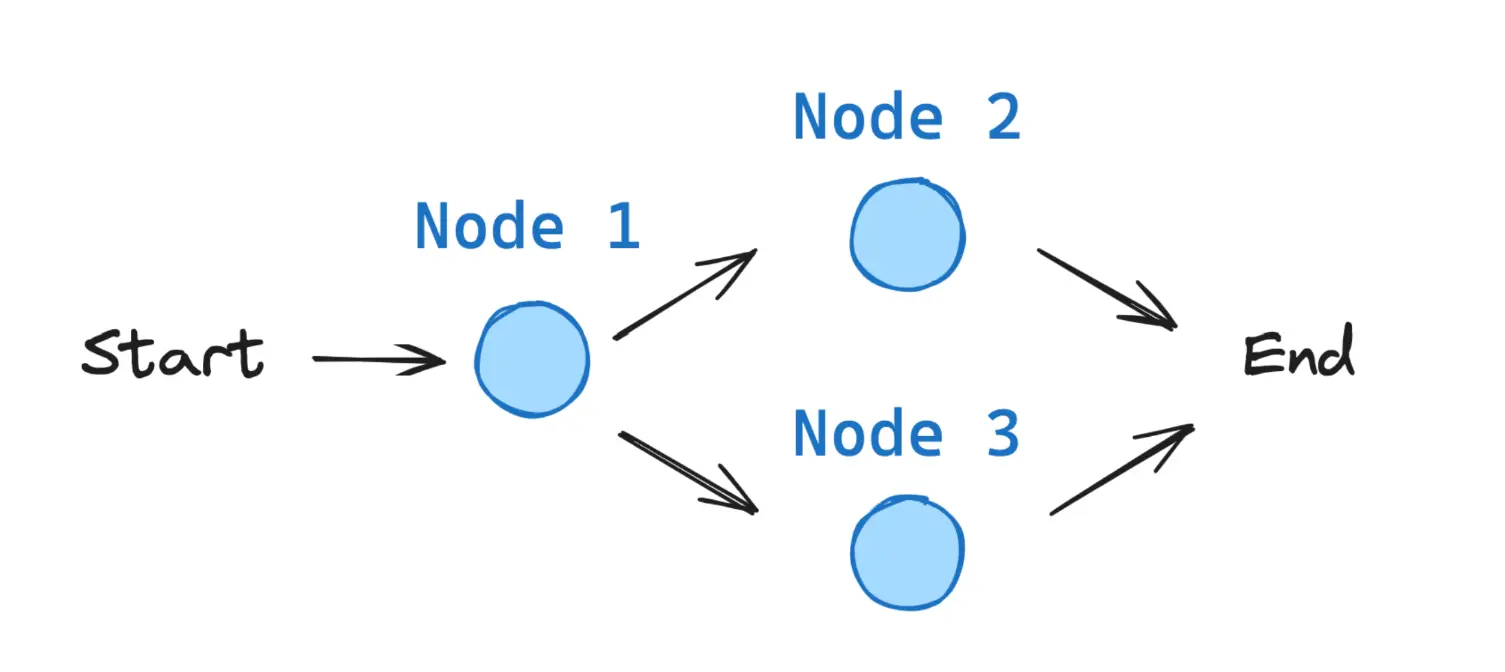
Todos los grafos de LangGraph comienzan desde un nodo START y terminan en un nodo END.
Instalación de LangGraph
Para instalar LangGraph se puede usar pip:
pip install -U langgrapho instalar desde Conda:
conda install langgraphInstalación del módulo de Hugging Face y Anthropic
Vamos a usar un modelo de lenguaje de Hugging Face, por lo que necesitamos instalar su paquete de LangGraph.
pip install langchain-huggingfacePara una parte vamos a usar Sonnet 3.7, luego explicaremos por qué. Así que también instalamos el paquete de Anthropic.
pip install langchain_anthropicAPI KEY de Hugging Face
Vamos a usar Qwen/Qwen2.5-72B-Instruct a través de Hugging Face Inference Endpoints, por lo que necesitamos una API KEY.
Para poder usar el Inference Endpoints de HuggingFace, lo primero que necesitas es tener una cuenta en HuggingFace. Una vez la tengas, hay que ir a Access tokens en la configuración de tu perfil y generar un nuevo token.
Hay que ponerle un nombre. En mi caso, le voy a poner langgraph y habilitar el permiso Make calls to inference providers. Nos creará un token que tendremos que copiar
Para gestionar el token, vamos a crear un archivo en la misma ruta en la que estemos trabajando llamado .env y vamos a poner el token que hemos copiado en el archivo de la siguiente manera:
HUGGINGFACE_LANGGRAPH="hf_...."Ahora, para poder obtener el token, necesitamos tener instalado dotenv, que lo instalamos mediante
pip install python-dotenvEjecutamos lo siguiente
InputPythonimport osimport dotenvdotenv.load_dotenv()HUGGINGFACE_TOKEN = os.getenv("HUGGINGFACE_LANGGRAPH")Copied
Ahora que tenemos un token, creamos un cliente. Para ello, necesitamos tener instalada la librería huggingface_hub. La instalamos mediante conda o pip.
pip install --upgrade huggingface_hubo
conda install -c conda-forge huggingface_hubAhora tenemos que elegir qué modelo vamos a usar. Puedes ver los modelos disponibles en la página de Supported models de la documentación de Inference Endpoints de Hugging Face.
Vamos a usar Qwen2.5-72B-Instruct que es un modelo muy bueno.
InputPythonMODEL = "Qwen/Qwen2.5-72B-Instruct"Copied
Ahora podemos crear el cliente
InputPythonfrom huggingface_hub import InferenceClientclient = InferenceClient(api_key=HUGGINGFACE_TOKEN, model=MODEL)clientCopied
<InferenceClient(model='Qwen/Qwen2.5-72B-Instruct', timeout=None)>
Hacemos una prueba a ver si funciona
InputPythonmessage = [{ "role": "user", "content": "Hola, qué tal?" }]stream = client.chat.completions.create(messages=message,temperature=0.5,max_tokens=1024,top_p=0.7,stream=False)response = stream.choices[0].message.contentprint(response)Copied
¡Hola! Estoy bien, gracias por preguntar. ¿Cómo estás tú? ¿En qué puedo ayudarte hoy?
API KEY de Anthropic
Crear un chatbot básico
Vamos a crear un chatbot simple usando LangGraph. Este chatbot responderá directamente a los mensajes del usuario. Aunque es simple, nos servirá para ver los conceptos básicos de la construcción de grafos con LangGraph.
Como su nombre indica, LangGraph es una biblioteca para manejar grafos. Así que comenzamos creando un grafo StateGraph.
Un StateGraph define la estructura de nuestro chatbot como una máquina de estados. Agregaremos nodos a nuestro grafo para representar los llms, tools y funciones, los llms podrán hacer uso de esas tools y funciones; y añadiremos edges para especificar cómo el bot debe hacer la transición entre esos nodos.
Así que comenzamos creando un StateGraph que necesita una clase State para manejar el estado del grafo. Como ahora vamos a crear un chatbot sencillo, solo necesitamos manejar una lista de mensajes en el estado.
InputPythonfrom typing import Annotatedfrom typing_extensions import TypedDictfrom langgraph.graph import StateGraphfrom langgraph.graph.message import add_messagesclass State(TypedDict):# Messages have the type "list". The `add_messages` function# in the annotation defines how this state key should be updated# (in this case, it appends messages to the list, rather than overwriting them)messages: Annotated[list, add_messages]graph_builder = StateGraph(State)Copied
La función add_messages une dos listas de mensajes.
Llegarán nuevas listas de mensajes, por lo que se unirán a la lista de mensajes ya existente. Cada lista de mensajes contiene un ID, por lo que se agregan con este ID. Esto asegura que los mensajes solo se añaden, no se reemplazan, a no ser que un nuevo mensaje tenga el mismo ID que uno ya existente, que entonces se reemplaza.
add_messages es una reducer function, es una función que se encarga de actualizar el estado.
El grafo graph_builder que hemos creado recibe un estado State y devuelve un nuevo estado State. Además, actualiza la lista de mensajes.
**Concepto**
> Al definir un grafo, el primer paso es definir su
State. ElStateincluye el esquema del grafo y lasreducer functionsque manejan actualizaciones del estado.
> En nuestro ejemplo,
Statees de tipoTypedDict(diccionario tipado) con una llave:messages.
>
add_messageses unareducer functionque se utiliza para agregar nuevos mensajes a la lista en lugar de sobrescribirlos en la lista. Si una llave de un estado no tiene unareducer function, cada valor que llegue de esa clave sobrescribirá los valores anteriores. >
add_messageses unareducer functionde langgraph, pero nosotros vamos a poder crear las nuestras
Ahora vamos a agregar al grafo el nodo chatbot. Los nodos representan unidades de trabajo. Por lo general, son funciones regulares de Python.
Añadimos un nodo con el método add_node que recibe el nombre del nodo y la función que se ejecutará.
De modo que vamos a crear un LLM con HuggingFace, después crearemos un chat model con LangChain que hará referencia al LLM creado. Una vez tenemos definido un chat model, definimos la función que se ejecutará en el nodo de nuestro grafo. Esa función hará una llamada al chat model creado y devolverá el resultado.
Por último vamos a añadir un nodo con la función del chatbot al grafo
InputPythonfrom langchain_huggingface import HuggingFaceEndpoint, ChatHuggingFacefrom huggingface_hub import loginos.environ["LANGCHAIN_TRACING_V2"] = "false" # Disable LangSmith tracing# Create the LLM modellogin(token=HUGGINGFACE_TOKEN) # Login to HuggingFace to use the modelMODEL = "Qwen/Qwen2.5-72B-Instruct"model = HuggingFaceEndpoint(repo_id=MODEL,task="text-generation",max_new_tokens=512,do_sample=False,repetition_penalty=1.03,)# Create the chat modelllm = ChatHuggingFace(llm=model)# Define the chatbot functiondef chatbot_function(state: State):return {"messages": [llm.invoke(state["messages"])]}# The first argument is the unique node name# The second argument is the function or object that will be called whenever# the node is used.graph_builder.add_node("chatbot_node", chatbot_function)Copied
<langgraph.graph.state.StateGraph at 0x130548440>
Hemos usado ChatHuggingFace que es un chat del tipo BaseChatModel que es un tipo de chat base de LangChain. Una vez hemos creado el BaseChatModel, hemos creado la función chatbot_function que se ejecutará cuando se ejecute el nodo. Y por último, hemos creado el nodo chatbot_node y le hemos indicado que tiene que ejecutar la función chatbot_function.
**Aviso**
> La función de nodo
chatbot_functiontoma el estadoStatecomo entrada y devuelve un diccionario que contiene una actualización de la listamessagespara la keymensajes. Este es el patrón básico para todas las funciones del nodoLangGraph.
La reducer function de nuestro grafo add_messages agregará los mensajes de respuesta del llm a cualquier mensaje que ya esté en el estado.
A continuación, agregamos un nodo entry. Esto le dice a nuestro grafo dónde empezar su trabajo cada vez que lo ejecutamos.
InputPythonfrom langgraph.graph import STARTgraph_builder.add_edge(START, "chatbot_node")Copied
<langgraph.graph.state.StateGraph at 0x130548440>
Del mismo modo, añadimos un nodo finish. Esto indica al grafo que cada vez que se ejecuta este nodo, puede terminar el trabajo.
InputPythonfrom langgraph.graph import ENDgraph_builder.add_edge("chatbot_node", END)Copied
<langgraph.graph.state.StateGraph at 0x130548440>
Hemos importado START y END que podemos encontrarlos en constants y son el primer y el último nodo de nuestro grafo.
Normalmente son nodos virtuales
Finalmente, tenemos que compilar nuestro grafo. Para hacerlo, usamos el método constructor de grafos compile(). Esto crea un CompiledGraph que podemos usar para ejecutar nuestra aplicación.
InputPythongraph = graph_builder.compile()Copied
Podemos visualizar el grafo usando el método get_graph y uno de los métodos de "dibujo", como draw_ascii o draw_mermaid_png. El dibujo de cada uno de los métodos requiere dependencias adicionales.
InputPythonfrom IPython.display import Image, displaytry:display(Image(graph.get_graph().draw_mermaid_png()))except Exception as e:print(f"Error al visualizar el grafo: {e}")Copied
<IPython.core.display.Image object>
¡Ahora podemos probar el chatbot!
**Consejo**
> En el siguiente bloque de código, puedes salir del bucle de chat en cualquier momento escribiendo
quit,exitoq.
InputPython# Colors for the terminalCOLOR_GREEN = "\033[32m"COLOR_YELLOW = "\033[33m"COLOR_RESET = "\033[0m"def stream_graph_updates(user_input: str):for event in graph.stream({"messages": [{"role": "user", "content": user_input}]}):for value in event.values():print(f"{COLOR_GREEN}User: {COLOR_RESET}{user_input}")print(f"{COLOR_YELLOW}Assistant: {COLOR_RESET}{value['messages'][-1].content}")while True:try:user_input = input("User: ")if user_input.lower() in ["quit", "exit", "q"]:print(f"{COLOR_GREEN}User: {COLOR_RESET}{user_input}")print(f"{COLOR_YELLOW}Assistant: {COLOR_RESET}Goodbye!")breakevents =stream_graph_updates(user_input)except:# fallback if input() is not availableuser_input = "What do you know about LangGraph?"print("User: " + user_input)stream_graph_updates(user_input)breakCopied
User: HelloAssistant: Hello! It's nice to meet you. How can I assist you today? Whether you have questions, need information, or just want to chat, I'm here to help!User: How are you doing?Assistant: I'm just a computer program, so I don't have feelings, but I'm here and ready to help you with any questions or tasks you have! How can I assist you today?User: Me well, I'm making a post about LangGraph, what do you think?Assistant: LangGraph is an intriguing topic, especially if you're delving into the realm of graph-based models and their applications in natural language processing (NLP). LangGraph, as I understand, is a framework or tool that leverages graph theory to improve or provide a new perspective on NLP tasks such as text classification, information extraction, and semantic analysis. By representing textual information as graphs (nodes for entities and edges for relationships), it can offer a more nuanced understanding of the context and semantics in language data.If you're making a post about it, here are a few points you might consider:1. **Introduction to LangGraph**: Start with a brief explanation of what LangGraph is and its core principles. How does it model language or text differently compared to traditional NLP approaches? What unique advantages does it offer by using graph-based methods?2. **Applications of LangGraph**: Discuss some of the key applications where LangGraph has been or can be applied. This could include improving the accuracy of sentiment analysis, enhancing machine translation, or optimizing chatbot responses to be more contextually aware.3. **Technical Innovations**: Highlight any technical innovations or advancements that LangGraph brings to the table. This could be about new algorithms, more efficient data structures, or novel ways of training models on graph data.4. **Challenges and Limitations**: It's also important to address the challenges and limitations of using graph-based methods in NLP. Performance, scalability, and the current state of the technology can be discussed here.5. **Future Prospects**: Wrap up with a look into the future of LangGraph and graph-based NLP in general. What are the upcoming trends, potential areas of growth, and how might these tools start impacting broader technology landscapes?Each section can help frame your post in a way that's informative and engaging for your audience, whether they're technical experts or casual readers looking for an introduction to this intriguing area of NLP.User: qAssistant: Goodbye!
**¡Felicidades!** Has construido tu primer chatbot usando LangGraph. Este bot puede participar en una conversación básica tomando la entrada del usuario y generando respuestas utilizando el LLM que hemos definido.
Antes hemos ido escribiendo el código poco a poco y puede que no haya quedado muy claro. Se ha hecho así para explicar cada parte del código, pero ahora vamos a volver a escribirlo, pero ordenado de otra manera, que queda más claro a la vista. Es decir, ahora que no hay que explicar cada parte del código, lo agrupamos de otra manera para que sea más claro
InputPythonfrom typing import Annotatedfrom typing_extensions import TypedDictfrom langgraph.graph import StateGraph, START, ENDfrom langgraph.graph.message import add_messagesfrom langchain_huggingface import HuggingFaceEndpoint, ChatHuggingFacefrom huggingface_hub import loginfrom IPython.display import Image, displayimport osos.environ["LANGCHAIN_TRACING_V2"] = "false" # Disable LangSmith tracingimport dotenvdotenv.load_dotenv()HUGGINGFACE_TOKEN = os.getenv("HUGGINGFACE_LANGGRAPH")# Stateclass State(TypedDict):messages: Annotated[list, add_messages]# Create the LLM modellogin(token=HUGGINGFACE_TOKEN) # Login to HuggingFace to use the modelMODEL = "Qwen/Qwen2.5-72B-Instruct"model = HuggingFaceEndpoint(repo_id=MODEL,task="text-generation",max_new_tokens=512,do_sample=False,repetition_penalty=1.03,)# Create the chat modelllm = ChatHuggingFace(llm=model)# Functiondef chatbot_function(state: State):return {"messages": [llm.invoke(state["messages"])]}# Start to build the graphgraph_builder = StateGraph(State)# Add nodes to the graphgraph_builder.add_node("chatbot_node", chatbot_function)# Add edgesgraph_builder.add_edge(START, "chatbot_node")graph_builder.add_edge("chatbot_node", END)# Compile the graphgraph = graph_builder.compile()# Display the graphtry:display(Image(graph.get_graph().draw_mermaid_png()))except Exception as e:print(f"Error al visualizar el grafo: {e}")Copied
<IPython.core.display.Image object>
Más
Todos los bloques más están por si quieres profundizar más en LangGraph, si no, puedes leer todo sin leer los bloques más
Tipado del estado
Hemos visto cómo crear un agente con un estado tipado mediante TypedDict, pero podemos crearlo con otro tipo tipado.
Tipado mediante TypeDict
Es la forma que hemos visto antes, tipamos el estado como un diccionario usando el tipado de Python TypeDict. Le pasamos una llave y un valor para cada variable de nuestro estado
from typing_extensions import TypedDict
from typing import Annotated
from langgraph.graph.message import add_messages
from langgraph.graph import StateGraph

class State(TypedDict):
  messages: Annotated[list, add_messages]
Para acceder a los mensajes lo hacemos como con cualquier diccionario, mediante state["messages"]
Tipado mediante dataclass
Otra opción es usar el tipado de Python dataclass
from dataclasses import dataclass
from typing import Annotated
from langgraph.graph.message import add_messages
from langgraph.graph import StateGraph

@dataclass
class State:
  messages: Annotated[list, add_messages]
Como se puede ver, es similar al tipado mediante diccionarios, pero ahora, al ser el estado una clase, accedemos a los mensajes mediante state.messages
Tipado con Pydantic
Pydantic es una librería muy usada para tipar datos en Python. Nos ofrece la posibilidad de añadir una comprobación del tipado. Vamos a comprobar que el mensaje empiece con 'User', 'Assistant' o 'System'
from pydantic import BaseModel, field_validator, ValidationError
from typing import Annotated
from langgraph.graph.message import add_messages

class State(BaseModel):
  messages: Annotated[list, add_messages] # Should start by 'User', 'Assistant' or 'System'

  @field_validator('messages')
  @classmethod
  def validate_messages(cls, value):
    # Ensure the messages start with `User`, `Assistant` or `System`
    if not value.startswith["'User'"] and not value.startswith["'Assistant'"] and not value.startswith["'System'"]:
      raise ValueError("Message must start with 'User', 'Assistant' or 'System'")        return value

try:
  state = PydanticState(messages=["Hello"])
except ValidationError as e:
  print("Validation Error:", e)
Reducers
Como hemos dicho, necesitamos usar una función de tipo Reducer para indicar cómo actualizar el estado, ya que, si no, los valores del estado se sobreescriben.
Vamos a ver un ejemplo de un grafo en el que no usamos una función de tipo Reducer para indicar cómo actualizar el estado
InputPythonfrom typing_extensions import TypedDictfrom langgraph.graph import StateGraph, START, ENDfrom IPython.display import Image, displayclass State(TypedDict):foo: intdef node_1(state):print("---Node 1---")return {"foo": state['foo'] + 1}def node_2(state):print("---Node 2---")return {"foo": state['foo'] + 1}def node_3(state):print("---Node 3---")return {"foo": state['foo'] + 1}# Build graphbuilder = StateGraph(State)builder.add_node("node_1", node_1)builder.add_node("node_2", node_2)builder.add_node("node_3", node_3)# Logicbuilder.add_edge(START, "node_1")builder.add_edge("node_1", "node_2")builder.add_edge("node_1", "node_3")builder.add_edge("node_2", END)builder.add_edge("node_3", END)# Addgraph = builder.compile()# Viewdisplay(Image(graph.get_graph().draw_mermaid_png()))Copied
<IPython.core.display.Image object>
Como vemos hemos definido un grafo en el que primero se ejecuta el nodo 1 y luego el 2 y el 3. Vamos a ejecutarlo a ver qué pasa
InputPythonfrom langgraph.errors import InvalidUpdateErrortry:graph.invoke({"foo" : 1})except InvalidUpdateError as e:print(f"InvalidUpdateError occurred: {e}")Copied
---Node 1------Node 2------Node 3---InvalidUpdateError occurred: At key 'foo': Can receive only one value per step. Use an Annotated key to handle multiple values.For troubleshooting, visit: https://python.langchain.com/docs/troubleshooting/errors/INVALID_CONCURRENT_GRAPH_UPDATE
Obtenemos un error porque primero el nodo 1 modifica el valor de foo y luego los nodos 2 y 3 intentan modificar el valor de foo en paralelo, lo cual da un error
Así que para evitar eso usamos una función de tipo Reducer para indicar cómo modificar el estado
Reducers predefinidos
Usamos el tipo Annotated para especificar que es una función de tipo Reducer. Y usamos el operador add para añadir un valor a una lista
InputPythonfrom typing_extensions import TypedDictfrom langgraph.graph import StateGraph, START, ENDfrom IPython.display import Image, displayfrom operator import addfrom typing import Annotatedclass State(TypedDict):foo: Annotated[list[int], add]def node_1(state):print("---Node 1---")return {"foo": [state['foo'][-1] + 1]}def node_2(state):print("---Node 2---")return {"foo": [state['foo'][-1] + 1]}def node_3(state):print("---Node 3---")return {"foo": [state['foo'][-1] + 1]}# Build graphbuilder = StateGraph(State)builder.add_node("node_1", node_1)builder.add_node("node_2", node_2)builder.add_node("node_3", node_3)# Logicbuilder.add_edge(START, "node_1")builder.add_edge("node_1", "node_2")builder.add_edge("node_1", "node_3")builder.add_edge("node_2", END)builder.add_edge("node_3", END)# Addgraph = builder.compile()# Viewdisplay(Image(graph.get_graph().draw_mermaid_png()))Copied
<IPython.core.display.Image object>
Lo volvemos a ejecutar a ver qué pasa
InputPythongraph.invoke({"foo" : [1]})Copied
---Node 1------Node 2------Node 3---
{'foo': [1, 2, 3, 3]}
Como vemos, inicializamos el valor de foo a 1, lo cual se añade en una lista. Luego el nodo 1 le suma 1 y lo añade como nuevo valor en la lista, es decir, añade un 2. Por último, los nodos 2 y 3 suman uno al último valor de la lista, es decir, los dos nodos obtienen un 3 y los dos nodos lo añaden al final de la lista, por eso la lista resultante tiene dos 3 al final
Vamos a ver el caso de que una rama tenga más nodos que otra
InputPythonfrom typing_extensions import TypedDictfrom langgraph.graph import StateGraph, START, ENDfrom IPython.display import Image, displayfrom operator import addfrom typing import Annotatedclass State(TypedDict):foo: Annotated[list[int], add]def node_1(state):print("---Node 1---")return {"foo": [state['foo'][-1] + 1]}def node_2_1(state):print("---Node 2_1---")return {"foo": [state['foo'][-1] + 1]}def node_2_2(state):print("---Node 2_2---")return {"foo": [state['foo'][-1] + 1]}def node_3(state):print("---Node 3---")return {"foo": [state['foo'][-1] + 1]}# Build graphbuilder = StateGraph(State)builder.add_node("node_1", node_1)builder.add_node("node_2_1", node_2_1)builder.add_node("node_2_2", node_2_2)builder.add_node("node_3", node_3)# Logicbuilder.add_edge(START, "node_1")builder.add_edge("node_1", "node_2_1")builder.add_edge("node_1", "node_3")builder.add_edge("node_2_1", "node_2_2")builder.add_edge("node_2_2", END)builder.add_edge("node_3", END)# Addgraph = builder.compile()# Viewdisplay(Image(graph.get_graph().draw_mermaid_png()))Copied
<IPython.core.display.Image object>
Si ahora ejecutamos el grafo
InputPythongraph.invoke({"foo" : [1]})Copied
---Node 1------Node 2_1------Node 3------Node 2_2---
{'foo': [1, 2, 3, 3, 4]}
Lo que ha pasado es que primero se ha ejecutado el nodo 1, a continuación el nodo 2_1, después, en paralelo, los nodos 2_2 y 3, y por último el nodo END
Como hemos definido foo como una lista de enteros, y está tipada, si inicializamos el estado con None obtenemos un error
InputPythontry:graph.invoke({"foo" : None})except TypeError as e:print(f"TypeError occurred: {e}")Copied
TypeError occurred: can only concatenate list (not "NoneType") to list
Vamos a ver cómo arreglarlo con reducers personalizados
Reducers personalizados
A veces no podemos usar un Reducer predefinido y tenemos que crear el nuestro
InputPythonfrom typing_extensions import TypedDictfrom langgraph.graph import StateGraph, START, ENDfrom IPython.display import Image, displayfrom typing import Annotateddef reducer_function(current_list, new_item: list | None):if current_list is None:current_list = []if new_item is not None:return current_list + new_itemreturn current_listclass State(TypedDict):foo: Annotated[list[int], reducer_function]def node_1(state):print("---Node 1---")if len(state['foo']) == 0:return {'foo': [0]}return {"foo": [state['foo'][-1] + 1]}def node_2(state):print("---Node 2---")return {"foo": [state['foo'][-1] + 1]}def node_3(state):print("---Node 3---")return {"foo": [state['foo'][-1] + 1]}# Build graphbuilder = StateGraph(State)builder.add_node("node_1", node_1)builder.add_node("node_2", node_2)builder.add_node("node_3", node_3)# Logicbuilder.add_edge(START, "node_1")builder.add_edge("node_1", "node_2")builder.add_edge("node_1", "node_3")builder.add_edge("node_2", END)builder.add_edge("node_3", END)# Addgraph = builder.compile()# Viewdisplay(Image(graph.get_graph().draw_mermaid_png()))Copied
<IPython.core.display.Image object>
Si ahora iniciamos el grafo con un valor None ya no nos da un error
InputPythontry:graph.invoke({"foo" : None})except TypeError as e:print(f"TypeError occurred: {e}")Copied
---Node 1------Node 2------Node 3---
Múltiples estados
Estados privados
Supongamos que queremos ocultar variables del estado, por la razón que sea, porque algunas variables solo aportan ruido o porque queremos mantener alguna variable privada.
Si queremos tener un estado privado, simplemente lo creamos.
InputPythonfrom typing_extensions import TypedDictfrom IPython.display import Image, displayfrom langgraph.graph import StateGraph, START, ENDclass OverallState(TypedDict):public_var: intclass PrivateState(TypedDict):private_var: intdef node_1(state: OverallState) -> PrivateState:print("---Node 1---")return {"private_var": state['public_var'] + 1}def node_2(state: PrivateState) -> OverallState:print("---Node 2---")return {"public_var": state['private_var'] + 1}# Build graphbuilder = StateGraph(OverallState)builder.add_node("node_1", node_1)builder.add_node("node_2", node_2)# Logicbuilder.add_edge(START, "node_1")builder.add_edge("node_1", "node_2")builder.add_edge("node_2", END)# Addgraph = builder.compile()# Viewdisplay(Image(graph.get_graph().draw_mermaid_png()))Copied
<IPython.core.display.Image object>
Como vemos hemos creado el estado privado PrivateState y el estado público OverallState. Cada uno con una variable privada y una pública. Primero se ejecuta el nodo 1, que modifica la variable privada y la devuelve. Luego se ejecuta el nodo 2, que modifica la variable pública y la devuelve. Vamos a ejecutar el grafo para ver qué pasa
InputPythongraph.invoke({"public_var" : 1})Copied
---Node 1------Node 2---
{'public_var': 3}
Como vemos al ejecutar el grafo, pasamos la variable pública public_var y obtenemos a la salida otra variable pública public_var con el valor modificado, pero nunca se ha accedido a la variable privada private_var
Estados de entrada y salida
Podemos definir las variables de entrada y salida del grafo. Aunque internamente el estado puede tener más variables, definimos qué variables son de entrada al grafo y qué variables son de salida.
InputPythonfrom typing_extensions import TypedDictfrom IPython.display import Image, displayfrom langgraph.graph import StateGraph, START, ENDclass InputState(TypedDict):question: strclass OutputState(TypedDict):answer: strclass OverallState(TypedDict):question: stranswer: strnotes: strdef thinking_node(state: InputState):return {"answer": "bye", "notes": "... his is name is Lance"}def answer_node(state: OverallState) -> OutputState:return {"answer": "bye Lance"}graph = StateGraph(OverallState, input=InputState, output=OutputState)graph.add_node("answer_node", answer_node)graph.add_node("thinking_node", thinking_node)graph.add_edge(START, "thinking_node")graph.add_edge("thinking_node", "answer_node")graph.add_edge("answer_node", END)graph = graph.compile()# Viewdisplay(Image(graph.get_graph().draw_mermaid_png()))Copied
<IPython.core.display.Image object>
En este caso el estado tiene 3 variables, question, answer y notes. Sin embargo definimos como entrada al grafo question y como salida del grafo answer. Por lo tanto, el estado interno puede tener más variables, pero no se tienen en cuenta a la hora de invocar el grafo. Vamos a ejecutar el grafo para ver qué pasa
InputPythongraph.invoke({"question":"hi"})Copied
{'answer': 'bye Lance'}
Como vemos, le hemos metido question al grafo y hemos obtenido answer a la salida.
Manejo del contexto
Vamos a volver a ver el código del chatbot básico
InputPythonfrom typing import Annotatedfrom typing_extensions import TypedDictfrom langgraph.graph import StateGraph, START, ENDfrom langgraph.graph.message import add_messagesfrom langchain_huggingface import HuggingFaceEndpoint, ChatHuggingFacefrom huggingface_hub import loginfrom IPython.display import Image, displayimport osimport dotenvdotenv.load_dotenv()HUGGINGFACE_TOKEN = os.getenv("HUGGINGFACE_LANGGRAPH")class State(TypedDict):messages: Annotated[list, add_messages]os.environ["LANGCHAIN_TRACING_V2"] = "false" # Disable LangSmith tracing# Create the LLM modellogin(token=HUGGINGFACE_TOKEN) # Login to HuggingFace to use the modelMODEL = "Qwen/Qwen2.5-72B-Instruct"model = HuggingFaceEndpoint(repo_id=MODEL,task="text-generation",max_new_tokens=512,do_sample=False,repetition_penalty=1.03,)# Create the chat modelllm = ChatHuggingFace(llm=model)# Define the chatbot functiondef chatbot_function(state: State):return {"messages": [llm.invoke(state["messages"])]}# Create graph buildergraph_builder = StateGraph(State)# Add nodesgraph_builder.add_node("chatbot_node", chatbot_function)# Connect nodesgraph_builder.add_edge(START, "chatbot_node")graph_builder.add_edge("chatbot_node", END)# Compile the graphgraph = graph_builder.compile()display(Image(graph.get_graph().draw_mermaid_png()))Copied
<IPython.core.display.Image object>
Vamos a crear un contexto que le pasaremos al modelo
InputPythonfrom langchain_core.messages import AIMessage, HumanMessagemessages = [AIMessage(f"So you said you were researching ocean mammals?", name="Bot")]messages.append(HumanMessage(f"Yes, I know about whales. But what others should I learn about?", name="Lance"))for m in messages:m.pretty_print()Copied
================================== Ai Message ==================================Name: BotSo you said you were researching ocean mammals?================================ Human Message =================================Name: LanceYes, I know about whales. But what others should I learn about?
Si se lo pasamos al grafo, obtendremos la salida
InputPythonoutput = graph.invoke({'messages': messages})for m in output['messages']:m.pretty_print()Copied
================================== Ai Message ==================================Name: BotSo you said you were researching ocean mammals?================================ Human Message =================================Name: LanceYes, I know about whales. But what others should I learn about?================================== Ai Message ==================================That's a great topic! Besides whales, there are several other fascinating ocean mammals you might want to learn about. Here are a few:1. **Dolphins**: Highly intelligent and social, dolphins are found in all oceans of the world. They are known for their playful behavior and communication skills.2. **Porpoises**: Similar to dolphins but generally smaller and stouter, porpoises are less social and more elusive. They are found in coastal waters around the world.3. **Seals and Sea Lions**: These are semi-aquatic mammals that can be found in both Arctic and Antarctic regions, as well as in more temperate waters. They are known for their sleek bodies and flippers, and they differ in their ability to walk on land (sea lions can "walk" on their flippers, while seals can only wriggle or slide).4. **Walruses**: Known for their large tusks and whiskers, walruses are found in the Arctic. They are well-adapted to cold waters and have a thick layer of blubber to keep them warm.5. **Manatees and Dugongs**: These gentle, herbivorous mammals are often called "sea cows." They live in shallow, coastal areas and are found in tropical and subtropical regions. Manatees are found in the Americas, while dugongs are found in the Indo-Pacific region.6. **Otters**: While not fully aquatic, sea otters spend most of their lives in the water and are excellent swimmers. They are known for their dense fur, which keeps them warm in cold waters.7. **Polar Bears**: Although primarily considered land animals, polar bears are excellent swimmers and spend a significant amount of time in the water, especially when hunting for seals.Each of these mammals has unique adaptations and behaviors that make them incredibly interesting to study. If you have any specific questions or topics you'd like to explore further, feel free to ask!
Como vemos ahora en la salida tenemos un mensaje más.
Si esto sigue creciendo llegará un momento en el que tendremos un contexto muy largo, por lo que supondrá un mayor gasto de tokens, que puede acarrear un mayor gasto económico y conllevar también mayor latencia.
Además, con contextos muy largos los LLMs empiezan a rendir peor.
En los últimos modelos, a día de la escritura de este post, por encima de 8k tokens de contexto, empieza a decaer el rendimiento del LLM
Así que vamos a ver varias maneras de gestionar esto
Modificar el contexto con funciones de tipo Reducer
Hemos visto que con las funciones de tipo Reducer podemos modificar los mensajes del estado
InputPythonfrom typing import Annotatedfrom typing_extensions import TypedDictfrom langgraph.graph import StateGraph, START, ENDfrom langgraph.graph.message import add_messagesfrom langchain_huggingface import HuggingFaceEndpoint, ChatHuggingFacefrom langchain_core.messages import RemoveMessagefrom huggingface_hub import loginfrom IPython.display import Image, displayimport osimport dotenvdotenv.load_dotenv()HUGGINGFACE_TOKEN = os.getenv("HUGGINGFACE_LANGGRAPH")class State(TypedDict):messages: Annotated[list, add_messages]os.environ["LANGCHAIN_TRACING_V2"] = "false" # Disable LangSmith tracing# Create the LLM modellogin(token=HUGGINGFACE_TOKEN) # Login to HuggingFace to use the modelMODEL = "Qwen/Qwen2.5-72B-Instruct"model = HuggingFaceEndpoint(repo_id=MODEL,task="text-generation",max_new_tokens=512,do_sample=False,repetition_penalty=1.03,)# Create the chat modelllm = ChatHuggingFace(llm=model)# Nodesdef filter_messages(state: State):# Delete all but the 2 most recent messagesdelete_messages = [RemoveMessage(id=m.id) for m in state["messages"][:-2]]return {"messages": delete_messages}def chat_model_node(state: State):return {"messages": [llm.invoke(state["messages"])]}# Create graph buildergraph_builder = StateGraph(State)# Add nodesgraph_builder.add_node("filter_messages_node", filter_messages)graph_builder.add_node("chatbot_node", chat_model_node)# Connecto nodesgraph_builder.add_edge(START, "filter_messages_node")graph_builder.add_edge("filter_messages_node", "chatbot_node")graph_builder.add_edge("chatbot_node", END)# Compile the graphgraph = graph_builder.compile()display(Image(graph.get_graph().draw_mermaid_png()))Copied
<IPython.core.display.Image object>
Como vemos en el grafo, primero filtramos los mensajes y luego pasamos el resultado al modelo.
Volvemos a crear un contexto que le pasaremos al modelo, pero ahora con más mensajes
InputPythonfrom langchain_core.messages import AIMessage, HumanMessagemessages = [AIMessage(f"So you said you were researching ocean mammals?", name="Bot")]messages.append(HumanMessage(f"Yes, I know about whales. But what others should I learn about?", name="Lance"))messages.append(AIMessage(f"I know about sharks too", name="Bot"))messages.append(HumanMessage(f"What others should I learn about?", name="Lance"))messages.append(AIMessage(f"I know about dolphins too", name="Bot"))messages.append(HumanMessage(f"Tell me more about dolphins", name="Lance"))for m in messages:m.pretty_print()Copied
================================== Ai Message ==================================Name: BotSo you said you were researching ocean mammals?================================ Human Message =================================Name: LanceYes, I know about whales. But what others should I learn about?================================== Ai Message ==================================Name: BotI know about sharks too================================ Human Message =================================Name: LanceWhat others should I learn about?================================== Ai Message ==================================Name: BotI know about dolphins too================================ Human Message =================================Name: LanceTell me more about dolphins
Si se lo pasamos al grafo, obtendremos la salida
InputPythonoutput = graph.invoke({'messages': messages})for m in output['messages']:m.pretty_print()Copied
================================== Ai Message ==================================Name: BotI know about dolphins too================================ Human Message =================================Name: LanceTell me more about dolphins================================== Ai Message ==================================Dolphins are highly intelligent marine mammals that are part of the family Delphinidae, which includes about 40 species. They are found in oceans worldwide, from tropical to temperate regions, and are known for their agility and playful behavior. Here are some interesting facts about dolphins:1. **Social Behavior**: Dolphins are highly social animals and often live in groups called pods, which can range from a few individuals to several hundred. Social interactions are complex and include cooperative behaviors, such as hunting and defending against predators.2. **Communication**: Dolphins communicate using a variety of sounds, including clicks, whistles, and body language. These sounds can be used for navigation (echolocation), communication, and social bonding. Each dolphin has a unique signature whistle that helps identify it to others in the pod.3. **Intelligence**: Dolphins are considered one of the most intelligent animals on Earth. They have large brains and display behaviors such as problem-solving, mimicry, and even the use of tools. Some studies suggest that dolphins can recognize themselves in mirrors, indicating a level of self-awareness.4. **Diet**: Dolphins are carnivores and primarily feed on fish and squid. They use echolocation to locate and catch their prey. Some species, like the bottlenose dolphin, have been observed using teamwork to herd fish into tight groups, making them easier to catch.5. **Reproduction**: Dolphins typically give birth to a single calf after a gestation period of about 10 to 12 months. Calves are born tail-first and are immediately helped to the surface for their first breath by their mother or another dolphin. Calves nurse for up to two years and remain dependent on their mothers for a significant period.6. **Conservation**: Many dolphin species are threatened by human activities such as pollution, overfishing, and habitat destruction. Some species, like the Indo-Pacific humpback dolphin and the Amazon river dolphin, are endangered. Conservation efforts are crucial to protect these animals and their habitats.7. **Human Interaction**: Dolphins have a long history of interaction with humans, often appearing in mythology and literature. In some cultures, they are considered sacred or bring good luck. Today, dolphins are popular in marine parks and are often the focus of eco-tourism activities, such as dolphin-watching tours.Dolphins continue to fascinate scientists and the general public alike, with ongoing research into their behavior, communication, and social structures providing new insights into these remarkable creatures.
Como se puede ver, la función de filtrado ha eliminado todos los mensajes menos los dos últimos y esos dos mensajes se han pasado como contexto al LLM.
Recortar mensajes
Otra solución es recortar cada mensaje de la lista de mensajes que tenga muchos tokens, se establece un límite de tokens y se elimina el mensaje que supera ese límite.
InputPythonfrom typing import Annotatedfrom typing_extensions import TypedDictfrom langgraph.graph import StateGraph, START, ENDfrom langgraph.graph.message import add_messagesfrom langchain_huggingface import HuggingFaceEndpoint, ChatHuggingFacefrom langchain_core.messages import trim_messagesfrom huggingface_hub import loginfrom IPython.display import Image, displayimport osimport dotenvdotenv.load_dotenv()HUGGINGFACE_TOKEN = os.getenv("HUGGINGFACE_LANGGRAPH")class State(TypedDict):messages: Annotated[list, add_messages]os.environ["LANGCHAIN_TRACING_V2"] = "false" # Disable LangSmith tracing# Create the LLM modellogin(token=HUGGINGFACE_TOKEN) # Login to HuggingFace to use the modelMODEL = "Qwen/Qwen2.5-72B-Instruct"model = HuggingFaceEndpoint(repo_id=MODEL,task="text-generation",max_new_tokens=512,do_sample=False,repetition_penalty=1.03,)# Create the chat modelllm = ChatHuggingFace(llm=model)# Nodesdef trim_messages_node(state: State):# Trim the messages based on the specified parameterstrimmed_messages = trim_messages(state["messages"],max_tokens=100, # Maximum tokens allowed in the trimmed liststrategy="last", # Keep the latest messagestoken_counter=llm, # Use the LLM's tokenizer to count tokensallow_partial=True, # Allow cutting messages mid-way if needed)# Print the trimmed messages to see the effect of trim_messagesprint("--- trimmed messages (input to LLM) ---")for m in trimmed_messages:m.pretty_print()print("------------------------------------------------")# Invoke the LLM with the trimmed messagesresponse = llm.invoke(trimmed_messages)# Return the LLM's response in the correct state formatreturn {"messages": [response]}# Create graph buildergraph_builder = StateGraph(State)# Add nodesgraph_builder.add_node("trim_messages_node", trim_messages_node)# Connecto nodesgraph_builder.add_edge(START, "trim_messages_node")graph_builder.add_edge("trim_messages_node", END)# Compile the graphgraph = graph_builder.compile()display(Image(graph.get_graph().draw_mermaid_png()))Copied
<IPython.core.display.Image object>
Como vemos en el grafo, primero filtramos los mensajes y luego pasamos el resultado al modelo.
Volvemos a crear un contexto que le pasaremos al modelo, pero ahora con más mensajes
InputPythonfrom langchain_core.messages import AIMessage, HumanMessagemessages = [AIMessage(f"So you said you were researching ocean mammals?", name="Bot")]messages.append(HumanMessage(f"Yes, I know about whales. But what others should I learn about?", name="Lance"))messages.append(AIMessage(f"""I know about sharks too. They are very dangerous, but they are also very beautiful.Sometimes have been seen in the wild, but they are not very common. In the wild, they are very dangerous, but they are also very beautiful.They live in the sea and in the ocean. They can travel long distances and can be found in many parts of the world.Often they live in groups of 20 or more, but they are not very common.They should eat a lot of food. Normally they eat a lot of fish.The white shark is the largest of the sharks and is the most dangerous.The great white shark is the most famous of the sharks and is the most dangerous.The tiger shark is the most aggressive of the sharks and is the most dangerous.The hammerhead shark is the most beautiful of the sharks and is the most dangerous.The mako shark is the fastest of the sharks and is the most dangerous.The bull shark is the most common of the sharks and is the most dangerous.""", name="Bot"))messages.append(HumanMessage(f"What others should I learn about?", name="Lance"))messages.append(AIMessage(f"I know about dolphins too", name="Bot"))messages.append(HumanMessage(f"Tell me more about dolphins", name="Lance"))for m in messages:m.pretty_print()Copied
================================== Ai Message ==================================Name: BotSo you said you were researching ocean mammals?================================ Human Message =================================Name: LanceYes, I know about whales. But what others should I learn about?================================== Ai Message ==================================Name: BotI know about sharks too. They are very dangerous, but they are also very beautiful.Sometimes have been seen in the wild, but they are not very common. In the wild, they are very dangerous, but they are also very beautiful.They live in the sea and in the ocean. They can travel long distances and can be found in many parts of the world.Often they live in groups of 20 or more, but they are not very common.They should eat a lot of food. Normally they eat a lot of fish.The white shark is the largest of the sharks and is the most dangerous.The great white shark is the most famous of the sharks and is the most dangerous.The tiger shark is the most aggressive of the sharks and is the most dangerous.The hammerhead shark is the most beautiful of the sharks and is the most dangerous.The mako shark is the fastest of the sharks and is the most dangerous.The bull shark is the most common of the sharks and is the most dangerous.================================ Human Message =================================Name: LanceWhat others should I learn about?================================== Ai Message ==================================Name: BotI know about dolphins too================================ Human Message =================================Name: LanceTell me more about dolphins
Si se lo pasamos al grafo obtendremos la salida
InputPythonoutput = graph.invoke({'messages': messages})Copied
--- trimmed messages (input to LLM) ---================================== Ai Message ==================================Name: BotThe tiger shark is the most aggressive of the sharks and is the most dangerous.The hammerhead shark is the most beautiful of the sharks and is the most dangerous.The mako shark is the fastest of the sharks and is the most dangerous.The bull shark is the most common of the sharks and is the most dangerous.================================ Human Message =================================Name: LanceWhat others should I learn about?================================== Ai Message ==================================Name: BotI know about dolphins too================================ Human Message =================================Name: LanceTell me more about dolphins------------------------------------------------
Como se puede ver se ha recortado el contexto que se le pasa al LLM, el mensaje que era muy largo y tenía muchos tokens se ha recortado. Vamos a ver la salida del LLM
InputPythonfor m in output['messages']:m.pretty_print()Copied
================================== Ai Message ==================================Name: BotSo you said you were researching ocean mammals?================================ Human Message =================================Name: LanceYes, I know about whales. But what others should I learn about?================================== Ai Message ==================================Name: BotI know about sharks too. They are very dangerous, but they are also very beautiful.Sometimes have been seen in the wild, but they are not very common. In the wild, they are very dangerous, but they are also very beautiful.They live in the sea and in the ocean. They can travel long distances and can be found in many parts of the world.Often they live in groups of 20 or more, but they are not very common.They should eat a lot of food. Normally they eat a lot of fish.The white shark is the largest of the sharks and is the most dangerous.The great white shark is the most famous of the sharks and is the most dangerous.The tiger shark is the most aggressive of the sharks and is the most dangerous.The hammerhead shark is the most beautiful of the sharks and is the most dangerous.The mako shark is the fastest of the sharks and is the most dangerous.The bull shark is the most common of the sharks and is the most dangerous.================================ Human Message =================================Name: LanceWhat others should I learn about?================================== Ai Message ==================================Name: BotI know about dolphins too================================ Human Message =================================Name: LanceTell me more about dolphins================================== Ai Message ==================================Certainly! Dolphins are intelligent marine mammals that are part of the family Delphinidae, which includes nearly 40 species. Here are some interesting facts about dolphins:1. **Intelligence**: Dolphins are known for their high intelligence and have large brains relative to their body size. They exhibit behaviors that suggest social complexity, self-awareness, and problem-solving skills. For example, they can recognize themselves in mirrors, a trait shared by only a few other species.2. **Communication**: Dolphins communicate using a variety of clicks, whistles, and body language. Each dolphin has a unique "signature whistle" that helps identify it to others, similar to a human name. They use echolocation to navigate and locate prey by emitting clicks and interpreting the echoes that bounce back.3. **Social Structure**: Dolphins are highly social animals and often live in groups called pods. These pods can vary in size from a few individuals to several hundred. Within these groups, dolphins form complex social relationships and often cooperate to hunt and protect each other from predators.4. **Habitat**: Dolphins are found in all the world's oceans and in some rivers. Different species have adapted to various environments, from tropical waters to the cooler regions of the open sea. Some species, like the Amazon river dolphin (also known as the boto), live in freshwater rivers.5. **Diet**: Dolphins are carnivores and primarily eat fish, squid, and crustaceans. Their diet can vary depending on the species and their habitat. Some species, like the killer whale (which is actually a large dolphin), can even hunt larger marine mammals.6. **Reproduction**: Dolphins have a long gestation period, typically around 10 to 12 months. Calves are born tail-first and are nursed by their mothers for up to two years. Dolphins often form strong bonds with their offspring and other members of their pod.7. **Conservation**: Many species of dolphins face threats such as pollution, overfishing, and entanglement in fishing nets. Conservation efforts are ongoing to protect these animals and their habitats. Organizations like the International Union for Conservation of Nature (IUCN) and the World Wildlife Fund (WWF) work to raise awareness and implement conservation measures.8. **Cultural Significance**: Dolphins have been a source of fascination and inspiration for humans for centuries. They appear in myths, legends, and art across many cultures and are often seen as symbols of intelligence, playfulness, and freedom.Dolphins are truly remarkable creatures with a lot to teach us about social behavior, communication, and the complexities of marine ecosystems. If you have any specific questions or want to know more about a particular species, feel free to ask!
Con un contexto recortado, el LLM sigue contestando
Modificación del contexto y recorte de mensajes
Vamos a juntar las dos técnicas anteriores, modificaremos el contexto y recortaremos los mensajes.
InputPythonfrom typing_extensions import TypedDictfrom langgraph.graph import StateGraph, START, ENDfrom langgraph.graph.message import add_messagesfrom langchain_huggingface import HuggingFaceEndpoint, ChatHuggingFacefrom langchain_core.messages import RemoveMessage, trim_messagesfrom huggingface_hub import loginfrom IPython.display import Image, displayimport osimport dotenvdotenv.load_dotenv()HUGGINGFACE_TOKEN = os.getenv("HUGGINGFACE_LANGGRAPH")class State(TypedDict):messages: Annotated[list, add_messages]os.environ["LANGCHAIN_TRACING_V2"] = "false" # Disable LangSmith tracing# Create the LLM modellogin(token=HUGGINGFACE_TOKEN) # Login to HuggingFace to use the modelMODEL = "Qwen/Qwen2.5-72B-Instruct"model = HuggingFaceEndpoint(repo_id=MODEL,task="text-generation",max_new_tokens=512,do_sample=False,repetition_penalty=1.03,)# Create the chat modelllm = ChatHuggingFace(llm=model)# Nodesdef filter_messages(state: State):# Delete all but the 2 most recent messagesdelete_messages = [RemoveMessage(id=m.id) for m in state["messages"][:-2]]return {"messages": delete_messages}def trim_messages_node(state: State):# print the messagesprint("--- messages (input to trim_messages) ---")for m in state["messages"]:m.pretty_print()print("------------------------------------------------")# Trim the messages based on the specified parameterstrimmed_messages = trim_messages(state["messages"],max_tokens=100, # Maximum tokens allowed in the trimmed liststrategy="last", # Keep the latest messagestoken_counter=llm, # Use the LLM's tokenizer to count tokensallow_partial=True, # Allow cutting messages mid-way if needed)# Print the trimmed messages to see the effect of trim_messagesprint("--- trimmed messages (input to LLM) ---")for m in trimmed_messages:m.pretty_print()print("------------------------------------------------")# Invoke the LLM with the trimmed messagesresponse = llm.invoke(trimmed_messages)# Return the LLM's response in the correct state formatreturn {"messages": [response]}def chat_model_node(state: State):return {"messages": [llm.invoke(state["messages"])]}# Create graph buildergraph_builder = StateGraph(State)# Add nodesgraph_builder.add_node("filter_messages_node", filter_messages)graph_builder.add_node("chatbot_node", chat_model_node)graph_builder.add_node("trim_messages_node", trim_messages_node)# Connecto nodesgraph_builder.add_edge(START, "filter_messages_node")graph_builder.add_edge("filter_messages_node", "trim_messages_node")graph_builder.add_edge("trim_messages_node", "chatbot_node")graph_builder.add_edge("chatbot_node", END)# Compile the graphgraph = graph_builder.compile()display(Image(graph.get_graph().draw_mermaid_png()))Copied
<IPython.core.display.Image object>
Ahora filtramos quedándonos con los dos últimos mensajes, luego trimamos el contexto para que no se gasten muchos tokens y finalmente pasamos el resultado al modelo.
Creamos un contexto para pasárselo al grafo
InputPythonfrom langchain_core.messages import AIMessage, HumanMessagemessages = [AIMessage(f"So you said you were researching ocean mammals?", name="Bot")]messages.append(HumanMessage(f"Yes, I know about whales. But what others should I learn about?", name="Lance"))messages.append(AIMessage(f"I know about dolphins too", name="Bot"))messages.append(HumanMessage(f"What others should I learn about?", name="Lance"))messages.append(AIMessage(f"""I know about sharks too. They are very dangerous, but they are also very beautiful.Sometimes have been seen in the wild, but they are not very common. In the wild, they are very dangerous, but they are also very beautiful.They live in the sea and in the ocean. They can travel long distances and can be found in many parts of the world.Often they live in groups of 20 or more, but they are not very common.They should eat a lot of food. Normally they eat a lot of fish.The white shark is the largest of the sharks and is the most dangerous.The great white shark is the most famous of the sharks and is the most dangerous.The tiger shark is the most aggressive of the sharks and is the most dangerous.The hammerhead shark is the most beautiful of the sharks and is the most dangerous.The mako shark is the fastest of the sharks and is the most dangerous.The bull shark is the most common of the sharks and is the most dangerous.""", name="Bot"))messages.append(HumanMessage(f"What others should I learn about?", name="Lance"))for m in messages:m.pretty_print()Copied
================================== Ai Message ==================================Name: BotSo you said you were researching ocean mammals?================================ Human Message =================================Name: LanceYes, I know about whales. But what others should I learn about?================================== Ai Message ==================================Name: BotI know about dolphins too================================ Human Message =================================Name: LanceWhat others should I learn about?================================== Ai Message ==================================Name: BotI know about sharks too. They are very dangerous, but they are also very beautiful.Sometimes have been seen in the wild, but they are not very common. In the wild, they are very dangerous, but they are also very beautiful.They live in the sea and in the ocean. They can travel long distances and can be found in many parts of the world.Often they live in groups of 20 or more, but they are not very common.They should eat a lot of food. Normally they eat a lot of fish.The white shark is the largest of the sharks and is the most dangerous.The great white shark is the most famous of the sharks and is the most dangerous.The tiger shark is the most aggressive of the sharks and is the most dangerous.The hammerhead shark is the most beautiful of the sharks and is the most dangerous.The mako shark is the fastest of the sharks and is the most dangerous.The bull shark is the most common of the sharks and is the most dangerous.================================ Human Message =================================Name: LanceWhat others should I learn about?
Se lo pasamos al grafo y obtenemos la salida
InputPythonoutput = graph.invoke({'messages': messages})Copied
--- messages (input to trim_messages) ---================================== Ai Message ==================================Name: BotI know about sharks too. They are very dangerous, but they are also very beautiful.Sometimes have been seen in the wild, but they are not very common. In the wild, they are very dangerous, but they are also very beautiful.They live in the sea and in the ocean. They can travel long distances and can be found in many parts of the world.Often they live in groups of 20 or more, but they are not very common.They should eat a lot of food. Normally they eat a lot of fish.The white shark is the largest of the sharks and is the most dangerous.The great white shark is the most famous of the sharks and is the most dangerous.The tiger shark is the most aggressive of the sharks and is the most dangerous.The hammerhead shark is the most beautiful of the sharks and is the most dangerous.The mako shark is the fastest of the sharks and is the most dangerous.The bull shark is the most common of the sharks and is the most dangerous.================================ Human Message =================================Name: LanceWhat others should I learn about?--------------------------------------------------- trimmed messages (input to LLM) ---================================ Human Message =================================Name: LanceWhat others should I learn about?------------------------------------------------
Como se ve, solo nos hemos quedado con el último mensaje, ha sido porque la función de filtrado ha devuelto los dos últimos mensajes, pero la función de truncado ha eliminado el penúltimo mensaje por tener más de 100 tokens.
Vamos a ver qué tenemos a la salida del modelo
InputPythonfor m in output['messages']:m.pretty_print()Copied
================================== Ai Message ==================================Name: BotI know about sharks too. They are very dangerous, but they are also very beautiful.Sometimes have been seen in the wild, but they are not very common. In the wild, they are very dangerous, but they are also very beautiful.They live in the sea and in the ocean. They can travel long distances and can be found in many parts of the world.Often they live in groups of 20 or more, but they are not very common.They should eat a lot of food. Normally they eat a lot of fish.The white shark is the largest of the sharks and is the most dangerous.The great white shark is the most famous of the sharks and is the most dangerous.The tiger shark is the most aggressive of the sharks and is the most dangerous.The hammerhead shark is the most beautiful of the sharks and is the most dangerous.The mako shark is the fastest of the sharks and is the most dangerous.The bull shark is the most common of the sharks and is the most dangerous.================================ Human Message =================================Name: LanceWhat others should I learn about?================================== Ai Message ==================================Certainly! To provide a more tailored response, it would be helpful to know what areas or topics you're interested in. However, here’s a general list of areas that are often considered valuable for personal and professional development:1. **Technology & Digital Skills**:- Programming languages (Python, JavaScript, etc.)...- Goal setting and motivation- Personal finance and budgeting- Critical thinking and problem solving8. **Social & Environmental Impact**:- Social entrepreneurship- Community organizing and activism- Sustainable living practices- Climate change and environmental policyIf you have a specific area of interest or a particular goal in mind, feel free to share, and I can provide more detailed recommendations!================================== Ai Message ==================================
Hemos filtrado tanto el estado que el LLM no tiene contexto suficiente, más adelante veremos una manera de solucionarlo añadiendo al estado un resumen de la conversación.
Modos de streaming
Streaming síncrono
En este caso vamos a recibir el resultado del LLM completo de una vez haya terminado de generar el texto.
Para explicar los modos de streaming síncrono, primero vamos a crear un grafo básico.
InputPythonfrom typing import Annotatedfrom typing_extensions import TypedDictfrom langgraph.graph import StateGraph, START, ENDfrom langgraph.graph.message import add_messagesfrom langchain_huggingface import HuggingFaceEndpoint, ChatHuggingFacefrom langchain_core.messages import HumanMessagefrom huggingface_hub import loginfrom IPython.display import Image, displayimport osimport dotenvdotenv.load_dotenv()HUGGINGFACE_TOKEN = os.getenv("HUGGINGFACE_LANGGRAPH")class State(TypedDict):messages: Annotated[list, add_messages]os.environ["LANGCHAIN_TRACING_V2"] = "false" # Disable LangSmith tracing# Create the LLM modellogin(token=HUGGINGFACE_TOKEN) # Login to HuggingFace to use the modelMODEL = "Qwen/Qwen2.5-72B-Instruct"model = HuggingFaceEndpoint(repo_id=MODEL,task="text-generation",max_new_tokens=512,do_sample=False,repetition_penalty=1.03,)# Create the chat modelllm = ChatHuggingFace(llm=model)# Nodesdef chat_model_node(state: State):# Return the LLM's response in the correct state formatreturn {"messages": [llm.invoke(state["messages"])]}# Create graph buildergraph_builder = StateGraph(State)# Add nodesgraph_builder.add_node("chatbot_node", chat_model_node)# Connecto nodesgraph_builder.add_edge(START, "chatbot_node")graph_builder.add_edge("chatbot_node", END)# Compile the graphgraph = graph_builder.compile()display(Image(graph.get_graph().draw_mermaid_png()))Copied
<IPython.core.display.Image object>
Ahora tenemos dos maneras de obtener el resultado del LLM, una es mediante el modo updates y la otra mediante el modo values.

Mientras que updates nos da cada nuevo resultado, values nos da todo el historial de resultados.
Updates
InputPythonfor chunk in graph.stream({"messages": [HumanMessage(content="hi! I'm Máximo")]}, stream_mode="updates"):print(chunk['chatbot_node']['messages'][-1].content)Copied
Hello Máximo! It's nice to meet you. How can I assist you today? Feel free to ask me any questions or let me know if you need help with anything specific.
Values
InputPythonfor chunk in graph.stream({"messages": [HumanMessage(content="hi! I'm Máximo")]}, stream_mode="values"):print(chunk['messages'][-1].content)Copied
hi! I'm MáximoHello Máximo! It's nice to meet you. How can I assist you today? Feel free to ask me any questions or let me know if you need help with anything specific.
Streaming asíncrono
Ahora vamos a recibir el resultado del LLM token a token. Para ello tenemos que añadir streaming=True cuando creamos el LLM de HuggingFace y tenemos que cambiar la función del nodo del chatbot para que sea asíncrona.
InputPythonfrom typing import Annotatedfrom typing_extensions import TypedDictfrom langgraph.graph import StateGraph, START, ENDfrom langgraph.graph.message import add_messagesfrom langchain_huggingface import HuggingFaceEndpoint, ChatHuggingFacefrom langchain_core.messages import HumanMessagefrom huggingface_hub import loginfrom IPython.display import Image, displayimport osimport dotenvdotenv.load_dotenv()HUGGINGFACE_TOKEN = os.getenv("HUGGINGFACE_LANGGRAPH")class State(TypedDict):messages: Annotated[list, add_messages]os.environ["LANGCHAIN_TRACING_V2"] = "false" # Disable LangSmith tracing# Create the LLM modellogin(token=HUGGINGFACE_TOKEN) # Login to HuggingFace to use the modelMODEL = "Qwen/Qwen2.5-72B-Instruct"model = HuggingFaceEndpoint(repo_id=MODEL,task="text-generation",max_new_tokens=512,do_sample=False,repetition_penalty=1.03,streaming=True,)# Create the chat modelllm = ChatHuggingFace(llm=model)# Nodesasync def chat_model_node(state: State):async for token in llm.astream_log(state["messages"]):yield {"messages": [token]}# Create graph buildergraph_builder = StateGraph(State)# Add nodesgraph_builder.add_node("chatbot_node", chat_model_node)# Connecto nodesgraph_builder.add_edge(START, "chatbot_node")graph_builder.add_edge("chatbot_node", END)# Compile the graphgraph = graph_builder.compile()display(Image(graph.get_graph().draw_mermaid_png()))Copied
<IPython.core.display.Image object>
Como se puede ver, la función se ha creado asíncrona y se ha convertido en un generador, ya que el yield devuelve un valor y pausa la ejecución de la función hasta que se llame de nuevo.
Vamos a ejecutar el grafo de forma asíncrona y vemos los tipos de eventos que se generan.
InputPythontry:async for event in graph.astream_events({"messages": [HumanMessage(content="hi! I'm Máximo")]}, version="v2"):print(f"event: {event}")except Exception as e:print(f"Error: {e}")Copied
event: {'event': 'on_chain_start', 'data': {'input': {'messages': [HumanMessage(content="hi! I'm Máximo", additional_kwargs={}, response_metadata={})]}}, 'name': 'LangGraph', 'tags': [], 'run_id': 'c9c40a00-157a-4229-a0d1-fda00e7bfd34', 'metadata': {}, 'parent_ids': []}event: {'event': 'on_chain_start', 'data': {'input': {'messages': [HumanMessage(content="hi! I'm Máximo", additional_kwargs={}, response_metadata={}, id='6469501c-07b0-42e4-a3e6-f133ace1860c')]}}, 'name': 'chatbot_node', 'tags': ['graph:step:1'], 'run_id': '638828c0-4add-4141-b6b6-484446100237', 'metadata': {'langgraph_step': 1, 'langgraph_node': 'chatbot_node', 'langgraph_triggers': ('branch:to:chatbot_node',), 'langgraph_path': ('__pregel_pull', 'chatbot_node'), 'langgraph_checkpoint_ns': 'chatbot_node:b7599990-0c1a-4133-fb2c-f32105784fbd'}, 'parent_ids': ['c9c40a00-157a-4229-a0d1-fda00e7bfd34']}event: {'event': 'on_chain_start', 'data': {}, 'name': 'chatbot_node', 'tags': ['seq:step:1'], 'run_id': '15247b1a-1cd6-4863-9402-66499f921244', 'metadata': {'langgraph_step': 1, 'langgraph_node': 'chatbot_node', 'langgraph_triggers': ('branch:to:chatbot_node',), 'langgraph_path': ('__pregel_pull', 'chatbot_node'), 'langgraph_checkpoint_ns': 'chatbot_node:b7599990-0c1a-4133-fb2c-f32105784fbd', 'checkpoint_ns': 'chatbot_node:b7599990-0c1a-4133-fb2c-f32105784fbd'}, 'parent_ids': ['c9c40a00-157a-4229-a0d1-fda00e7bfd34', '638828c0-4add-4141-b6b6-484446100237']}event: {'event': 'on_chat_model_start', 'data': {'input': {'messages': [[HumanMessage(content="hi! I'm Máximo", additional_kwargs={}, response_metadata={}, id='6469501c-07b0-42e4-a3e6-f133ace1860c')]]}}, 'name': 'ChatHuggingFace', 'tags': [], 'run_id': '74dfdbb9-4c2d-4a08-ad7d-795b5953cae3', 'metadata': {'langgraph_step': 1, 'langgraph_node': 'chatbot_node', 'langgraph_triggers': ('branch:to:chatbot_node',), 'langgraph_path': ('__pregel_pull', 'chatbot_node'), 'langgraph_checkpoint_ns': 'chatbot_node:b7599990-0c1a-4133-fb2c-f32105784fbd', 'checkpoint_ns': 'chatbot_node:b7599990-0c1a-4133-fb2c-f32105784fbd', 'ls_provider': 'huggingface', 'ls_model_type': 'chat'}, 'parent_ids': ['c9c40a00-157a-4229-a0d1-fda00e7bfd34', '638828c0-4add-4141-b6b6-484446100237', '15247b1a-1cd6-4863-9402-66499f921244']}event: {'event': 'on_chain_stream', 'run_id': '15247b1a-1cd6-4863-9402-66499f921244', 'name': 'chatbot_node', 'tags': ['seq:step:1'], 'metadata': {'langgraph_step': 1, 'langgraph_node': 'chatbot_node', 'langgraph_triggers': ('branch:to:chatbot_node',), 'langgraph_path': ('__pregel_pull', 'chatbot_node'), 'langgraph_checkpoint_ns': 'chatbot_node:b7599990-0c1a-4133-fb2c-f32105784fbd', 'checkpoint_ns': 'chatbot_node:b7599990-0c1a-4133-fb2c-f32105784fbd'}, 'data': {'chunk': {'messages': [RunLogPatch({'op': 'replace','path': '','value': {'final_output': None,'id': '74dfdbb9-4c2d-4a08-ad7d-795b5953cae3','logs': {},'name': 'ChatHuggingFace','streamed_output': [],'type': 'llm'}})]}}, 'parent_ids': ['c9c40a00-157a-4229-a0d1-fda00e7bfd34', '638828c0-4add-4141-b6b6-484446100237']}event: {'event': 'on_chat_model_stream', 'data': {'chunk': AIMessageChunk(content='Hello', additional_kwargs={}, response_metadata={})}, 'run_id': '74dfdbb9-4c2d-4a08-ad7d-795b5953cae3', 'name': 'ChatHuggingFace', 'tags': [], 'metadata': {'langgraph_step': 1, 'langgraph_node': 'chatbot_node', 'langgraph_triggers': ('branch:to:chatbot_node',), 'langgraph_path': ('__pregel_pull', 'chatbot_node'), 'langgraph_checkpoint_ns': 'chatbot_node:b7599990-0c1a-4133-fb2c-f32105784fbd', 'checkpoint_ns': 'chatbot_node:b7599990-0c1a-4133-fb2c-f32105784fbd', 'ls_provider': 'huggingface', 'ls_model_type': 'chat'}, 'parent_ids': ['c9c40a00-157a-4229-a0d1-fda00e7bfd34', '638828c0-4add-4141-b6b6-484446100237', '15247b1a-1cd6-4863-9402-66499f921244']}event: {'event': 'on_chat_model_stream', 'data': {'chunk': AIMessageChunk(content=' Má', additional_kwargs={}, response_metadata={})}, 'run_id': '74dfdbb9-4c2d-4a08-ad7d-795b5953cae3', 'name': 'ChatHuggingFace', 'tags': [], 'metadata': {'langgraph_step': 1, 'langgraph_node': 'chatbot_node', 'langgraph_triggers': ('branch:to:chatbot_node',), 'langgraph_path': ('__pregel_pull', 'chatbot_node'), 'langgraph_checkpoint_ns': 'chatbot_node:b7599990-0c1a-4133-fb2c-f32105784fbd', 'checkpoint_ns': 'chatbot_node:b7599990-0c1a-4133-fb2c-f32105784fbd', 'ls_provider': 'huggingface', 'ls_model_type': 'chat'}, 'parent_ids': ['c9c40a00-157a-4229-a0d1-fda00e7bfd34', '638828c0-4add-4141-b6b6-484446100237', '15247b1a-1cd6-4863-9402-66499f921244']}event: {'event': 'on_chat_model_stream', 'data': {'chunk': AIMessageChunk(content='ximo', additional_kwargs={}, response_metadata={})}, 'run_id': '74dfdbb9-4c2d-4a08-ad7d-795b5953cae3', 'name': 'ChatHuggingFace', 'tags': [], 'metadata': {'langgraph_step': 1, 'langgraph_node': 'chatbot_node', 'langgraph_triggers': ('branch:to:chatbot_node',), 'langgraph_path': ('__pregel_pull', 'chatbot_node'), 'langgraph_checkpoint_ns': 'chatbot_node:b7599990-0c1a-4133-fb2c-f32105784fbd', 'checkpoint_ns': 'chatbot_node:b7599990-0c1a-4133-fb2c-f32105784fbd', 'ls_provider': 'huggingface', 'ls_model_type': 'chat'}, 'parent_ids': ['c9c40a00-157a-4229-a0d1-fda00e7bfd34', '638828c0-4add-4141-b6b6-484446100237', '15247b1a-1cd6-4863-9402-66499f921244']}event: {'event': 'on_chat_model_stream', 'data': {'chunk': AIMessageChunk(content='!', additional_kwargs={}, response_metadata={})}, 'run_id': '74dfdbb9-4c2d-4a08-ad7d-795b5953cae3', 'name': 'ChatHuggingFace', 'tags': [], 'metadata': {'langgraph_step': 1, 'langgraph_node': 'chatbot_node', 'langgraph_triggers': ('branch:to:chatbot_node',), 'langgraph_path': ('__pregel_pull', 'chatbot_node'), 'langgraph_checkpoint_ns': 'chatbot_node:b7599990-0c1a-4133-fb2c-f32105784fbd', 'checkpoint_ns': 'chatbot_node:b7599990-0c1a-4133-fb2c-f32105784fbd', 'ls_provider': 'huggingface', 'ls_model_type': 'chat'}, 'parent_ids': ['c9c40a00-157a-4229-a0d1-fda00e7bfd34', '638828c0-4add-4141-b6b6-484446100237', '15247b1a-1cd6-4863-9402-66499f921244']}event: {'event': 'on_chat_model_stream', 'data': {'chunk': AIMessageChunk(content=' It', additional_kwargs={}, response_metadata={})}, 'run_id': '74dfdbb9-4c2d-4a08-ad7d-795b5953cae3', 'name': 'ChatHuggingFace', 'tags': [], 'metadata': {'langgraph_step': 1, 'langgraph_node': 'chatbot_node', 'langgraph_triggers': ('branch:to:chatbot_node',), 'langgraph_path': ('__pregel_pull', 'chatbot_node'), 'langgraph_checkpoint_ns': 'chatbot_node:b7599990-0c1a-4133-fb2c-f32105784fbd', 'checkpoint_ns': 'chatbot_node:b7599990-0c1a-4133-fb2c-f32105784fbd', 'ls_provider': 'huggingface', 'ls_model_type': 'chat'}, 'parent_ids': ['c9c40a00-157a-4229-a0d1-fda00e7bfd34', '638828c0-4add-4141-b6b6-484446100237', '15247b1a-1cd6-4863-9402-66499f921244']}event: {'event': 'on_chat_model_stream', 'data': {'chunk': AIMessageChunk(content="'s", additional_kwargs={}, response_metadata={})}, 'run_id': '74dfdbb9-4c2d-4a08-ad7d-795b5953cae3', 'name': 'ChatHuggingFace', 'tags': [], 'metadata': {'langgraph_step': 1, 'langgraph_node': 'chatbot_node', 'langgraph_triggers': ('branch:to:chatbot_node',), 'langgraph_path': ('__pregel_pull', 'chatbot_node'), 'langgraph_checkpoint_ns': 'chatbot_node:b7599990-0c1a-4133-fb2c-f32105784fbd', 'checkpoint_ns': 'chatbot_node:b7599990-0c1a-4133-fb2c-f32105784fbd', 'ls_provider': 'huggingface', 'ls_model_type': 'chat'}, 'parent_ids': ['c9c40a00-157a-4229-a0d1-fda00e7bfd34', '638828c0-4add-4141-b6b6-484446100237', '15247b1a-1cd6-4863-9402-66499f921244']}event: {'event': 'on_chat_model_stream', 'data': {'chunk': AIMessageChunk(content=' nice', additional_kwargs={}, response_metadata={})}, 'run_id': '74dfdbb9-4c2d-4a08-ad7d-795b5953cae3', 'name': 'ChatHuggingFace', 'tags': [], 'metadata': {'langgraph_step': 1, 'langgraph_node': 'chatbot_node', 'langgraph_triggers': ('branch:to:chatbot_node',), 'langgraph_path': ('__pregel_pull', 'chatbot_node'), 'langgraph_checkpoint_ns': 'chatbot_node:b7599990-0c1a-4133-fb2c-f32105784fbd', 'checkpoint_ns': 'chatbot_node:b7599990-0c1a-4133-fb2c-f32105784fbd', 'ls_provider': 'huggingface', 'ls_model_type': 'chat'}, 'parent_ids': ['c9c40a00-157a-4229-a0d1-fda00e7bfd34', '638828c0-4add-4141-b6b6-484446100237', '15247b1a-1cd6-4863-9402-66499f921244']}event: {'event': 'on_chat_model_stream', 'data': {'chunk': AIMessageChunk(content=' to', additional_kwargs={}, response_metadata={})}, 'run_id': '74dfdbb9-4c2d-4a08-ad7d-795b5953cae3', 'name': 'ChatHuggingFace', 'tags': [], 'metadata': {'langgraph_step': 1, 'langgraph_node': 'chatbot_node', 'langgraph_triggers': ('branch:to:chatbot_node',), 'langgraph_path': ('__pregel_pull', 'chatbot_node'), 'langgraph_checkpoint_ns': 'chatbot_node:b7599990-0c1a-4133-fb2c-f32105784fbd', 'checkpoint_ns': 'chatbot_node:b7599990-0c1a-4133-fb2c-f32105784fbd', 'ls_provider': 'huggingface', 'ls_model_type': 'chat'}, 'parent_ids': ['c9c40a00-157a-4229-a0d1-fda00e7bfd34', '638828c0-4add-4141-b6b6-484446100237', '15247b1a-1cd6-4863-9402-66499f921244']}event: {'event': 'on_chat_model_stream', 'data': {'chunk': AIMessageChunk(content=' meet', additional_kwargs={}, response_metadata={})}, 'run_id': '74dfdbb9-4c2d-4a08-ad7d-795b5953cae3', 'name': 'ChatHuggingFace', 'tags': [], 'metadata': {'langgraph_step': 1, 'langgraph_node': 'chatbot_node', 'langgraph_triggers': ('branch:to:chatbot_node',), 'langgraph_path': ('__pregel_pull', 'chatbot_node'), 'langgraph_checkpoint_ns': 'chatbot_node:b7599990-0c1a-4133-fb2c-f32105784fbd', 'checkpoint_ns': 'chatbot_node:b7599990-0c1a-4133-fb2c-f32105784fbd', 'ls_provider': 'huggingface', 'ls_model_type': 'chat'}, 'parent_ids': ['c9c40a00-157a-4229-a0d1-fda00e7bfd34', '638828c0-4add-4141-b6b6-484446100237', '15247b1a-1cd6-4863-9402-66499f921244']}event: {'event': 'on_chat_model_stream', 'data': {'chunk': AIMessageChunk(content=' you', additional_kwargs={}, response_metadata={})}, 'run_id': '74dfdbb9-4c2d-4a08-ad7d-795b5953cae3', 'name': 'ChatHuggingFace', 'tags': [], 'metadata': {'langgraph_step': 1, 'langgraph_node': 'chatbot_node', 'langgraph_triggers': ('branch:to:chatbot_node',), 'langgraph_path': ('__pregel_pull', 'chatbot_node'), 'langgraph_checkpoint_ns': 'chatbot_node:b7599990-0c1a-4133-fb2c-f32105784fbd', 'checkpoint_ns': 'chatbot_node:b7599990-0c1a-4133-fb2c-f32105784fbd', 'ls_provider': 'huggingface', 'ls_model_type': 'chat'}, 'parent_ids': ['c9c40a00-157a-4229-a0d1-fda00e7bfd34', '638828c0-4add-4141-b6b6-484446100237', '15247b1a-1cd6-4863-9402-66499f921244']}event: {'event': 'on_chat_model_stream', 'data': {'chunk': AIMessageChunk(content='.', additional_kwargs={}, response_metadata={})}, 'run_id': '74dfdbb9-4c2d-4a08-ad7d-795b5953cae3', 'name': 'ChatHuggingFace', 'tags': [], 'metadata': {'langgraph_step': 1, 'langgraph_node': 'chatbot_node', 'langgraph_triggers': ('branch:to:chatbot_node',), 'langgraph_path': ('__pregel_pull', 'chatbot_node'), 'langgraph_checkpoint_ns': 'chatbot_node:b7599990-0c1a-4133-fb2c-f32105784fbd', 'checkpoint_ns': 'chatbot_node:b7599990-0c1a-4133-fb2c-f32105784fbd', 'ls_provider': 'huggingface', 'ls_model_type': 'chat'}, 'parent_ids': ['c9c40a00-157a-4229-a0d1-fda00e7bfd34', '638828c0-4add-4141-b6b6-484446100237', '15247b1a-1cd6-4863-9402-66499f921244']}event: {'event': 'on_chat_model_stream', 'data': {'chunk': AIMessageChunk(content=' How', additional_kwargs={}, response_metadata={})}, 'run_id': '74dfdbb9-4c2d-4a08-ad7d-795b5953cae3', 'name': 'ChatHuggingFace', 'tags': [], 'metadata': {'langgraph_step': 1, 'langgraph_node': 'chatbot_node', 'langgraph_triggers': ('branch:to:chatbot_node',), 'langgraph_path': ('__pregel_pull', 'chatbot_node'), 'langgraph_checkpoint_ns': 'chatbot_node:b7599990-0c1a-4133-fb2c-f32105784fbd', 'checkpoint_ns': 'chatbot_node:b7599990-0c1a-4133-fb2c-f32105784fbd', 'ls_provider': 'huggingface', 'ls_model_type': 'chat'}, 'parent_ids': ['c9c40a00-157a-4229-a0d1-fda00e7bfd34', '638828c0-4add-4141-b6b6-484446100237', '15247b1a-1cd6-4863-9402-66499f921244']}event: {'event': 'on_chat_model_stream', 'data': {'chunk': AIMessageChunk(content=' can', additional_kwargs={}, response_metadata={})}, 'run_id': '74dfdbb9-4c2d-4a08-ad7d-795b5953cae3', 'name': 'ChatHuggingFace', 'tags': [], 'metadata': {'langgraph_step': 1, 'langgraph_node': 'chatbot_node', 'langgraph_triggers': ('branch:to:chatbot_node',), 'langgraph_path': ('__pregel_pull', 'chatbot_node'), 'langgraph_checkpoint_ns': 'chatbot_node:b7599990-0c1a-4133-fb2c-f32105784fbd', 'checkpoint_ns': 'chatbot_node:b7599990-0c1a-4133-fb2c-f32105784fbd', 'ls_provider': 'huggingface', 'ls_model_type': 'chat'}, 'parent_ids': ['c9c40a00-157a-4229-a0d1-fda00e7bfd34', '638828c0-4add-4141-b6b6-484446100237', '15247b1a-1cd6-4863-9402-66499f921244']}event: {'event': 'on_chat_model_stream', 'data': {'chunk': AIMessageChunk(content=' I', additional_kwargs={}, response_metadata={})}, 'run_id': '74dfdbb9-4c2d-4a08-ad7d-795b5953cae3', 'name': 'ChatHuggingFace', 'tags': [], 'metadata': {'langgraph_step': 1, 'langgraph_node': 'chatbot_node', 'langgraph_triggers': ('branch:to:chatbot_node',), 'langgraph_path': ('__pregel_pull', 'chatbot_node'), 'langgraph_checkpoint_ns': 'chatbot_node:b7599990-0c1a-4133-fb2c-f32105784fbd', 'checkpoint_ns': 'chatbot_node:b7599990-0c1a-4133-fb2c-f32105784fbd', 'ls_provider': 'huggingface', 'ls_model_type': 'chat'}, 'parent_ids': ['c9c40a00-157a-4229-a0d1-fda00e7bfd34', '638828c0-4add-4141-b6b6-484446100237', '15247b1a-1cd6-4863-9402-66499f921244']}event: {'event': 'on_chat_model_stream', 'data': {'chunk': AIMessageChunk(content=' assist', additional_kwargs={}, response_metadata={})}, 'run_id': '74dfdbb9-4c2d-4a08-ad7d-795b5953cae3', 'name': 'ChatHuggingFace', 'tags': [], 'metadata': {'langgraph_step': 1, 'langgraph_node': 'chatbot_node', 'langgraph_triggers': ('branch:to:chatbot_node',), 'langgraph_path': ('__pregel_pull', 'chatbot_node'), 'langgraph_checkpoint_ns': 'chatbot_node:b7599990-0c1a-4133-fb2c-f32105784fbd', 'checkpoint_ns': 'chatbot_node:b7599990-0c1a-4133-fb2c-f32105784fbd', 'ls_provider': 'huggingface', 'ls_model_type': 'chat'}, 'parent_ids': ['c9c40a00-157a-4229-a0d1-fda00e7bfd34', '638828c0-4add-4141-b6b6-484446100237', '15247b1a-1cd6-4863-9402-66499f921244']}event: {'event': 'on_chat_model_stream', 'data': {'chunk': AIMessageChunk(content=' you', additional_kwargs={}, response_metadata={})}, 'run_id': '74dfdbb9-4c2d-4a08-ad7d-795b5953cae3', 'name': 'ChatHuggingFace', 'tags': [], 'metadata': {'langgraph_step': 1, 'langgraph_node': 'chatbot_node', 'langgraph_triggers': ('branch:to:chatbot_node',), 'langgraph_path': ('__pregel_pull', 'chatbot_node'), 'langgraph_checkpoint_ns': 'chatbot_node:b7599990-0c1a-4133-fb2c-f32105784fbd', 'checkpoint_ns': 'chatbot_node:b7599990-0c1a-4133-fb2c-f32105784fbd', 'ls_provider': 'huggingface', 'ls_model_type': 'chat'}, 'parent_ids': ['c9c40a00-157a-4229-a0d1-fda00e7bfd34', '638828c0-4add-4141-b6b6-484446100237', '15247b1a-1cd6-4863-9402-66499f921244']}event: {'event': 'on_chat_model_stream', 'data': {'chunk': AIMessageChunk(content=' today', additional_kwargs={}, response_metadata={})}, 'run_id': '74dfdbb9-4c2d-4a08-ad7d-795b5953cae3', 'name': 'ChatHuggingFace', 'tags': [], 'metadata': {'langgraph_step': 1, 'langgraph_node': 'chatbot_node', 'langgraph_triggers': ('branch:to:chatbot_node',), 'langgraph_path': ('__pregel_pull', 'chatbot_node'), 'langgraph_checkpoint_ns': 'chatbot_node:b7599990-0c1a-4133-fb2c-f32105784fbd', 'checkpoint_ns': 'chatbot_node:b7599990-0c1a-4133-fb2c-f32105784fbd', 'ls_provider': 'huggingface', 'ls_model_type': 'chat'}, 'parent_ids': ['c9c40a00-157a-4229-a0d1-fda00e7bfd34', '638828c0-4add-4141-b6b6-484446100237', '15247b1a-1cd6-4863-9402-66499f921244']}event: {'event': 'on_chat_model_stream', 'data': {'chunk': AIMessageChunk(content='?', additional_kwargs={}, response_metadata={})}, 'run_id': '74dfdbb9-4c2d-4a08-ad7d-795b5953cae3', 'name': 'ChatHuggingFace', 'tags': [], 'metadata': {'langgraph_step': 1, 'langgraph_node': 'chatbot_node', 'langgraph_triggers': ('branch:to:chatbot_node',), 'langgraph_path': ('__pregel_pull', 'chatbot_node'), 'langgraph_checkpoint_ns': 'chatbot_node:b7599990-0c1a-4133-fb2c-f32105784fbd', 'checkpoint_ns': 'chatbot_node:b7599990-0c1a-4133-fb2c-f32105784fbd', 'ls_provider': 'huggingface', 'ls_model_type': 'chat'}, 'parent_ids': ['c9c40a00-157a-4229-a0d1-fda00e7bfd34', '638828c0-4add-4141-b6b6-484446100237', '15247b1a-1cd6-4863-9402-66499f921244']}event: {'event': 'on_chat_model_stream', 'data': {'chunk': AIMessageChunk(content=' Feel', additional_kwargs={}, response_metadata={})}, 'run_id': '74dfdbb9-4c2d-4a08-ad7d-795b5953cae3', 'name': 'ChatHuggingFace', 'tags': [], 'metadata': {'langgraph_step': 1, 'langgraph_node': 'chatbot_node', 'langgraph_triggers': ('branch:to:chatbot_node',), 'langgraph_path': ('__pregel_pull', 'chatbot_node'), 'langgraph_checkpoint_ns': 'chatbot_node:b7599990-0c1a-4133-fb2c-f32105784fbd', 'checkpoint_ns': 'chatbot_node:b7599990-0c1a-4133-fb2c-f32105784fbd', 'ls_provider': 'huggingface', 'ls_model_type': 'chat'}, 'parent_ids': ['c9c40a00-157a-4229-a0d1-fda00e7bfd34', '638828c0-4add-4141-b6b6-484446100237', '15247b1a-1cd6-4863-9402-66499f921244']}event: {'event': 'on_chat_model_stream', 'data': {'chunk': AIMessageChunk(content=' free', additional_kwargs={}, response_metadata={})}, 'run_id': '74dfdbb9-4c2d-4a08-ad7d-795b5953cae3', 'name': 'ChatHuggingFace', 'tags': [], 'metadata': {'langgraph_step': 1, 'langgraph_node': 'chatbot_node', 'langgraph_triggers': ('branch:to:chatbot_node',), 'langgraph_path': ('__pregel_pull', 'chatbot_node'), 'langgraph_checkpoint_ns': 'chatbot_node:b7599990-0c1a-4133-fb2c-f32105784fbd', 'checkpoint_ns': 'chatbot_node:b7599990-0c1a-4133-fb2c-f32105784fbd', 'ls_provider': 'huggingface', 'ls_model_type': 'chat'}, 'parent_ids': ['c9c40a00-157a-4229-a0d1-fda00e7bfd34', '638828c0-4add-4141-b6b6-484446100237', '15247b1a-1cd6-4863-9402-66499f921244']}event: {'event': 'on_chat_model_stream', 'data': {'chunk': AIMessageChunk(content=' to', additional_kwargs={}, response_metadata={})}, 'run_id': '74dfdbb9-4c2d-4a08-ad7d-795b5953cae3', 'name': 'ChatHuggingFace', 'tags': [], 'metadata': {'langgraph_step': 1, 'langgraph_node': 'chatbot_node', 'langgraph_triggers': ('branch:to:chatbot_node',), 'langgraph_path': ('__pregel_pull', 'chatbot_node'), 'langgraph_checkpoint_ns': 'chatbot_node:b7599990-0c1a-4133-fb2c-f32105784fbd', 'checkpoint_ns': 'chatbot_node:b7599990-0c1a-4133-fb2c-f32105784fbd', 'ls_provider': 'huggingface', 'ls_model_type': 'chat'}, 'parent_ids': ['c9c40a00-157a-4229-a0d1-fda00e7bfd34', '638828c0-4add-4141-b6b6-484446100237', '15247b1a-1cd6-4863-9402-66499f921244']}event: {'event': 'on_chat_model_stream', 'data': {'chunk': AIMessageChunk(content=' ask', additional_kwargs={}, response_metadata={})}, 'run_id': '74dfdbb9-4c2d-4a08-ad7d-795b5953cae3', 'name': 'ChatHuggingFace', 'tags': [], 'metadata': {'langgraph_step': 1, 'langgraph_node': 'chatbot_node', 'langgraph_triggers': ('branch:to:chatbot_node',), 'langgraph_path': ('__pregel_pull', 'chatbot_node'), 'langgraph_checkpoint_ns': 'chatbot_node:b7599990-0c1a-4133-fb2c-f32105784fbd', 'checkpoint_ns': 'chatbot_node:b7599990-0c1a-4133-fb2c-f32105784fbd', 'ls_provider': 'huggingface', 'ls_model_type': 'chat'}, 'parent_ids': ['c9c40a00-157a-4229-a0d1-fda00e7bfd34', '638828c0-4add-4141-b6b6-484446100237', '15247b1a-1cd6-4863-9402-66499f921244']}event: {'event': 'on_chat_model_stream', 'data': {'chunk': AIMessageChunk(content=' me', additional_kwargs={}, response_metadata={})}, 'run_id': '74dfdbb9-4c2d-4a08-ad7d-795b5953cae3', 'name': 'ChatHuggingFace', 'tags': [], 'metadata': {'langgraph_step': 1, 'langgraph_node': 'chatbot_node', 'langgraph_triggers': ('branch:to:chatbot_node',), 'langgraph_path': ('__pregel_pull', 'chatbot_node'), 'langgraph_checkpoint_ns': 'chatbot_node:b7599990-0c1a-4133-fb2c-f32105784fbd', 'checkpoint_ns': 'chatbot_node:b7599990-0c1a-4133-fb2c-f32105784fbd', 'ls_provider': 'huggingface', 'ls_model_type': 'chat'}, 'parent_ids': ['c9c40a00-157a-4229-a0d1-fda00e7bfd34', '638828c0-4add-4141-b6b6-484446100237', '15247b1a-1cd6-4863-9402-66499f921244']}event: {'event': 'on_chat_model_stream', 'data': {'chunk': AIMessageChunk(content=' any', additional_kwargs={}, response_metadata={})}, 'run_id': '74dfdbb9-4c2d-4a08-ad7d-795b5953cae3', 'name': 'ChatHuggingFace', 'tags': [], 'metadata': {'langgraph_step': 1, 'langgraph_node': 'chatbot_node', 'langgraph_triggers': ('branch:to:chatbot_node',), 'langgraph_path': ('__pregel_pull', 'chatbot_node'), 'langgraph_checkpoint_ns': 'chatbot_node:b7599990-0c1a-4133-fb2c-f32105784fbd', 'checkpoint_ns': 'chatbot_node:b7599990-0c1a-4133-fb2c-f32105784fbd', 'ls_provider': 'huggingface', 'ls_model_type': 'chat'}, 'parent_ids': ['c9c40a00-157a-4229-a0d1-fda00e7bfd34', '638828c0-4add-4141-b6b6-484446100237', '15247b1a-1cd6-4863-9402-66499f921244']}event: {'event': 'on_chat_model_stream', 'data': {'chunk': AIMessageChunk(content=' questions', additional_kwargs={}, response_metadata={})}, 'run_id': '74dfdbb9-4c2d-4a08-ad7d-795b5953cae3', 'name': 'ChatHuggingFace', 'tags': [], 'metadata': {'langgraph_step': 1, 'langgraph_node': 'chatbot_node', 'langgraph_triggers': ('branch:to:chatbot_node',), 'langgraph_path': ('__pregel_pull', 'chatbot_node'), 'langgraph_checkpoint_ns': 'chatbot_node:b7599990-0c1a-4133-fb2c-f32105784fbd', 'checkpoint_ns': 'chatbot_node:b7599990-0c1a-4133-fb2c-f32105784fbd', 'ls_provider': 'huggingface', 'ls_model_type': 'chat'}, 'parent_ids': ['c9c40a00-157a-4229-a0d1-fda00e7bfd34', '638828c0-4add-4141-b6b6-484446100237', '15247b1a-1cd6-4863-9402-66499f921244']}
/Users/macm1/miniforge3/envs/langgraph/lib/python3.13/site-packages/huggingface_hub/inference/_generated/_async_client.py:2308: FutureWarning: `stop_sequences` is a deprecated argument for `text_generation` task and will be removed in version '0.28.0'. Use `stop` instead.warnings.warn(
event: {'event': 'on_chat_model_stream', 'data': {'chunk': AIMessageChunk(content=' or', additional_kwargs={}, response_metadata={})}, 'run_id': '74dfdbb9-4c2d-4a08-ad7d-795b5953cae3', 'name': 'ChatHuggingFace', 'tags': [], 'metadata': {'langgraph_step': 1, 'langgraph_node': 'chatbot_node', 'langgraph_triggers': ('branch:to:chatbot_node',), 'langgraph_path': ('__pregel_pull', 'chatbot_node'), 'langgraph_checkpoint_ns': 'chatbot_node:b7599990-0c1a-4133-fb2c-f32105784fbd', 'checkpoint_ns': 'chatbot_node:b7599990-0c1a-4133-fb2c-f32105784fbd', 'ls_provider': 'huggingface', 'ls_model_type': 'chat'}, 'parent_ids': ['c9c40a00-157a-4229-a0d1-fda00e7bfd34', '638828c0-4add-4141-b6b6-484446100237', '15247b1a-1cd6-4863-9402-66499f921244']}event: {'event': 'on_chat_model_stream', 'data': {'chunk': AIMessageChunk(content=' let', additional_kwargs={}, response_metadata={})}, 'run_id': '74dfdbb9-4c2d-4a08-ad7d-795b5953cae3', 'name': 'ChatHuggingFace', 'tags': [], 'metadata': {'langgraph_step': 1, 'langgraph_node': 'chatbot_node', 'langgraph_triggers': ('branch:to:chatbot_node',), 'langgraph_path': ('__pregel_pull', 'chatbot_node'), 'langgraph_checkpoint_ns': 'chatbot_node:b7599990-0c1a-4133-fb2c-f32105784fbd', 'checkpoint_ns': 'chatbot_node:b7599990-0c1a-4133-fb2c-f32105784fbd', 'ls_provider': 'huggingface', 'ls_model_type': 'chat'}, 'parent_ids': ['c9c40a00-157a-4229-a0d1-fda00e7bfd34', '638828c0-4add-4141-b6b6-484446100237', '15247b1a-1cd6-4863-9402-66499f921244']}event: {'event': 'on_chat_model_stream', 'data': {'chunk': AIMessageChunk(content=' me', additional_kwargs={}, response_metadata={})}, 'run_id': '74dfdbb9-4c2d-4a08-ad7d-795b5953cae3', 'name': 'ChatHuggingFace', 'tags': [], 'metadata': {'langgraph_step': 1, 'langgraph_node': 'chatbot_node', 'langgraph_triggers': ('branch:to:chatbot_node',), 'langgraph_path': ('__pregel_pull', 'chatbot_node'), 'langgraph_checkpoint_ns': 'chatbot_node:b7599990-0c1a-4133-fb2c-f32105784fbd', 'checkpoint_ns': 'chatbot_node:b7599990-0c1a-4133-fb2c-f32105784fbd', 'ls_provider': 'huggingface', 'ls_model_type': 'chat'}, 'parent_ids': ['c9c40a00-157a-4229-a0d1-fda00e7bfd34', '638828c0-4add-4141-b6b6-484446100237', '15247b1a-1cd6-4863-9402-66499f921244']}event: {'event': 'on_chat_model_stream', 'data': {'chunk': AIMessageChunk(content=' know', additional_kwargs={}, response_metadata={})}, 'run_id': '74dfdbb9-4c2d-4a08-ad7d-795b5953cae3', 'name': 'ChatHuggingFace', 'tags': [], 'metadata': {'langgraph_step': 1, 'langgraph_node': 'chatbot_node', 'langgraph_triggers': ('branch:to:chatbot_node',), 'langgraph_path': ('__pregel_pull', 'chatbot_node'), 'langgraph_checkpoint_ns': 'chatbot_node:b7599990-0c1a-4133-fb2c-f32105784fbd', 'checkpoint_ns': 'chatbot_node:b7599990-0c1a-4133-fb2c-f32105784fbd', 'ls_provider': 'huggingface', 'ls_model_type': 'chat'}, 'parent_ids': ['c9c40a00-157a-4229-a0d1-fda00e7bfd34', '638828c0-4add-4141-b6b6-484446100237', '15247b1a-1cd6-4863-9402-66499f921244']}event: {'event': 'on_chat_model_stream', 'data': {'chunk': AIMessageChunk(content=' if', additional_kwargs={}, response_metadata={})}, 'run_id': '74dfdbb9-4c2d-4a08-ad7d-795b5953cae3', 'name': 'ChatHuggingFace', 'tags': [], 'metadata': {'langgraph_step': 1, 'langgraph_node': 'chatbot_node', 'langgraph_triggers': ('branch:to:chatbot_node',), 'langgraph_path': ('__pregel_pull', 'chatbot_node'), 'langgraph_checkpoint_ns': 'chatbot_node:b7599990-0c1a-4133-fb2c-f32105784fbd', 'checkpoint_ns': 'chatbot_node:b7599990-0c1a-4133-fb2c-f32105784fbd', 'ls_provider': 'huggingface', 'ls_model_type': 'chat'}, 'parent_ids': ['c9c40a00-157a-4229-a0d1-fda00e7bfd34', '638828c0-4add-4141-b6b6-484446100237', '15247b1a-1cd6-4863-9402-66499f921244']}event: {'event': 'on_chat_model_stream', 'data': {'chunk': AIMessageChunk(content=' you', additional_kwargs={}, response_metadata={})}, 'run_id': '74dfdbb9-4c2d-4a08-ad7d-795b5953cae3', 'name': 'ChatHuggingFace', 'tags': [], 'metadata': {'langgraph_step': 1, 'langgraph_node': 'chatbot_node', 'langgraph_triggers': ('branch:to:chatbot_node',), 'langgraph_path': ('__pregel_pull', 'chatbot_node'), 'langgraph_checkpoint_ns': 'chatbot_node:b7599990-0c1a-4133-fb2c-f32105784fbd', 'checkpoint_ns': 'chatbot_node:b7599990-0c1a-4133-fb2c-f32105784fbd', 'ls_provider': 'huggingface', 'ls_model_type': 'chat'}, 'parent_ids': ['c9c40a00-157a-4229-a0d1-fda00e7bfd34', '638828c0-4add-4141-b6b6-484446100237', '15247b1a-1cd6-4863-9402-66499f921244']}event: {'event': 'on_chat_model_stream', 'data': {'chunk': AIMessageChunk(content=' need', additional_kwargs={}, response_metadata={})}, 'run_id': '74dfdbb9-4c2d-4a08-ad7d-795b5953cae3', 'name': 'ChatHuggingFace', 'tags': [], 'metadata': {'langgraph_step': 1, 'langgraph_node': 'chatbot_node', 'langgraph_triggers': ('branch:to:chatbot_node',), 'langgraph_path': ('__pregel_pull', 'chatbot_node'), 'langgraph_checkpoint_ns': 'chatbot_node:b7599990-0c1a-4133-fb2c-f32105784fbd', 'checkpoint_ns': 'chatbot_node:b7599990-0c1a-4133-fb2c-f32105784fbd', 'ls_provider': 'huggingface', 'ls_model_type': 'chat'}, 'parent_ids': ['c9c40a00-157a-4229-a0d1-fda00e7bfd34', '638828c0-4add-4141-b6b6-484446100237', '15247b1a-1cd6-4863-9402-66499f921244']}event: {'event': 'on_chat_model_stream', 'data': {'chunk': AIMessageChunk(content=' help', additional_kwargs={}, response_metadata={})}, 'run_id': '74dfdbb9-4c2d-4a08-ad7d-795b5953cae3', 'name': 'ChatHuggingFace', 'tags': [], 'metadata': {'langgraph_step': 1, 'langgraph_node': 'chatbot_node', 'langgraph_triggers': ('branch:to:chatbot_node',), 'langgraph_path': ('__pregel_pull', 'chatbot_node'), 'langgraph_checkpoint_ns': 'chatbot_node:b7599990-0c1a-4133-fb2c-f32105784fbd', 'checkpoint_ns': 'chatbot_node:b7599990-0c1a-4133-fb2c-f32105784fbd', 'ls_provider': 'huggingface', 'ls_model_type': 'chat'}, 'parent_ids': ['c9c40a00-157a-4229-a0d1-fda00e7bfd34', '638828c0-4add-4141-b6b6-484446100237', '15247b1a-1cd6-4863-9402-66499f921244']}event: {'event': 'on_chat_model_stream', 'data': {'chunk': AIMessageChunk(content=' with', additional_kwargs={}, response_metadata={})}, 'run_id': '74dfdbb9-4c2d-4a08-ad7d-795b5953cae3', 'name': 'ChatHuggingFace', 'tags': [], 'metadata': {'langgraph_step': 1, 'langgraph_node': 'chatbot_node', 'langgraph_triggers': ('branch:to:chatbot_node',), 'langgraph_path': ('__pregel_pull', 'chatbot_node'), 'langgraph_checkpoint_ns': 'chatbot_node:b7599990-0c1a-4133-fb2c-f32105784fbd', 'checkpoint_ns': 'chatbot_node:b7599990-0c1a-4133-fb2c-f32105784fbd', 'ls_provider': 'huggingface', 'ls_model_type': 'chat'}, 'parent_ids': ['c9c40a00-157a-4229-a0d1-fda00e7bfd34', '638828c0-4add-4141-b6b6-484446100237', '15247b1a-1cd6-4863-9402-66499f921244']}event: {'event': 'on_chat_model_stream', 'data': {'chunk': AIMessageChunk(content=' anything', additional_kwargs={}, response_metadata={})}, 'run_id': '74dfdbb9-4c2d-4a08-ad7d-795b5953cae3', 'name': 'ChatHuggingFace', 'tags': [], 'metadata': {'langgraph_step': 1, 'langgraph_node': 'chatbot_node', 'langgraph_triggers': ('branch:to:chatbot_node',), 'langgraph_path': ('__pregel_pull', 'chatbot_node'), 'langgraph_checkpoint_ns': 'chatbot_node:b7599990-0c1a-4133-fb2c-f32105784fbd', 'checkpoint_ns': 'chatbot_node:b7599990-0c1a-4133-fb2c-f32105784fbd', 'ls_provider': 'huggingface', 'ls_model_type': 'chat'}, 'parent_ids': ['c9c40a00-157a-4229-a0d1-fda00e7bfd34', '638828c0-4add-4141-b6b6-484446100237', '15247b1a-1cd6-4863-9402-66499f921244']}event: {'event': 'on_chat_model_stream', 'data': {'chunk': AIMessageChunk(content=' specific', additional_kwargs={}, response_metadata={})}, 'run_id': '74dfdbb9-4c2d-4a08-ad7d-795b5953cae3', 'name': 'ChatHuggingFace', 'tags': [], 'metadata': {'langgraph_step': 1, 'langgraph_node': 'chatbot_node', 'langgraph_triggers': ('branch:to:chatbot_node',), 'langgraph_path': ('__pregel_pull', 'chatbot_node'), 'langgraph_checkpoint_ns': 'chatbot_node:b7599990-0c1a-4133-fb2c-f32105784fbd', 'checkpoint_ns': 'chatbot_node:b7599990-0c1a-4133-fb2c-f32105784fbd', 'ls_provider': 'huggingface', 'ls_model_type': 'chat'}, 'parent_ids': ['c9c40a00-157a-4229-a0d1-fda00e7bfd34', '638828c0-4add-4141-b6b6-484446100237', '15247b1a-1cd6-4863-9402-66499f921244']}event: {'event': 'on_chat_model_stream', 'data': {'chunk': AIMessageChunk(content='.', additional_kwargs={}, response_metadata={})}, 'run_id': '74dfdbb9-4c2d-4a08-ad7d-795b5953cae3', 'name': 'ChatHuggingFace', 'tags': [], 'metadata': {'langgraph_step': 1, 'langgraph_node': 'chatbot_node', 'langgraph_triggers': ('branch:to:chatbot_node',), 'langgraph_path': ('__pregel_pull', 'chatbot_node'), 'langgraph_checkpoint_ns': 'chatbot_node:b7599990-0c1a-4133-fb2c-f32105784fbd', 'checkpoint_ns': 'chatbot_node:b7599990-0c1a-4133-fb2c-f32105784fbd', 'ls_provider': 'huggingface', 'ls_model_type': 'chat'}, 'parent_ids': ['c9c40a00-157a-4229-a0d1-fda00e7bfd34', '638828c0-4add-4141-b6b6-484446100237', '15247b1a-1cd6-4863-9402-66499f921244']}event: {'event': 'on_chat_model_stream', 'data': {'chunk': AIMessageChunk(content='<|im_end|>', additional_kwargs={}, response_metadata={})}, 'run_id': '74dfdbb9-4c2d-4a08-ad7d-795b5953cae3', 'name': 'ChatHuggingFace', 'tags': [], 'metadata': {'langgraph_step': 1, 'langgraph_node': 'chatbot_node', 'langgraph_triggers': ('branch:to:chatbot_node',), 'langgraph_path': ('__pregel_pull', 'chatbot_node'), 'langgraph_checkpoint_ns': 'chatbot_node:b7599990-0c1a-4133-fb2c-f32105784fbd', 'checkpoint_ns': 'chatbot_node:b7599990-0c1a-4133-fb2c-f32105784fbd', 'ls_provider': 'huggingface', 'ls_model_type': 'chat'}, 'parent_ids': ['c9c40a00-157a-4229-a0d1-fda00e7bfd34', '638828c0-4add-4141-b6b6-484446100237', '15247b1a-1cd6-4863-9402-66499f921244']}event: {'event': 'on_chat_model_end', 'data': {'output': AIMessage(content="Hello Máximo! It's nice to meet you. How can I assist you today? Feel free to ask me any questions or let me know if you need help with anything specific.<|im_end|>", additional_kwargs={}, response_metadata={}, id='run-74dfdbb9-4c2d-4a08-ad7d-795b5953cae3-0'), 'input': {'messages': [[HumanMessage(content="hi! I'm Máximo", additional_kwargs={}, response_metadata={}, id='6469501c-07b0-42e4-a3e6-f133ace1860c')]]}}, 'run_id': '74dfdbb9-4c2d-4a08-ad7d-795b5953cae3', 'name': 'ChatHuggingFace', 'tags': [], 'metadata': {'langgraph_step': 1, 'langgraph_node': 'chatbot_node', 'langgraph_triggers': ('branch:to:chatbot_node',), 'langgraph_path': ('__pregel_pull', 'chatbot_node'), 'langgraph_checkpoint_ns': 'chatbot_node:b7599990-0c1a-4133-fb2c-f32105784fbd', 'checkpoint_ns': 'chatbot_node:b7599990-0c1a-4133-fb2c-f32105784fbd', 'ls_provider': 'huggingface', 'ls_model_type': 'chat'}, 'parent_ids': ['c9c40a00-157a-4229-a0d1-fda00e7bfd34', '638828c0-4add-4141-b6b6-484446100237', '15247b1a-1cd6-4863-9402-66499f921244']}event: {'event': 'on_chain_stream', 'run_id': '15247b1a-1cd6-4863-9402-66499f921244', 'name': 'chatbot_node', 'tags': ['seq:step:1'], 'metadata': {'langgraph_step': 1, 'langgraph_node': 'chatbot_node', 'langgraph_triggers': ('branch:to:chatbot_node',), 'langgraph_path': ('__pregel_pull', 'chatbot_node'), 'langgraph_checkpoint_ns': 'chatbot_node:b7599990-0c1a-4133-fb2c-f32105784fbd', 'checkpoint_ns': 'chatbot_node:b7599990-0c1a-4133-fb2c-f32105784fbd'}, 'data': {'chunk': {'messages': [RunLogPatch({'op': 'add','path': '/streamed_output/-','value': AIMessage(content="Hello Máximo! It's nice to meet you. How can I assist you today? Feel free to ask me any questions or let me know if you need help with anything specific.<|im_end|>", additional_kwargs={}, response_metadata={}, id='run-74dfdbb9-4c2d-4a08-ad7d-795b5953cae3-0')},{'op': 'replace','path': '/final_output','value': AIMessage(content="Hello Máximo! It's nice to meet you. How can I assist you today? Feel free to ask me any questions or let me know if you need help with anything specific.<|im_end|>", additional_kwargs={}, response_metadata={}, id='run-74dfdbb9-4c2d-4a08-ad7d-795b5953cae3-0')})]}}, 'parent_ids': ['c9c40a00-157a-4229-a0d1-fda00e7bfd34', '638828c0-4add-4141-b6b6-484446100237']}event: {'event': 'on_chain_end', 'data': {'output': {'messages': [RunLogPatch({'op': 'add','path': '/streamed_output/-','value': AIMessage(content="Hello Máximo! It's nice to meet you. How can I assist you today? Feel free to ask me any questions or let me know if you need help with anything specific.<|im_end|>", additional_kwargs={}, response_metadata={}, id='run-74dfdbb9-4c2d-4a08-ad7d-795b5953cae3-0')},{'op': 'replace','path': '/final_output','value': AIMessage(content="Hello Máximo! It's nice to meet you. How can I assist you today? Feel free to ask me any questions or let me know if you need help with anything specific.<|im_end|>", additional_kwargs={}, response_metadata={}, id='run-74dfdbb9-4c2d-4a08-ad7d-795b5953cae3-0')})]}, 'input': {'messages': [HumanMessage(content="hi! I'm Máximo", additional_kwargs={}, response_metadata={}, id='6469501c-07b0-42e4-a3e6-f133ace1860c')]}}, 'run_id': '15247b1a-1cd6-4863-9402-66499f921244', 'name': 'chatbot_node', 'tags': ['seq:step:1'], 'metadata': {'langgraph_step': 1, 'langgraph_node': 'chatbot_node', 'langgraph_triggers': ('branch:to:chatbot_node',), 'langgraph_path': ('__pregel_pull', 'chatbot_node'), 'langgraph_checkpoint_ns': 'chatbot_node:b7599990-0c1a-4133-fb2c-f32105784fbd', 'checkpoint_ns': 'chatbot_node:b7599990-0c1a-4133-fb2c-f32105784fbd'}, 'parent_ids': ['c9c40a00-157a-4229-a0d1-fda00e7bfd34', '638828c0-4add-4141-b6b6-484446100237']}event: {'event': 'on_chain_stream', 'run_id': '638828c0-4add-4141-b6b6-484446100237', 'name': 'chatbot_node', 'tags': ['graph:step:1'], 'metadata': {'langgraph_step': 1, 'langgraph_node': 'chatbot_node', 'langgraph_triggers': ('branch:to:chatbot_node',), 'langgraph_path': ('__pregel_pull', 'chatbot_node'), 'langgraph_checkpoint_ns': 'chatbot_node:b7599990-0c1a-4133-fb2c-f32105784fbd'}, 'data': {'chunk': {'messages': [RunLogPatch({'op': 'add','path': '/streamed_output/-','value': AIMessage(content="Hello Máximo! It's nice to meet you. How can I assist you today? Feel free to ask me any questions or let me know if you need help with anything specific.<|im_end|>", additional_kwargs={}, response_metadata={}, id='run-74dfdbb9-4c2d-4a08-ad7d-795b5953cae3-0')},{'op': 'replace','path': '/final_output','value': AIMessage(content="Hello Máximo! It's nice to meet you. How can I assist you today? Feel free to ask me any questions or let me know if you need help with anything specific.<|im_end|>", additional_kwargs={}, response_metadata={}, id='run-74dfdbb9-4c2d-4a08-ad7d-795b5953cae3-0')})]}}, 'parent_ids': ['c9c40a00-157a-4229-a0d1-fda00e7bfd34']}event: {'event': 'on_chain_end', 'data': {'output': {'messages': [RunLogPatch({'op': 'add','path': '/streamed_output/-','value': AIMessage(content="Hello Máximo! It's nice to meet you. How can I assist you today? Feel free to ask me any questions or let me know if you need help with anything specific.<|im_end|>", additional_kwargs={}, response_metadata={}, id='run-74dfdbb9-4c2d-4a08-ad7d-795b5953cae3-0')},{'op': 'replace','path': '/final_output','value': AIMessage(content="Hello Máximo! It's nice to meet you. How can I assist you today? Feel free to ask me any questions or let me know if you need help with anything specific.<|im_end|>", additional_kwargs={}, response_metadata={}, id='run-74dfdbb9-4c2d-4a08-ad7d-795b5953cae3-0')})]}, 'input': {'messages': [HumanMessage(content="hi! I'm Máximo", additional_kwargs={}, response_metadata={}, id='6469501c-07b0-42e4-a3e6-f133ace1860c')]}}, 'run_id': '638828c0-4add-4141-b6b6-484446100237', 'name': 'chatbot_node', 'tags': ['graph:step:1'], 'metadata': {'langgraph_step': 1, 'langgraph_node': 'chatbot_node', 'langgraph_triggers': ('branch:to:chatbot_node',), 'langgraph_path': ('__pregel_pull', 'chatbot_node'), 'langgraph_checkpoint_ns': 'chatbot_node:b7599990-0c1a-4133-fb2c-f32105784fbd'}, 'parent_ids': ['c9c40a00-157a-4229-a0d1-fda00e7bfd34']}Error: Unsupported message type: <class 'langchain_core.tracers.log_stream.RunLogPatch'>For troubleshooting, visit: https://python.langchain.com/docs/troubleshooting/errors/MESSAGE_COERCION_FAILURE
Como se puede ver, los tokens llegan con el evento on_chat_model_stream, así que vamos a capturarlo e imprimirlo.
InputPythontry:async for event in graph.astream_events({"messages": [HumanMessage(content="hi! I'm Máximo")]}, version="v2"):if event["event"] == "on_chat_model_stream":print(event["data"]["chunk"].content, end=" | ", flush=True)except Exception as e:passCopied
/Users/macm1/miniforge3/envs/langgraph/lib/python3.13/site-packages/huggingface_hub/inference/_generated/_async_client.py:2308: FutureWarning: `stop_sequences` is a deprecated argument for `text_generation` task and will be removed in version '0.28.0'. Use `stop` instead.warnings.warn(
Hello | Má | ximo | ! | It | 's | nice | to | meet | you | . | How | can | I | assist | you | today | ? | Feel | free | to | ask | me | any | questions | or | let | me | know | if | you | need | help | with | anything | specific | . | <|im_end|> |
Subgrafos
Antes hemos visto cómo bifurcar un grafo de manera que se ejecuten nodos en paralelo, pero supongamos el caso de que ahora lo que queremos es que lo que se ejecute en paralelo sean subgrafos. Así que vamos a ver cómo hacerlo
Vamos a ver cómo hacer un grafo de gestión de logs que va a tener un subgrafo de resumen de logs y otro subgrafo de análisis de errores en los logs.

Así que lo que vamos a hacer es primero definir cada uno de los subgrafos por separado y luego añadirlos al grafo principal.
Subgrafo de análisis de errores en logs
Importamos las librerías necesarias
InputPythonfrom IPython.display import Image, displayfrom langgraph.graph import StateGraph, START, ENDfrom operator import addfrom typing_extensions import TypedDictfrom typing import List, Optional, AnnotatedCopied
Creamos una clase con la estructura de los logs
InputPython# The structure of the logsclass Log(TypedDict):id: strquestion: strdocs: Optional[List]answer: strgrade: Optional[int]grader: Optional[str]feedback: Optional[str]Copied
Creamos ahora dos clases, una con la estructura de los errores de los logs y otra con el análisis que reportará a la salida
InputPython# Failure Analysis Sub-graphclass FailureAnalysisState(TypedDict):cleaned_logs: List[Log]failures: List[Log]fa_summary: strprocessed_logs: List[str]class FailureAnalysisOutputState(TypedDict):fa_summary: strprocessed_logs: List[str]Copied
Creamos ahora las funciones de los nodos, una obtendrá los fallos en los logs, para ello buscará los logs que tengan algún valor en el campo grade. Otra generará un resumen de los fallos. Además, vamos a poner prints para poder ver qué está pasando internamente.
InputPythondef get_failures(state):""" Get logs that contain a failure """cleaned_logs = state["cleaned_logs"]print(f" debug get_failures: cleaned_logs: {cleaned_logs}")failures = [log for log in cleaned_logs if "grade" in log]print(f" debug get_failures: failures: {failures}")return {"failures": failures}def generate_summary(state):""" Generate summary of failures """failures = state["failures"]print(f" debug generate_summary: failures: {failures}")fa_summary = "Poor quality retrieval of documentation."print(f" debug generate_summary: fa_summary: {fa_summary}")processed_logs = [f"failure-analysis-on-log-{failure['id']}" for failure in failures]print(f" debug generate_summary: processed_logs: {processed_logs}")return {"fa_summary": fa_summary, "processed_logs": processed_logs}Copied
Por último, creamos el grafo, añadimos los nodos y los edges y lo compilamos
InputPythonfa_builder = StateGraph(FailureAnalysisState,output=FailureAnalysisOutputState)fa_builder.add_node("get_failures", get_failures)fa_builder.add_node("generate_summary", generate_summary)fa_builder.add_edge(START, "get_failures")fa_builder.add_edge("get_failures", "generate_summary")fa_builder.add_edge("generate_summary", END)graph = fa_builder.compile()display(Image(graph.get_graph().draw_mermaid_png()))Copied
<IPython.core.display.Image object>
Vamos a crear un log de prueba
InputPythonfailure_log = {"id": "1","question": "What is the meaning of life?","docs": None,"answer": "42","grade": 1,"grader": "AI","feedback": "Good job!"}Copied
Ejecutamos el grafo con el log de prueba. Como la función get_failures coge la key cleaned_logs del estado, tenemos que pasarle el log al grafo en esa misma key.
InputPythongraph.invoke({"cleaned_logs": [failure_log]})Copied
debug get_failures: cleaned_logs: [{'id': '1', 'question': 'What is the meaning of life?', 'docs': None, 'answer': '42', 'grade': 1, 'grader': 'AI', 'feedback': 'Good job!'}]debug get_failures: failures: [{'id': '1', 'question': 'What is the meaning of life?', 'docs': None, 'answer': '42', 'grade': 1, 'grader': 'AI', 'feedback': 'Good job!'}]debug generate_summary: failures: [{'id': '1', 'question': 'What is the meaning of life?', 'docs': None, 'answer': '42', 'grade': 1, 'grader': 'AI', 'feedback': 'Good job!'}]debug generate_summary: fa_summary: Poor quality retrieval of documentation.debug generate_summary: processed_logs: ['failure-analysis-on-log-1']
{'fa_summary': 'Poor quality retrieval of documentation.','processed_logs': ['failure-analysis-on-log-1']}
Se puede ver que ha encontrado el log de prueba, ya que tiene un valor de 1 en el campo grade y luego ha generado un resumen de los fallos.
Vamos a definir todo el subgrafo junto otra vez para que se vea más claro y además para quitar los prints que hemos puesto para debug.
InputPythonfrom IPython.display import Image, displayfrom langgraph.graph import StateGraph, START, ENDfrom operator import addfrom typing_extensions import TypedDictfrom typing import List, Optional, Annotated# The structure of the logsclass Log(TypedDict):id: strquestion: strdocs: Optional[List]answer: strgrade: Optional[int]grader: Optional[str]feedback: Optional[str]# Failure clasesclass FailureAnalysisState(TypedDict):cleaned_logs: List[Log]failures: List[Log]fa_summary: strprocessed_logs: List[str]class FailureAnalysisOutputState(TypedDict):fa_summary: strprocessed_logs: List[str]# Functionsdef get_failures(state):""" Get logs that contain a failure """cleaned_logs = state["cleaned_logs"]failures = [log for log in cleaned_logs if "grade" in log]return {"failures": failures}def generate_summary(state):""" Generate summary of failures """failures = state["failures"]fa_summary = "Poor quality retrieval of documentation."processed_logs = [f"failure-analysis-on-log-{failure['id']}" for failure in failures]return {"fa_summary": fa_summary, "processed_logs": processed_logs}# Build the graphfa_builder = StateGraph(FailureAnalysisState,output=FailureAnalysisOutputState)fa_builder.add_node("get_failures", get_failures)fa_builder.add_node("generate_summary", generate_summary)fa_builder.add_edge(START, "get_failures")fa_builder.add_edge("get_failures", "generate_summary")fa_builder.add_edge("generate_summary", END)graph = fa_builder.compile()display(Image(graph.get_graph().draw_mermaid_png()))Copied
<IPython.core.display.Image object>
Si ahora lo volvemos a ejecutar obtenemos el mismo resultado, pero sin los prints.
InputPythongraph.invoke({"cleaned_logs": [failure_log]})Copied
{'fa_summary': 'Poor quality retrieval of documentation.','processed_logs': ['failure-analysis-on-log-1']}
Subgrafo de resumen de logs
Ahora creamos el subgrafo de resumen de logs. En este caso no hace falta volver a crear la clase con la estructura de los logs, por lo que creamos las clases con la estructura para los resúmenes de los logs y con la estructura de la salida.
InputPython# Summarization subgraphclass QuestionSummarizationState(TypedDict):cleaned_logs: List[Log]qs_summary: strreport: strprocessed_logs: List[str]class QuestionSummarizationOutputState(TypedDict):report: strprocessed_logs: List[str]Copied
Ahora definimos las funciones de los nodos, una generará el resumen de los logs y otra "enviará el resumen a Slack".
InputPythondef generate_summary(state):cleaned_logs = state["cleaned_logs"]print(f" debug generate_summary: cleaned_logs: {cleaned_logs}")summary = "Questions focused on ..."print(f" debug generate_summary: summary: {summary}")processed_logs = [f"summary-on-log-{log['id']}" for log in cleaned_logs]print(f" debug generate_summary: processed_logs: {processed_logs}")return {"qs_summary": summary, "processed_logs": processed_logs}def send_to_slack(state):qs_summary = state["qs_summary"]print(f" debug send_to_slack: qs_summary: {qs_summary}")report = "foo bar baz"print(f" debug send_to_slack: report: {report}")return {"report": report}Copied
Por último, creamos el grafo, añadimos los nodos y los edges y lo compilamos.
InputPython# Build the graphqs_builder = StateGraph(QuestionSummarizationState,output=QuestionSummarizationOutputState)qs_builder.add_node("generate_summary", generate_summary)qs_builder.add_node("send_to_slack", send_to_slack)qs_builder.add_edge(START, "generate_summary")qs_builder.add_edge("generate_summary", "send_to_slack")qs_builder.add_edge("send_to_slack", END)graph = qs_builder.compile()display(Image(graph.get_graph().draw_mermaid_png()))Copied
<IPython.core.display.Image object>
Volvemos a probar con el log que creamos antes.
InputPythongraph.invoke({"cleaned_logs": [failure_log]})Copied
debug generate_summary: cleaned_logs: [{'id': '1', 'question': 'What is the meaning of life?', 'docs': None, 'answer': '42', 'grade': 1, 'grader': 'AI', 'feedback': 'Good job!'}]debug generate_summary: summary: Questions focused on ...debug generate_summary: processed_logs: ['summary-on-log-1']debug send_to_slack: qs_summary: Questions focused on ...debug send_to_slack: report: foo bar baz
{'report': 'foo bar baz', 'processed_logs': ['summary-on-log-1']}
Volvemos a escribir el subgrafo, todo junto para ver con mayor claridad y sin los prints.
InputPython# Summarization clasesclass QuestionSummarizationState(TypedDict):cleaned_logs: List[Log]qs_summary: strreport: strprocessed_logs: List[str]class QuestionSummarizationOutputState(TypedDict):report: strprocessed_logs: List[str]# Functionsdef generate_summary(state):cleaned_logs = state["cleaned_logs"]summary = "Questions focused on ..."processed_logs = [f"summary-on-log-{log['id']}" for log in cleaned_logs]return {"qs_summary": summary, "processed_logs": processed_logs}def send_to_slack(state):qs_summary = state["qs_summary"]report = "foo bar baz"return {"report": report}# Build the graphqs_builder = StateGraph(QuestionSummarizationState,output=QuestionSummarizationOutputState)qs_builder.add_node("generate_summary", generate_summary)qs_builder.add_node("send_to_slack", send_to_slack)qs_builder.add_edge(START, "generate_summary")qs_builder.add_edge("generate_summary", "send_to_slack")qs_builder.add_edge("send_to_slack", END)graph = qs_builder.compile()display(Image(graph.get_graph().draw_mermaid_png()))Copied
<IPython.core.display.Image object>
Volvemos a ejecutar el grafo con el log de prueba.
InputPythongraph.invoke({"cleaned_logs": [failure_log]})Copied
{'report': 'foo bar baz', 'processed_logs': ['summary-on-log-1']}
Grafo principal
Ahora que tenemos los dos subgrafos, podemos crear el grafo principal que los usará. Para ello creamos la clase EntryGraphState que tendrá el estado de los dos subgrafos.
InputPython# Entry Graphclass EntryGraphState(TypedDict):raw_logs: List[Log]cleaned_logs: List[Log]fa_summary: str # This will only be generated in the FA sub-graphreport: str # This will only be generated in the QS sub-graphprocessed_logs: Annotated[List[int], add] # This will be generated in BOTH sub-graphsCopied
Creamos una función de limpieza de logs, que será un nodo que se ejecutará antes de los dos subgrafos y que les aportará los logs limpios, y a través de la key cleaned_logs, que es la que los dos subgrafos toman del estado.
InputPythondef clean_logs(state):# Get logsraw_logs = state["raw_logs"]# Data cleaning raw_logs -> docscleaned_logs = raw_logsreturn {"cleaned_logs": cleaned_logs}Copied
Ahora creamos el grafo principal
InputPython# Build the graphentry_builder = StateGraph(EntryGraphState)Copied
Añadimos los nodos. Para añadir un subgrafo como nodo, lo que hacemos es añadir su compilación
InputPython# Add nodesentry_builder.add_node("clean_logs", clean_logs)entry_builder.add_node("question_summarization", qs_builder.compile())entry_builder.add_node("failure_analysis", fa_builder.compile())Copied
<langgraph.graph.state.StateGraph at 0x107985ef0>
A partir de aquí ya es como si siempre, añadimos los edges y lo compilamos.
InputPython# Add edgesentry_builder.add_edge(START, "clean_logs")entry_builder.add_edge("clean_logs", "failure_analysis")entry_builder.add_edge("clean_logs", "question_summarization")entry_builder.add_edge("failure_analysis", END)entry_builder.add_edge("question_summarization", END)# Compile the graphgraph = entry_builder.compile()Copied
Adding an edge to a graph that has already been compiled. This will not be reflected in the compiled graph.Adding an edge to a graph that has already been compiled. This will not be reflected in the compiled graph.Adding an edge to a graph that has already been compiled. This will not be reflected in the compiled graph.Adding an edge to a graph that has already been compiled. This will not be reflected in the compiled graph.Adding an edge to a graph that has already been compiled. This will not be reflected in the compiled graph.
Por último, mostramos el grafo. Añadimos xray=1 para que se vea el estado interno del grafo.
InputPython# Setting xray to 1 will show the internal structure of the nested graphdisplay(Image(graph.get_graph(xray=1).draw_mermaid_png()))Copied
<IPython.core.display.Image object>
Si no hubiésemos añadido xray=1, el grafo se vería así
InputPythondisplay(Image(graph.get_graph().draw_mermaid_png()))Copied
<IPython.core.display.Image object>
Ahora creamos dos logs de prueba, en uno habrá un error (un valor en grade) y en el otro no.
InputPython# Dummy logsquestion_answer = Log(id="1",question="How can I import ChatOllama?",answer="To import ChatOllama, use: 'from langchain_community.chat_models import ChatOllama.'",)question_answer_feedback = Log(id="2",question="How can I use Chroma vector store?",answer="To use Chroma, define: rag_chain = create_retrieval_chain(retriever, question_answer_chain).",grade=0,grader="Document Relevance Recall",feedback="The retrieved documents discuss vector stores in general, but not Chroma specifically",)raw_logs = [question_answer,question_answer_feedback]Copied
Se los pasamos al grafo principal
InputPythongraph.invoke({"raw_logs": raw_logs})Copied
{'raw_logs': [{'id': '1','question': 'How can I import ChatOllama?','answer': "To import ChatOllama, use: 'from langchain_community.chat_models import ChatOllama.'"},{'id': '2','question': 'How can I use Chroma vector store?','answer': 'To use Chroma, define: rag_chain = create_retrieval_chain(retriever, question_answer_chain).','grade': 0,'grader': 'Document Relevance Recall','feedback': 'The retrieved documents discuss vector stores in general, but not Chroma specifically'}],'cleaned_logs': [{'id': '1','question': 'How can I import ChatOllama?','answer': "To import ChatOllama, use: 'from langchain_community.chat_models import ChatOllama.'"},{'id': '2','question': 'How can I use Chroma vector store?','answer': 'To use Chroma, define: rag_chain = create_retrieval_chain(retriever, question_answer_chain).','grade': 0,'grader': 'Document Relevance Recall','feedback': 'The retrieved documents discuss vector stores in general, but not Chroma specifically'}],'fa_summary': 'Poor quality retrieval of documentation.','report': 'foo bar baz','processed_logs': ['failure-analysis-on-log-2','summary-on-log-1','summary-on-log-2']}
Al igual que antes, escribimos todo el grafo para verlo con mayor claridad
InputPython# Entry Graphclass EntryGraphState(TypedDict):raw_logs: List[Log]cleaned_logs: List[Log]fa_summary: str # This will only be generated in the FA sub-graphreport: str # This will only be generated in the QS sub-graphprocessed_logs: Annotated[List[int], add] # This will be generated in BOTH sub-graphs# Functionsdef clean_logs(state):# Get logsraw_logs = state["raw_logs"]# Data cleaning raw_logs -> docscleaned_logs = raw_logsreturn {"cleaned_logs": cleaned_logs}# Build the graphentry_builder = StateGraph(EntryGraphState)# Add nodesentry_builder.add_node("clean_logs", clean_logs)entry_builder.add_node("question_summarization", qs_builder.compile())entry_builder.add_node("failure_analysis", fa_builder.compile())# Add edgesentry_builder.add_edge(START, "clean_logs")entry_builder.add_edge("clean_logs", "failure_analysis")entry_builder.add_edge("clean_logs", "question_summarization")entry_builder.add_edge("failure_analysis", END)entry_builder.add_edge("question_summarization", END)# Compile the graphgraph = entry_builder.compile()# Setting xray to 1 will show the internal structure of the nested graphdisplay(Image(graph.get_graph(xray=1).draw_mermaid_png()))Copied
<IPython.core.display.Image object>
Le pasamos los logs de prueba al grafo principal
InputPythongraph.invoke({"raw_logs": raw_logs})Copied
{'raw_logs': [{'id': '1','question': 'How can I import ChatOllama?','answer': "To import ChatOllama, use: 'from langchain_community.chat_models import ChatOllama.'"},{'id': '2','question': 'How can I use Chroma vector store?','answer': 'To use Chroma, define: rag_chain = create_retrieval_chain(retriever, question_answer_chain).','grade': 0,'grader': 'Document Relevance Recall','feedback': 'The retrieved documents discuss vector stores in general, but not Chroma specifically'}],'cleaned_logs': [{'id': '1','question': 'How can I import ChatOllama?','answer': "To import ChatOllama, use: 'from langchain_community.chat_models import ChatOllama.'"},{'id': '2','question': 'How can I use Chroma vector store?','answer': 'To use Chroma, define: rag_chain = create_retrieval_chain(retriever, question_answer_chain).','grade': 0,'grader': 'Document Relevance Recall','feedback': 'The retrieved documents discuss vector stores in general, but not Chroma specifically'}],'fa_summary': 'Poor quality retrieval of documentation.','report': 'foo bar baz','processed_logs': ['failure-analysis-on-log-2','summary-on-log-1','summary-on-log-2']}
Ramas dinámicas
Hasta ahora hemos creado nodos y edges estáticos, pero hay veces en las que no sabemos si vamos a necesitar una rama hasta que se ejecute el grafo. Para ello, podemos usar el método SEND de LangGraph, que permite crear ramas dinámicamente.
Para verlo, vamos a crear un grafo que genere chistes sobre unos temas, pero como no sabemos de antemano sobre cuántos temas queremos generar chistes, mediante el método SEND vamos a crear ramas dinámicamente, de manera que si quedan temas por generar, se creará una nueva rama.
Nota: Este apartado lo vamos a hacer usando Sonnet 3.7, ya que la integración de HuggingFace no tiene la funcionalidad de
with_structured_outputque proporciona una salida estructurada con una estructura definida.
Primero importamos las librerías necesarias.
InputPythonimport operatorfrom typing import Annotatedfrom typing_extensions import TypedDictfrom langgraph.graph import END, StateGraph, STARTfrom langchain_anthropic import ChatAnthropicimport osos.environ["LANGCHAIN_TRACING_V2"] = "false" # Disable LangSmith tracingimport dotenvdotenv.load_dotenv()ANTHROPIC_TOKEN = os.getenv("ANTHROPIC_LANGGRAPH_API_KEY")from IPython.display import ImageCopied
Creamos las clases con la estructura del estado.
InputPythonclass OverallState(TypedDict):topic: strsubjects: listjokes: Annotated[list, operator.add]best_selected_joke: strclass JokeState(TypedDict):subject: strCopied
Creamos el LLM
InputPython# Create the LLM modelllm = ChatAnthropic(model="claude-3-7-sonnet-20250219", api_key=ANTHROPIC_TOKEN)Copied
Creamos la función que generará los temas.
Vamos a usar with_structured_output para que el LLM genere una salida con una estructura definida por nosotros, esa estructura la vamos a definir con la clase Subjects que es una clase de tipo BaseModel de Pydantic.
InputPythonfrom pydantic import BaseModelclass Subjects(BaseModel):subjects: list[str]subjects_prompt = """Generate a list of 3 sub-topics that are all related to this overall topic: {topic}."""def generate_topics(state: OverallState):prompt = subjects_prompt.format(topic=state["topic"])response = llm.with_structured_output(Subjects).invoke(prompt)return {"subjects": response.subjects}Copied
Ahora definimos la función que generará los chistes.
InputPythonclass Joke(BaseModel):joke: strjoke_prompt = """Generate a joke about {subject}"""def generate_joke(state: JokeState):prompt = joke_prompt.format(subject=state["subject"])response = llm.with_structured_output(Joke).invoke(prompt)return {"jokes": [response.joke]}Copied
Y por último la función que seleccionará el mejor chiste.
InputPythonclass BestJoke(BaseModel):id: intbest_joke_prompt = """Below are a bunch of jokes about {topic}. Select the best one! Return the ID of the best one, starting 0 as the ID for the first joke. Jokes: {jokes}"""def best_joke(state: OverallState):jokes = " ".join(state["jokes"])prompt = best_joke_prompt.format(topic=state["topic"], jokes=jokes)response = llm.with_structured_output(BestJoke).invoke(prompt)return {"best_selected_joke": state["jokes"][response.id]}Copied
Ahora vamos a crear una función que decida si crear una nueva rama con SEND o no, y para decidirlo comprobará si quedan temas por generar.
InputPythonfrom langgraph.constants import Senddef continue_to_jokes(state: OverallState):return [Send("generate_joke", {"subject": s}) for s in state["subjects"]]Copied
Construimos el grafo, añadimos los nodos y los edges.
InputPython# Build the graphgraph = StateGraph(OverallState)# Add nodesgraph.add_node("generate_topics", generate_topics)graph.add_node("generate_joke", generate_joke)graph.add_node("best_joke", best_joke)# Add edgesgraph.add_edge(START, "generate_topics")graph.add_conditional_edges("generate_topics", continue_to_jokes, ["generate_joke"])graph.add_edge("generate_joke", "best_joke")graph.add_edge("best_joke", END)# Compile the graphapp = graph.compile()# Display the graphImage(app.get_graph().draw_mermaid_png())Copied
<IPython.core.display.Image object>
Cómo se puede ver el edge entre generate_topics y generate_joke se representa con una línea discontinua, lo que indica que es una rama dinámica.
Creamos ahora un diccionario con la key topic que es la que necesita el nodo generate_topics para generar los temas y se lo pasamos al grafo.
InputPython# Call the graph: here we call it to generate a list of jokesfor state in app.stream({"topic": "animals"}):print(state)Copied
{'generate_topics': {'subjects': ['Marine Animals', 'Endangered Species', 'Animal Behavior']}}{'generate_joke': {'jokes': ["Why don't cats play poker in the wild? Too many cheetahs!"]}}{'generate_joke': {'jokes': ["Why don't sharks eat clownfish? Because they taste funny!"]}}{'generate_joke': {'jokes': ["Why don't endangered species tell jokes? Because they're afraid of dying out from laughter!"]}}{'best_joke': {'best_selected_joke': "Why don't cats play poker in the wild? Too many cheetahs!"}}
Volvemos a crear el grafo con todo el código junto para mayor claridad.
InputPythonimport operatorfrom typing import Annotatedfrom typing_extensions import TypedDictfrom pydantic import BaseModelfrom langgraph.graph import END, StateGraph, STARTfrom langgraph.constants import Sendfrom langchain_anthropic import ChatAnthropicimport osos.environ["LANGCHAIN_TRACING_V2"] = "false" # Disable LangSmith tracingimport dotenvdotenv.load_dotenv()ANTHROPIC_TOKEN = os.getenv("ANTHROPIC_LANGGRAPH_API_KEY")from IPython.display import Image# Prompts we will usesubjects_prompt = """Generate a list of 3 sub-topics that are all related to this overall topic: {topic}."""joke_prompt = """Generate a joke about {subject}"""best_joke_prompt = """Below are a bunch of jokes about {topic}. Select the best one! Return the ID of the best one, starting 0 as the ID for the first joke. Jokes: {jokes}"""# Create the LLM modelllm = ChatAnthropic(model="claude-3-7-sonnet-20250219", api_key=ANTHROPIC_TOKEN)class Subjects(BaseModel):subjects: list[str]class BestJoke(BaseModel):id: intclass OverallState(TypedDict):topic: strsubjects: listjokes: Annotated[list, operator.add]best_selected_joke: strclass JokeState(TypedDict):subject: strclass Joke(BaseModel):joke: strdef generate_topics(state: OverallState):prompt = subjects_prompt.format(topic=state["topic"])response = llm.with_structured_output(Subjects).invoke(prompt)return {"subjects": response.subjects}def continue_to_jokes(state: OverallState):return [Send("generate_joke", {"subject": s}) for s in state["subjects"]]def generate_joke(state: JokeState):prompt = joke_prompt.format(subject=state["subject"])response = llm.with_structured_output(Joke).invoke(prompt)return {"jokes": [response.joke]}def best_joke(state: OverallState):jokes = " ".join(state["jokes"])prompt = best_joke_prompt.format(topic=state["topic"], jokes=jokes)response = llm.with_structured_output(BestJoke).invoke(prompt)return {"best_selected_joke": state["jokes"][response.id]}# Build the graphgraph = StateGraph(OverallState)# Add nodesgraph.add_node("generate_topics", generate_topics)graph.add_node("generate_joke", generate_joke)graph.add_node("best_joke", best_joke)# Add edgesgraph.add_edge(START, "generate_topics")graph.add_conditional_edges("generate_topics", continue_to_jokes, ["generate_joke"])graph.add_edge("generate_joke", "best_joke")graph.add_edge("best_joke", END)# Compile the graphapp = graph.compile()# Display the graphImage(app.get_graph().draw_mermaid_png())Copied
<IPython.core.display.Image object>
Volvemos a ejecutarlo, pero ahora, en vez de con animales, lo vamos a hacer con coches
InputPythonfor state in app.stream({"topic": "cars"}):print(state)Copied
{'generate_topics': {'subjects': ['Car Maintenance and Repair', 'Electric and Hybrid Vehicles', 'Automotive Design and Engineering']}}{'generate_joke': {'jokes': ["Why don't electric cars tell jokes? They're afraid of running out of charge before they get to the punchline!"]}}{'generate_joke': {'jokes': ["Why don't automotive engineers play hide and seek? Because good luck hiding when you're always making a big noise about torque!"]}}{'generate_joke': {'jokes': ["Why don't cars ever tell their own jokes? Because they always exhaust themselves during the delivery! Plus, their timing belts are always a little off."]}}{'best_joke': {'best_selected_joke': "Why don't electric cars tell jokes? They're afraid of running out of charge before they get to the punchline!"}}
Mejorar el chatbot con herramientas
Para manejar algunas consultas, nuestro chatbot no puede responder desde su conocimiento, así que vamos a integrar una herramienta de búsqueda web. Nuestro bot puede utilizar esta herramienta para encontrar información relevante y proporcionar mejores respuestas.
Requisitos
Antes de comenzar, tenemos que instalar el buscador Tavily que es un buscador web que nos permite buscar información en la web.
pip install -U tavily-python langchain_communityDespués, tenemos que crear una API KEY, la escribimos en nuestro archivo .env y la cargamos en una variable.
InputPythonimport dotenvimport osdotenv.load_dotenv()HUGGINGFACE_TOKEN = os.getenv("HUGGINGFACE_LANGGRAPH")TAVILY_API_KEY = os.getenv("TAVILY_LANGGRAPH_API_KEY")Copied
Chatbot con tools
Primero creamos el estado y el LLM
InputPythonfrom typing import Annotatedfrom typing_extensions import TypedDictfrom langgraph.graph import StateGraph, START, ENDfrom langgraph.graph.message import add_messagesfrom langchain_huggingface import HuggingFaceEndpoint, ChatHuggingFacefrom huggingface_hub import loginimport jsonimport osfrom IPython.display import Image, displayos.environ["LANGCHAIN_TRACING_V2"] = "false" # Disable LangSmith tracingimport dotenvdotenv.load_dotenv()HUGGINGFACE_TOKEN = os.getenv("HUGGINGFACE_LANGGRAPH")class State(TypedDict):messages: Annotated[list, add_messages]# Create the LLMlogin(token=HUGGINGFACE_TOKEN) # Login to HuggingFace to use the modelMODEL = "Qwen/Qwen2.5-72B-Instruct"model = HuggingFaceEndpoint(repo_id=MODEL,task="text-generation",max_new_tokens=512,do_sample=False,repetition_penalty=1.03,)# Create the chat modelllm = ChatHuggingFace(llm=model)Copied
Ahora, definimos la herramienta de búsqueda web mediante TavilySearchResults
InputPythonfrom langchain_community.utilities.tavily_search import TavilySearchAPIWrapperfrom langchain_community.tools.tavily_search import TavilySearchResultsTAVILY_API_KEY = os.getenv("TAVILY_LANGGRAPH_API_KEY")wrapper = TavilySearchAPIWrapper(tavily_api_key=TAVILY_API_KEY)tool = TavilySearchResults(api_wrapper=wrapper, max_results=2)Copied
Probamos la herramienta, vamos a hacer una búsqueda en Internet
InputPythontool.invoke("What was the result of Real Madrid's at last match in the Champions League?")Copied
				Failed to multipart ingest runs: langsmith.utils.LangSmithError: Failed to POST https://eu.api.smith.langchain.com/runs/multipart in LangSmith API. HTTPError('403 Client Error: Forbidden for url: https://eu.api.smith.langchain.com/runs/multipart', '{"error":"Forbidden"}
')
[{'title': 'HIGHLIGHTS | Real Madrid 3-2 Leganés | LaLiga 2024/25 - YouTube','url': 'https://www.youtube.com/watch?v=Np-Kwz4RDpY','content': "20:14 · Go to channel · RONALDO'S LAST MATCH WITH REAL MADRID: THE MOST THRILLING FINAL EVER! ... Champions League 1/4 Final | PES. Football",'score': 0.65835214},{'title': 'Real Madrid | History | UEFA Champions League','url': 'https://www.uefa.com/uefachampionsleague/history/clubs/50051--real-madrid/','content': '1955/56 P W D L Final 7 5 0 2 UEFA Champions League [...] 2010/11 P W D L Semi-finals 12 8 3 1 2009/10 P W D L Round of 16 8 4 2 2 2000s 2008/09 P W D L Round of 16 8 4 0 4 2007/08 P W D L Round of 16 8 3 2 3 2006/07 P W D L Round of 16 8 4 2 2 2005/06 P W D L Round of 16 8 3 2 3 2004/05 P W D L Round of 16 10 6 2 2 2003/04 P W D L Quarter-finals 10 6 3 1 2002/03 P W D L Semi-finals 16 7 5 4 2001/02 P W D L Final 17 12 3 2 2000/01 P W D L Semi-finals 16 9 2 5 1990s 1999/00 P W D L Final 17 10 3 4 1998/99 P W D L Quarter-finals 8 4 1 3 [...] 1969/70 P W D L Second round 4 2 0 2 1968/69 P W D L Second round 4 3 0 1 1967/68 P W D L Semi-finals 8 2 4 2 1966/67 P W D L Quarter-finals 4 1 0 3 1965/66 P W D L Final 9 5 2 2 1964/65 P W D L Quarter-finals 6 4 1 1 1963/64 P W D L Final 9 7 0 2 1962/63 P W D L Preliminary round 2 0 1 1 1961/62 P W D L Final 10 8 0 2 1960/61 P W D L First round 2 0 1 1 1950s 1959/60 P W D L Final 7 6 0 1 1958/59 P W D L Final 8 5 2 1 1957/58 P W D L Final 7 5 1 1 1956/57 P W D L Final 8 6 1 1','score': 0.6030211}]
Los resultados son resúmenes de páginas que nuestro chatbot puede usar para responder preguntas.
Creamos una lista de herramientas, porque nuestro grafo necesita definir las herramientas mediante una lista.
InputPythontools_list = [tool]Copied
Ahora que tenemos la lista de tools creamos un llm_with_tools
InputPython# Modification: tell the LLM which tools it can callllm_with_tools = llm.bind_tools(tools_list)Copied
Definimos la función que irá en el nodo chatbot
InputPython# Define the chatbot functiondef chatbot_function(state: State):return {"messages": [llm_with_tools.invoke(state["messages"])]}Copied
Necesitamos crear una función para ejecutar las tools_list si se llaman. Agregamos las tools_list a un nuevo nodo.
Más tarde haremos esto con el método ToolNode de LangGraph, pero primero lo construiremos nosotros mismos para entender cómo funciona.
Vamos a implementar la clase BasicToolNode, que comprueba el mensaje más reciente en el estado y llama a las tools_list si el mensaje contiene tool_calls.
Se basa en el soporte de tool_calling de los LLMs, que está disponible en Anthropic, HuggingFace, Google Gemini, OpenAI y varios otros proveedores de LLM.
InputPythonfrom langchain_core.messages import ToolMessageclass BasicToolNode:"""A node that runs the tools requested in the last AIMessage."""def __init__(self, tools: list) -> None:"""Initialize the toolsArgs:tools (list): The tools to useReturns:None"""# Initialize the toolsself.tools_by_name = {tool.name: tool for tool in tools}def __call__(self, inputs: dict):"""Call the nodeArgs:inputs (dict): The inputs to the nodeReturns:dict: The outputs of the node"""# Get the last messageif messages := inputs.get("messages", []):message = messages[-1]else:raise ValueError("No message found in input")# Execute the toolsoutputs = []for tool_call in message.tool_calls:tool_result = self.tools_by_name[tool_call["name"]].invoke(tool_call["args"])outputs.append(ToolMessage(content=json.dumps(tool_result),name=tool_call["name"],tool_call_id=tool_call["id"],))return {"messages": outputs}basic_tool_node = BasicToolNode(tools=tools_list)Copied
Hemos usado ToolMessage que pasa el resultado de ejecutar una tool de nuevo al LLM.
ToolMessage contiene el resultado de una invocación de una tool.
Es decir, en cuanto tenemos el resultado de usar una Tool, se lo pasamos al LLM para que lo procese
Con el objeto de basic_tool_node (que es un objeto de la clase BasicToolNode que hemos creado) ya podemos hacer que el LLM ejecute tools
Ahora, igual que hicimos cuando construimos un chatbot básico, vamos a crear el grafo y añadirle nodos
InputPython# Create graphgraph_builder = StateGraph(State)# Add the chatbot nodegraph_builder.add_node("chatbot_node", chatbot_function)graph_builder.add_node("tools_node", basic_tool_node)Copied
<langgraph.graph.state.StateGraph at 0x14996cd70>
Cuando el LLM reciba un mensaje, como conoce las tools que tiene a disposición, decidirá si contestar o usar una tool. Así que vamos a crear una función de rutado, que ejecutará una tool si el LLM decide usarla, o si no terminará la ejecución del grafo
InputPythondef route_tools_function(state: State,):"""Use in the conditional_edge to route to the ToolNode if the last messagehas tool calls. Otherwise, route to the end."""# Get last messageif isinstance(state, list):ai_message = state[-1]elif messages := state.get("messages", []):ai_message = messages[-1]else:raise ValueError(f"No messages found in input state to tool_edge: {state}")# Router in function of last messageif hasattr(ai_message, "tool_calls") and len(ai_message.tool_calls) > 0:return "tools_node"return ENDCopied
Añadimos los edges.
Tenemos que añadir un edge especial mediante add_conditional_edges, que creará un nodo condicional. Une el nodo chatbot_node con la función de rutado que hemos creado antes route_tools_function. Con este nodo, si obtenemos a la salida de route_tools_function el string tools_node rutará el grafo al nodo tools_node, pero si recibimos END rutará el grafo al nodo END y terminará la ejecución del grafo
Más tarde, reemplazaremos esto con el método preconstruido tools_condition, pero ahora lo implementamos nosotros mismos para ver cómo funciona.
Por último, se añade otro edge que une tools_node con chatbot_node, para que cuando termine de ejecutarse una tool el grafo vuelva al nodo del LLM
InputPython# Add edgesgraph_builder.add_edge(START, "chatbot_node")graph_builder.add_conditional_edges("chatbot_node",route_tools_function,# The following dictionary lets you tell the graph to interpret the condition's outputs as a specific node# It defaults to the identity function, but if you# want to use a node named something else apart from "tools",# You can update the value of the dictionary to something else# e.g., "tools": "my_tools"{"tools_node": "tools_node", END: END},)graph_builder.add_edge("tools_node", "chatbot_node")Copied
<langgraph.graph.state.StateGraph at 0x14996cd70>
Compilamos el nodo y lo representamos
InputPythongraph = graph_builder.compile()try:display(Image(graph.get_graph().draw_mermaid_png()))except Exception as e:print(f"Error al visualizar el grafo: {e}")Copied
<IPython.core.display.Image object>
Ahora podemos hacer preguntas al bot fuera de sus datos de entrenamiento
InputPython# Colors for the terminalCOLOR_GREEN = "\033[32m"COLOR_YELLOW = "\033[33m"COLOR_RESET = "\033[0m"def stream_graph_updates(user_input: str):for event in graph.stream({"messages": [{"role": "user", "content": user_input}]}):for value in event.values():print(f"{COLOR_GREEN}User: {COLOR_RESET}{user_input}")print(f"{COLOR_YELLOW}Assistant: {COLOR_RESET}{value['messages'][-1].content}")while True:try:user_input = input("User: ")if user_input.lower() in ["quit", "exit", "q"]:print(f"{COLOR_GREEN}User: {COLOR_RESET}{user_input}")print(f"{COLOR_YELLOW}Assistant: {COLOR_RESET}Goodbye!")breakstream_graph_updates(user_input)except:# fallback if input() is not availableuser_input = "What do you know about LangGraph?"print("User: " + user_input)stream_graph_updates(user_input)breakCopied
				User: How did Real Madrid fare this weekend against Leganes in La Liga?Assistant:User: How did Real Madrid fare this weekend against Leganes in La Liga?Assistant: [{"title": "Real Madrid 3-2 Leganes: Goals and highlights - LaLiga 24/25 | Marca", "url": "https://www.marca.com/en/soccer/laliga/r-madrid-leganes/2025/03/29/01_0101_20250329_186_957-live.html", "content": "While their form has varied throughout the campaign there is no denying Real Madrid are a force at home in LaLiga this season, as they head into Saturday's match having picked up 34 points from 13 matches.

As for Leganes they currently sit 18th in the table, though they are level with Alaves for 17th as both teams look to stay in the top flight. [...] The two teams have already played twice this season, with Real Madrid securing a 3-0 win in the reverse league fixture. They also met in the quarter-finals of the Copa del Rey, a game Real won 3-2.

Real Madrid vs Leganes LIVE - Latest Updates

Match ends, Real Madrid 3, Leganes 2.

Second Half ends, Real Madrid 3, Leganes 2.

Foul by Vinícius Júnior (Real Madrid).

Seydouba Cissé (Leganes) wins a free kick in the defensive half. [...] Goal! Real Madrid 1, Leganes 1. Diego García (Leganes) left footed shot from very close range.

Attempt missed. Óscar Rodríguez (Leganes) left footed shot from the centre of the box.

Goal! Real Madrid 1, Leganes 0. Kylian Mbappé (Real Madrid) converts the penalty with a right footed shot.

Penalty Real Madrid. Arda Güler draws a foul in the penalty area.

Penalty conceded by Óscar Rodríguez (Leganes) after a foul in the penalty area.

Delay over. They are ready to continue.", "score": 0.8548001}, {"title": "Real Madrid 3-2 Leganés (Mar 29, 2025) Game Analysis - ESPN", "url": "https://www.espn.com/soccer/report/_/gameId/704946", "content": "Real Madrid

Leganés

Mbappé nets twice to keep Real Madrid's title hopes alive

Real Madrid vs. Leganés - Game Highlights

Watch the Game Highlights from Real Madrid vs. Leganés, 03/30/2025

Real Madrid's Kylian Mbappé struck twice to help his side come from behind to claim a hard-fought 3-2 home win over relegation-threatened Leganes on Saturday to move the second-placed reigning champions level on points with leaders Barcelona. [...] Leganes pushed for an equaliser but fell to a third consecutive defeat to sit 18th on 27 points, level with Alaves who are one place higher in the safety zone on goal difference.

"We have done a tremendous job. We leave with our heads held high because we were fighting until the end to score here," Leganes striker Garcia said.

"Ultimately, it was down to the details that they took it. We played a very serious game and now we have to think about next week."

Game Information", "score": 0.82220376}]User: How did Real Madrid fare this weekend against Leganes in La Liga?Assistant:User: How did Real Madrid fare this weekend against Leganes in La Liga?Assistant: [{"title": "Real Madrid vs Leganes 3-2 | Highlights & All Goals - YouTube", "url": "https://www.youtube.com/watch?v=ngBWsjmeHEk", "content": "Real Madrid secured a dramatic 3-2 victory over Leganes in an intense La Liga showdown on 29 March 2025! ⚽ Watch all the goals and", "score": 0.5157425}, {"title": "Real Madrid 3-2 Leganés (Mar 29, 2025) Game Analysis - ESPN", "url": "https://www.espn.com/soccer/report/_/gameId/704946", "content": ""We know what we always have to do: win. We started well, in the opposition half, and we scored a goal. Then we didn't play well for 20 minutes and conceded two goals," said Mbappé.

"But we know that if we play well we'll score and in the second half we scored two goals. We won the game and we're very happy.

"We worked on [the set piece] a few weeks ago with the staff. I knew I could shoot this way, I saw the space. I asked the others to let me shoot and it worked out well." [...] Leganes pushed for an equaliser but fell to a third consecutive defeat to sit 18th on 27 points, level with Alaves who are one place higher in the safety zone on goal difference.

"We have done a tremendous job. We leave with our heads held high because we were fighting until the end to score here," Leganes striker Garcia said.

"Ultimately, it was down to the details that they took it. We played a very serious game and now we have to think about next week."

Game Information [...] However, Leganes responded almost immediately as Diego Garcia tapped in a loose ball at the far post to equalise in the following minute before Rodriguez set up Dani Raba to slot past goalkeeper Andriy Lunin in the 41st.

Real midfielder Jude Bellingham brought the scores level two minutes after the break, sliding the ball into the net after a rebound off the crossbar. Mbappé then bagged the winner with a brilliant curled free kick in the 76th minute for his second.", "score": 0.50944775}]User: How did Real Madrid fare this weekend against Leganes in La Liga?Assistant:User: How did Real Madrid fare this weekend against Leganes in La Liga?Assistant: [{"title": "Real Madrid 3-2 Leganés (Mar 29, 2025) Game Analysis - ESPN", "url": "https://www.espn.com/soccer/report/_/gameId/704946", "content": "Real Madrid

Leganés

Mbappé nets twice to keep Real Madrid's title hopes alive

Real Madrid vs. Leganés - Game Highlights

Watch the Game Highlights from Real Madrid vs. Leganés, 03/30/2025

Real Madrid's Kylian Mbappé struck twice to help his side come from behind to claim a hard-fought 3-2 home win over relegation-threatened Leganes on Saturday to move the second-placed reigning champions level on points with leaders Barcelona. [...] Leganes pushed for an equaliser but fell to a third consecutive defeat to sit 18th on 27 points, level with Alaves who are one place higher in the safety zone on goal difference.

"We have done a tremendous job. We leave with our heads held high because we were fighting until the end to score here," Leganes striker Garcia said.

"Ultimately, it was down to the details that they took it. We played a very serious game and now we have to think about next week."

Game Information [...] However, Leganes responded almost immediately as Diego Garcia tapped in a loose ball at the far post to equalise in the following minute before Rodriguez set up Dani Raba to slot past goalkeeper Andriy Lunin in the 41st.

Real midfielder Jude Bellingham brought the scores level two minutes after the break, sliding the ball into the net after a rebound off the crossbar. Mbappé then bagged the winner with a brilliant curled free kick in the 76th minute for his second.", "score": 0.93666285}, {"title": "MBAPPE BRACE Leganes vs. Real Madrid - ESPN FC - YouTube", "url": "https://www.youtube.com/watch?v=0xwUhzx19_4", "content": "MBAPPE BRACE 🔥 Leganes vs. Real Madrid | LALIGA Highlights | ESPN FC
 ESPN FC
 6836 likes
 550646 views
 29 Mar 2025
 Watch these highlights as Kylian Mbappe scores 2 goals to give Real Madrid the 3-2 victory over Leganes in their LALIGA matchup.

✔ Subscribe to ESPN+: http://espnplus.com/soccer/youtube
✔ Subscribe to ESPN FC on YouTube: http://bit.ly/SUBSCRIBEtoESPNFC
 790 comments", "score": 0.92857105}]User: How did Real Madrid fare this weekend against Leganes in La Liga?Assistant:User: How did Real Madrid fare this weekend against Leganes in La Liga?Assistant: [{"title": "(VIDEO) All Goals from Real Madrid vs Leganes in La Liga", "url": "https://www.beinsports.com/en-us/soccer/la-liga/articles-video/-video-all-goals-from-real-madrid-vs-leganes-in-la-liga-2025-03-29?ess=", "content": "Real Madrid will host CD Leganes this Saturday, March 29, 2025, at the Santiago Bernabéu in a Matchday 29 clash of LaLiga EA Sports.", "score": 0.95628047}, {"title": "Real Madrid v Leganes | March 29, 2025 | Goal.com US", "url": "https://www.goal.com/en-us/match/real-madrid-vs-leganes/sZTw_SnjyKCcntxKHHQI7", "content": "Latest news, stats and live commentary for the LaLiga's meeting between Real Madrid v Leganes on the March 29, 2025.", "score": 0.9522955}]User: How did Real Madrid fare this weekend against Leganes in La Liga?Assistant: Real Madrid faced Leganes in La Liga this weekend and came away with a 3-2 victory at the Santiago Bernabéu. The match was intense, with Kylian Mbappé scoring twice for Real Madrid, including a curled free kick in the 76th minute that proved to be the winner. Leganes managed to take the lead briefly with goals from Diego García and Dani Raba, but Real Madrid leveled through Jude Bellingham before Mbappé's second goal secured the win. This result keeps Real Madrid's title hopes alive, moving them level on points with leaders Barcelona.User: Which players played the match?Assistant: The question is too vague and doesn't provide context such as the sport, league, or specific match in question. Could you please provide more details?User: qAssistant: Goodbye!
Como ves, primero le he preguntado cómo quedó el Real Madrid en su último partido en la Liga contra el Leganés
, como es algo de actualidad, ha decidido usar la herramienta de búsqueda, con lo que ha obtenido el resultado
Sin embargo, a continuación le he preguntado qué jugadores jugaron y no sabía de qué le hablaba, eso es porque no se mantiene el contexto de la conversación. Así que lo siguiente que vamos a hacer es agregar una memoria al agente para que pueda mantener el contexto de la conversación.
Vamos a escribir todo junto para que sea más legible
InputPythonfrom typing import Annotatedfrom typing_extensions import TypedDictfrom langgraph.graph import StateGraph, START, ENDfrom langgraph.graph.message import add_messagesfrom langchain_huggingface import HuggingFaceEndpoint, ChatHuggingFacefrom huggingface_hub import loginfrom langchain_community.utilities.tavily_search import TavilySearchAPIWrapperfrom langchain_community.tools.tavily_search import TavilySearchResultsfrom langchain_core.messages import ToolMessagefrom IPython.display import Image, displayimport jsonimport osos.environ["LANGCHAIN_TRACING_V2"] = "false" # Disable LangSmith tracingimport dotenvdotenv.load_dotenv()HUGGINGFACE_TOKEN = os.getenv("HUGGINGFACE_LANGGRAPH")TAVILY_API_KEY = os.getenv("TAVILY_LANGGRAPH_API_KEY")# Stateclass State(TypedDict):messages: Annotated[list, add_messages]# Toolswrapper = TavilySearchAPIWrapper(tavily_api_key=TAVILY_API_KEY)tool = TavilySearchResults(api_wrapper=wrapper, max_results=2)tools_list = [tool]# Create the LLM modellogin(token=HUGGINGFACE_TOKEN) # Login to HuggingFace to use the modelMODEL = "Qwen/Qwen2.5-72B-Instruct"model = HuggingFaceEndpoint(repo_id=MODEL,task="text-generation",max_new_tokens=512,do_sample=False,repetition_penalty=1.03,)# Create the chat modelllm = ChatHuggingFace(llm=model)# Create the LLM with toolsllm_with_tools = llm.bind_tools(tools_list)# BasicToolNode classclass BasicToolNode:"""A node that runs the tools requested in the last AIMessage."""def __init__(self, tools: list) -> None:"""Initialize the toolsArgs:tools (list): The tools to useReturns:None"""# Initialize the toolsself.tools_by_name = {tool.name: tool for tool in tools}def __call__(self, inputs: dict):"""Call the nodeArgs:inputs (dict): The inputs to the nodeReturns:dict: The outputs of the node"""# Get the last messageif messages := inputs.get("messages", []):message = messages[-1]else:raise ValueError("No message found in input")# Execute the toolsoutputs = []for tool_call in message.tool_calls:tool_result = self.tools_by_name[tool_call["name"]].invoke(tool_call["args"])outputs.append(ToolMessage(content=json.dumps(tool_result),name=tool_call["name"],tool_call_id=tool_call["id"],))return {"messages": outputs}basic_tool_node = BasicToolNode(tools=tools_list)# Functionsdef chatbot_function(state: State):return {"messages": [llm_with_tools.invoke(state["messages"])]}# Route functiondef route_tools_function(state: State):"""Use in the conditional_edge to route to the ToolNode if the last messagehas tool calls. Otherwise, route to the end."""# Get last messageif isinstance(state, list):ai_message = state[-1]elif messages := state.get("messages", []):ai_message = messages[-1]else:raise ValueError(f"No messages found in input state to tool_edge: {state}")# Router in function of last messageif hasattr(ai_message, "tool_calls") and len(ai_message.tool_calls) > 0:return "tools_node"return END# Start to build the graphgraph_builder = StateGraph(State)# Add nodes to the graphgraph_builder.add_node("chatbot_node", chatbot_function)graph_builder.add_node("tools_node", basic_tool_node)# Add edgesgraph_builder.add_edge(START, "chatbot_node")graph_builder.add_conditional_edges("chatbot_node",route_tools_function,{"tools_node": "tools_node",END: END},)graph_builder.add_edge("tools_node", "chatbot_node")# Compile the graphgraph = graph_builder.compile()# Display the graphtry:display(Image(graph.get_graph().draw_mermaid_png()))except Exception as e:print(f"Error al visualizar el grafo: {e}")Copied
Error al visualizar el grafo: Failed to reach https://mermaid.ink/ API while trying to render your graph after 1 retries. To resolve this issue:1. Check your internet connection and try again2. Try with higher retry settings: `draw_mermaid_png(..., max_retries=5, retry_delay=2.0)`3. Use the Pyppeteer rendering method which will render your graph locally in a browser: `draw_mermaid_png(..., draw_method=MermaidDrawMethod.PYPPETEER)`
Ejecutamos el grafo
InputPython# Colors for the terminalCOLOR_GREEN = "\033[32m"COLOR_YELLOW = "\033[33m"COLOR_RESET = "\033[0m"def stream_graph_updates(user_input: str):for event in graph.stream({"messages": [{"role": "user", "content": user_input}]}):for value in event.values():print(f"{COLOR_GREEN}User: {COLOR_RESET}{user_input}")print(f"{COLOR_YELLOW}Assistant: {COLOR_RESET}{value['messages'][-1].content}")while True:try:user_input = input("User: ")if user_input.lower() in ["quit", "exit", "q"]:print(f"{COLOR_GREEN}User: {COLOR_RESET}{user_input}")print(f"{COLOR_YELLOW}Assistant: {COLOR_RESET}Goodbye!")breakstream_graph_updates(user_input)except:# fallback if input() is not availableuser_input = "What do you know about LangGraph?"print("User: " + user_input)stream_graph_updates(user_input)breakCopied
User: How did Real Madrid fare this weekend against Leganes in La Liga?Assistant:User: How did Real Madrid fare this weekend against Leganes in La Liga?Assistant: [{"title": "Real Madrid 3-2 Leganes: Mbappe, Bellingham inspire comeback to ...", "url": "https://www.nbcsports.com/soccer/news/how-to-watch-real-madrid-vs-leganes-live-stream-link-tv-team-news-prediction", "content": "Real Madrid fought back to beat struggling Leganes 3-2 at the Santiago Bernabeu on Saturday as Kylian Mbappe scored twice and Jude", "score": 0.78749067}, {"title": "Real Madrid vs Leganes 3-2: LaLiga – as it happened - Al Jazeera", "url": "https://www.aljazeera.com/sports/liveblog/2025/3/29/live-real-madrid-vs-leganes-laliga", "content": "Defending champions Real Madrid beat 3-2 Leganes in Spain's LaLiga. The match at Santiago Bernabeu in Madrid, Spain saw Real trail 2-1 at half-", "score": 0.7485182}]User: How did Real Madrid fare this weekend against Leganes in La Liga?Assistant:User: How did Real Madrid fare this weekend against Leganes in La Liga?Assistant: [{"title": "Real Madrid vs Leganés: Spanish La Liga stats & head-to-head - BBC", "url": "https://www.bbc.com/sport/football/live/cm2ndndvdgmt", "content": "Mbappe scores winner as Real Madrid survive Leganes scare Match Summary Sat 29 Mar 2025 ‧ Spanish La Liga Real Madrid 3 , Leganés 2 at Full time Real MadridReal MadridReal Madrid 3 2 LeganésLeganésLeganés Full time FT Half Time Real Madrid 1 , Leganés 2 HT 1-2 Key Events Real Madrid K. Mbappé (32' pen, 76')Penalty 32 minutes, Goal 76 minutes J. Bellingham (47')Goal 47 minutes Leganés Diego García (34')Goal 34 minutes Dani Raba (41')Goal 41 minutes [...] Good nightpublished at 22:14 Greenwich Mean Time 29 March 22:14 GMT 29 March Thanks for joining us, that was a great game. See you again soon for more La Liga action. 13 2 Share close panel Share page Copy link About sharing Postpublished at 22:10 Greenwich Mean Time 29 March 22:10 GMT 29 March FT: Real Madrid 3-2 Leganes [...] Postpublished at 22:02 Greenwich Mean Time 29 March 22:02 GMT 29 March FT: Real Madrid 3-2 Leganes Over to you, Barcelona. Hansi Flick's side face Girona tomorrow (15:15 BST) and have the chance to regain their three point lead if they are victorious. 18 6 Share close panel Share page Copy link About sharing", "score": 0.86413884}, {"title": "Real Madrid 3 - 2 CD Leganés (03/29) - Game Report - 365Scores", "url": "https://www.365scores.com/en-us/football/match/laliga-11/cd-leganes-real-madrid-131-9242-11", "content": "The game between Real Madrid and CD Leganés ended with a score of Real Madrid 3 - 2 CD Leganés. On 365Scores, you can check all the head-to-head results between", "score": 0.8524574}]User: How did Real Madrid fare this weekend against Leganes in La Liga?Assistant:User: How did Real Madrid fare this weekend against Leganes in La Liga?Assistant: [{"title": "Real Madrid 3-2 Leganés (Mar 29, 2025) Final Score - ESPN", "url": "https://www.espn.com/soccer/match/_/gameId/704946/leganes-real-madrid", "content": "Game Information Santiago Bernabéu 8:00 PM, March 29, 2025Coverage: ESPN Deportes/ESPN+ Madrid, Spain Attendance: 73,641 [...] Match Commentary -Match ends, Real Madrid 3, Leganes 2.90'+9'Second Half ends, Real Madrid 3, Leganes 2.90'+7'Seydouba Cissé (Leganes) wins a free kick in the defensive half. Full Commentary Match Stats RMALEG Possession 70.7% 29.3% Shots on Goal 10 4 Shot Attempts 24 10 Yellow Cards 1 4 Corner Kicks 8 3 Saves 2 6 4-2-3-1 13 Lunin * 20 García * 22 Rüdiger * 35 Asencio * 17 Vázquez 6 Camavinga * 10 Modric 21 Díaz 5 Bellingham * 15 Güler 9 Mbappé [...] | Rayo Vallecano | 35 | 12 | 11 | 12 | -5 | 47 | | Mallorca | 35 | 13 | 8 | 14 | -7 | 47 | | Valencia | 35 | 11 | 12 | 12 | -8 | 45 | | Osasuna | 35 | 10 | 15 | 10 | -8 | 45 | | Real Sociedad | 35 | 12 | 7 | 16 | -9 | 43 | | Getafe | 35 | 10 | 9 | 16 | -3 | 39 | | Espanyol | 35 | 10 | 9 | 16 | -9 | 39 | | Girona | 35 | 10 | 8 | 17 | -12 | 38 | | Sevilla | 35 | 9 | 11 | 15 | -10 | 38 | | Alavés | 35 | 8 | 11 | 16 | -12 | 35 | | Leganés | 35 | 7 | 13 | 15 | -18 | 34 |", "score": 0.93497354}, {"title": "Real Madrid v Leganes | March 29, 2025 | Goal.com US", "url": "https://www.goal.com/en-us/match/real-madrid-vs-leganes/sZTw_SnjyKCcntxKHHQI7", "content": "Latest news, stats and live commentary for the LaLiga's meeting between Real Madrid v Leganes on the March 29, 2025.", "score": 0.921929}]User: How did Real Madrid fare this weekend against Leganes in La Liga?Assistant:User: How did Real Madrid fare this weekend against Leganes in La Liga?Assistant: [{"title": "Real Madrid 3-2 Leganés (Mar 29, 2025) Final Score - ESPN", "url": "https://www.espn.com/soccer/match/_/gameId/704946/leganes-real-madrid", "content": "Game Information Santiago Bernabéu 8:00 PM, March 29, 2025Coverage: ESPN Deportes/ESPN+ Madrid, Spain Attendance: 73,641 [...] Match Commentary -Match ends, Real Madrid 3, Leganes 2.90'+9'Second Half ends, Real Madrid 3, Leganes 2.90'+7'Seydouba Cissé (Leganes) wins a free kick in the defensive half. Full Commentary Match Stats RMALEG Possession 70.7% 29.3% Shots on Goal 10 4 Shot Attempts 24 10 Yellow Cards 1 4 Corner Kicks 8 3 Saves 2 6 4-2-3-1 13 Lunin * 20 García * 22 Rüdiger * 35 Asencio * 17 Vázquez 6 Camavinga * 10 Modric 21 Díaz 5 Bellingham * 15 Güler 9 Mbappé [...] Mbappé nets twice to maintain Madrid title hopes ------------------------------------------------ Kylian Mbappé struck twice to guide Real Madrid to a 3-2 home win over relegation-threatened Leganes on Saturday. Mar 29, 2025, 10:53 pm - Reuters Match Timeline Real Madrid Leganés KO 32 34 41 HT 47 62 62 62 65 66 72 74 76 81 83 86 89 FT", "score": 0.96213967}]User: How did Real Madrid fare this weekend against Leganes in La Liga?Assistant:User: How did Real Madrid fare this weekend against Leganes in La Liga?Assistant: [{"title": "Real Madrid 3-2 Leganés (Mar 29, 2025) Final Score - ESPN", "url": "https://www.espn.com/soccer/match/_/gameId/704946/leganes-real-madrid", "content": "Game Information Santiago Bernabéu 8:00 PM, March 29, 2025Coverage: ESPN Deportes/ESPN+ Madrid, Spain Attendance: 73,641 [...] Match Commentary -Match ends, Real Madrid 3, Leganes 2.90'+9'Second Half ends, Real Madrid 3, Leganes 2.90'+7'Seydouba Cissé (Leganes) wins a free kick in the defensive half. Full Commentary Match Stats RMALEG Possession 70.7% 29.3% Shots on Goal 10 4 Shot Attempts 24 10 Yellow Cards 1 4 Corner Kicks 8 3 Saves 2 6 4-2-3-1 13 Lunin * 20 García * 22 Rüdiger * 35 Asencio * 17 Vázquez 6 Camavinga * 10 Modric 21 Díaz 5 Bellingham * 15 Güler 9 Mbappé [...] -550 o3.5 +105 -1.5 -165 LEGLeganésLeganés (6-9-14) (6-9-14, 27 pts) u3.5 -120 +950 u3.5 -135", "score": 0.9635647}, {"title": "Real Madrid v Leganes | March 29, 2025 | Goal.com US", "url": "https://www.goal.com/en-us/match/real-madrid-vs-leganes/sZTw_SnjyKCcntxKHHQI7", "content": "Latest news, stats and live commentary for the LaLiga's meeting between Real Madrid v Leganes on the March 29, 2025.", "score": 0.95921934}]...- **Attendance**: The match was played in front of 73,641 spectators.- **Key Moments**:- Real Madrid trailed 2-1 at half-time but mounted a comeback in the second half.- Mbappé's penalty in the 32nd minute and his second goal in the 76th minute were crucial in turning the game around.- Bellingham's goal in the 47th minute shortly after the break tied the game.This victory is significant for Real Madrid as they continue their push for the La Liga title, while Leganés remains in a difficult position, fighting against relegation.User: Which players played the match?Assistant: I'm sorry, but I need more information to answer your question. Could you please specify which match you're referring to, including the sport, the teams, or any other relevant details? This will help me provide you with the correct information.User: qAssistant: Goodbye!
Volvemos a ver que el problema es que no recuerda el contexto de la conversación.
---
➡️ **Continúa en la Parte 2: memoria a corto plazo**, donde haremos que el chatbot recuerde la conversación.