
Why the terminal
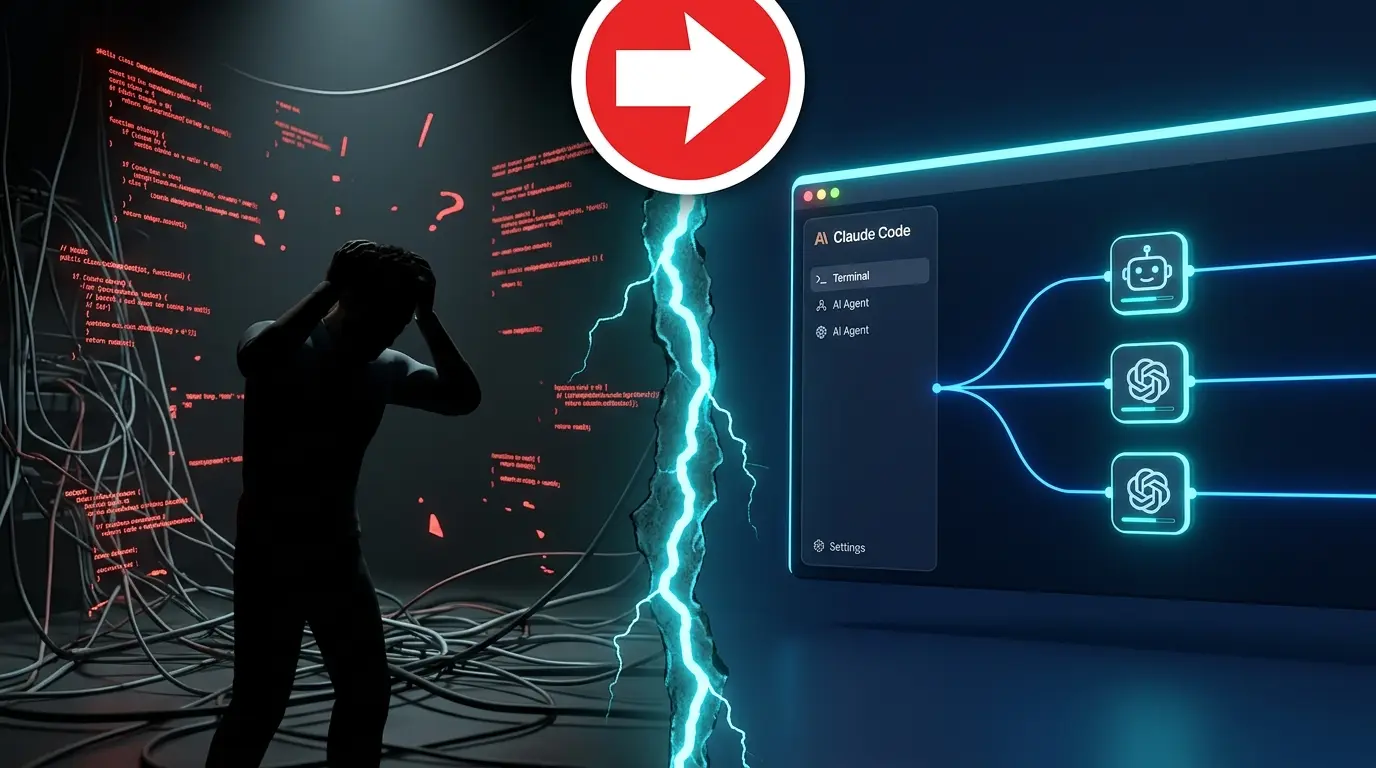
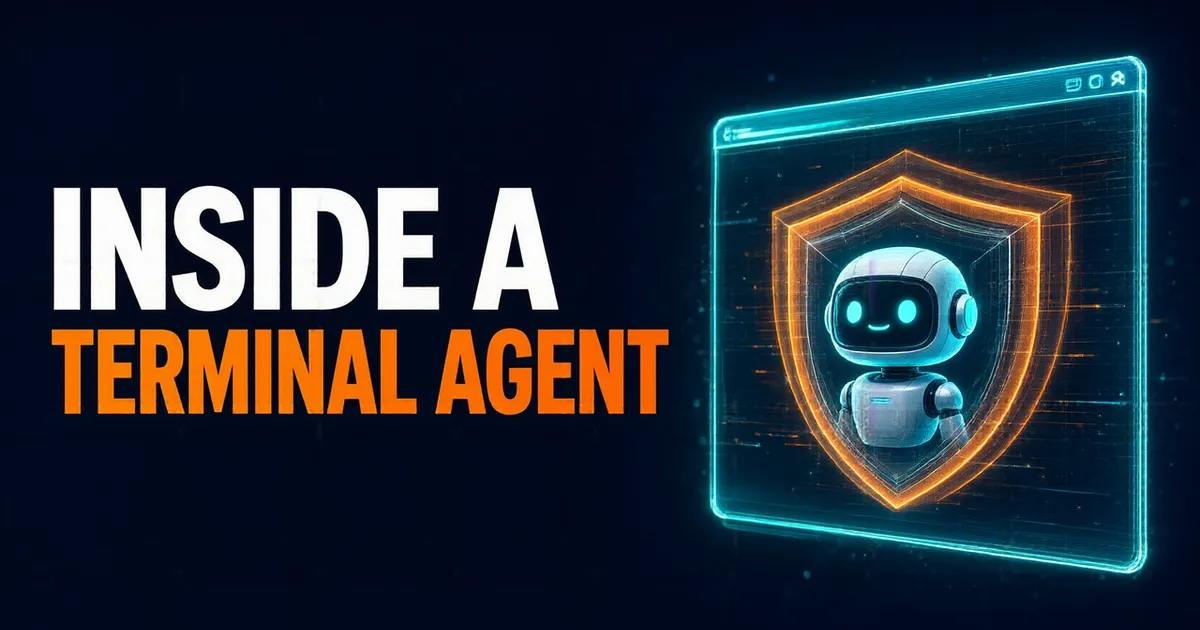
For years, coding assistants lived inside the editor, like copilots that suggested lines and had to be watched closely. Now the shift is toward the terminal, and Claude Code led the way. It makes sense: the terminal is the heart of development. That's where version control, builds, remote SSH sessions and headless servers live.
The impact is already huge. GitHub Copilot has more than fifteen million developers, and every major lab has its own terminal agent. But doing it well isn't easy: on Terminal-Bench, even frontier models solve less than 65% of the tasks, and on LongCLI-Bench, with long tasks, less than 20%.
The paper sums up the problem in three challenges:
Long sessions overflow the model's context window.
An agent that can run any command can also wreck everything.
Every capability you add takes up space in the prompt.
Scaffolding, harness and a compound system
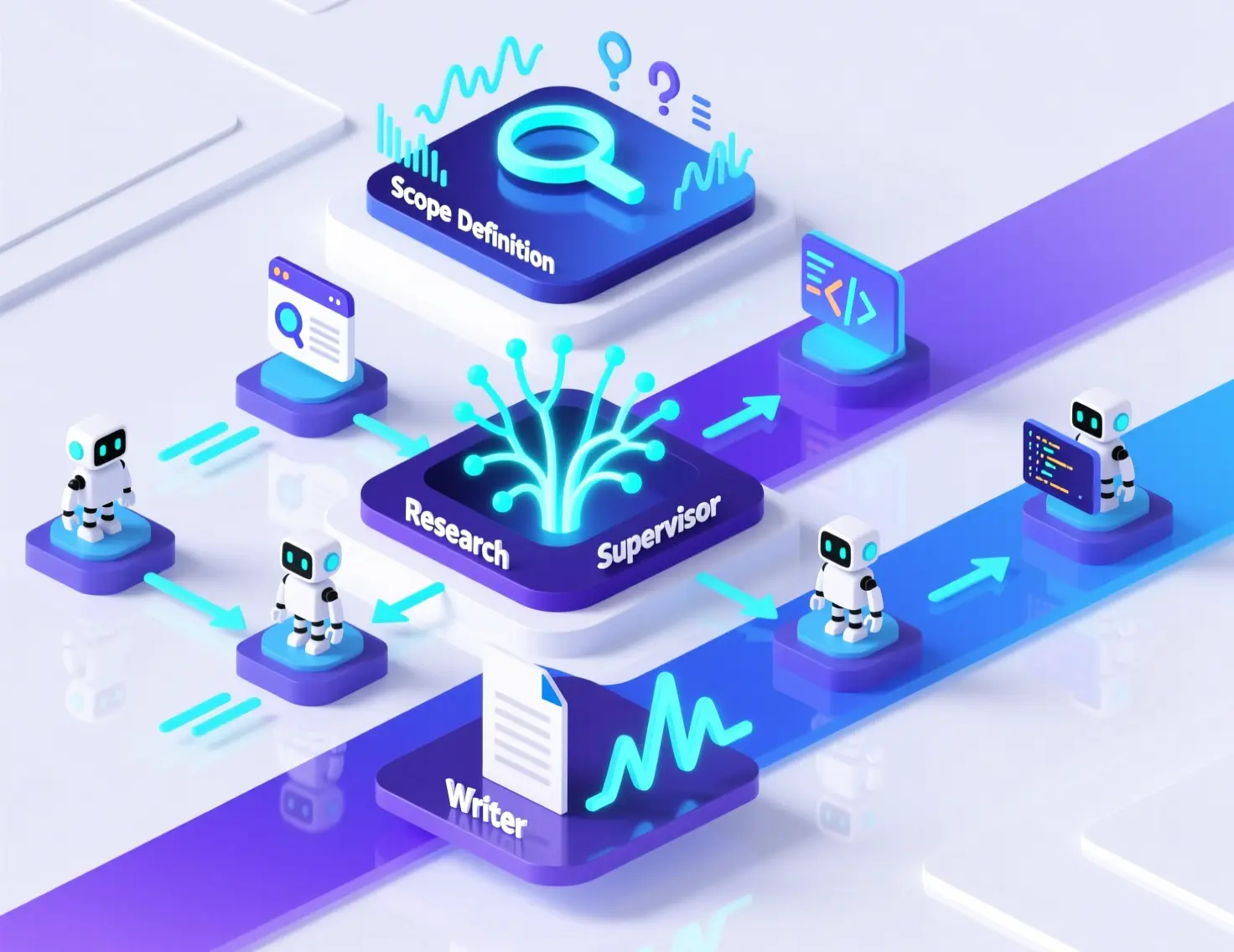
To tackle them, the paper splits the work into two phases. Scaffolding assembles the agent before the first message: the system prompt, the tool schemas and the subagent registry. The harness orchestrates everything afterwards, while it works: it runs the tools, manages the context and enforces safety.
Why a paper like this? Because almost nobody explains how these agents are built. Some frameworks are designed for benchmarks, like SWE-Agent; others run in the browser, like OpenHands; and terminal agents like Aider, Goose or OpenCode don't publish technical reports. Neither does Claude Code, which is also closed.
The central idea is that OpenDev is a compound AI system. It isn't a single model, but a set of agents and workflows, each one connected to the model the user chooses. So switching providers or cutting costs is a matter of configuration, not code, and the agent gets better as soon as better models come out.
Three principles guide the design:
- Separation of concerns: each decision (the model, the context, safety, the tools) is configured and changed without touching the others.
- Graceful degradation: keep working when tokens, iterations or the network run out.
- Transparency over magic: the developer can see and correct everything the agent does, from each tool call to each compaction.
Four layers, five of safety
OpenDev is organized in four layers: at the top, the entry layer, with a terminal interface and a web one; below it, the agent, which reasons; then the tools and the context; and at the bottom, persistence, which saves everything. Every request goes through them in order, from top to bottom.
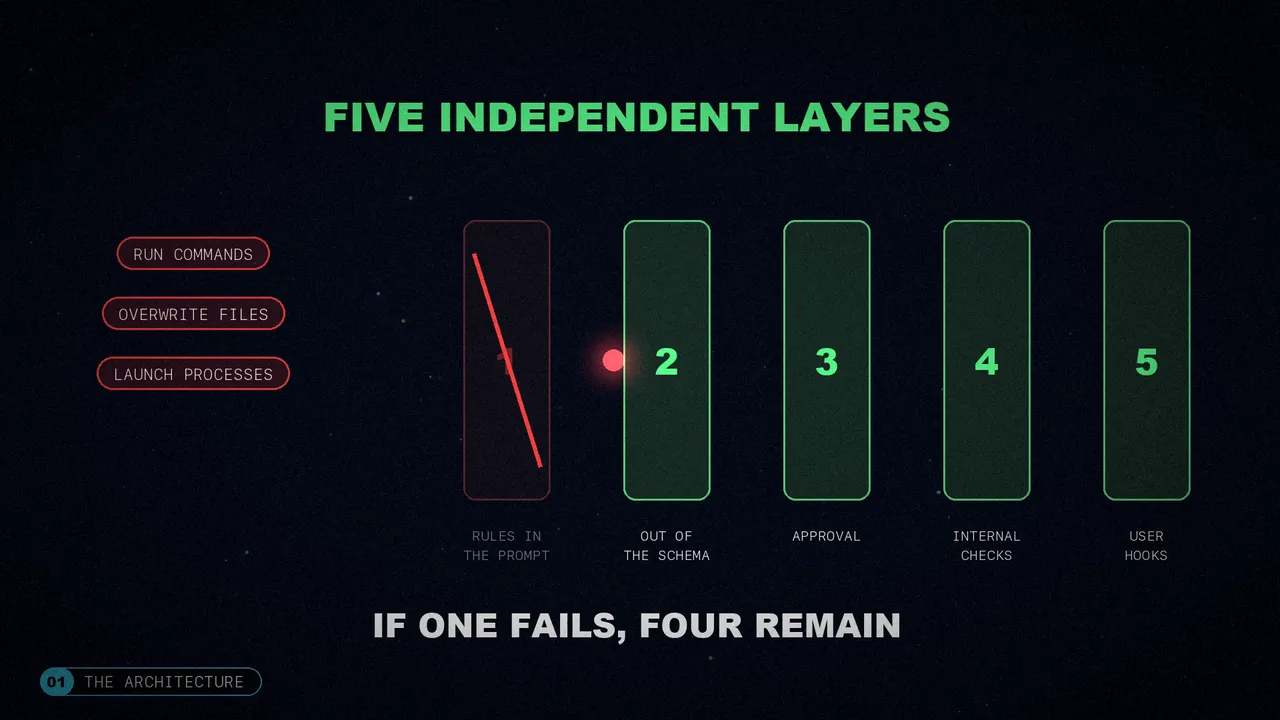
Since the agent can run commands, overwrite files and launch processes, a single safety mechanism isn't enough. There are five independent layers, and if one fails, four remain:
- Rules in the prompt.
- Tools that don't even appear in the agent's schema.
- Approval at runtime, with permissions that persist.
- Checks inside each tool: dangerous patterns, stale reads, timeouts.
- Hooks defined by the user.
The agent core
First surprise: there's no hierarchy of agent types, just one class. The main agent, the subagents and the ones you define are all instances of it, and only their parameters change, above all which tools they can use. At first they had separate classes (a planner, an explorer, a web generator…), and combining capabilities, like a web agent that also plans, became a mess.
A factory builds the agents in three steps, in a fixed order: first the skills, then the subagents and, finally, the main agent. The order matters, because the tool that launches subagents describes the available ones, so they have to exist beforehand. And each agent is built complete from the start: with lazy construction, the first call was slower and tools that arrived late, like MCP ones, didn't show up in the prompt.
Two modes: plan and execute
If you ask it to plan, or type /plan, a planner subagent with read-only tools steps in. It explores the code, analyzes it and writes a plan with seven sections: goal, context, files to change, new files, steps, verification and risks. You approve it (reviewing each edit or not) or ask for changes, and then it's carried out with every tool available.
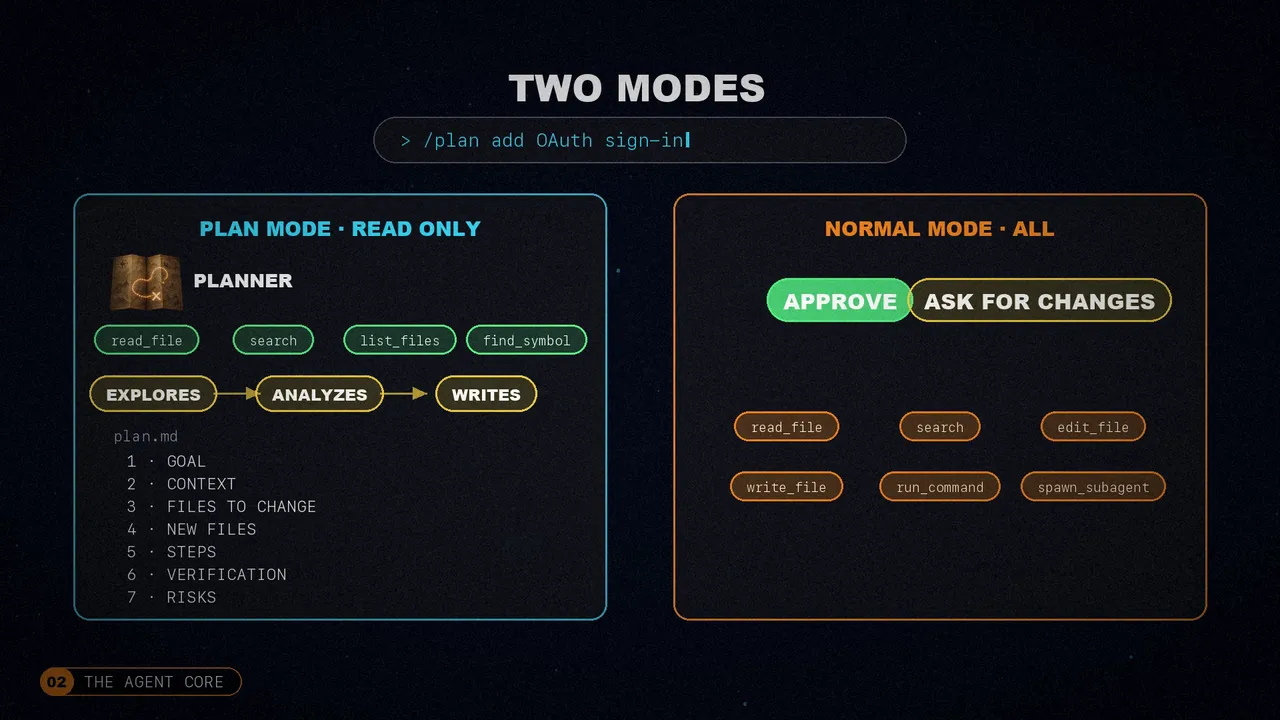
Before, plan mode was a state machine with four tools (enter, exit, create and edit the plan), and sometimes the agent never left and got stuck in read-only mode. Now the planner can't write because those tools don't even exist in its schema. There's no need to block them.
The cycle of every message
Every message follows the same cycle: the agent picks up whatever you typed while it was working, compresses the context if needed, thinks if that's enabled and calls the model. Reads run in parallel, up to five at a time, and writes run one after another. Before finishing, it checks that no tasks are left pending.
The cycle has ten events where you can hook your own scripts: the start of the session, each message, before and after every tool, the subagents or compaction. A pre-hook can block the tool (with exit code 2) or rewrite its arguments, for example to add --dry-run or to run the linter after a file is edited.
And not everything needs the model: anything that starts with a slash goes straight to a command (clear the session, compact, change mode or model, connect an MCP server). These are deterministic operations: they don't ask for approval and don't spend tokens.
Five models and the ReAct loop
Each phase of the work calls for a different model, so OpenDev assigns five roles, and if one is missing, another takes its place:
The main model, the one that uses the tools.
Reasons without tools, so it doesn't rush.
Reviews the reasoning, only at the highest level.
One understands screenshots and images; another, small and fast, summarizes the context.
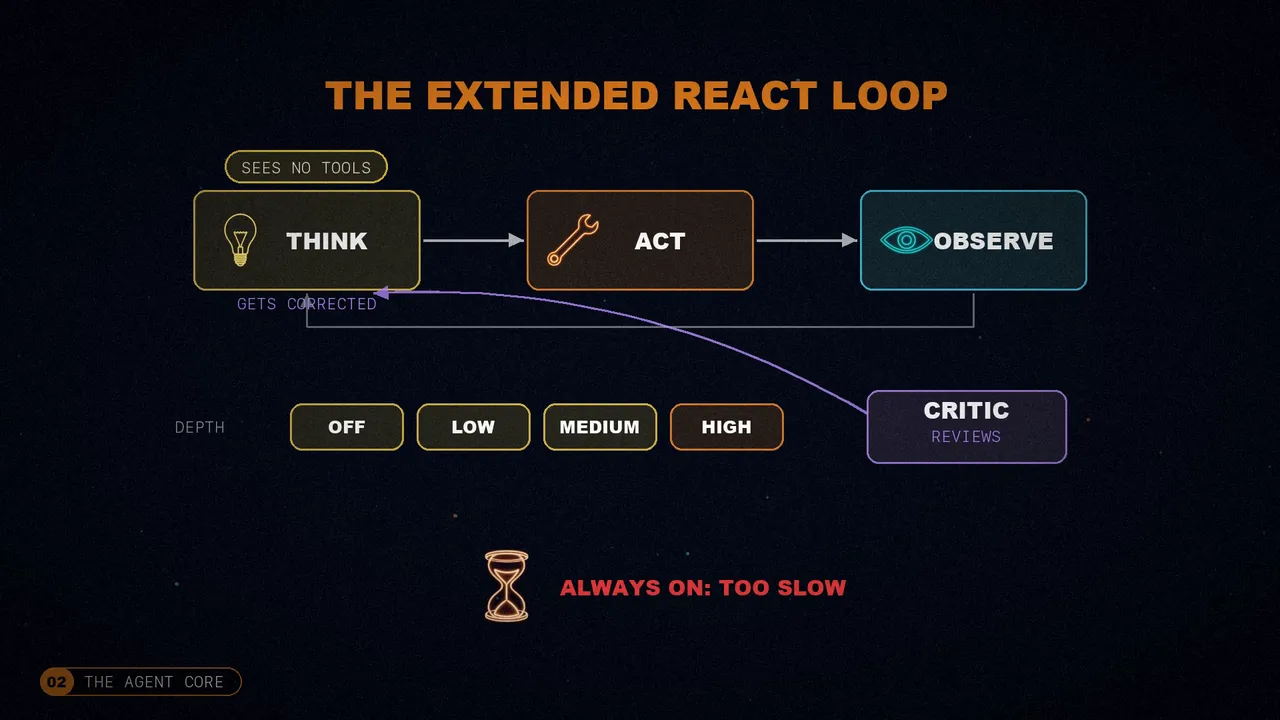
The heart is an extended ReAct loop. Classic ReAct mixes reasoning and acting in the same turn, and with the tools in sight, the model tends to act before thinking. That's why there's a thinking phase first, with a model that sees no tools at all. It has four depth levels; at the highest one, the critic reviews the reasoning and the model corrects it. Applying self-critique all the time turned out to be too slow.
Stuck loops
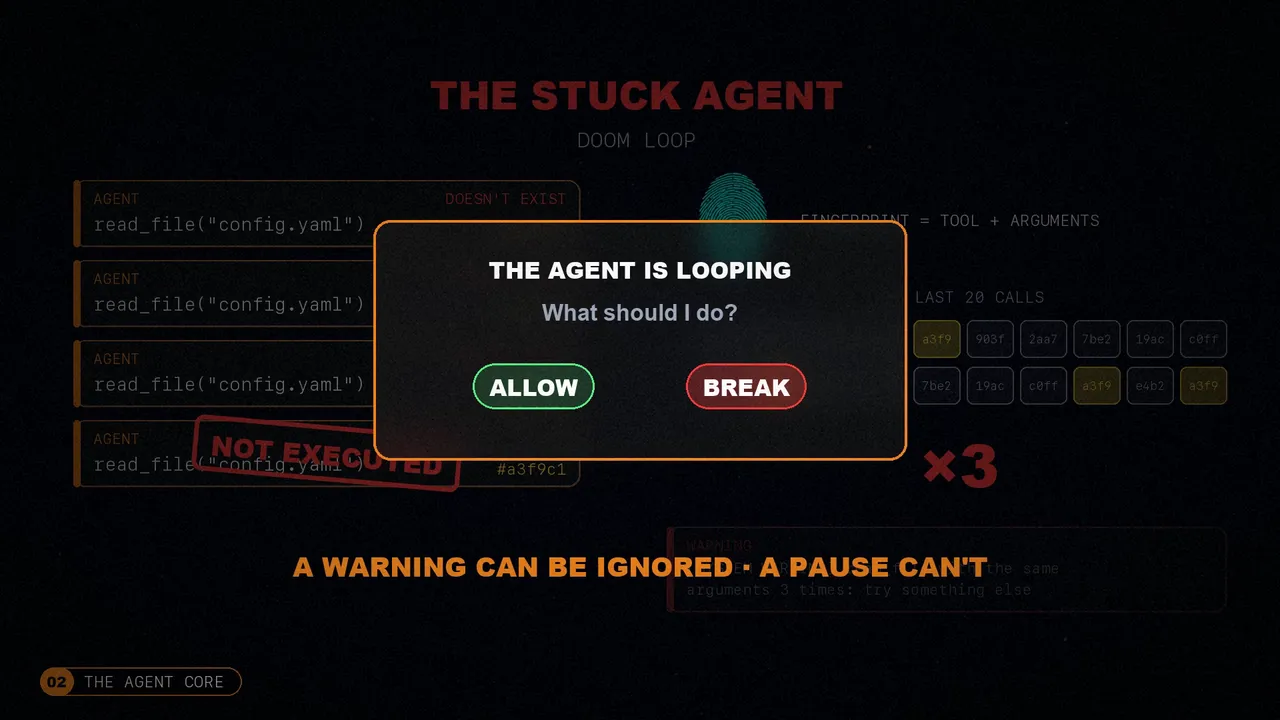
Another trap: the agent that keeps repeating itself, like endlessly reading a file that doesn't exist. OpenDev takes a fingerprint of every call, with the tool and its arguments, and watches the last twenty. If one repeats three times, it warns the model and doesn't run it. If it insists, it stops and asks you whether to allow it or break the loop. As the paper puts it, a warning can be ignored; a real pause can't.
Specialized subagents
The main agent delegates to subagents: a code explorer, a planner, code and security reviewers, web generators… Each one only has the tools for its role. That keeps their context smaller, they don't step on the task list (only the main agent keeps it) and, if they make a mistake, the damage stays contained. If you ask for several independent things, it launches several at once, each in its own thread and context, and then merges the results into a single answer. At first they didn't know when to stop and the explorer kept rereading the same files; now they have explicit stop conditions.
Context engineering
The quality of each answer depends, above all, on what the model sees in its window: which instructions it gets, how much conversation it keeps, what it has learned before and what information is gathered for each call. OpenDev treats this as a top priority.
A modular prompt, with caching
Instead of one huge system prompt, it's built from independent sections, each in its own file and with a condition. The git rules, for example, only load inside a repository. They're filtered, sorted by priority and joined; whatever doesn't help neither takes up space nor distracts the model. There are even sections specific to each model provider.
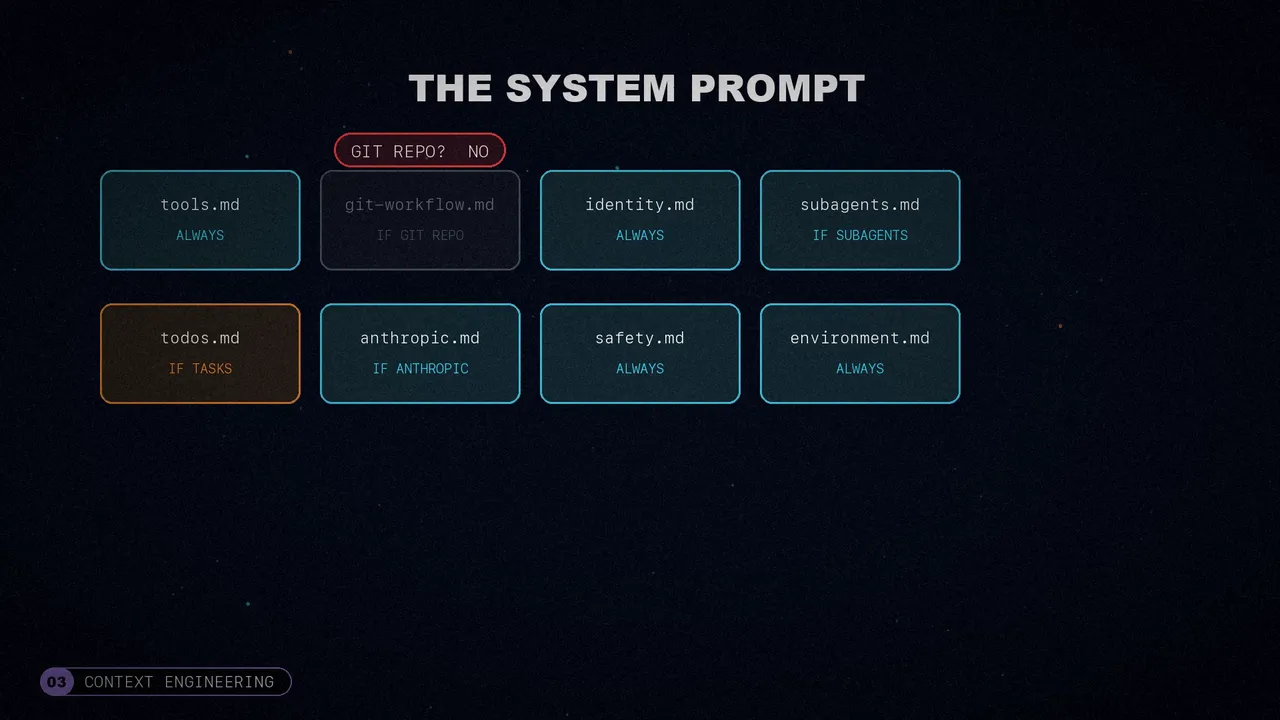
On top of that, the prompt is split in two: a stable part, 80 to 90% of the total, and another that changes with the session. The stable part goes into the provider's cache, and since the prompt travels with every call, the cost of that part drops by around 88%.
Summarized results and outputs saved to a file
What takes up the most space is tool results: reading a file can cost three thousand tokens. So each result is summarized according to its type: a read becomes “read, 142 lines”; a search, “23 matches”. And if an output goes over eight thousand characters, it's saved to a separate file and only a preview with the path stays in the conversation. Before, a single test run could eat thirty thousand tokens; with these two changes, sessions went from lasting 15-20 turns to 30-40 before filling the context.
A dual memory for thinking
The thinking phase uses a dual memory, inspired by cognitive science. Episodic memory is a summary of the whole conversation, with the goals and decisions. Working memory holds the last six exchanges, word for word. Together they give the big picture and the details, with a fixed token budget.
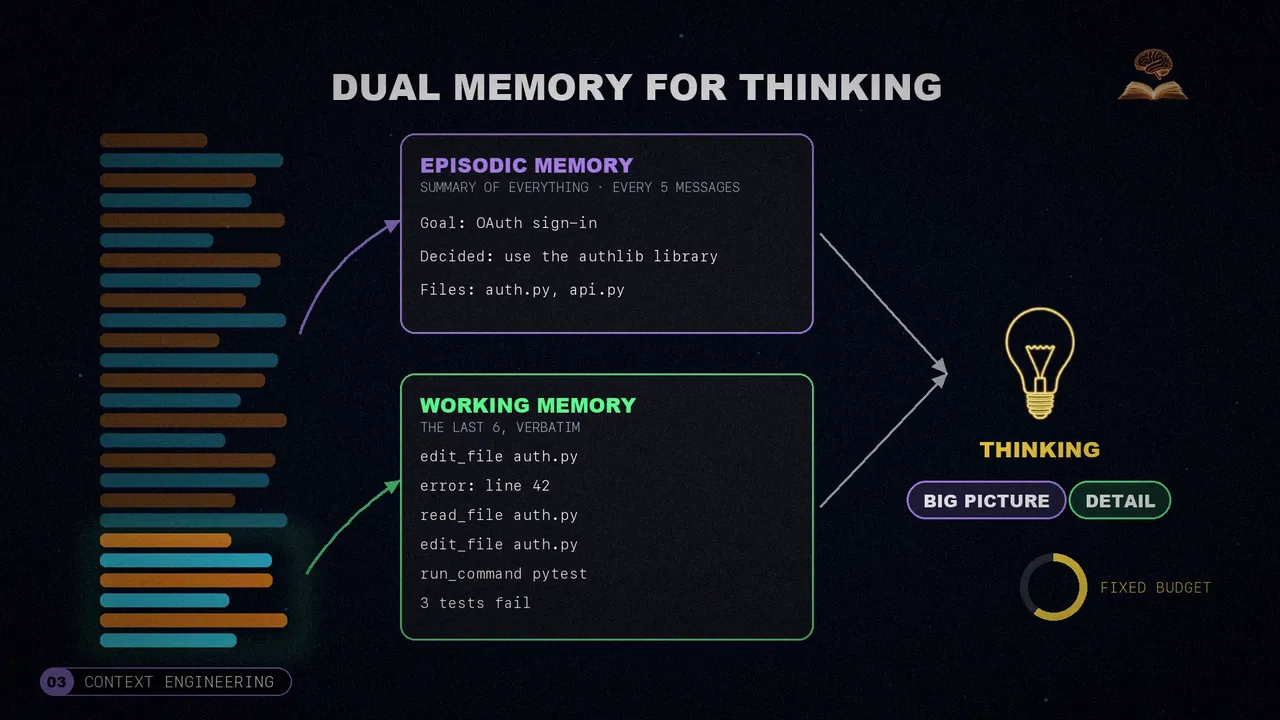
They tried both extremes. With only summaries, paths and names got lost, and the agent cited files that didn't exist. With only the recent messages, it forgot the goal after ten turns. And a subtle detail: summarizing a summary piles up errors, so the summary is rebuilt every five messages from the full conversation.
Instructions that fade
This is the problem I liked most in the paper, because anyone who uses agents will recognize it. You tell it to always run the tests after editing. For the first few turns, it does. But after about twenty tool calls, it stops. The instruction is still in the prompt, but it's so far back that the model no longer pays attention to it. They saw it consistently in sessions of more than fifteen calls.
The solution is system reminders: short messages injected right before the agent is about to get it wrong. Eight detectors watch the conversation: tools that fail without a retry, too many reads in a row, unfinished tasks, approved plans that never get carried out… And each reminder has a cap, so it doesn't turn into noise.
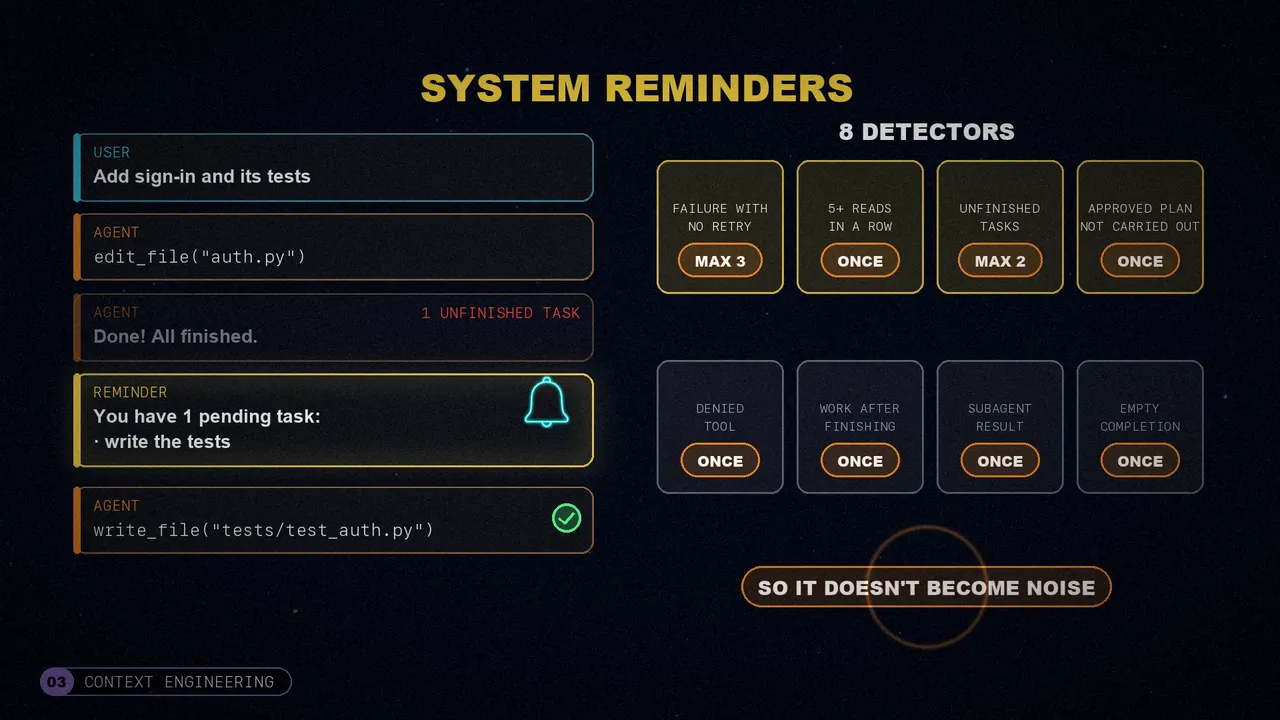
The curious detail: reminders arrive as user messages, not system ones. After forty turns, another system instruction gets lost in the background; what the user says, on the other hand, is the most recent thing, something that just happened and calls for a response. In their tests, the model obeyed much more this way.
Errors are a similar story: when something fails, the agent tends to apologize instead of fixing it. OpenDev classifies each error into six types (permission denied, file not found, edit mismatch, syntax, rate limit and timeout) and gives it concrete instructions. “Read the file again” works much better than “fix it”. And it tries three times at most.
Compacting without losing anything
Tool outputs end up taking 70 to 80% of the context. The usual approach is to wait until it's almost full and summarize everything at once, losing a lot. OpenDev compresses in stages:
- 70%: it just warns.
- 80%: old outputs become references.
- 85%: it prunes the ones far behind.
- 90%: it masks almost everything except the most recent.
- 99%: a model summarizes the conversation.
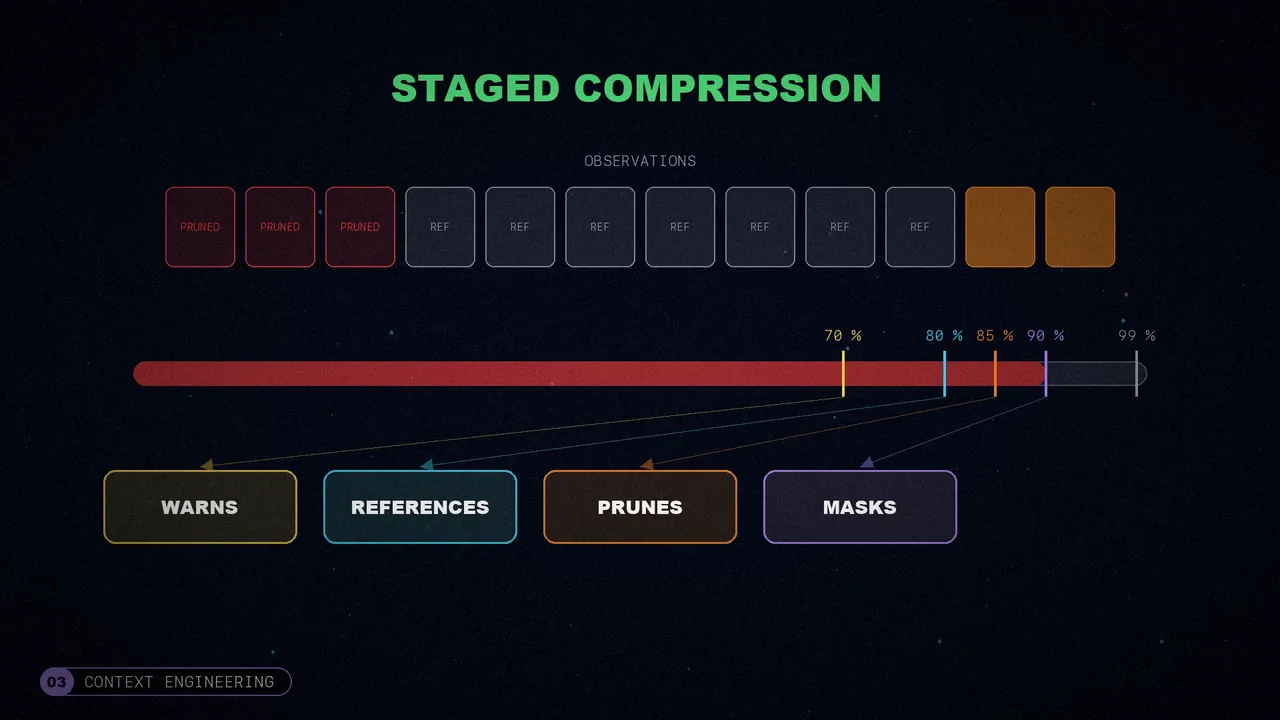
And even then nothing is lost: the whole conversation is saved to a file, and the summary includes its path and an index of everything the agent touched. According to the paper, this cuts the peak context taken up by observations by 54%, and in typical thirty-turn sessions the emergency summary often isn't needed at all.
The agent also learns from one session to the next with a playbook of strategies: short bullets tagged as helpful, harmful or neutral. Before each query it picks the best ones by effectiveness (0.5), recency (0.3) and similarity to the question (0.2). And every five messages, a reflector analyzes what worked and a curator updates the playbook.
Finding the right code
Finding the right code is the most decisive thing for a coding agent: everything else depends on it. By default, agents use grep for everything. OpenDev first looks for the strongest anchor in the request: a function name goes to the language server; an error message, to text search; and a code pattern, to the structural matcher.
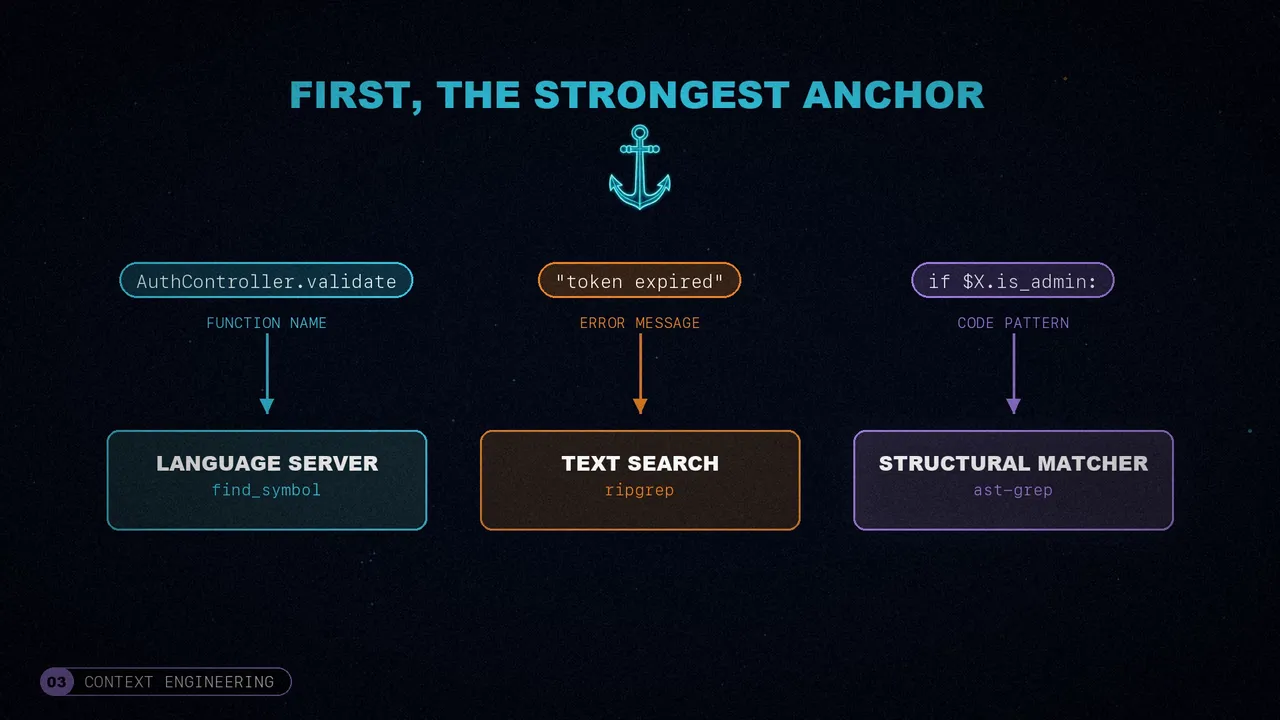
If the task requires deep exploration, it delegates to the explorer subagent, which chains searches in its own context: it locates a class, reads its dependencies and traces where they're used. The thousands of intermediate lines stay in its window, and the main agent only gets the summary.
The tools
OpenDev ships 35 built-in tools, organized in a registry by category: files, processes, web, symbols, tasks… Before, they were all in a single namespace, with name clashes and safety that was hard to configure; with categories, rules are applied by group.
Before running anything, you decide how much autonomy to give it: manual, with an approval for every step; semi-automatic, which only lets reads through; or automatic. On top of that there are rules by pattern, by command and by prefix, and danger rules, like wiping the entire disk, which are always denied. What you approve is saved across sessions: otherwise, you'd end up approving everything out of fatigue.
Files and flexible editing
Reading numbers the lines and, if the file is huge, shows the beginning and the end. Before editing, it checks that nobody has changed the file since the last read, so it doesn't overwrite your work. And writing only creates new files: to modify one, you have to edit it, not rewrite it from memory.
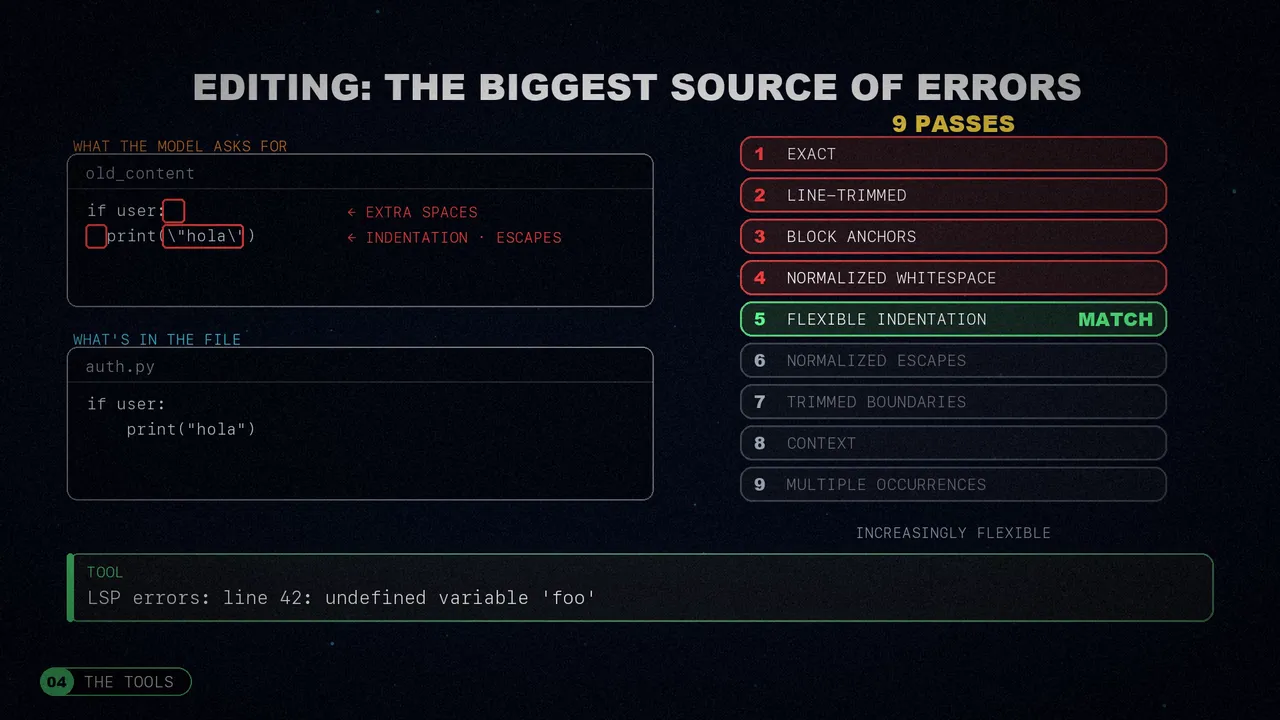
Editing was the biggest source of errors. The model asks to replace a text that almost matches the one in the file, with extra spaces, different indentation or escaped characters. OpenDev tries nine passes, from the exact match to increasingly flexible ones, and keeps the first that fits. Then the language server warns it about any bugs it introduced.
Shell, web and language servers
Every shell command goes through six stages: safety filters, preparation, server detection, execution, output handling and time limits. If it recognizes a development server, it moves it to the background. Before, with a fixed timeout, those processes always died; now it depends on activity: one minute without output, or ten in total.
For the web it uses a real browser, because a lot of documentation needs JavaScript, and it also searches and takes screenshots. To understand the code, it connects to language servers, the same ones editors use: it finds symbols and references, renames across the whole project and rewrites the body of a function without touching its signature.
To talk to you, it asks questions with options instead of free text (and you can always answer something else), keeps a task list with only one in progress, presents the plan for your approval and has an explicit tool to say it's done.
MCP and skills, on demand
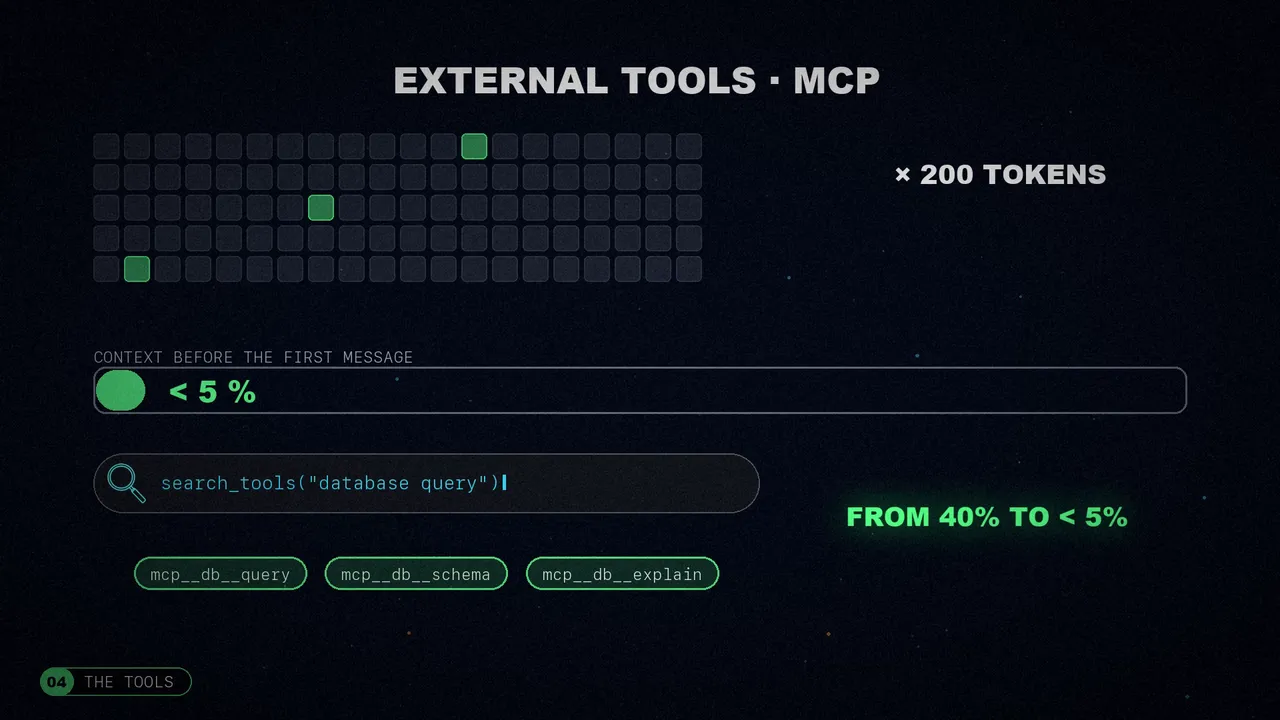
A hundred MCP tools at around two hundred tokens each add up to twenty thousand tokens just in definitions. At first they loaded them all, and they ate up to 40% of the context before the first message. Now the agent searches for them by keyword when it needs them and only loads those: the initial cost dropped to less than 5%. It does the same with skills: at startup it only loads their name and description.
Persistence
Everything is stored in plain files, with no database. Each session is two files, the metadata and the transcript (one message per line), written to a temporary copy and then renamed, so they're never left half-written. And if the session index gets corrupted, it rebuilds itself.
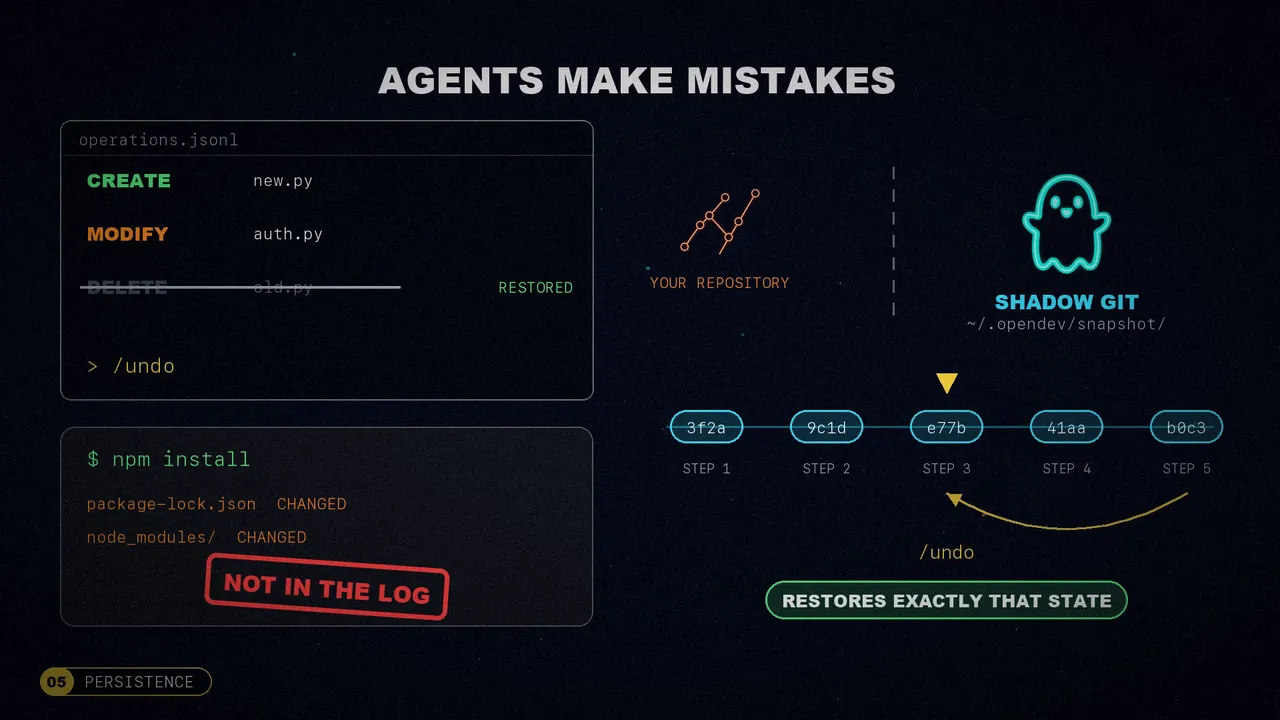
Agents make mistakes, so every file operation is logged and can be undone with a single command. But a shell command also changes files, for example when installing dependencies. For that there's a shadow git repository, separate from yours, which saves a snapshot at every step; undo restores exactly that state.
Configuration works in levels (defaults, environment, user and project, which wins over everything), API keys are only read from the environment, and model data is cached, so the agent starts up even without a connection.
The five lessons
- Context is the central constraint. It's consumed by the system itself and by the agent's actions, and tool outputs take 70 to 80% of it. A richer result improves each turn, but shortens the useful life of the session.
- Steering the agent is a signal-to-noise problem. The prompt's influence fades as the conversation grows. To stop it from using grep for everything, they gave it a decision tree with concrete criteria: “if you're looking for a function or a class, use the symbol search”. None of that “use the most appropriate tool”.
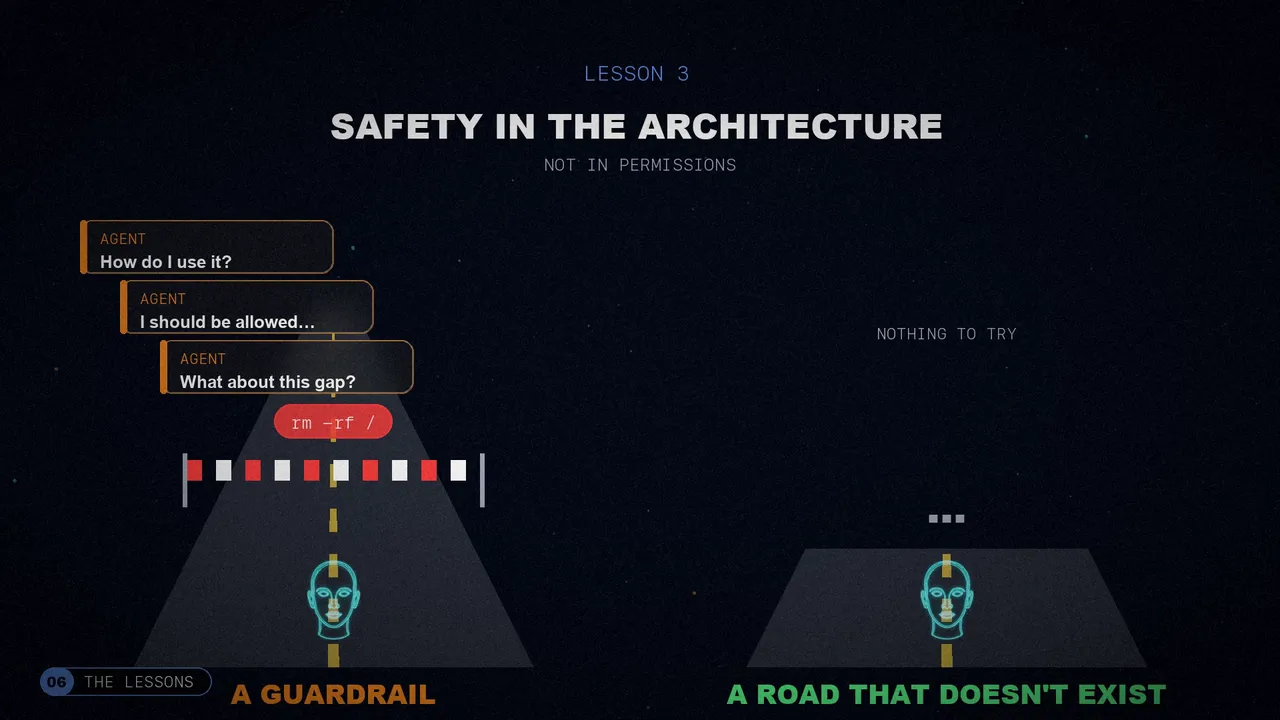
- Safety belongs in the architecture, not in permissions. A model that sees a dangerous tool can reason about how to use it, argue why it should be allowed and look for gaps in the rules. If the tool isn't in its schema, it doesn't even try. It's the difference between a guardrail and a road that doesn't exist.
- Models get it almost right. A system that demands precision spends its life recovering from errors; better to have tools that absorb the imprecision: flexible editing, moving anything that looks like a server to the background, or installing a missing dependency.
- Loading everything up front doesn't scale. Better a lightweight index at startup and the full content when it's needed. Whatever can be rebuilt should regenerate itself. And anything deterministic stays outside the agent loop.
What's missing
The author openly admits it: the paper documents decisions, but it doesn't include a systematic quantitative evaluation. The numbers come from experience with OpenDev itself, without comparing it to other agents on benchmarks like Terminal-Bench or LongCLI-Bench. Measuring it that way is the first step still pending.
And it proposes where to go next: thresholds that adapt to each task (a simple bug doesn't need the thinking phase), a memory that carries over from one project to another and understands code as a graph, subagents that talk to each other, reminders that are learned automatically instead of designed by hand, and the same agent inside the editor too.
A good terminal agent doesn't depend only on the model: it's well-managed context, layered safety, tools that forgive mistakes and a memory that learns.
Which OpenDev idea would you add to your agent?
Sources
- “Building Effective AI Coding Agents for the Terminal: Scaffolding, Harness, Context Engineering, and Lessons Learned”, by Nghi D. Q. Bui (OpenDev), arXiv 2603.05344, March 2026.
- The agent's code: opendev-to/opendev.
- The video, on my three channels: Spanish, English and Portuguese.