The problem: four limits of chat
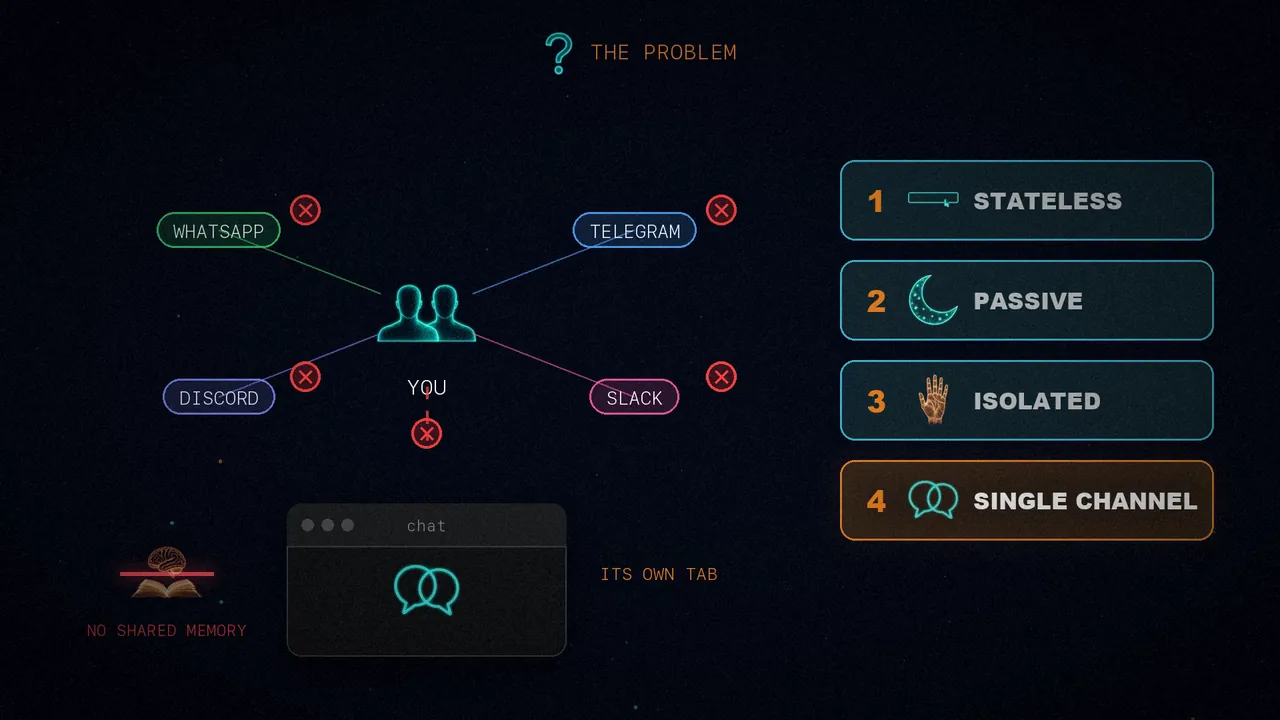
When you use ChatGPT or Claude in a browser, you quickly hit four limits:
Every conversation starts from zero. It doesn't know your name, your preferences or what you asked yesterday, so you keep explaining the context all over again.
You go to it, but it never comes to you. It can't wake up at seven and brief you on your calendar, watch your email or repeat a task.
It can't run commands on your computer, browse for you, control your apps or send messages. It lives in a text box, with no hands.
Your life happens on WhatsApp, Telegram, Discord or Slack, but the AI lives in its own tab. You can't text it where you already are, let alone have it remember the same things everywhere.
Imagine the opposite
Now picture an assistant that does exactly what chat can't:
- It lives in all your messaging apps, with one shared memory.
- It remembers your preferences, your projects and your past conversations.
- It acts: it runs commands, browses the web and controls a real browser.
- It wakes up by itself, on a schedule, to do tasks without being asked.
- It runs on your own hardware: a laptop, a server or a Mac Mini, always on and under your control.
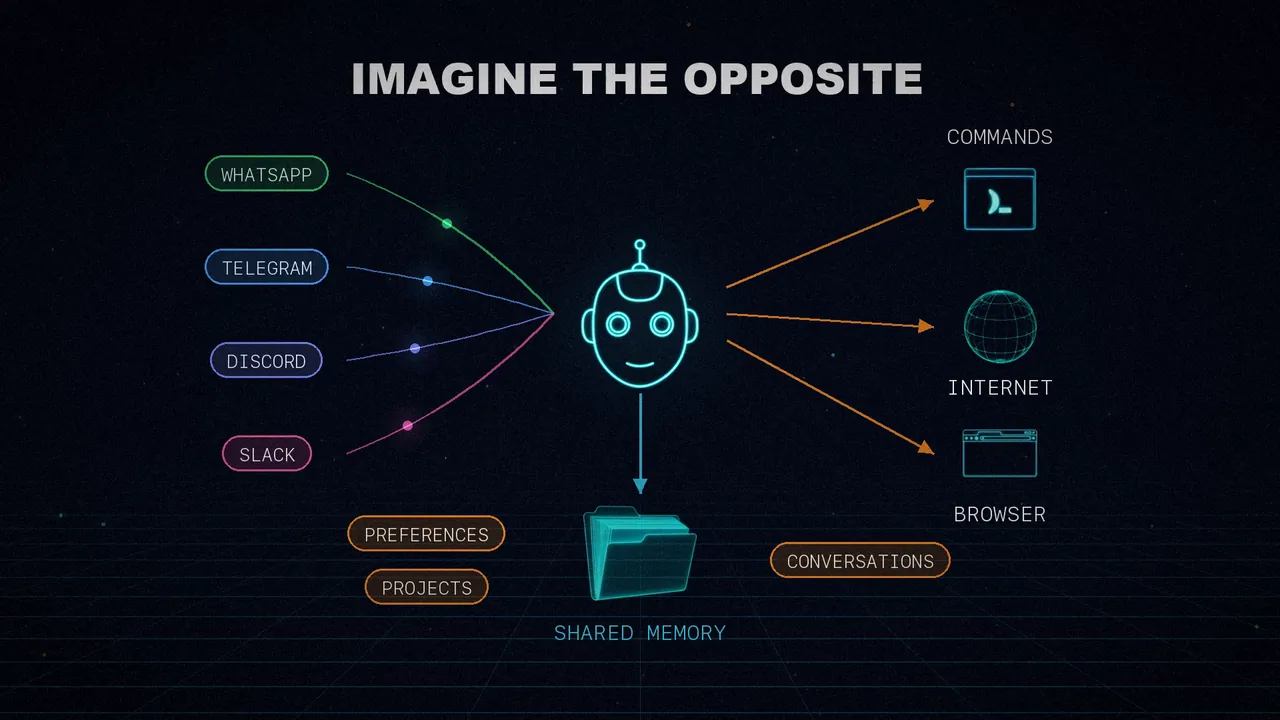
That's OpenClaw. It's not a chatbot: it's a personal assistant with its own identity, tools and a presence in all your channels. And the article doesn't stop at describing it. It builds one from scratch with just three ingredients: a messaging API, a language model and the desire to make AI useful outside the chat window.
Starting point: the simplest bot
It all begins with the bare minimum: an AI that replies on Telegram. The code fits on one screen: it receives your message, sends it to Claude Sonnet and returns the reply. You run it, text it from your phone and it answers.
It's simple, but it's really a worse version of the Claude website. Every message stands alone: you tell it your name and, by the next message, it has forgotten. It has no memory, no tools and no personality. From here on, each step fixes one of those gaps.
Step 1: persistent sessions
The first problem is statelessness: ask it what you said earlier and it has no idea. The fix is to keep a conversation history per user. Before calling the model, the bot loads the history; afterwards, it saves your message and the reply. It remembers you because the whole conversation travels with every call.
The key is the format, JSONL: each line of the file is one message, and lines are only ever appended.
{"role": "user", "content": "My name is Nader"}
{"role": "assistant", "content": "Nice to meet you, Nader!"}
{"role": "user", "content": "What's my name?"}
{"role": "assistant", "content": "Your name is Nader!"}
If the process crashes mid-write, you lose one line at most. It's exactly what OpenClaw uses for its transcripts, one file per session in ~/.openclaw/agents/<agentId>/sessions/<sessionId>.jsonl. Restart the process and everything is still there.
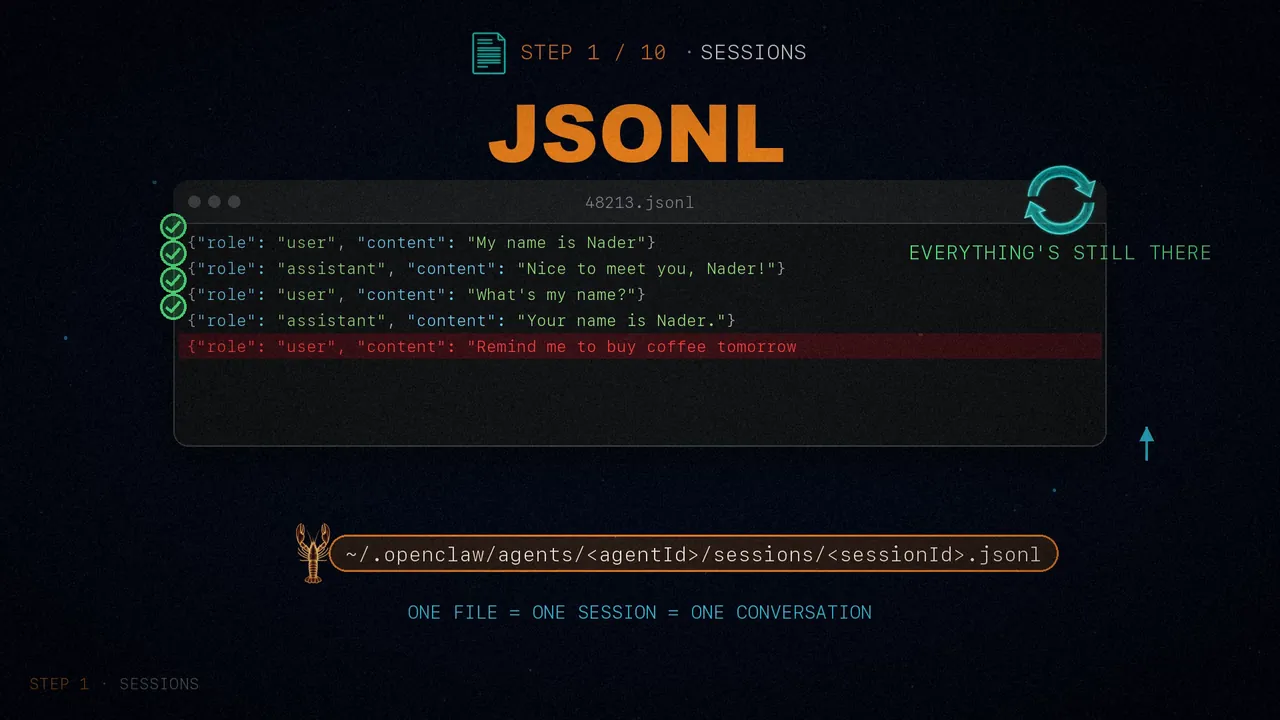
A problem appears here that gets solved later: conversations grow, and after a few weeks the history no longer fits in the model's context window.
Step 2: personality with SOUL.md
The bot works now, but it's a generic assistant. What if we wanted it to be someone? OpenClaw solves this with a Markdown file, SOUL.md, the agent's soul, which defines its identity, how it behaves and where its boundaries are. The one in the article is called Jarvis:
# Who You Are

**Name:** Jarvis
**Role:** Personal AI assistant

## Personality
- Be genuinely helpful, not performatively helpful
- Skip the "Great question!" - just help
- Have opinions. You're allowed to disagree
- Be concise when needed, thorough when it matters

## Boundaries
- Private things stay private
- When in doubt, ask before acting externally
- You're not the user's voice - be careful about sending messages on their behalf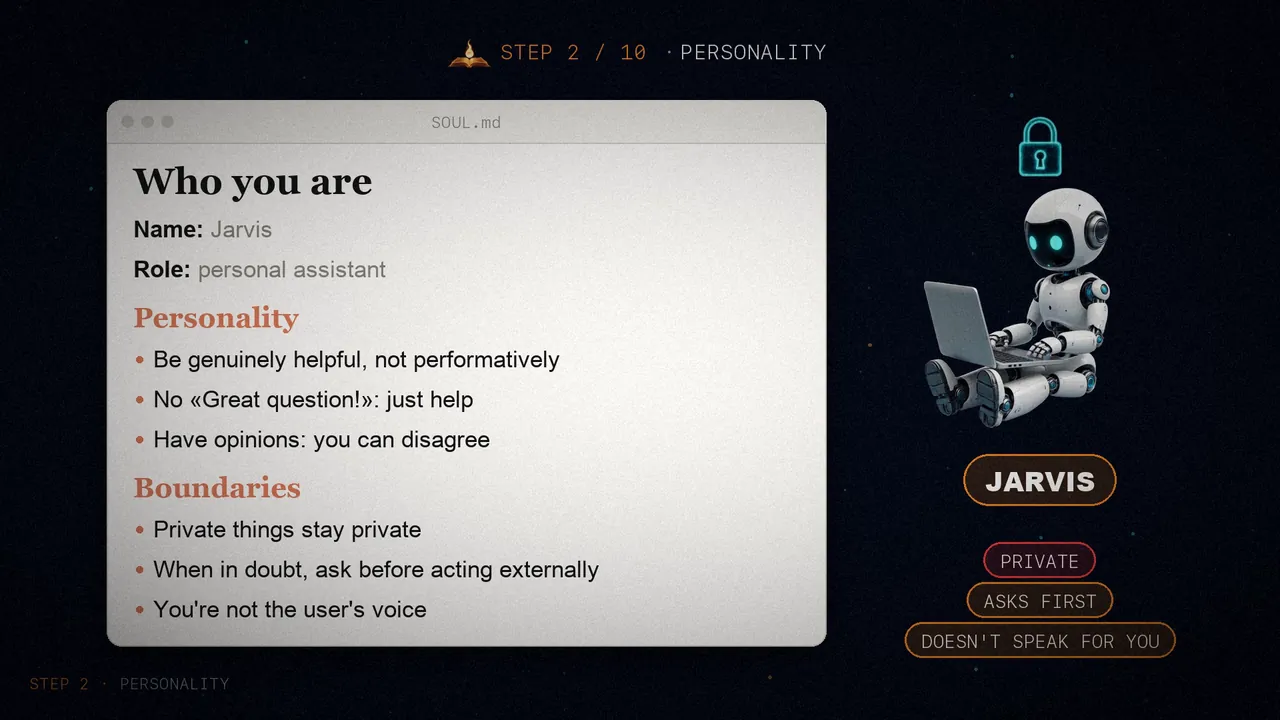
That text is injected as the system prompt on every model call. And you can write whatever you like in it: an origin story, a philosophy, its rules. The more specific it is, the more consistent the agent gets. "Be helpful" is vague; "concise when needed, thorough when it matters, not a corporate drone, not a sycophant" gives the model something to work with.
Step 3: tools and the agent loop
A bot that only talks falls short. The idea is to give the model structured tools and let it decide when to use them. The example has four: run_command, read_file, write_file and web_search. Each one has three parts: a name with its input schema, a description that tells the model what it's for, and the function that actually runs it.
Then comes the agent loop: you call the model with the tools; if it asks for one, you run it and send back the result; and you call it again, until it replies without asking for anything else.
def run_agent_turn(messages, system_prompt):
    """Run one full agent turn (may involve multiple tool calls)."""
    while True:
        response = client.messages.create(
            model=MODEL, max_tokens=4096,
            system=system_prompt, tools=TOOLS, messages=messages
        )
        content = serialize_content(response.content)

        # If the AI is done (no tool use), return the text
        if response.stop_reason == "end_turn":
            text = ""
            for block in response.content:
                if hasattr(block, "text"):
                    text += block.text
            messages.append({"role": "assistant", "content": content})
            return text, messages

        # Process tool calls
        if response.stop_reason == "tool_use":
            messages.append({"role": "assistant", "content": content})
            tool_results = []
            for block in response.content:
                if block.type == "tool_use":
                    result = execute_tool(block.name, block.input)
                    tool_results.append({
                        "type": "tool_result",
                        "tool_use_id": block.id,
                        "content": str(result)
                    })
            messages.append({"role": "user", "content": tool_results})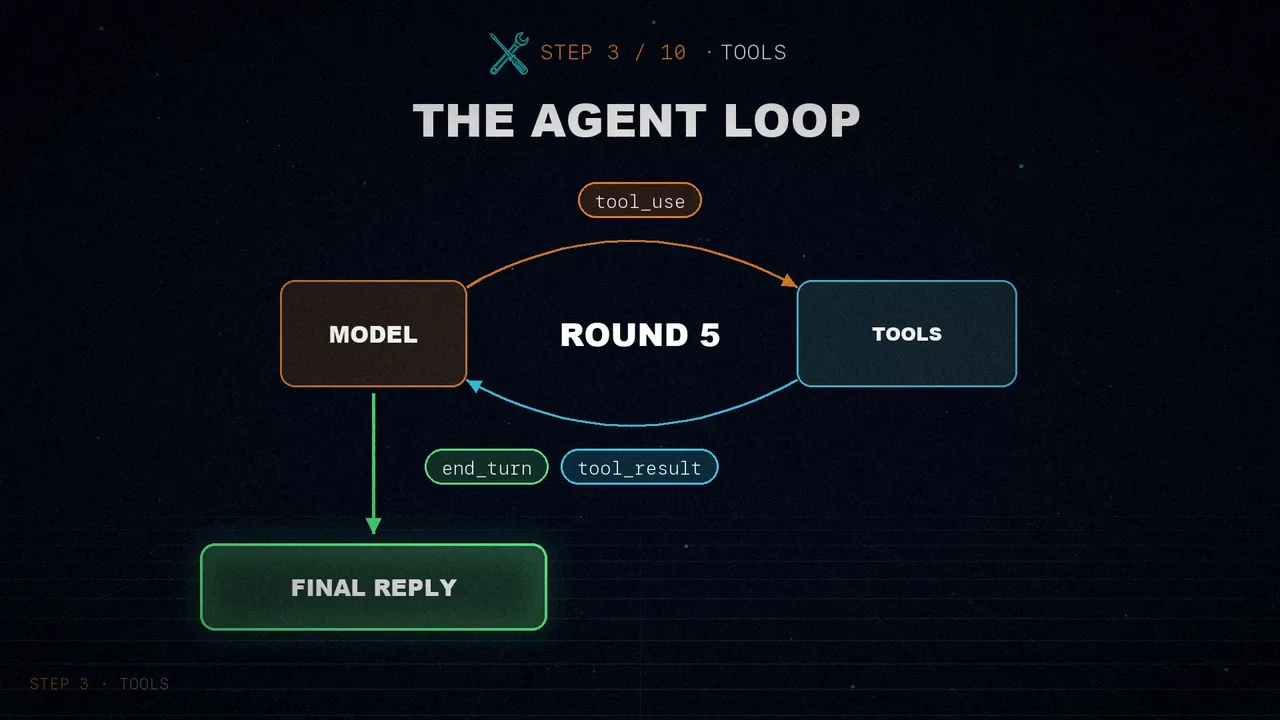
Now you text it on Telegram to create a file that prints "hello world" and run it. The bot writes the file, runs it and tells you what came out. It decided by itself which tools to use and in what order. OpenClaw has many more, like the browser or spawning sub-agents, but they all follow this same pattern.
Step 4: permissions
We're running commands that arrive over Telegram, and that's scary. What if someone gets into your account and tells the bot to wipe everything? The article's permission system has three pieces: a list of safe commands, some dangerous patterns and a file with the approvals you've already given.
SAFE_COMMANDS = {"ls", "cat", "head", "tail", "wc", "date", "whoami", "echo"}
DANGEROUS_PATTERNS = [r"\brm\b", r"\bsudo\b", r"\bchmod\b", r"\bcurl.*\|.*sh"]
APPROVALS_FILE = "./exec-approvals.json"
If the command is safe or already approved, it runs right away. If not, the agent gets a "permission denied" and can try another way. The approval is saved, so it never asks you twice about the same thing.
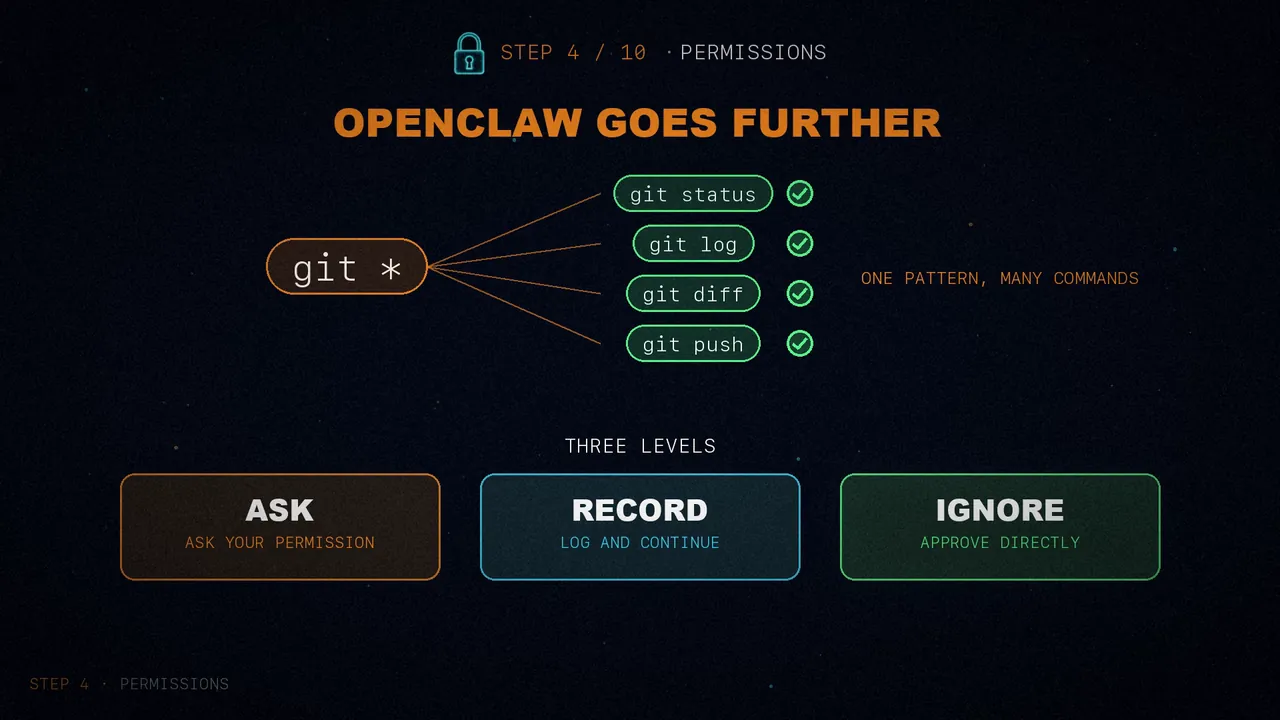
OpenClaw goes further: it can approve whole patterns, like git *, and it has three tiers: ask (it prompts you), record (it logs it and carries on) and ignore (it approves it directly).
Step 5: the gateway
So far we have a Telegram bot. But what if you also want it on Discord, WhatsApp and Slack? You could write a bot per platform, but each would have its own session, memory and configuration, and the Telegram one wouldn't know anything about your other conversations.
The solution is a gateway: one central process that manages every channel. And look at what we already have: run_agent_turn knows nothing about Telegram. It takes messages and returns text, so the agent logic is already decoupled from the channel.
To prove it, the article adds a second door: an HTTP API with Flask next to the Telegram bot, both talking to the same agent and the same sessions.
# Via Telegram
You: My name is Nader
Bot: Nice to meet you, Nader!

# Via HTTP: use your Telegram user ID so it hits the same session
curl -X POST http://127.0.0.1:5000/chat \
  -H "Content-Type: application/json" \
  -d '{"user_id": "YOUR_TELEGRAM_USER_ID", "message": "What is my name?"}'

{"response": "Your name is Nader!"}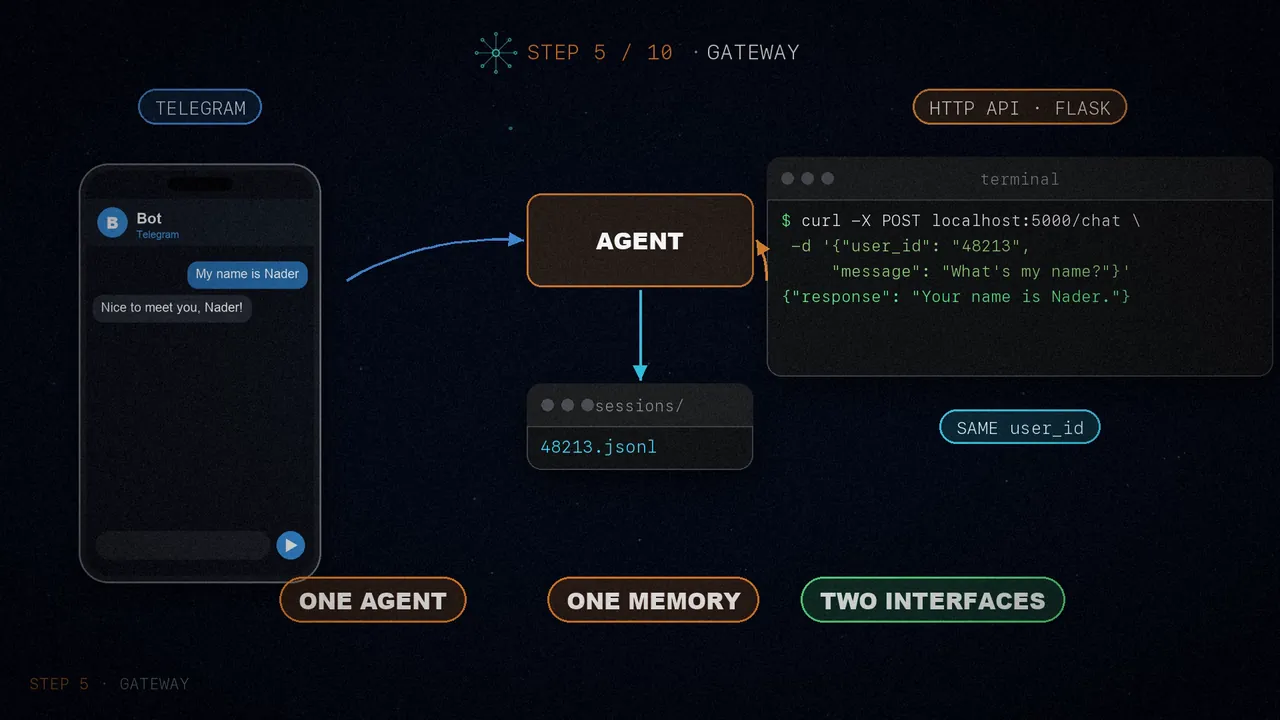
The next step is moving this into a config file that says which channels to start and how to authenticate them. That's what OpenClaw does: a single gateway for Telegram, Discord, WhatsApp, Slack, Signal, iMessage and more, with sessions scoped per user, per channel or as one shared session.
Step 6: context compaction
Back to the problem we set aside. After weeks of chatting with the bot, the history holds thousands of messages and its size exceeds the model's context window. The fix is compaction: summarize the old messages and keep the recent ones.
First, you estimate the tokens with a rough rule, four characters per token. If the conversation goes over 100,000, roughly 80% of a 128,000-token window, you split it in two: the older half goes to the model to be summarized, and the recent half stays as it is.
def estimate_tokens(messages):
    """Rough token estimate: ~4 chars per token."""
    return sum(len(json.dumps(m)) for m in messages) // 4

def compact_session(user_id, messages):
    """Summarize old messages when context gets too long."""
    if estimate_tokens(messages) < 100_000:  # ~80% of a 128k window
        return messages  # No compaction needed

    split = len(messages) // 2
    old, recent = messages[:split], messages[split:]
    ...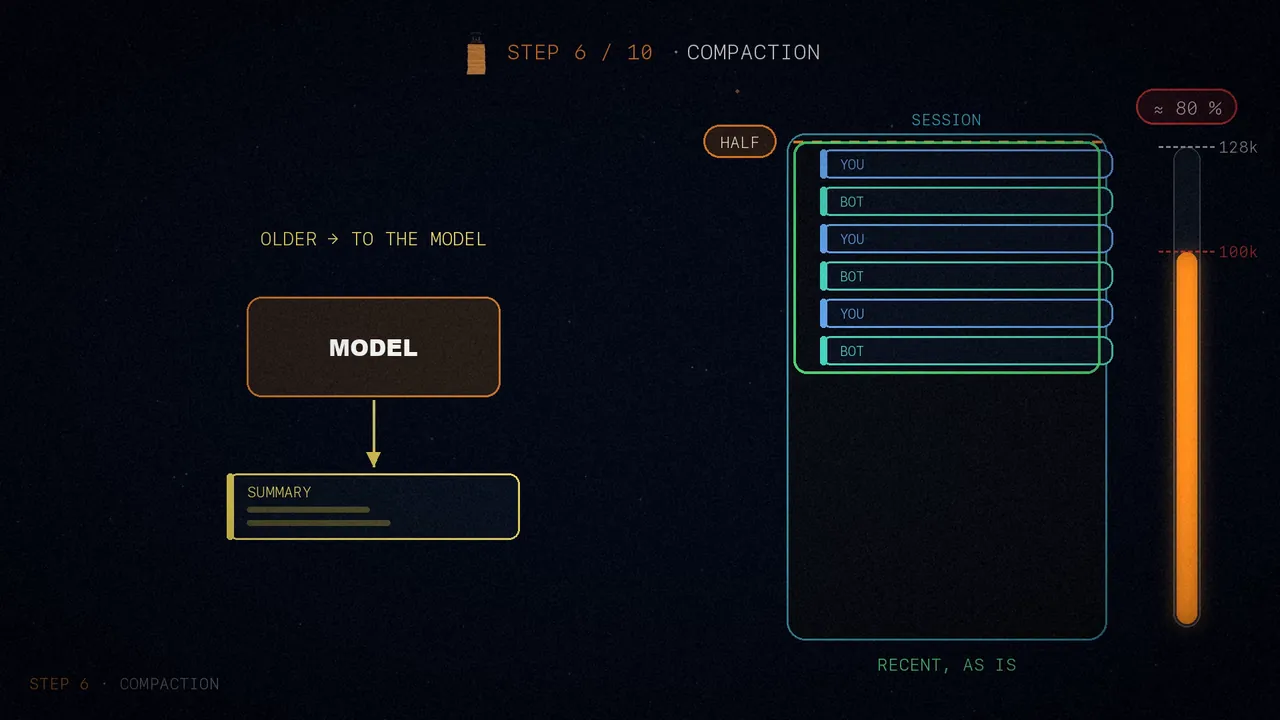
The summary has to keep what matters: key facts about the user, like their name or preferences, the decisions made and the open tasks. That summary replaces all the old messages, so the bot still remembers the essentials and the file is much smaller. To test it without chatting for hours, lower the threshold to 1,000 tokens.
OpenClaw's compaction is more refined: it splits messages into chunks by token count, summarizes each chunk separately and leaves a safety margin, because the estimate is never exact. But the idea is the same.
Step 7: long-term memory
The history is the memory of the conversation, but if you reset the session or start another one, it's all gone. You need a separate memory that survives restarts. The idea: two more tools, save_memory and memory_search, over Markdown files in a folder.
You: Remember that my favorite restaurant is Elvies and I prefer to go on weekends.

Bot: [uses save_memory to write nader-profile.md]
     Got it — saved your restaurant preference.

[Reset the session or restart the bot]

You: Where should we go for dinner?

Bot: [uses memory_search for "restaurant dinner favorite"]
     How about Elvies? I know it's your favorite. Want to go this weekend?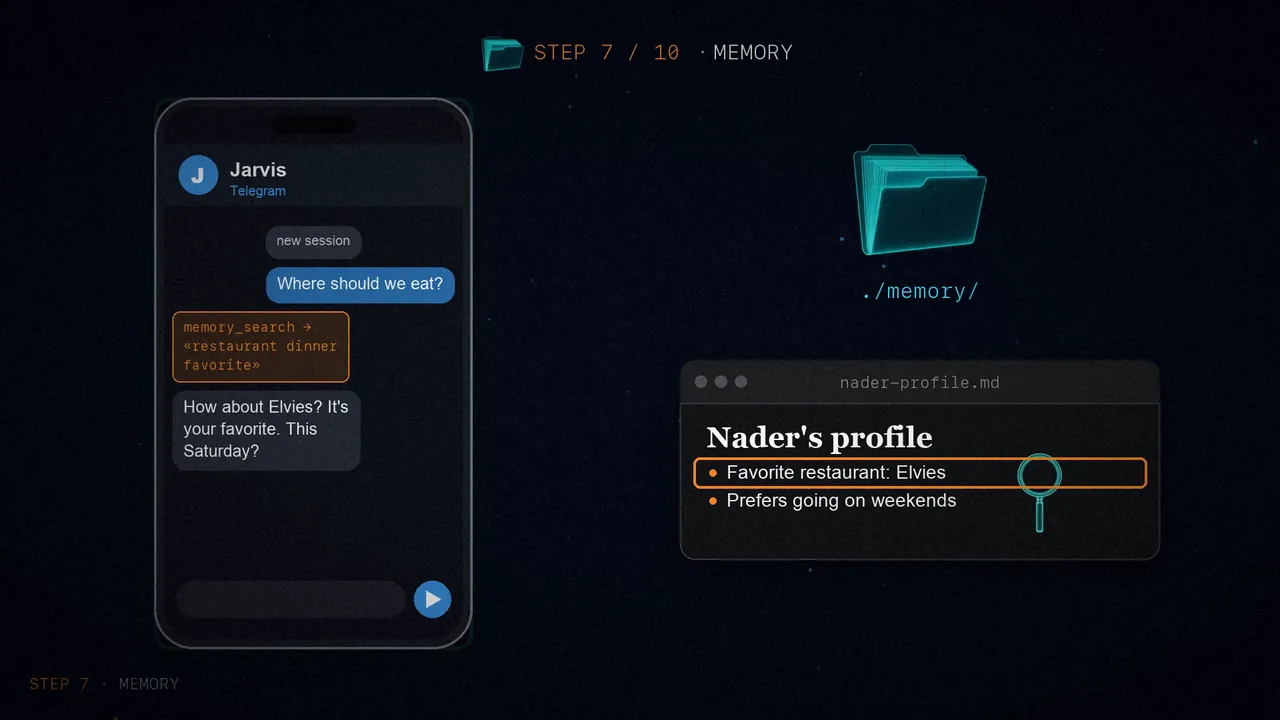
It works because the memory is in files. Our search is by keywords, which is enough to get started. OpenClaw uses vector search with embeddings, which finds things by meaning: that way, "auth bug" matches "authentication issues".
Step 8: the command queue
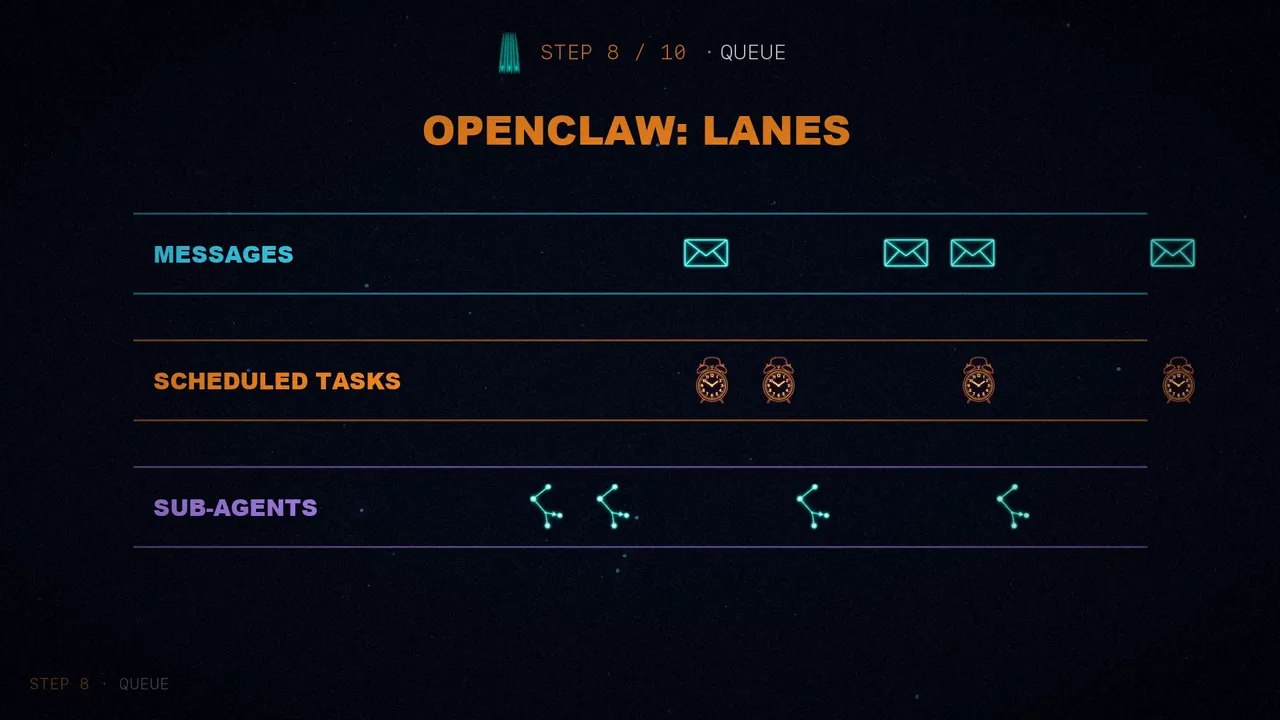
This step solves a subtle but critical problem: what happens if two messages arrive at once? You ask it on Telegram to check your calendar and, at the same time, on the web, what the weather is like. Both load the same session, both write to it, and the file ends up corrupted.
The fix is simple: one lock per session. Only one message is processed at a time in each session. Messages from the same user queue up, and those from different users run in parallel.
session_locks = defaultdict(threading.Lock)

async def handle_message(update: Update, context):
    user_id = str(update.effective_user.id)

    with session_locks[user_id]:
        messages = load_session(user_id)
        messages = compact_session(user_id, messages)
        messages.append({"role": "user", "content": update.message.text})

        response_text, messages = run_agent_turn(messages, SOUL)

        save_session(user_id, messages)

    await update.message.reply_text(response_text)
OpenClaw extends this with separate lanes for messages, scheduled tasks and sub-agents.
Step 9: heartbeats (scheduled tasks)
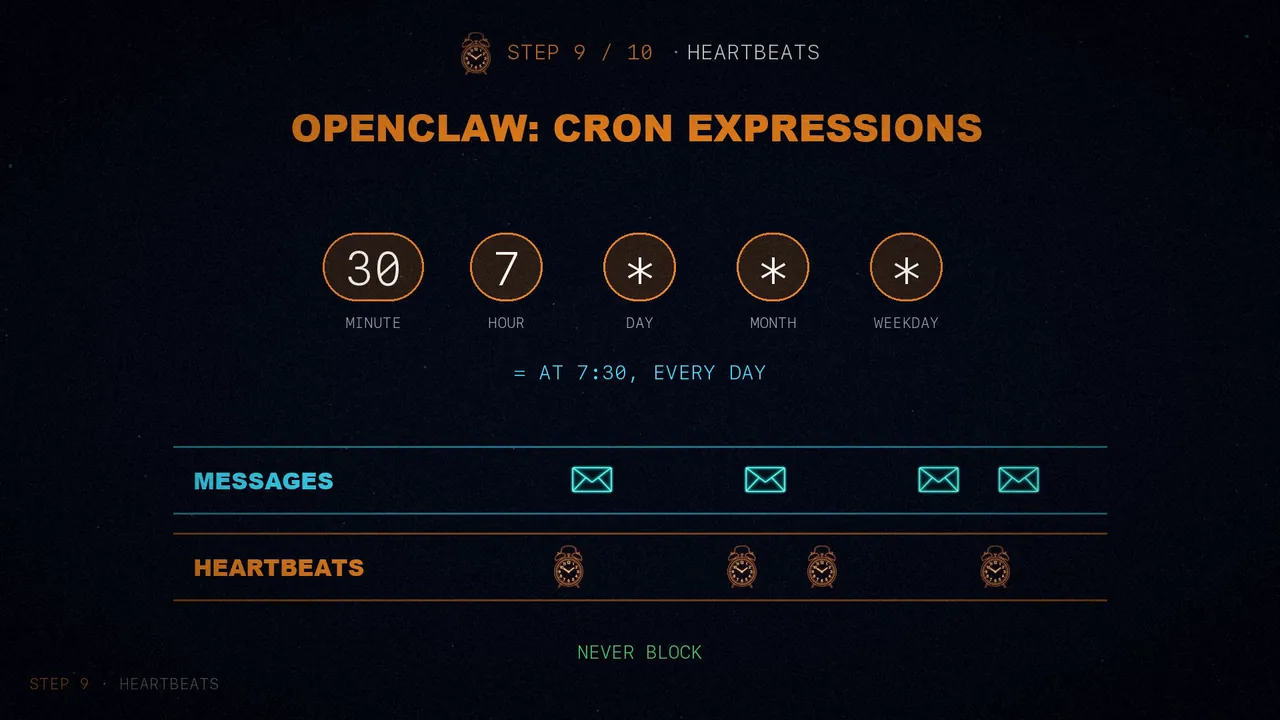
So far the agent only replies when you talk to it. What if you want it to check your email every morning, or brief you on your calendar before meetings? You need heartbeats: tasks that wake the agent up on a timer. The article's example is a morning briefing, every day at 7:30:
def morning_briefing():
    # Use an isolated session key so cron doesn't pollute main chat
    session_key = "cron:morning-briefing"

    with session_locks[session_key]:
        messages = load_session(session_key)
        messages.append({
            "role": "user",
            "content": "Good morning! Check today's date and give me a motivational quote."
        })
        response_text, messages = run_agent_turn(messages, SOUL)
        save_session(session_key, messages)

schedule.every().day.at("07:30").do(morning_briefing)
The important part is that each heartbeat uses its own session (cron:morning-briefing), so it doesn't fill your main conversation with noise. And it calls the same run_agent_turn: it's just another message, only a clock fires it instead of a person.
OpenClaw accepts full cron expressions, like 30 7 * * *, and gives them their own lane so they never block real-time messages.
Step 10: multiple agents
With more tasks, one personality and one set of tools can't do it all: a research assistant needs different instructions from a general one. The solution is several agent configurations, each with its own soul and session, and a router that picks who gets each message.
The example has two: Jarvis, the general assistant, and Scout, a research specialist who has to cite sources for every claim.
def resolve_agent(message_text):
    """Route messages to the right agent based on prefix commands."""
    if message_text.startswith("/research "):
        return "researcher", message_text[len("/research "):]
    return "main", message_text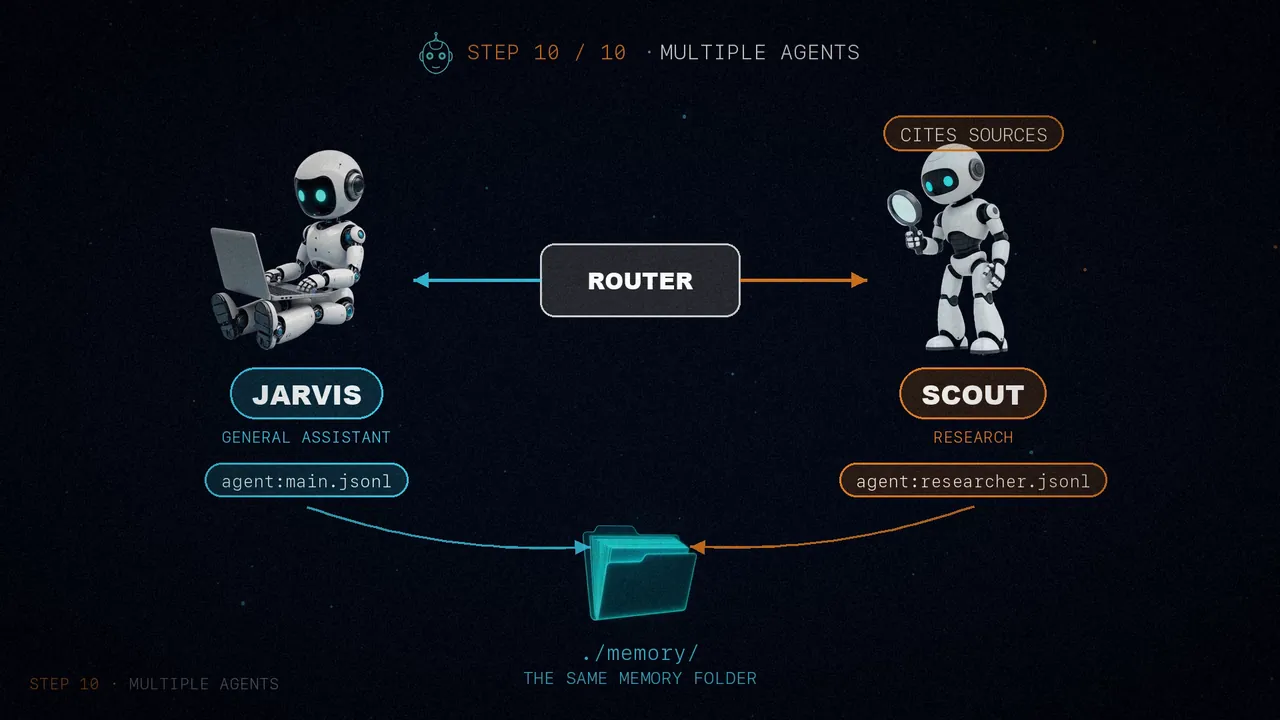
Each has its own conversation, but both share the same memory folder, and that lets them collaborate. You ask Scout to research best practices for async programming in Python; it searches the web and saves what it finds. Then you ask Jarvis what Scout found, and it looks it up in that memory. No direct messages between them: just shared files.
OpenClaw extends this with sub-agents and inter-agent messaging, but the underlying pattern is the same: each agent is just a soul, a session and some tools.
All together: mini OpenClaw
The article puts it all into one program, mini-openclaw.py: an interactive console of about 400 lines of Python with sessions, a soul, tools, permissions, compaction, memory, a queue, scheduled tasks and multiple agents. I checked its code: it's a console, so out of the ten steps only the gateway is missing.
In the example session, you ask it to remember your favorite restaurant and it saves it; you ask what's in your project folder and it runs a command to see; you reset the session and, when you ask where you like to eat, it remembers.
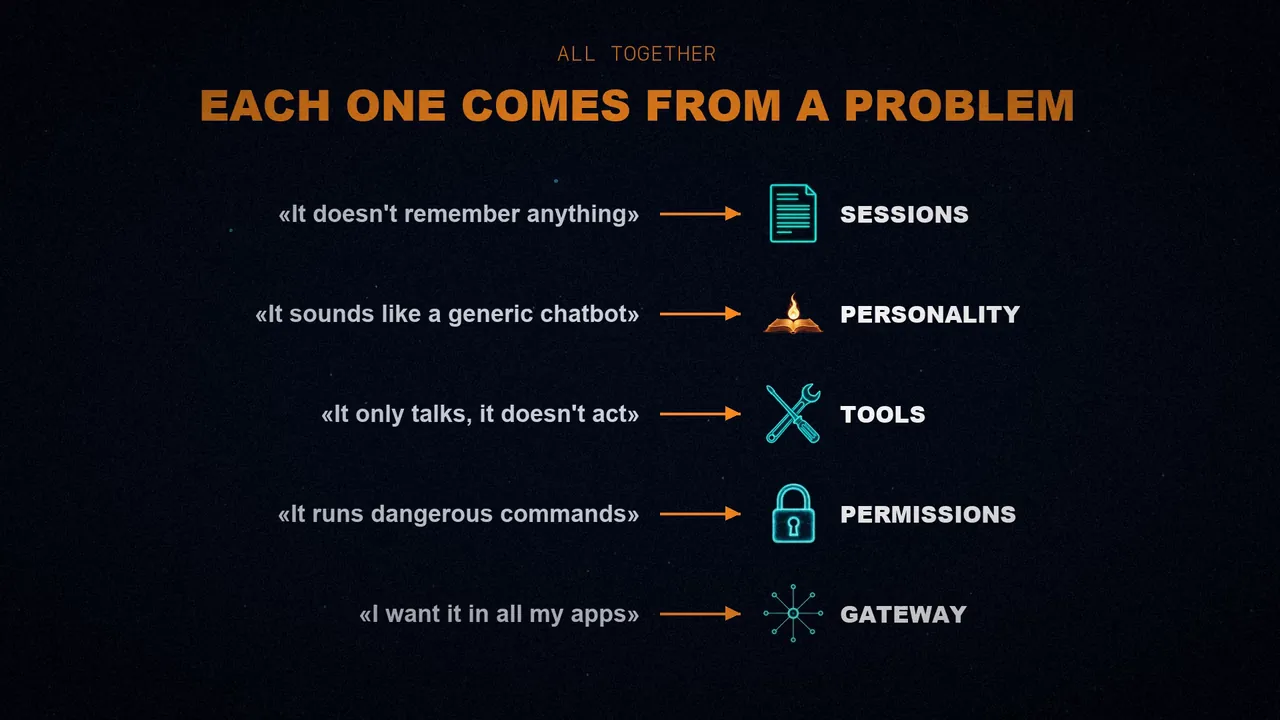
The beautiful part is that no piece is arbitrary. Each one came from a practical problem:
- "It doesn't remember anything" → sessions.
- "It sounds like a generic chatbot" → SOUL.md.
- "It only talks, it doesn't act" → tools and the agent loop.
- "It runs dangerous commands" → permissions.
- "I want it in all my apps" → gateway.
- "The conversation got too long" → compaction.
- "It forgets things between sessions" → memory.
- "Two messages at once corrupt the data" → command queue.
- "I want it to do things on its own" → heartbeats.
- "One agent can't do everything well" → multiple agents.
Going further: OpenClaw in production
The prototype covers the core architecture. The article closes with five ideas on how OpenClaw takes it to production, and they're worth a look.
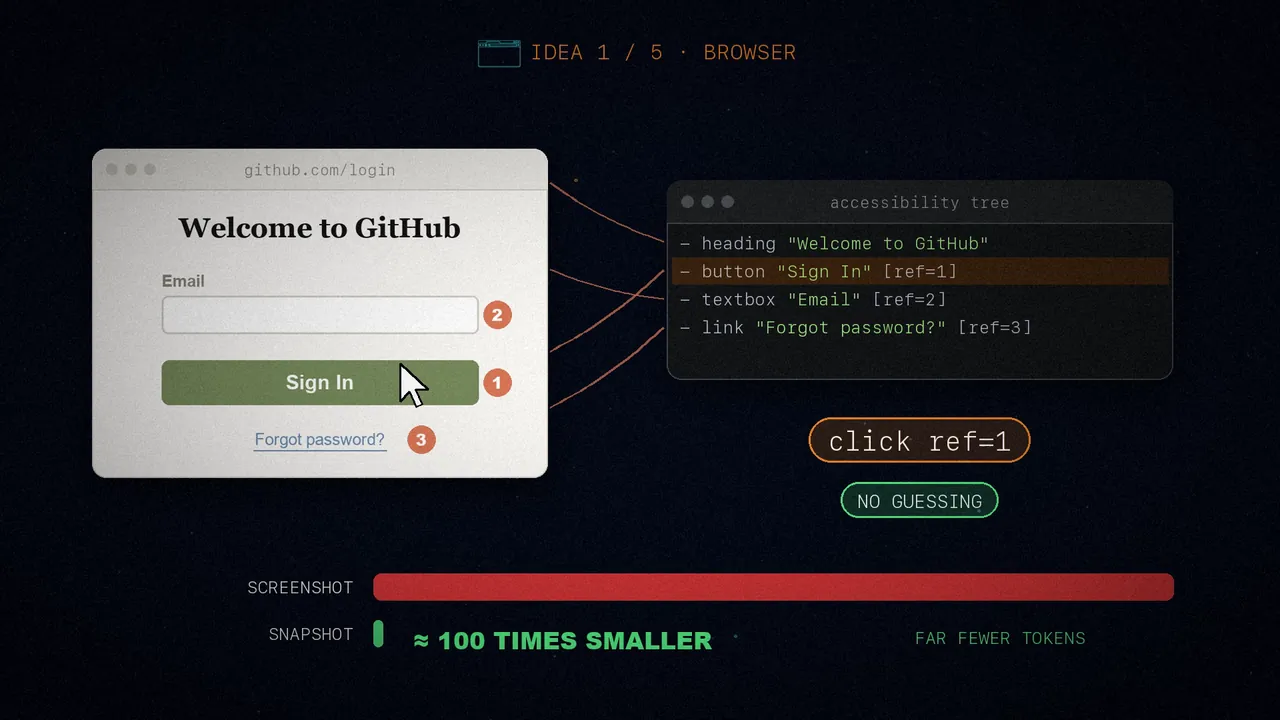
1. A browser with semantic snapshots
OpenClaw gives the agent a browser through Playwright, but instead of sending it screenshots, about 5 MB each, it sends a semantic snapshot, a text version of the page's accessibility tree:
snapshot = page.accessibility.snapshot()
# - heading "Welcome to GitHub"
# - button "Sign In" [ref=1]
# - textbox "Email" [ref=2]
# - link "Forgot password?" [ref=3]
Every element you can interact with gets a number. When the agent wants to click something, it says click ref=1. No guessing, and it's roughly a hundred times smaller than a screenshot, so it uses far fewer tokens.
2. Session scoping
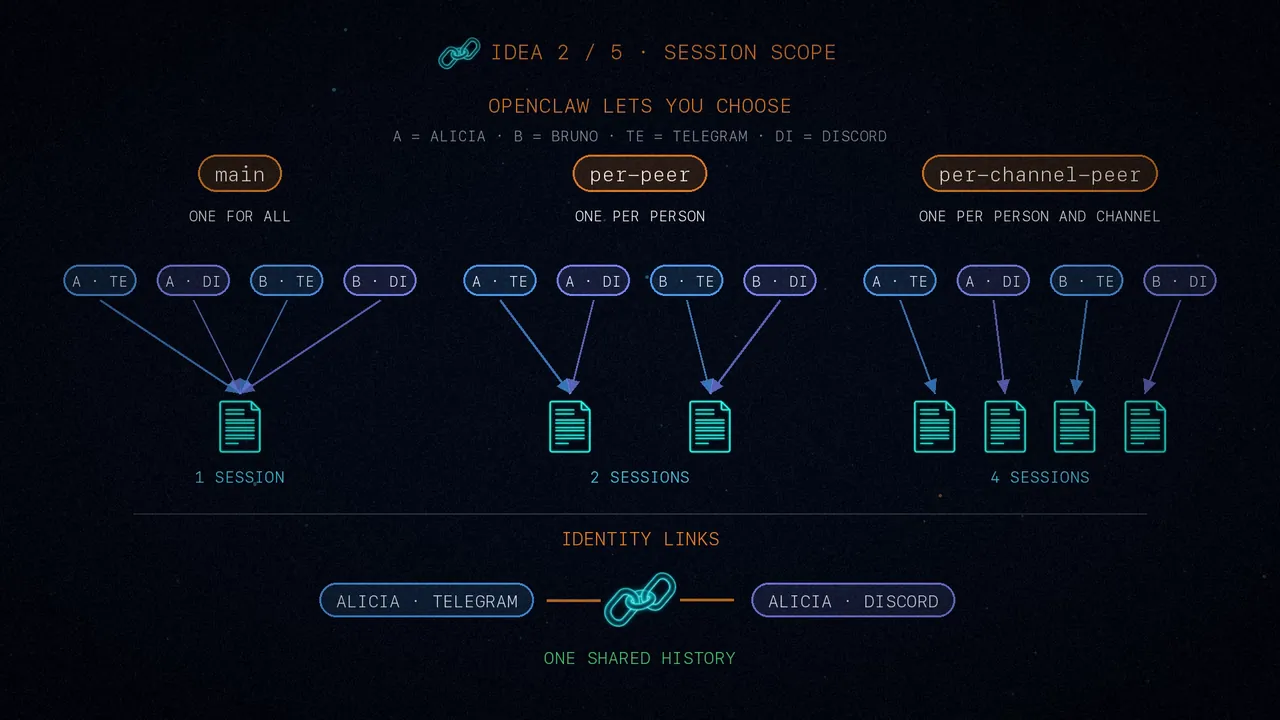
Our prototype uses the user as the key. OpenClaw lets you choose: main (one session for all direct messages), per-peer (one for each person across channels) or per-channel-peer (one per person and channel). And with identity links, what Alice says on Telegram and on Discord shares the same history.
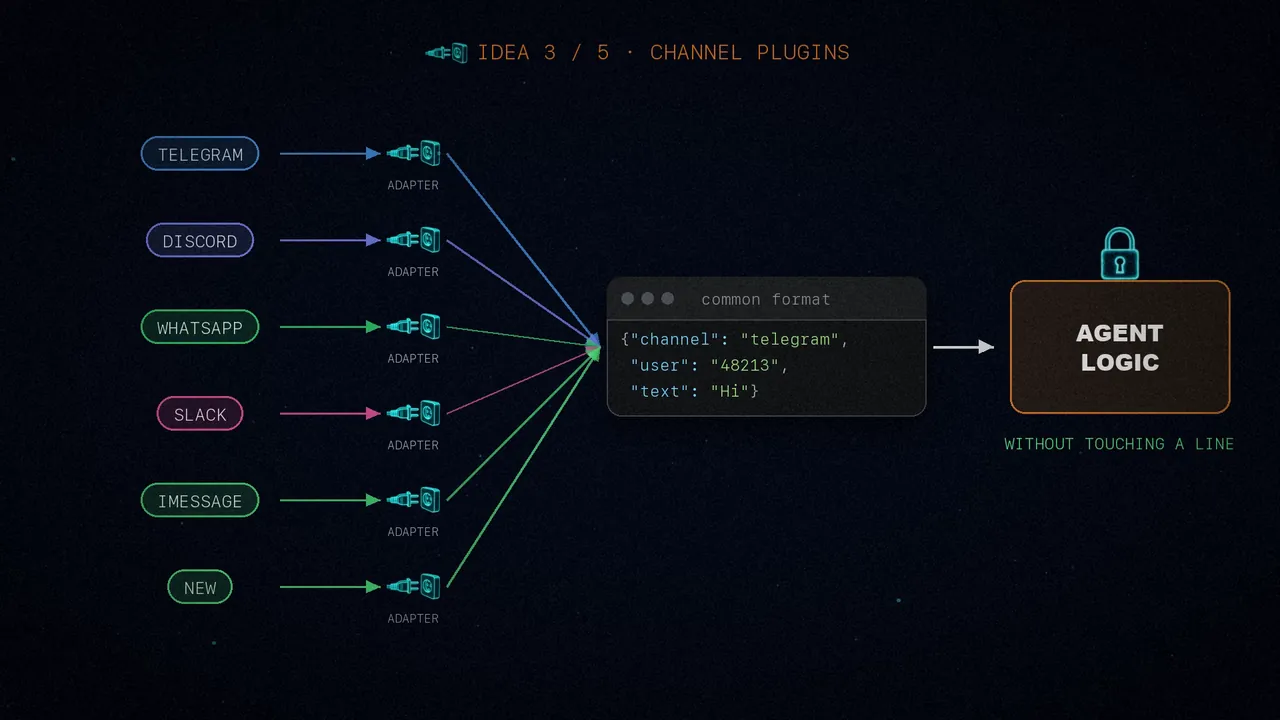
3. Channels as plugins
Each channel, from Telegram to iMessage, is an adapter that translates its messages into a common format. To add a new channel, you just write its adapter, without touching a single line of the agent logic.
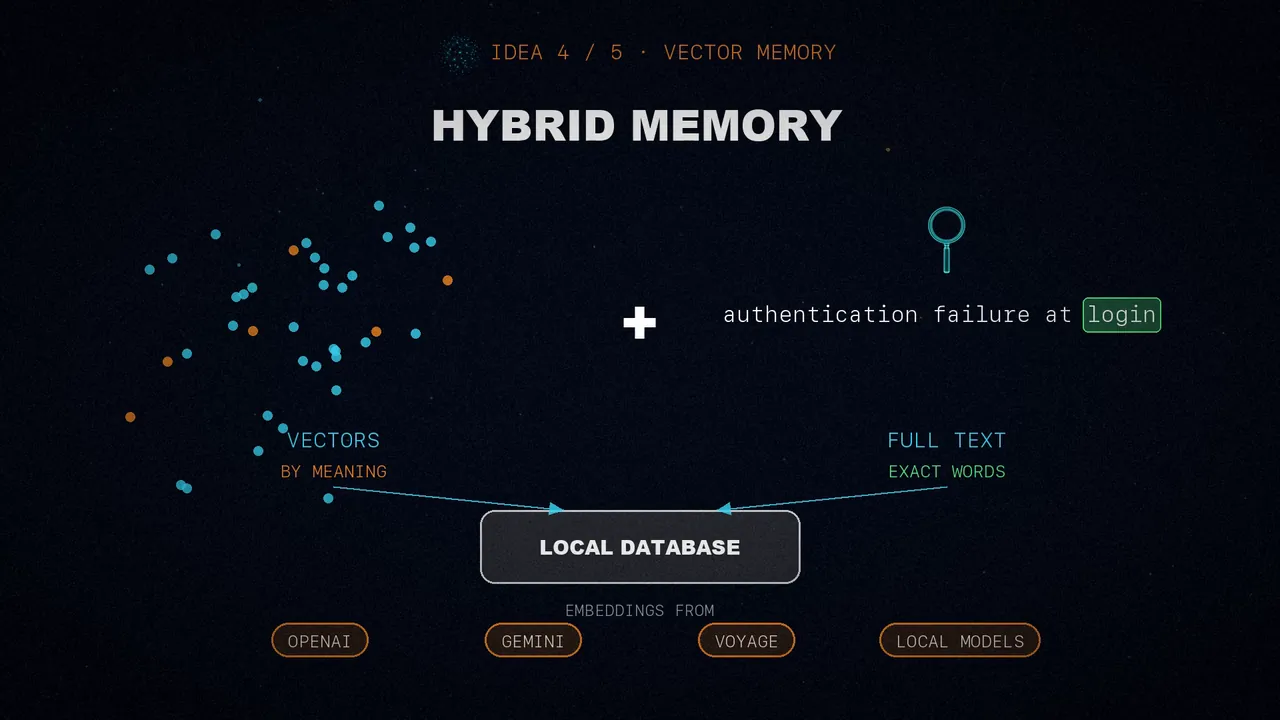
4. Hybrid memory
It combines vectors, which find things by meaning, with a full-text index (FTS5) for exact words. All in a local SQLite database, with embeddings from OpenAI, Gemini, Voyage or local models.
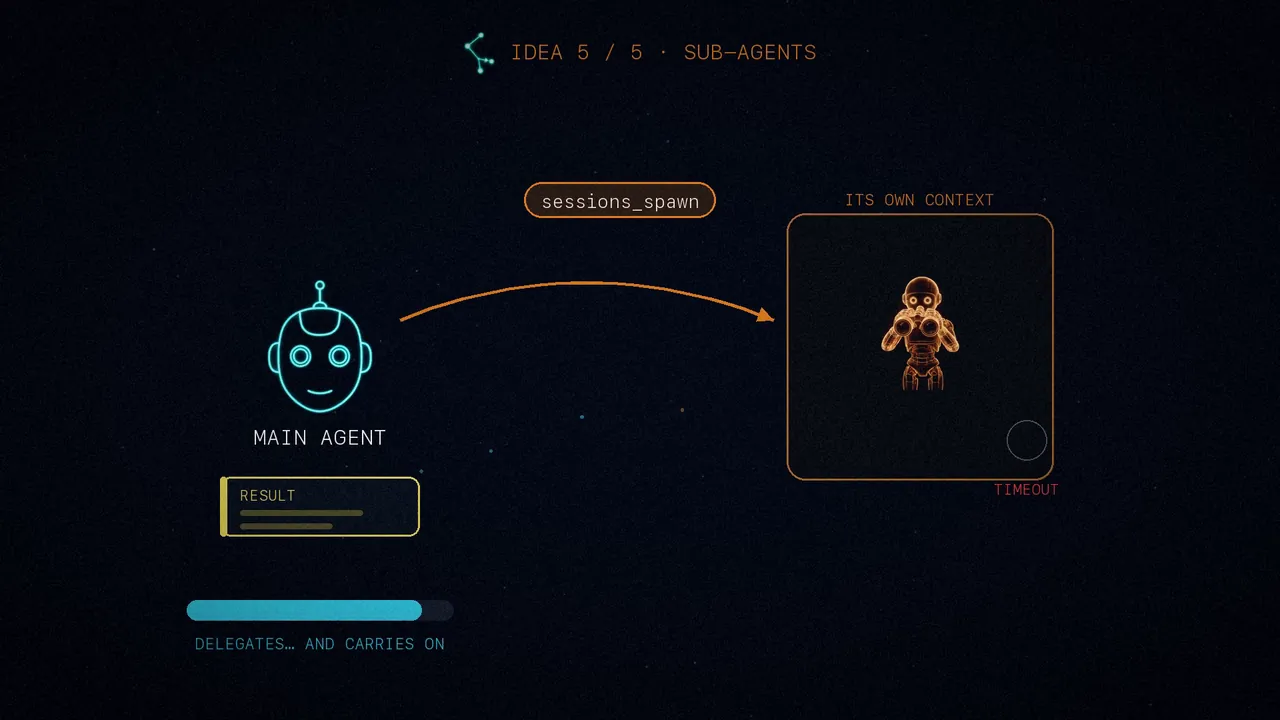
5. Sub-agents
In our prototype, routing is manual. In OpenClaw, an agent can spawn another by itself with sessions_spawn. The child works in its own context, with a timeout, and hands the result back to the parent. So the main agent delegates deep research and carries on when the specialist is done.
If you want to build your own
The article's advice is to go step by step:
- Start with one channel: a Telegram or Discord bot with sessions.
- Add tools one at a time: file reading and writing first, then the shell.
- Add memory when you need it: as soon as sessions reset, you'll want it.
- Add channels when one isn't enough: the gateway emerges naturally.
- Add agents when tasks specialize: start with two, not ten.
Or just use OpenClaw, which is open source and handles the edge cases. But now you know how it works under the hood.
In short
A persistent assistant is an agent loop surrounded by simple pieces: sessions, a soul, tools, permissions, a gateway, memory and scheduled tasks.
No piece is magic: each one solves a concrete problem.
Which piece would you add to your assistant?
Sources
- "You Could've Invented OpenClaw", by Nader Dabit (@dabit3), February 2026.
- The video, on my three channels: Spanish, English and Portuguese.