py-smi: NVIDIA GPU Monitor in Python

py-smi: NVIDIA GPU Monitor in Python

py-smilink image 3

Disclaimer: This post has been translated to English using a machine translation model. Please, let me know if you find any mistakes.

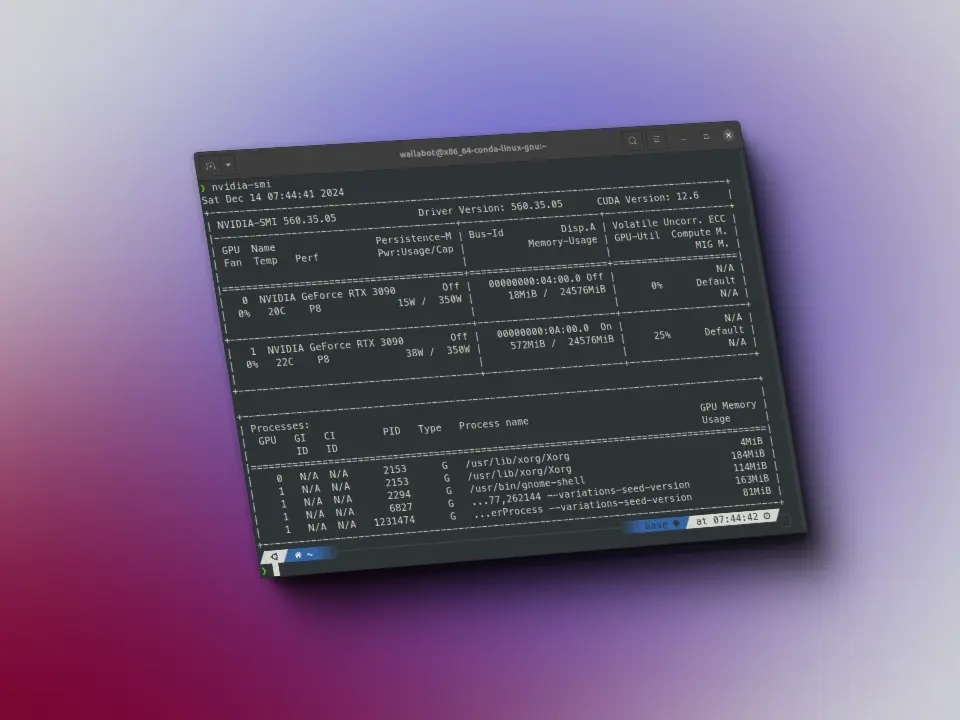
Do you want to be able to use nvidia-smi from Python? Here you have a library to do it.

Installationlink image 4

To install it, run:

pip install python-smi```
      

Usagelink image 5

We import the library

	
< > Input
Python
from py_smi import NVML
Copied

We create an object of pynvml (the library behind nvidia-smi)

	
< > Input
Python
nv = NVML()
Copied

We get the version of the driver and CUDA

	
< > Input
Python
nv.driver_version, nv.cuda_version
Copied
>_ Output
			
('560.35.03', '12.6')

Since in my case I have two GPUs, I create a variable with the number of GPUs

	
< > Input
Python
num_gpus = 2
Copied

I get the memory of each GPU

	
< > Input
Python
[nv.mem(i) for i in range(num_gpus)]
Copied
>_ Output
			
[_Memory(free=24136.6875, total=24576.0, used=439.3125),
_Memory(free=23509.0, total=24576.0, used=1067.0)]

The utilization

	
< > Input
Python
[nv.utilization() for i in range(num_gpus)]
Copied
>_ Output
			
[_Utilization(gpu=0, memory=0, enc=0, dec=0),
_Utilization(gpu=0, memory=0, enc=0, dec=0)]

The power used

This works very well for me, because when I was training a model and had both GPUs full, sometimes my computer would shut down, and looking at the power, I see that the second one consumes a lot, so it may be what I already suspected, which was due to power supply.

	
< > Input
Python
[nv.power(i) for i in range(num_gpus)]
Copied
>_ Output
			
[_Power(usage=15.382, limit=350.0), _Power(usage=40.573, limit=350.0)]

The clocks of each GPU

	
< > Input
Python
[nv.clocks(i) for i in range(num_gpus)]
Copied
>_ Output
			
[_Clocks(graphics=0, sm=0, mem=405), _Clocks(graphics=540, sm=540, mem=810)]

PCI Data

	
< > Input
Python
[nv.pcie_throughput(i) for i in range(num_gpus)]
Copied
>_ Output
			
[_PCIeThroughput(rx=0.0, tx=0.0),
_PCIeThroughput(rx=0.1630859375, tx=0.0234375)]

And the processes (I'm not running anything now)

	
< > Input
Python
[nv.processes(i) for i in range(num_gpus)]
Copied
>_ Output
			
[[], []]

Frequently asked questions

How can I get the driver version, CUDA version and per-GPU memory in Python without parsing nvidia-smi output?

Install the library with pip install python-smi, import it with from py_smi import NVML, and create nv = NVML() (which wraps pynvml, the library behind nvidia-smi). nv.driver_version, nv.cuda_version returns something like ('560.35.03', '12.6'), and [nv.mem(i) for i in range(num_gpus)] returns _Memory(free=..., total=..., used=...) objects in MiB for each GPU.

How do I use py-smi to diagnose why my PC shuts down when training with two GPUs at once?

nv.power(i) returns a _Power(usage, limit) per GPU (in the example, _Power(usage=15.382, limit=350.0) for one and _Power(usage=40.573, limit=350.0) for the other). The author used exactly this to confirm one of the two GPUs was drawing much more power than the other, pointing to a power-supply issue as the cause of the shutdowns when training with both GPUs under full load.

Continue reading

Last posts -->

Have you seen these projects?

Gymnasia

Gymnasia Gymnasia
Expo
React Native
TypeScript
OpenAI
Anthropic

Fitness app with two agents that run entirely on the device, with no backend, so the user's data never leaves the phone. A BYOK conversational coach with local tools and a remote system prompt with offline fallback, plus a food estimator that pulls macronutrients out of a photo of the plate, with barcode scanning against OpenFoodFacts.

LangGraph Deep Researcher

LangGraph Deep Researcher LangGraph Deep Researcher
Python
LangGraph
FastAPI
React
TypeScript
Docker

Multi-agent research system built with LangGraph. A supervisor breaks your question down into topics and launches search sub-agents in parallel; each one compresses its findings before handing them to a writer agent that produces the final sourced markdown report. Live streaming over WebSockets, a configurable model per role and bring-your-own API keys that are never persisted server-side.

Tau

Tau Tau
Python
LangChain

Multi-agent tutoring system for secondary school students, with one agent per subject and course material written and validated by a team of teachers. It was used with real students at a private school in Spain and at a secondary school in Colombia.

View all projects -->
>_ Available for projects

Do you have an AI project?

Let's talk.

maximofn@gmail.com

Machine Learning and AI specialist. I develop solutions with generative AI, intelligent agents and custom models.

Do you want to watch any talk?

Last talks -->

Do you want to improve with these tips?

Last tips -->

Use this locally

Hugging Face spaces allow us to run models with very simple demos, but what if the demo breaks? Or if the user deletes it? That's why I've created docker containers with some interesting spaces, to be able to use them locally, whatever happens. In fact, if you click on any project view button, it may take you to a space that doesn't work.

Flow edit

Flow edit Flow edit

FLUX.1-RealismLora

FLUX.1-RealismLora FLUX.1-RealismLora
View all containers -->
>_ Available for projects

Do you have an AI project?

Let's talk.

maximofn@gmail.com

Machine Learning and AI specialist. I develop solutions with generative AI, intelligent agents and custom models.

Do you want to train your model with these datasets?

short-jokes-dataset

HuggingFace

Dataset with jokes in English

Use: Fine-tuning text generation models for humor

231K rows 2 columns 45 MB
View on HuggingFace →

opus100

HuggingFace

Dataset with translations from English to Spanish

Use: Training English-Spanish translation models

1M rows 2 columns 210 MB
View on HuggingFace →

netflix_titles

HuggingFace

Dataset with Netflix movies and series

Use: Netflix catalog analysis and recommendation systems

8.8K rows 12 columns 3.5 MB
View on HuggingFace →
View more datasets -->