In the first part we learned how to keep version control of a project locally: the git areas, the initial configuration, and the commit workflow. In this second chapter we dive into **branches**: how to create them, move between them, merge them, and resolve conflicts. 🎸
Disclaimer: This post has been translated to English using a machine translation model. Please, let me know if you find any mistakes.
📚 **This entry is part of the _Git Guide_ series**, divided into three chapters that should be read in order:
> * Part 1: Version control locally
* 👉 **Part 2: Branches**
* Part 3: Remote repositories, stash, and tags
Branches
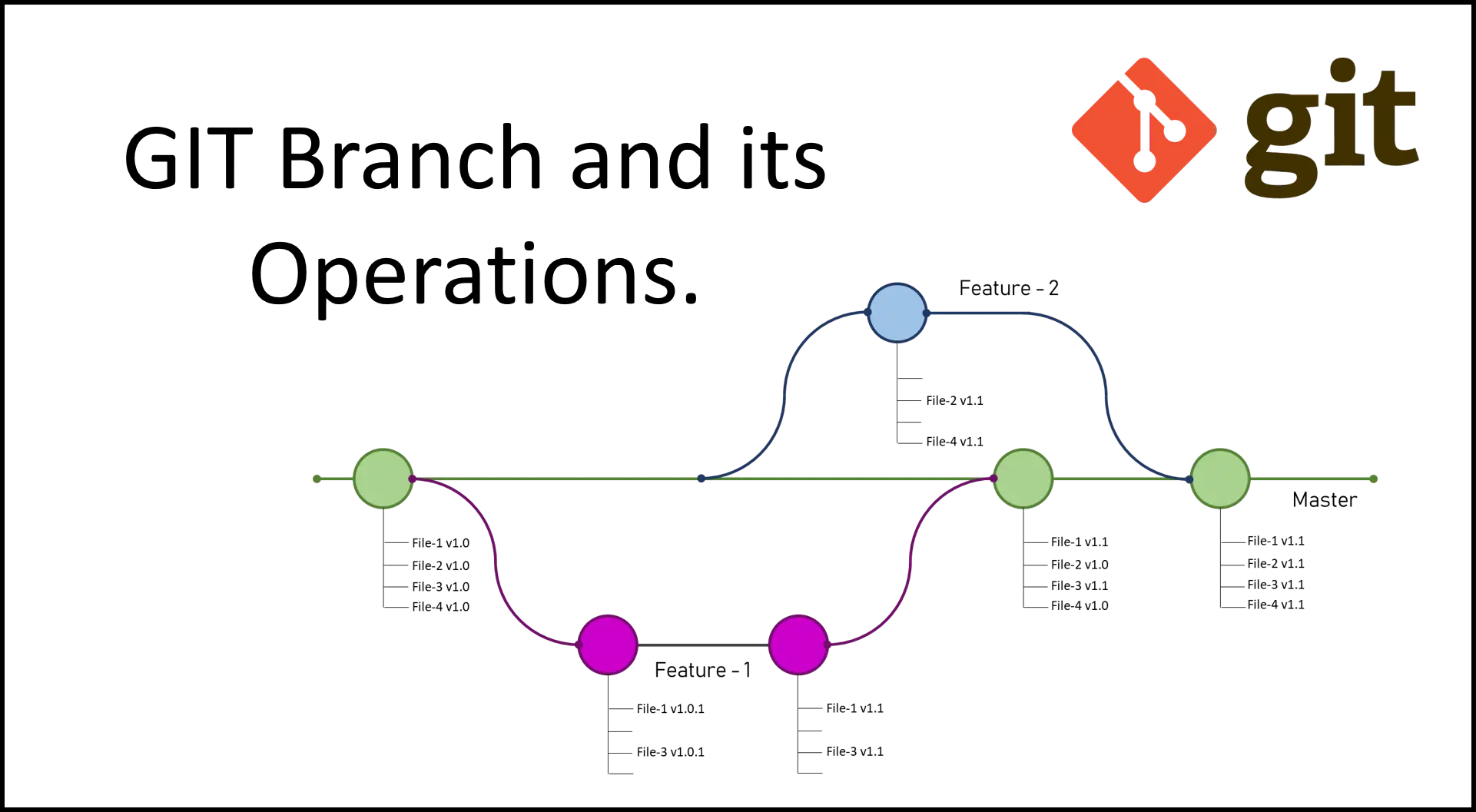
Using branches is very useful, as we can start developing a new feature without having to modify the original code.
Create a branch (git branch <branch name>)
**Note**: First of all, it should be said that to create a branch in a repository there must be at least one commit; if you try to create a branch before making the first commit, you will receive an error
To create a branch, we use the command git branch <branch name>
InputPython!cd notebook_git && git branch new_branchCopied
List branches (git branch)
We have created our first branch; we can check all the branches we have created by typing just git branch
InputPython!cd notebook_git && git branchCopied
* masternew_branch
In addition to listing, it tells us with an asterisk * which branch we are on, in this case on the master branch
Rename branches, goodbye to the master branch (git branch -m <old name> <new name>)
Historically in git the main branch has been called master, but this has bad historical connotations because of the master-slave concept, due to the suffering many people experienced, so the main branch is now usually referred to as main, so to rename it we use git branch -m master main
InputPython!cd notebook_git && git branch -m master mainCopied
We list the branches
InputPython!cd notebook_git && git branchCopied
* mainnew_branch
As we can see, we have been able to change the name of the main branch from master to main
Switch branches (git switch <branch>)
If we want to switch branches, we just have to write git switch <branch name>
InputPython!cd notebook_git && git switch new_branchCopied
Cambiado a rama 'new_branch'
Let's see which branch we're on with git branch
InputPython!cd notebook_git && git branchCopied
main* new_branch
As we can see, we have switched to the new_branch branch
If we want to create and switch to a branch in a single command, we can use git switch -c <branch name>
InputPython!cd notebook_git && git switch -c new_branch2Copied
Cambiado a nueva rama 'new_branch2'
Let's see which branch we're on
InputPython!cd notebook_git && git branchCopied
mainnew_branch* new_branch2
We have created and switched branches with a single command
Get the branch we are on (git branch --show-current)
As we have seen so far with git branch we can get a list of all the branches and also see which one we are currently on, but in the case where we have a large number of branches, which can happen in a work team with a lot of people, it is good to get the current branch without getting a list of all of them, for that we use git branch --show-current
InputPython!cd notebook_git && git branch --show-currentCopied
new_branch2
List of most recent branches (git branch --sort=-committerdate)
In case you have many branches, you may want to know which ones are the most recent to see which were created last and where the latest development should be. For that, we use git branch --sort=-committerdate
InputPython!cd notebook_git && git branch --sort=-committerdateCopied
* new_branch2new_branchmain
As we can see, it has ordered them in reverse order from when we created them.
The deprecated git checkout command
Until some time ago, the command to create branches and switch between them was git checkout, but this command not only does this, it also restores the working directory. However, this goes against the Linux philosophy, so the commands git branch, git switch, and git restore were created to split this functionality.
Merging branches (git merge)
As we have said, creating branches is very useful for developing new features without affecting the rest of the team. But when they are finished, they need to be brought into the main branch; to do this we use the command git merge <branch>
**Important**: We need to be on the branch that will receive the changes; that is, if we want to merge the changes made in the
new_branch2branch into themainbranch, first we must make sure we are on themainbranch
First, we check which branch we are on
InputPython!cd notebook_git && git branch --show-currentCopied
new_branch2
We removed archivo7.py
InputPython!cd notebook_git && git rm archivo7.pyCopied
rm 'archivo7.py'
We make a commit with the changes
InputPython!cd notebook_git && git commit -am "Eliminado archivo7.py"Copied
[new_branch2 5168f78] Eliminado archivo7.py1 file changed, 1 deletion(-)delete mode 100644 archivo7.py
If we do an ls, we see that archivo7.py is no longer there
InputPython!cd notebook_git && ls | grep archivo7Copied
We create a new file and make a commit
InputPython!cd notebook_git && touch archivo8.py && git add archivo8.py && git commit -m "Commit con el archivo 8"Copied
[new_branch2 564ccfb] Commit con el archivo 81 file changed, 0 insertions(+), 0 deletions(-)create mode 100644 archivo8.py
We have made two new commits on this branch, let’s see it with git log
InputPython!cd notebook_git && git log --graph --oneline --decorateCopied
* 564ccfb (HEAD -> new_branch2) Commit con el archivo 8* 5168f78 Eliminado archivo7.py* 4bb9d75 (new_branch, main) Commit con el archivo 7* ea615a9 Eliminado archivo5.py* e3153a5 Commit con los archivos 4 y 5* 0b09cfa Añadido .gitignore* 04ebd1f Commit con los archivos 1 y 2* c4930d7 Tercer commit, hola.py* 6e99e73 Segundo commit, hola.py* 1c95e4f Primer commit, hola.py
We switched to the main branch
InputPython!cd notebook_git && git switch mainCopied
Cambiado a rama 'main'
If we now run ls again, we will see that archivo7.py is there.
InputPython!cd notebook_git && ls | grep archivo7Copied
archivo7.py
We merge the branches, bringing the changes from new_branch2 into main
InputPython!cd notebook_git && git merge new_branch2Copied
Actualizando 4bb9d75..564ccfbFast-forwardarchivo7.py | 1 -archivo8.py | 02 files changed, 1 deletion(-)delete mode 100644 archivo7.pycreate mode 100644 archivo8.py
We do a git status
InputPython!cd notebook_git && git statusCopied
En la rama mainnada para hacer commit, el árbol de trabajo está limpio
We see that when doing the merge it is not necessary to make any commit; let’s see with a git log what happened
InputPython!cd notebook_git && git log --graph --oneline --decorateCopied
* 564ccfb (HEAD -> main, new_branch2) Commit con el archivo 8* 5168f78 Eliminado archivo7.py* 4bb9d75 (new_branch) Commit con el archivo 7* ea615a9 Eliminado archivo5.py* e3153a5 Commit con los archivos 4 y 5* 0b09cfa Añadido .gitignore* 04ebd1f Commit con los archivos 1 y 2* c4930d7 Tercer commit, hola.py* 6e99e73 Segundo commit, hola.py* 1c95e4f Primer commit, hola.py
We see that the commit from the new_branch2 branch has been incorporated into this branch
Fast-forward
In this case, we create a new branch, we do not touch the main one, and we only modify the new one, making several commits. So when merging the new branch into the main one, all the commits that were made on the new branch will be visible. To perform this type of merge, we write git merge --ff-only <rama>
InputPython### Este código es para crear el gráfico de las ramas, no es necesario para el cursoimport graphviz# Crear el gráfico con la dirección de las flechas de izquierda a derechaorin = graphviz.Digraph('G', graph_attr={'rankdir': 'LR'})fast_foward = graphviz.Digraph('G', graph_attr={'rankdir': 'LR'})# Agregar nodos (pelotas) A, B, C y D en la rama principalorin.node('A', shape='circle', label='A', color='blue')orin.node('B', shape='circle', label='B', color='blue')orin.node('C', shape='circle', label='C', color='blue')orin.node('D', shape='circle', label='D', color='blue')orin.node('E', shape='circle', label='', color='transparent')fast_foward.node('A', shape='circle', label='A', color='blue')fast_foward.node('B', shape='circle', label='B', color='blue')fast_foward.node('C', shape='circle', label='C', color='blue')fast_foward.node('D', shape='circle', label='D', color='blue')# Agregar nodos (pelotas) X e Y en la rama secundariaorin.node('X', shape='circle', label='X', color='green')orin.node('Y', shape='circle', label='Y', color='green')fast_foward.node('X', shape='circle', label='X', color='magenta')fast_foward.node('Y', shape='circle', label='Y', color='magenta')# Agregar flechas entre los nodos en la rama principalorin.edges(['AB', 'BC', 'CD'])orin.edge('D', 'E', color='transparent') # Hacer la flecha de C a D transparentefast_foward.edges(['AB', 'BC', 'CD', 'DX', 'XY'])# Agregar flechas entre los nodos en la rama secundariaorin.edges(['DX', 'XY'])# Mostrar el diagrama de flujo en la celda de código de Jupyter Notebookdisplay(orin)display(fast_foward)Copied
<graphviz.graphs.Digraph at 0x7f58f80c09a0>
<graphviz.graphs.Digraph at 0x7f58f9203fa0>
Let's first check that we are on the main branch
InputPython!cd notebook_git && git branch --show-currentCopied
main
We create a new branch
InputPython!cd notebook_git && git branch branch_fast_forwardCopied
We switched to her
InputPython!cd notebook_git && git switch branch_fast_forwardCopied
Cambiado a rama 'branch_fast_forward'
InputPython!cd notebook_git && git branch --show-currentCopied
branch_fast_forward
Let's see the log
InputPython!cd notebook_git && git log --graph --oneline --decorate --allCopied
* 564ccfb (HEAD -> branch_fast_forward, new_branch2, main) Commit con el archivo 8* 5168f78 Eliminado archivo7.py* 4bb9d75 (new_branch) Commit con el archivo 7* ea615a9 Eliminado archivo5.py* e3153a5 Commit con los archivos 4 y 5* 0b09cfa Añadido .gitignore* 04ebd1f Commit con los archivos 1 y 2* c4930d7 Tercer commit, hola.py* 6e99e73 Segundo commit, hola.py* 1c95e4f Primer commit, hola.py
Okay, we are on a branch created from the main one with all its log history, we make two new commits
InputPython!cd notebook_git && git rm archivo4.py && git commit -am "Eliminado archivo4.py"Copied
rm 'archivo4.py'[branch_fast_forward 4484e70] Eliminado archivo4.py1 file changed, 1 deletion(-)delete mode 100644 archivo4.py
InputPython!cd notebook_git && git rm hola.py && git commit -am "Eliminado hola.py"Copied
rm 'hola.py'[branch_fast_forward 94149fc] Eliminado hola.py1 file changed, 3 deletions(-)delete mode 100644 hola.py
We create a new log to see that in this new branch they have been created
InputPython!cd notebook_git && git log --graph --oneline --decorateCopied
* 94149fc (HEAD -> branch_fast_forward) Eliminado hola.py* 4484e70 Eliminado archivo4.py* 564ccfb (new_branch2, main) Commit con el archivo 8* 5168f78 Eliminado archivo7.py* 4bb9d75 (new_branch) Commit con el archivo 7* ea615a9 Eliminado archivo5.py* e3153a5 Commit con los archivos 4 y 5* 0b09cfa Añadido .gitignore* 04ebd1f Commit con los archivos 1 y 2* c4930d7 Tercer commit, hola.py* 6e99e73 Segundo commit, hola.py* 1c95e4f Primer commit, hola.py
As we can see, the last two commits are the ones we created, and we can verify that those commits are not on the main branch (to do that, I specify that it should be done on the main branch)
InputPython!cd notebook_git && git log main --graph --oneline --decorateCopied
* 564ccfb (new_branch2, main) Commit con el archivo 8* 5168f78 Eliminado archivo7.py* 4bb9d75 (new_branch) Commit con el archivo 7* ea615a9 Eliminado archivo5.py* e3153a5 Commit con los archivos 4 y 5* 0b09cfa Añadido .gitignore* 04ebd1f Commit con los archivos 1 y 2* c4930d7 Tercer commit, hola.py* 6e99e73 Segundo commit, hola.py* 1c95e4f Primer commit, hola.py
Now we switch to the main branch to do the merge
InputPython!cd notebook_git && git switch mainCopied
Cambiado a rama 'main'
Finally, we perform the fast-forward merge
InputPython!cd notebook_git && git merge --ff-only branch_fast_forwardCopied
Actualizando 564ccfb..94149fcFast-forwardarchivo4.py | 1 -hola.py | 3 ---2 files changed, 4 deletions(-)delete mode 100644 archivo4.pydelete mode 100644 hola.py
The merge has been done, let's see what happened to the log on the main branch
InputPython!cd notebook_git && git log --graph --oneline --decorateCopied
* 94149fc (HEAD -> main, branch_fast_forward) Eliminado hola.py* 4484e70 Eliminado archivo4.py* 564ccfb (new_branch2) Commit con el archivo 8* 5168f78 Eliminado archivo7.py* 4bb9d75 (new_branch) Commit con el archivo 7* ea615a9 Eliminado archivo5.py* e3153a5 Commit con los archivos 4 y 5* 0b09cfa Añadido .gitignore* 04ebd1f Commit con los archivos 1 y 2* c4930d7 Tercer commit, hola.py* 6e99e73 Segundo commit, hola.py* 1c95e4f Primer commit, hola.py
As can be seen, the two commits made on the branch_fast_forward branch have been retained.
No fast-forward or true merge
In this case we create a new branch, we do not touch the main one, and we modify the new one, making several commits. Next, we make a commit on the main branch. Therefore, when merging the new one into the main one, it will appear as a single commit in the new branch. To do this type of merge, we write git merge <rama> --no-ff
InputPython### Este código es para crear el gráfico de las ramas, no es necesario para el cursoimport graphviz# Crear el gráfico con la dirección de las flechas de izquierda a derechaorin = graphviz.Digraph('G', graph_attr={'rankdir': 'LR'})not_fast_forward = graphviz.Digraph('G', graph_attr={'rankdir': 'LR'})# Agregar nodos (pelotas) A, B, C y D en la rama principalorin.node('A', shape='circle', label='A', color='blue')orin.node('B', shape='circle', label='B', color='blue')orin.node('C', shape='circle', label='C', color='blue')orin.node('D', shape='circle', label='D', color='blue')orin.node('E', shape='circle', label='', color='transparent')not_fast_forward.node('A', shape='circle', label='A', color='blue')not_fast_forward.node('B', shape='circle', label='B', color='blue')not_fast_forward.node('C', shape='circle', label='C', color='blue')not_fast_forward.node('D', shape='circle', label='D', color='blue')not_fast_forward.node('E', shape='circle', label='E', color='blue')# Agregar nodos (pelotas) X e Y en la rama secundariaorin.node('X', shape='circle', label='X', color='green')orin.node('Y', shape='circle', label='Y', color='green')not_fast_forward.node('X', shape='circle', label='X', color='green')not_fast_forward.node('Y', shape='circle', label='Y', color='green')# Agregar nodo (pelota) M en la rama principalnot_fast_forward.node('M', shape='circle', label='M', color='magenta')# Agregar flechas entre los nodos en la rama principalorin.edges(['AB', 'BC', 'CD'])orin.edge('D', 'E', color='transparent') # Hacer la flecha de C a D transparentenot_fast_forward.edges(['AB', 'BC', 'CD', 'DE'])# Agregar flechas entre los nodos en la rama secundariaorin.edges(['DX', 'XY'])not_fast_forward.edges(['DX', 'XY', 'YM'])# Agregar flechas de la rama principal al nodo Mnot_fast_forward.edge('E', 'M')# Mostrar el diagrama de flujo en la celda de código de Jupyter Notebookdisplay(orin)display(not_fast_forward)Copied
<graphviz.graphs.Digraph at 0x7f58f80c2fb0>
<graphviz.graphs.Digraph at 0x7f58f80c2230>
Let's first check that we are on the main branch
InputPython!cd notebook_git && git branch --show-currentCopied
main
We create a new branch
InputPython!cd notebook_git && git branch branch_no_fast_forwardCopied
We switched to her
InputPython!cd notebook_git && git switch branch_no_fast_forwardCopied
Cambiado a rama 'branch_no_fast_forward'
InputPython!cd notebook_git && git branch --show-currentCopied
branch_no_fast_forward
Okay, we’re on a branch created from the main one, with all its log history, and we make two new commits
InputPython!cd notebook_git && touch file1 && git add file1 && git commit -m "file1"Copied
[branch_no_fast_forward e4e23c9] file11 file changed, 0 insertions(+), 0 deletions(-)create mode 100644 file1
InputPython!cd notebook_git && touch file2 && git add file2 && git commit -m "file2"Copied
[branch_no_fast_forward 8df3429] file21 file changed, 0 insertions(+), 0 deletions(-)create mode 100644 file2
We make a new log to see what has been created in this new branch
InputPython!cd notebook_git && git log --graph --oneline --decorateCopied
* 8df3429 (HEAD -> branch_no_fast_forward) file2* e4e23c9 file1* 94149fc (main, branch_fast_forward) Eliminado hola.py* 4484e70 Eliminado archivo4.py* 564ccfb (new_branch2) Commit con el archivo 8* 5168f78 Eliminado archivo7.py* 4bb9d75 (new_branch) Commit con el archivo 7* ea615a9 Eliminado archivo5.py* e3153a5 Commit con los archivos 4 y 5* 0b09cfa Añadido .gitignore* 04ebd1f Commit con los archivos 1 y 2* c4930d7 Tercer commit, hola.py* 6e99e73 Segundo commit, hola.py* 1c95e4f Primer commit, hola.py
As we can see, the last two commits are the ones we created, and we can verify that those commits are not on the main branch (for that, I specify that it should be done on the main branch)
InputPython!cd notebook_git && git log main --graph --oneline --decorateCopied
* 94149fc (main, branch_fast_forward) Eliminado hola.py* 4484e70 Eliminado archivo4.py* 564ccfb (new_branch2) Commit con el archivo 8* 5168f78 Eliminado archivo7.py* 4bb9d75 (new_branch) Commit con el archivo 7* ea615a9 Eliminado archivo5.py* e3153a5 Commit con los archivos 4 y 5* 0b09cfa Añadido .gitignore* 04ebd1f Commit con los archivos 1 y 2* c4930d7 Tercer commit, hola.py* 6e99e73 Segundo commit, hola.py* 1c95e4f Primer commit, hola.py
Now we are going to the main branch
InputPython!cd notebook_git && git switch mainCopied
Cambiado a rama 'main'
We create a new commit
InputPython!cd notebook_git && touch file3 && git add file3 && git commit -m "file3"Copied
[main 8bdf4d8] file31 file changed, 0 insertions(+), 0 deletions(-)create mode 100644 file3
Finally, we perform the non-fast-forward merge
InputPython!cd notebook_git && git merge branch_no_fast_forward --no-ffCopied
ommit. comenzando con '#' serán ignoradas, y un mensaje vacío abortasaria esta># especialmente si esto fusiona un upstream actualizado en una rama de tópico. /home/wallabot/Documentos/web/portafolio/posts/notebook_git/.git/MERGE_MSG [ línea 1/7 (14%), col 1/48 (2%), car 0/301 (0%) ] [ Párrafo justificado ]...llabot/Documentos/web/portafolio/posts/notebook_git/.git/MERGE_MSG Modificado
As we can see, it opens the editor for us to enter a commit message and a default message. We accept the message and see what has happened
InputPython!cd notebook_git && git statusCopied
En la rama mainnada para hacer commit, el árbol de trabajo está limpio
InputPython!cd notebook_git && git log --graph --oneline --decorateCopied
* 274529c (HEAD -> main) Merge branch 'branch_no_fast_forward' into main|\| * 8df3429 (branch_no_fast_forward) file2| * e4e23c9 file1* | 8bdf4d8 file3|/* 94149fc (branch_fast_forward) Eliminado hola.py* 4484e70 Eliminado archivo4.py* 564ccfb (new_branch2) Commit con el archivo 8* 5168f78 Eliminado archivo7.py* 4bb9d75 (new_branch) Commit con el archivo 7* ea615a9 Eliminado archivo5.py* e3153a5 Commit con los archivos 4 y 5* 0b09cfa Añadido .gitignore* 04ebd1f Commit con los archivos 1 y 2* c4930d7 Tercer commit, hola.py* 6e99e73 Segundo commit, hola.py* 1c95e4f Primer commit, hola.py
InputPython!cd notebook_git && lsCopied
api_keys.py archivo1.py archivo2.py archivo8.py file1 file2 file3
As we can see, a new commit has been created with the changes from the new branch on the main branch
Squash
In this type of merge, all the commits from a new branch are combined into a single one on the main branch; to do this, we write git merge <branch> --squash
InputPython### Este código es para crear el gráfico de las ramas, no es necesario para el cursoimport graphviz# Crear el gráfico con la dirección de las flechas de izquierda a derechaorin = graphviz.Digraph('G', graph_attr={'rankdir': 'LR'})squash = graphviz.Digraph('G', graph_attr={'rankdir': 'LR'})# Agregar nodos (pelotas) A, B, C y D en la rama principalorin.node('A', shape='circle', label='A', color='blue')orin.node('B', shape='circle', label='B', color='blue')orin.node('C', shape='circle', label='C', color='blue')orin.node('D', shape='circle', label='D', color='blue')orin.node('E', shape='circle', label='', color='transparent')squash.node('A', shape='circle', label='A', color='blue')squash.node('B', shape='circle', label='B', color='blue')squash.node('C', shape='circle', label='C', color='blue')squash.node('D', shape='circle', label='D', color='blue')# Agregar nodos (pelotas) X e Y en la rama secundariaorin.node('X', shape='circle', label='X', color='green')orin.node('Y', shape='circle', label='Y', color='green')# Agregar nodo (pelota) M en la rama principalsquash.node('M', shape='circle', label='M', color='magenta')# Agregar flechas entre los nodos en la rama principalorin.edges(['AB', 'BC', 'CD'])orin.edge('D', 'E', color='transparent') # Hacer la flecha de C a D transparentesquash.edges(['AB', 'BC', 'CD', 'DM'])# Agregar flechas entre los nodos en la rama secundariaorin.edges(['DX', 'XY'])# Mostrar el diagrama de flujo en la celda de código de Jupyter Notebookdisplay(orin)display(squash)Copied
<graphviz.graphs.Digraph at 0x7f58f80e6470>
<graphviz.graphs.Digraph at 0x7f58f80e6f80>
Let's first check that we are on the main branch
InputPython!cd notebook_git && git branch --show-currentCopied
main
We create a new branch
InputPython!cd notebook_git && git branch branch_squashCopied
We switched to her
InputPython!cd notebook_git && git switch branch_squashCopied
Cambiado a rama 'branch_squash'
InputPython!cd notebook_git && git branch --show-currentCopied
branch_squash
Let's look at the log
InputPython!cd notebook_git && git log --graph --oneline --decorate --allCopied
* 274529c (HEAD -> branch_squash, main) Merge branch 'branch_no_fast_forward' into main|\| * 8df3429 (branch_no_fast_forward) file2| * e4e23c9 file1* | 8bdf4d8 file3|/* 94149fc (branch_fast_forward) Eliminado hola.py* 4484e70 Eliminado archivo4.py* 564ccfb (new_branch2) Commit con el archivo 8* 5168f78 Eliminado archivo7.py* 4bb9d75 (new_branch) Commit con el archivo 7* ea615a9 Eliminado archivo5.py* e3153a5 Commit con los archivos 4 y 5* 0b09cfa Añadido .gitignore* 04ebd1f Commit con los archivos 1 y 2* c4930d7 Tercer commit, hola.py* 6e99e73 Segundo commit, hola.py* 1c95e4f Primer commit, hola.py
Okay, we’re on a branch created from the main one with all its commit history, and we make three new commits
InputPython!cd notebook_git && git rm file1 && git commit -am "Eliminado file1"Copied
rm 'file1'[branch_squash 767b632] Eliminado file11 file changed, 0 insertions(+), 0 deletions(-)delete mode 100644 file1
InputPython!cd notebook_git && git rm file2 && git commit -am "Eliminado file2"Copied
rm 'file2'[branch_squash a47f771] Eliminado file21 file changed, 0 insertions(+), 0 deletions(-)delete mode 100644 file2
InputPython!cd notebook_git && git rm file3 && git commit -am "Eliminado file3"Copied
rm 'file3'[branch_squash 85f8c9f] Eliminado file31 file changed, 0 insertions(+), 0 deletions(-)delete mode 100644 file3
We create a new log to see that in this new branch they have been created
InputPython!cd notebook_git && git log --graph --oneline --decorateCopied
* 85f8c9f (HEAD -> branch_squash) Eliminado file3* a47f771 Eliminado file2* 767b632 Eliminado file1* 274529c (main) Merge branch 'branch_no_fast_forward' into main|\| * 8df3429 (branch_no_fast_forward) file2| * e4e23c9 file1* | 8bdf4d8 file3|/* 94149fc (branch_fast_forward) Eliminado hola.py* 4484e70 Eliminado archivo4.py* 564ccfb (new_branch2) Commit con el archivo 8* 5168f78 Eliminado archivo7.py* 4bb9d75 (new_branch) Commit con el archivo 7* ea615a9 Eliminado archivo5.py* e3153a5 Commit con los archivos 4 y 5* 0b09cfa Añadido .gitignore* 04ebd1f Commit con los archivos 1 y 2* c4930d7 Tercer commit, hola.py* 6e99e73 Segundo commit, hola.py* 1c95e4f Primer commit, hola.py
As we can see, the last three commits are the ones we created, and we can verify that those commits are not on the main branch (for that, I specify that it should be done on the main branch)
InputPython!cd notebook_git && git log main --graph --oneline --decorateCopied
* 274529c (main) Merge branch 'branch_no_fast_forward' into main|\| * 8df3429 (branch_no_fast_forward) file2| * e4e23c9 file1* | 8bdf4d8 file3|/* 94149fc (branch_fast_forward) Eliminado hola.py* 4484e70 Eliminado archivo4.py* 564ccfb (new_branch2) Commit con el archivo 8* 5168f78 Eliminado archivo7.py* 4bb9d75 (new_branch) Commit con el archivo 7* ea615a9 Eliminado archivo5.py* e3153a5 Commit con los archivos 4 y 5* 0b09cfa Añadido .gitignore* 04ebd1f Commit con los archivos 1 y 2* c4930d7 Tercer commit, hola.py* 6e99e73 Segundo commit, hola.py* 1c95e4f Primer commit, hola.py
Now we go to the main branch to do the merge
InputPython!cd notebook_git && git switch mainCopied
Cambiado a rama 'main'
We do a squash merge
InputPython!cd notebook_git && git merge branch_squash --squashCopied
Actualizando 274529c..85f8c9fFast-forwardCommit de aplastamiento -- no actualizando HEADfile1 | 0file2 | 0file3 | 03 files changed, 0 insertions(+), 0 deletions(-)delete mode 100644 file1delete mode 100644 file2delete mode 100644 file3
The merge has been done, let's see what happened with the log in the main branch
InputPython!cd notebook_git && git log --graph --oneline --decorateCopied
* 274529c (HEAD -> main) Merge branch 'branch_no_fast_forward' into main|\| * 8df3429 (branch_no_fast_forward) file2| * e4e23c9 file1* | 8bdf4d8 file3|/* 94149fc (branch_fast_forward) Eliminado hola.py* 4484e70 Eliminado archivo4.py* 564ccfb (new_branch2) Commit con el archivo 8* 5168f78 Eliminado archivo7.py* 4bb9d75 (new_branch) Commit con el archivo 7* ea615a9 Eliminado archivo5.py* e3153a5 Commit con los archivos 4 y 5* 0b09cfa Añadido .gitignore* 04ebd1f Commit con los archivos 1 y 2* c4930d7 Tercer commit, hola.py* 6e99e73 Segundo commit, hola.py* 1c95e4f Primer commit, hola.py
The changes made in the branch do not appear; let's run a git status
InputPython!cd notebook_git && git statusCopied
En la rama mainCambios a ser confirmados:(usa "git restore --staged <archivo>..." para sacar del área de stage)borrados: file1borrados: file2borrados: file3
We see that we have to make the commit with the merge. This is because Git doesn’t know what message to put on it and leaves it up to us to do it, so we do it
InputPython!cd notebook_git && git commit -m "Merge squash de los commits de la rama branch_squash"Copied
[main 52acb97] Merge squash de los commits de la rama branch_squash3 files changed, 0 insertions(+), 0 deletions(-)delete mode 100644 file1delete mode 100644 file2delete mode 100644 file3
We go back to doing a git log
InputPython!cd notebook_git && git log --graph --oneline --decorateCopied
* 52acb97 (HEAD -> main) Merge squash de los commits de la rama branch_squash* 274529c Merge branch 'branch_no_fast_forward' into main|\| * 8df3429 (branch_no_fast_forward) file2| * e4e23c9 file1* | 8bdf4d8 file3|/* 94149fc (branch_fast_forward) Eliminado hola.py* 4484e70 Eliminado archivo4.py* 564ccfb (new_branch2) Commit con el archivo 8* 5168f78 Eliminado archivo7.py* 4bb9d75 (new_branch) Commit con el archivo 7* ea615a9 Eliminado archivo5.py* e3153a5 Commit con los archivos 4 y 5* 0b09cfa Añadido .gitignore* 04ebd1f Commit con los archivos 1 y 2* c4930d7 Tercer commit, hola.py* 6e99e73 Segundo commit, hola.py* 1c95e4f Primer commit, hola.py
Merge conflicts
When branches are merged, it may happen that the same file has been modified in multiple branches. This can be normal in projects where several people are developing, so let’s see how to resolve it.
We create a conflict
We verify that we are on the main branch
InputPython!cd notebook_git && git branch --show-currentCopied
main
We create a new branch from this one
InputPython!cd notebook_git && git branch rama_con_conflictoCopied
We add a line to the archivo1.py file, and we remember that we are on the main branch
InputPython!cd notebook_git && echo "print('rama main')" >> archivo1.pyCopied
InputPython!cd notebook_git && cat archivo1.pyCopied
print('Este es el archivo 1')print('rama main')
archivo1.py is modified, we make a commit
InputPython!cd notebook_git && git add archivo1.py && git commit -m "archivo1.py en rama main"Copied
[main 53f909b] archivo1.py en rama main1 file changed, 1 insertion(+)
Now we go to the rama_con_conflicto branch and add a new line to archivo1.py
InputPython!cd notebook_git && git switch rama_con_conflictoCopied
Cambiado a rama 'rama_con_conflicto'
InputPython!cd notebook_git && git branch --show-currentCopied
rama_con_conflicto
InputPython!cd notebook_git && echo "print('rama rama_con_conflicto')" >> archivo1.pyCopied
InputPython!cd notebook_git && cat archivo1.pyCopied
print('Este es el archivo 1')print('rama rama_con_conflicto')
As we can see, archivo1.py is not the same in the main branch and in the rama_con_conflicto branch. We make a commit with the modification of archivo1.py in the rama_con_conflicto branch
InputPython!cd notebook_git && git add archivo1.py && git commit -m "archivo1.py en rama rama_con_conflicto"Copied
[rama_con_conflicto 32851c3] archivo1.py en rama rama_con_conflicto1 file changed, 1 insertion(+)
We return to the main branch
InputPython!cd notebook_git && git switch mainCopied
Cambiado a rama 'main'
InputPython!cd notebook_git && git branch --show-currentCopied
main
We merge the rama_con_conflicto branch
InputPython!cd notebook_git && git merge rama_con_conflictoCopied
Auto-fusionando archivo1.pyCONFLICTO (contenido): Conflicto de fusión en archivo1.pyFusión automática falló; arregle los conflictos y luego realice un commit con el resultado.
When we do the merge, it already warns us that there is a conflict in archivo1.py and that the merge could not be completed. We run a git status
InputPython!cd notebook_git && git statusCopied
En la rama mainTienes rutas no fusionadas.(arregla los conflictos y ejecuta "git commit"(usa "git merge --abort" para abortar la fusion)Rutas no fusionadas:(usa "git add <archivo>..." para marcar una resolución)modificados por ambos: archivo1.pysin cambios agregados al commit (usa "git add" y/o "git commit -a")
It tells us the same thing, but gives us more information; it tells us that we can abort the merge with git merge --abort. But instead, we're going to fix it.
Resolve a conflict
In our case, we know where the problem is, but if we don’t know it, we can find the problem using git diff
InputPython!cd notebook_git && git diff archivo1.pyCopied
diff --cc archivo1.pyindex 8b4bf58,b5c003c..0000000--- a/archivo1.py+++ b/archivo1.py@@@ -1,2 -1,2 +1,6 @@@print('Este es el archivo 1')++<<<<<<< HEAD+print('rama main')++=======+ print('rama rama_con_conflicto')++>>>>>>> rama_con_conflicto
git diff is telling us that the problem is in the last line. The version of the file in the HEAD branch (the one we are currently on, main) has print('rama main') on the last line, while the version in the rama_con_conflicto branch has print('rama rama_con_conflicto') on the last line. So we need to open the file with any editor and fix this.
After editing the file with my code editor, I removed all the extra lines and it ended up like this
InputPython!cd notebook_git && cat archivo1.pyCopied
print('Este es el archivo 1')print('rama main')
Now we run a git status to see what we need to do
InputPython!cd notebook_git && git statusCopied
En la rama mainTienes rutas no fusionadas.(arregla los conflictos y ejecuta "git commit"(usa "git merge --abort" para abortar la fusion)Rutas no fusionadas:(usa "git add <archivo>..." para marcar una resolución)modificados por ambos: archivo1.pysin cambios agregados al commit (usa "git add" y/o "git commit -a")
It tells us that we have the file archivo1.py with changes, so we add it to the staged area and then make a commit
InputPython!cd notebook_git && git add archivo1.py && git commit -m "archivo1.py con el merge resuelto"Copied
[main 679bb49] archivo1.py con el merge resuelto
We run git status again to see if it has been resolved
InputPython!cd notebook_git && git statusCopied
En la rama mainnada para hacer commit, el árbol de trabajo está limpio
It seems to have been resolved; let's run a git log to check it.
InputPython!cd notebook_git && git log --graph --oneline --decorateCopied
* 679bb49 (HEAD -> main) archivo1.py con el merge resuelto|\| * 32851c3 (rama_con_conflicto) archivo1.py en rama rama_con_conflicto* | 53f909b archivo1.py en rama main|/* 52acb97 Merge squash de los commits de la rama branch_squash* 274529c Merge branch 'branch_no_fast_forward' into main|\| * 8df3429 (branch_no_fast_forward) file2| * e4e23c9 file1* | 8bdf4d8 file3|/* 94149fc (branch_fast_forward) Eliminado hola.py* 4484e70 Eliminado archivo4.py* 564ccfb (new_branch2) Commit con el archivo 8* 5168f78 Eliminado archivo7.py* 4bb9d75 (new_branch) Commit con el archivo 7* ea615a9 Eliminado archivo5.py* e3153a5 Commit con los archivos 4 y 5* 0b09cfa Añadido .gitignore* 04ebd1f Commit con los archivos 1 y 2* c4930d7 Tercer commit, hola.py* 6e99e73 Segundo commit, hola.py* 1c95e4f Primer commit, hola.py
Delete branches
The idea of a branch is to create it to develop a new functionality or feature in a way that does not affect the rest of the development team. Therefore, once this is achieved, it is merged into the main branch. So after the merge, it no longer makes sense to keep the branch, so it must be deleted, but this will be done differently depending on whether the branch has been merged into the main branch or not.
Remove branches that have been merged (git branch -d <branch>)
To delete a branch that has already been merged into the main one, you only need to run git branch -d <branch> or git branch --delete <branch>. Let's delete the last branch we created and merged.
InputPython!cd notebook_git && git branch -d rama_con_conflictoCopied
Eliminada la rama rama_con_conflicto (era 32851c3).
If we now list all the branches, we can see that we will no longer have rama_con_conflicto
InputPython!cd notebook_git && git branchCopied
branch_fast_forwardbranch_no_fast_forwardbranch_squash* mainnew_branchnew_branch2
Delete branches that have not been merged into the main branch (git branch -D <branch>)
If we try to do the same as before with a branch that has never been merged with another, we will get an error
Let's create a new branch, make a commit, and we're not going to merge it.
InputPython!cd notebook_git && git branch branch_sin_fusionCopied
InputPython!cd notebook_git && git switch branch_sin_fusionCopied
Cambiado a rama 'branch_sin_fusion'
InputPython!cd notebook_git && touch file4 && git add file4 && git commit -m "file4"Copied
[branch_sin_fusion 9506b0a] file41 file changed, 0 insertions(+), 0 deletions(-)create mode 100644 file4
InputPython!cd notebook_git && git switch mainCopied
Cambiado a rama 'main'
With everything we have learned so far, we can see that what we have done has been to create a new branch, switch to it, create a new file, make a commit, and return to the main branch. Now we are going to try to delete this new branch.
InputPython!cd notebook_git && git branch -d branch_sin_fusionCopied
error: La rama 'branch_sin_fusion' no ha sido fusionada completamente.Si estás seguro de querer borrarla, ejecuta 'git branch -D branch_sin_fusion'.
As we can see, it tells us that branch_sin_fusion has not been merged, so it has not been deleted, and that if we are sure we want to delete it we have to run git branch -D branch_sin_fusion, so we do it to delete it
InputPython!cd notebook_git && git branch -D branch_sin_fusionCopied
Eliminada la rama branch_sin_fusion (era 9506b0a).
It has now been deleted.
---
➡️ **Continue in Part 3: remote repositories, stash, and tags**, where you'll take your code to the cloud and make use of Git's advanced tools.