Streaming is not painting tokens
Without streaming, the app sends the question and waits several seconds for the model to finish. With streaming, the provider starts sending the answer while the model is still writing it, and the UI can show it little by little. The idea sounds simple: whenever a piece arrives, append it to the message on screen.
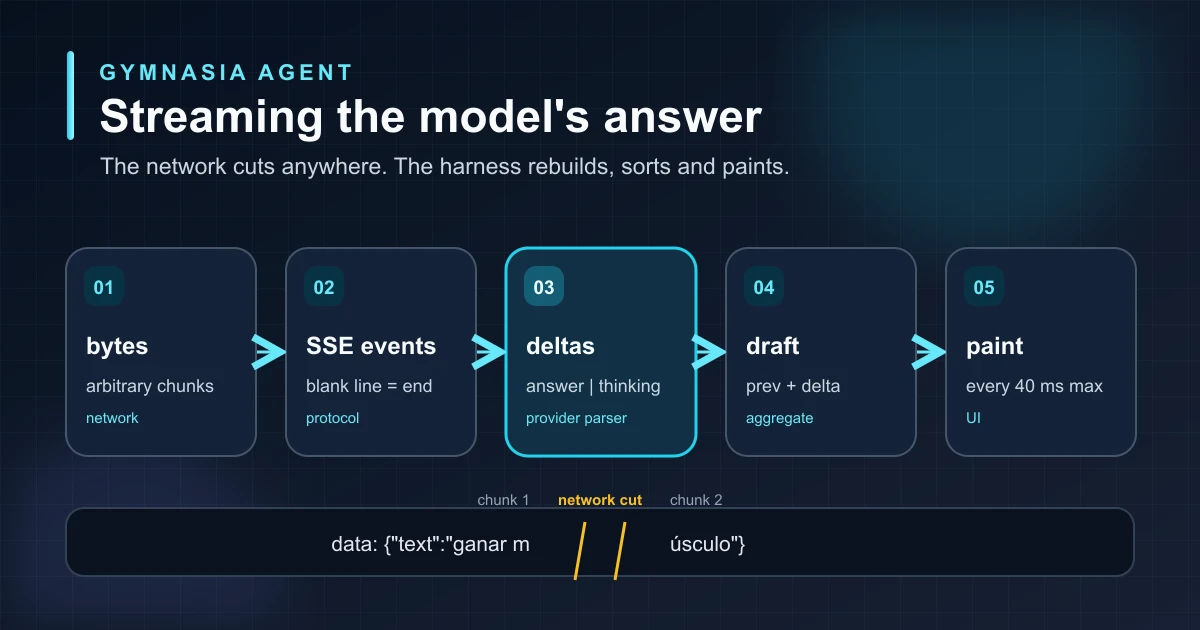
In practice, there are three problems between the network and the screen that this idea ignores. The network does not respect message boundaries: a chunk can cut an event in half, or even a character. The answer is not a single text flow: many models send their reasoning and their answer on separate channels. And painting every piece as soon as it arrives forces the UI to redraw the conversation dozens of times per second.
streaming an agent response means rebuilding complete units from arbitrary pieces, classifying them, and deciding when they are worth showing. Painting is the last step, not the only one.
The layers along the way
Each layer works with a different unit: bytes, text, events, deltas and, finally, the message the person sees. A delta is the new piece of text carried by an event, for example "build ". The aggregate is everything received so far, for example "Your goal is to build ". Keeping the layers apart lets you test each one on its own and change one without touching the others: SSE splitting is the same for all three providers, and painting does not know which provider is behind it.
Splitting SSE events
The three providers Gymnasia uses, OpenAI, Anthropic and Google, send the answer as SSE (Server-Sent Events): a text format where each event spans several lines and ends with a blank line. Lines starting with event: give the type and lines starting with data: carry the content, usually JSON:
event: content_block_delta
data: {"type":"content_block_delta","index":1,"delta":{"type":"text_delta","text":"build "}}

event: content_block_delta
data: {"type":"content_block_delta","index":1,"delta":{"type":"text_delta","text":"muscle"}}
The problem is that the network delivers chunks, not events. A single chunk can carry half an event, three events and the start of a fourth, or cut right between data: and its JSON. If the parser tries to interpret whatever it has as soon as it arrives, it will read incomplete JSON or, worse, an event with an empty data field that looks valid.
The solution is a buffer: accumulate everything received, extract the events that already have their closing blank line, and keep the remainder for the next chunk.
buffer = empty

when a chunk arrives:
    append the chunk to the end of buffer
    while buffer contains a blank line:
        event = everything before that blank line
        remove that event from the start of buffer
        process(event)
    # what is left in buffer is half an event:
    # wait for the next chunk
Notice what it does not do: it never interprets an event that lacks its closing blank line. There are also format details worth respecting: an event can have several data: lines, joined with a newline; lines starting with : are comments some servers send to keep the connection alive; some servers end lines with \r\n instead of \n, and after data: you strip a single space, not all of them. Anthropic, for example, interleaves ping events that the parser must ignore without breaking.
Bytes, text, and transports that accumulate
Before splitting events you have to turn bytes into text, and there is another boundary the network does not respect. In UTF-8, ú takes two bytes and an emoji such as 💪 takes four. If a chunk ends in the middle of those bytes and is converted to text on its own, the character is lost and a replacement symbol appears. The fix is the same idea as with events: convert only complete characters and keep the loose bytes until the rest arrives.
pending = no bytes

when bytes arrive:
    data = pending + bytes
    text = the complete characters in data
    pending = the trailing bytes of a half character
    send text to the parser
The second problem is that not every environment delivers the response in chunks. Some HTTP clients, like the one in Gymnasia's mobile app, only offer everything received so far and notify you each time it grows. If the harness sent that whole text to the parser on every notification, it would process the start of the answer again and again, and the message on screen would repeat sentences. The fix is to remember how much has already been read and pass only the new part to the parser:
read = 0

each time the received text grows:
    new = the received text from position read onwards
    read = length of the received text
    send new to the parser
That way the transport can change from one platform to another, but the parser always receives the same thing: new text, in the order it arrived. It does not know which path the text came through, and a test checks that the two transports Gymnasia uses produce exactly the same result from the same recorded stream.
Separating the answer from the reasoning
Models with visible reasoning send two text flows in the same response: what they think and what they answer. Mixing them would be a mistake: the reasoning is not written for the person and can contradict the final answer. Each provider marks the difference in its own way:
| Provider | Answer delta | Reasoning delta | Event that closes the turn |
|---|---|---|---|
| OpenAI (Responses) | response.output_text.delta | response.reasoning_summary_text.delta | response.completed |
| Anthropic (Messages) | content_block_delta with text_delta | content_block_delta with thinking_delta | message_stop |
| Google (Interactions) | step.delta of type text in a model_output step | step.delta of type thought_summary in a thought step | interaction.completed |
Each provider parser translates those events into two common channels, one for the answer and one for the reasoning. It hands each channel two things: the new delta and the aggregate of that channel.
when reading a provider event:
    if it is answer text:
        notify the answer channel with (delta, answer so far)
    if it is reasoning text:
        notify the reasoning channel with (delta, reasoning so far)
    otherwise:
        ignore it for the screen
Passing the aggregate along with the delta simplifies the UI: it does not have to keep its own running sum and cannot drift out of sync with the parser. In Gymnasia, the reasoning is shown in a collapsible block that stays open while the model writes and collapses when it finishes, so the answer stays in the foreground.
There can also be a policy layer between the parser and the screen. In Gymnasia, a health-safety filter reviews the text before showing it and only lets complete sentences through, because it cannot judge half a sentence. That is why the answer appears sentence by sentence rather than word by word, and for health-related questions the text is not shown until the answer is complete. Streaming still works underneath; what changes is how much the app decides to show.
Batching renders
A fast model can emit dozens of deltas per second. If each one updates the conversation state, the UI redraws the message list dozens of times per second, and on a phone that shows: scrolling gets heavy and taps respond late. The human eye does not need that frequency to perceive text as flowing.
The solution is to separate receiving from painting. Each delta only stores the aggregate in a variable, which costs nothing, and schedules a paint if none is pending. The paint reads the latest value of that variable. So the UI paints at most once every 40 milliseconds, about 25 times per second, no matter how many deltas arrive:
draft = ""
paint_pending = no

when a delta arrives:
    draft = aggregate                # cheap: just store it
    if no paint_pending:
        paint_pending = yes
        in 40 ms:
            paint_pending = no
            paint(draft)             # reads the latest value

when clearing the draft to retry:
    cancel the pending paint and paint now

when the answer finishes:
    cancel the pending paint and write the final answer
The three cases cover the message life cycle. Each delta schedules at most one paint. When the draft changes all at once, for example when clearing it before a retry, it is painted immediately. And at the end, the pending paint is cancelled before writing the final answer: if it ran afterwards, it would overwrite the final message with the draft. Because the paint always reads the aggregate, every frame is a prefix of the final text: the person never sees something that later disappears.
What happens if the stream breaks
A mobile connection can drop in the middle of an answer. When that happens, the UI has already shown part of the text, and it is tempting to leave it there as if it were the answer. It is not: a cut-off text can end in the middle of a recommendation. That is why each parser checks whether the event that closes the turn arrived. If it is missing, OpenAI and Anthropic mark the turn as truncated and Google throws a truncated error; in all three cases the harness rejects the turn.
The half-finished message is not saved as an answer. It is replaced by an error explaining that the answer was cut off and that the person can try again. If the failure is a network error and the harness retries on its own, it first clears the draft so the start of one answer is never mixed with the start of the next.
what is painted during the stream is a draft. It only becomes the answer when the provider confirms it has finished.
Tests
All of the above can be tested without a network or a model, by replaying recorded streams from the three providers. The test streams include reasoning, an answer, accented characters and a four-byte emoji, so any mishandled cut shows up.
Cut at every position
The stream is split in two at every possible character, with plain newlines and with CRLF. The rebuilt text must always be the same. This includes the classic cut between data: and its JSON.
Random chunking
A property-based test generates hundreds of random partitions of the stream and checks that the sum of the deltas always matches the final answer.
Two channels
Reasoning never reaches the answer channel or vice versa, and each aggregate is exactly the previous one plus its delta.
Transport
An emoji split across two byte chunks arrives intact; both transports produce the same turn; text appears before the request finishes.
Breaks
A stream without its closing event is rejected even if part of the text was already painted, and an HTTP error comes through with the provider's message.
Painting
With fake timers: a hundred deltas in the same window produce a single paint, cancelling the pending paint stops a late one from overwriting the final answer, and the last frame shows the full text.
The cut-at-every-position test is the most valuable one because it turns an intermittent failure, the one that only appears when the network cuts in exactly the wrong place, into a deterministic failure that reproduces on every run.
Learn to build a complete agent
This article is part of a series on how to build an agent or harness using a gym app as a practical example. Here we covered the layer that carries the model's answer to the screen; streaming tool calls applies the same idea to tool arguments, where waiting for the end is a matter of safety rather than smoothness.
-thumbnail.webp)